
TimeTackle
Сервис для умного учета времени и анализа загрузки на основе данных календаря.
Обзор
TimeTackle
Описание нейросети TimeTackle
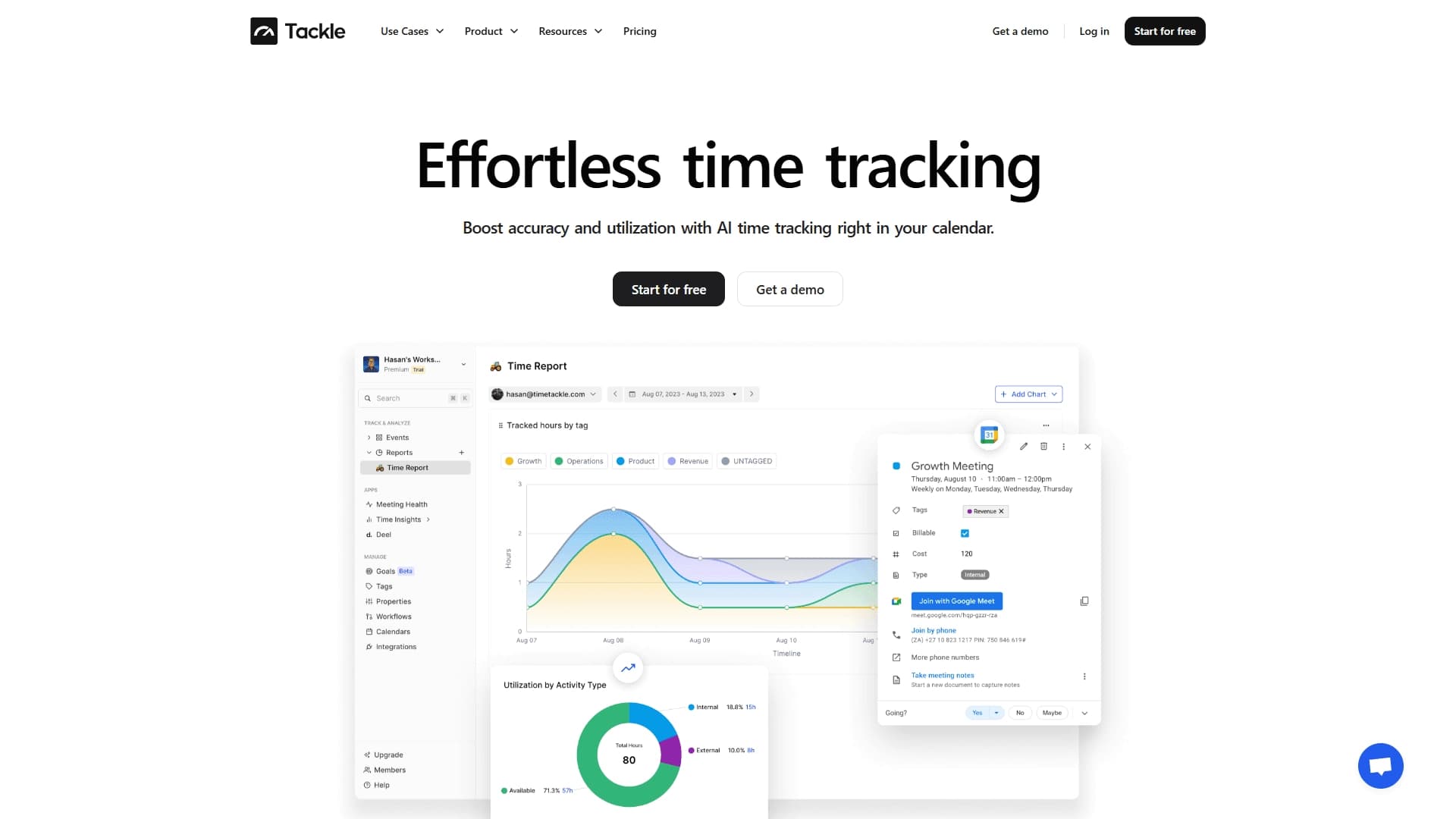
TimeTackle — это сервис интеллектуального учёта рабочего времени, который использует данные календаря для анализа занятости и формирования прозрачной картины рабочих процессов. Инструмент автоматически подключается к календарям пользователей и преобразует информацию о встречах в структурированные отчёты и интерактивные дашборды. Вместо того чтобы вручную фиксировать время, TimeTackle берёт за основу фактические календарные события и на их основе показывает, как распределяется рабочая нагрузка между сотрудниками, клиентами и проектами.
Это решение закрывает важную потребность бизнеса в объективных данных о временных затратах. TimeTackle позволяет не просто учитывать часы, а анализировать эффективность использования времени, выявлять перегрузки и находить возможности для оптимизации расписания. С точки зрения продукта, это не тайм-трекер в классическом понимании, а скорее аналитическая платформа, которая работает на стыке планирования, управления проектами и HR-аналитики.
Характеристики TimeTackle
| Характеристика | Значение |
|---|---|
| Тип | Аналитика календаря и учёт рабочего времени |
| Категории | Планирование и встречи, Отчёты |
| Веб-сайт | www.timetackle.com |
| Модель распространения | Не указана |
| Способ работы | Подключение к календарям, автоматический сбор данных о встречах |
| Основное назначение | Формирование отчётов о загрузке и аналитика временных затрат |
Для кого подходит нейросеть TimeTackle?
Руководители и операционные директора
TimeTackle будет полезен руководителям, которые хотят видеть объективную картину загрузки своих команд. Инструмент позволяет быстро оценить, кто из сотрудников перегружен, а у кого есть свободный ресурс. Это помогает принимать более взвешенные решения о распределении задач и предотвращать выгорание.
Координаторы проектов и ассистенты
Chief of Staff и персональные ассистенты могут использовать сервис для планирования расписания руководителей, приоритизации встреч и подготовки отчётов о занятости. Инструмент автоматизирует рутинную работу по сбору данных о том, на что уходит рабочее время.
Клиентские и продуктовые команды, агентства и НКО
Сервис подходит для команд, работающих с большим количеством внешних клиентов или проектов, а также для некоммерческих организаций. Он помогает оценивать затраты времени на обслуживание клиентов, сравнивать эффективность разных направлений и обосновывать распределение ресурсов перед стейкхолдерами.
Как использовать нейросеть TimeTackle?
Подключение и настройка
Первый шаг — подключение корпоративных или личных календарей к сервису. TimeTackle автоматически синхронизирует данные о встречах и событиях. Настройка включает определение категорий проектов, клиентов и сотрудников, по которым вы хотите анализировать загрузку.
Построение отчётов и дашбордов
После первичной настройки пользователь создаёт кастомные дашборды, которые отражают ключевые показатели занятости. Это могут быть графики загрузки по отделам, сводки времени на определённых клиентов или сравнение фактических затрат времени с плановыми.
Использование для планирования
Данные, полученные через TimeTackle, применяются для планирования ресурсов на будущие периоды. Аналитика помогает скорректировать расписание, перераспределить задачи между сотрудниками и определить, какие встречи приносят наибольшую отдачу.
Основные функции TimeTackle
Автоматический анализ календаря
Сервис подключается к календарям и преобразует разрозненные события во встречи с атрибутами. Каждое событие может быть отнесено к проекту, клиенту или категории. Это создаёт структурированную базу данных для последующего анализа загрузки сотрудников.
Кастомные дашборды и отчёты
Пользователи могут настраивать визуализацию данных под свои задачи. В отчётах отражается загрузка по людям, клиентам, проектам и временным периодам. Дашборды легко адаптируются под конкретные требования руководителя или команды.
Интеграции и экспорт данных
TimeTackle поддерживает экспорт данных календаря и интеграцию с CRM и другими корпоративными системами. Это позволяет встраивать аналитику по времени в существующие бизнес-процессы и объединять её с данными о продажах или эффективности проектов.
Преимущества TimeTackle
- Объективная картина рабочего дня. Сервис показывает фактическое распределение времени, не полагаясь на субъективные отчёты сотрудников, что особенно ценно для управленческих решений.
- Приоритизация на основе данных. Инструмент помогает выстроить расписание в соответствии с реальными бизнес-приоритетами, выявляя встречи и активности, которые не приносят достаточной ценности.
- Наглядность отчётности. Превращение разрозненных встреч в структурированные дашборды существенно упрощает коммуникацию с командой и стейкхолдерами, делая обсуждение загрузки более предметным.
Недостатки TimeTackle
В доступных источниках не указаны ограничения или явные недостатки инструмента. Потенциальные сложности могут возникать при адаптации сервиса к специфическим внутренним процессам компании, однако детальной информации о таких ограничениях в открытых данных нет. Также стоит учитывать, что эффективность анализа напрямую зависит от полноты и корректности заполнения календарей сотрудниками.
Какие задачи решает TimeTackle
Анализ занятости и учёт времени
Основная задача инструмента — объективный анализ занятости сотрудников по данным календаря. Это освобождает от необходимости вести ручные тайм-шиты и снижает риск ошибок при подсчёте рабочих часов.
Планирование ресурсов и оптимизация расписания
На основе фактических данных TimeTackle помогает планировать загрузку команды на будущие периоды, выявлять «узкие места» и перераспределять задачи, оптимизируя общее расписание.
Оценка отдачи и подготовка отчётности
Сервис позволяет оценить ROI встреч и проектов, а также сформировать прозрачные отчёты для стейкхолдеров. Это делает работу команды более подотчётной и помогает обосновывать инвестиции времени в те или иные инициативы.
Цены TimeTackle
Конкретная информация о ценах и тарифных планах TimeTackle в исходных данных не представлена. Для получения актуальной информации о стоимости подписки необходимо обратиться напрямую к официальному сайту продукта или запросить коммерческое предложение у команды сервиса. Рекомендуем ознакомиться с доступными тарифами на странице продукта, так как ценовая политика может меняться в зависимости от размера команды и набора функций.
Условия использования TimeTackle
Явные условия использования и требования к клиентам в представленных материалах не раскрыты. Отсутствует информация о минимальном сроке контракта, наличии бесплатного пробного периода и требованиях к техническому окружению. Для уточнения условий использования необходимо обращаться к официальной документации сервиса или службе поддержки TimeTackle.
Доступность TimeTackle
TimeTackle — это веб-сервис, официальный сайт которого расположен по адресу www.timetackle.com. Информация о наличии мобильного приложения, а также о географии распространения сервиса в исходных данных не упоминается. Наиболее вероятно, что продукт доступен на глобальном рынке, однако подробные сведения об этом лучше уточнить у разработчиков.
Чем отличается TimeTackle от аналогов
Ключевое отличие TimeTackle от многих классических тайм-трекеров (например, Toggl или Harvest) состоит в подходе к сбору данных. Сервис не требует от пользователя постоянно включать и выключать таймер при смене задач — он использует данные из календаря, которые уже создаются в процессе работы. Это делает учёт времени практически незаметным для сотрудников и снижает барьер внедрения.
В отличие от общего программного обеспечения для учёта времени, TimeTackle фокусируется именно на аналитике встреч и совещаний. Инструмент специализируется на том, чтобы дать руководителю ответ на вопрос: «Сколько времени реально уходит на встречи и приносят ли они нужный результат?». Среди упоминаемых в источниках аналогов — сервисы из категории AI-ассистентов и аналитических инструментов, такие как Mem, UX Audit Tool, InterviewCoachAI и другие, однако их функциональность и целевое назначение могут существенно отличаться от TimeTackle.
Заключение
TimeTackle — это современное решение для умного учёта времени и анализа занятости, которое избавляет бизнес от ручного сбора данных о рабочих часах. Используя информацию из календаря, сервис формирует объективную картину загрузки сотрудников, помогает планировать ресурсы и оптимизировать расписание. Инструмент будет ценен для руководителей, которые хотят понять, куда уходит рабочее время команды, и выстроить работу в соответствии с реальными приоритетами бизнеса.
Часто задаваемые вопросы
Смотрите также


Платформа для автоматизированного создания, редактирования и перевода видеоклипов с помощью ИИ.

Платформа с искусственным интеллектом для анализа финансовых данных и поддержки инвестиционных решений.


Сервис для отслеживания упоминаний бренда в ответах генеративных нейросетей.

Онлайн-сервис, который позволяет общаться с PDF-документами в чате: задавать вопросы и получать краткие ответы с указанием источника.


Сервис для быстрой генерации электронных книг по заданной теме.


Расширение для Chrome, которое помогает управлять вкладками, историей и закладками с помощью ИИ-ассистента.


Платформа для создания корпоративных чат-ботов на основе собственных документов без программирования.


Универсальный AI-ассистент, который анализирует видео и веб-страницы, отвечает на вопросы и создает конспекты.