
Tempo
Платформа для визуальной разработки React-интерфейсов, объединяющая дизайн и код в одном пространстве.
Обзор
Tempo
Описание нейросети Tempo
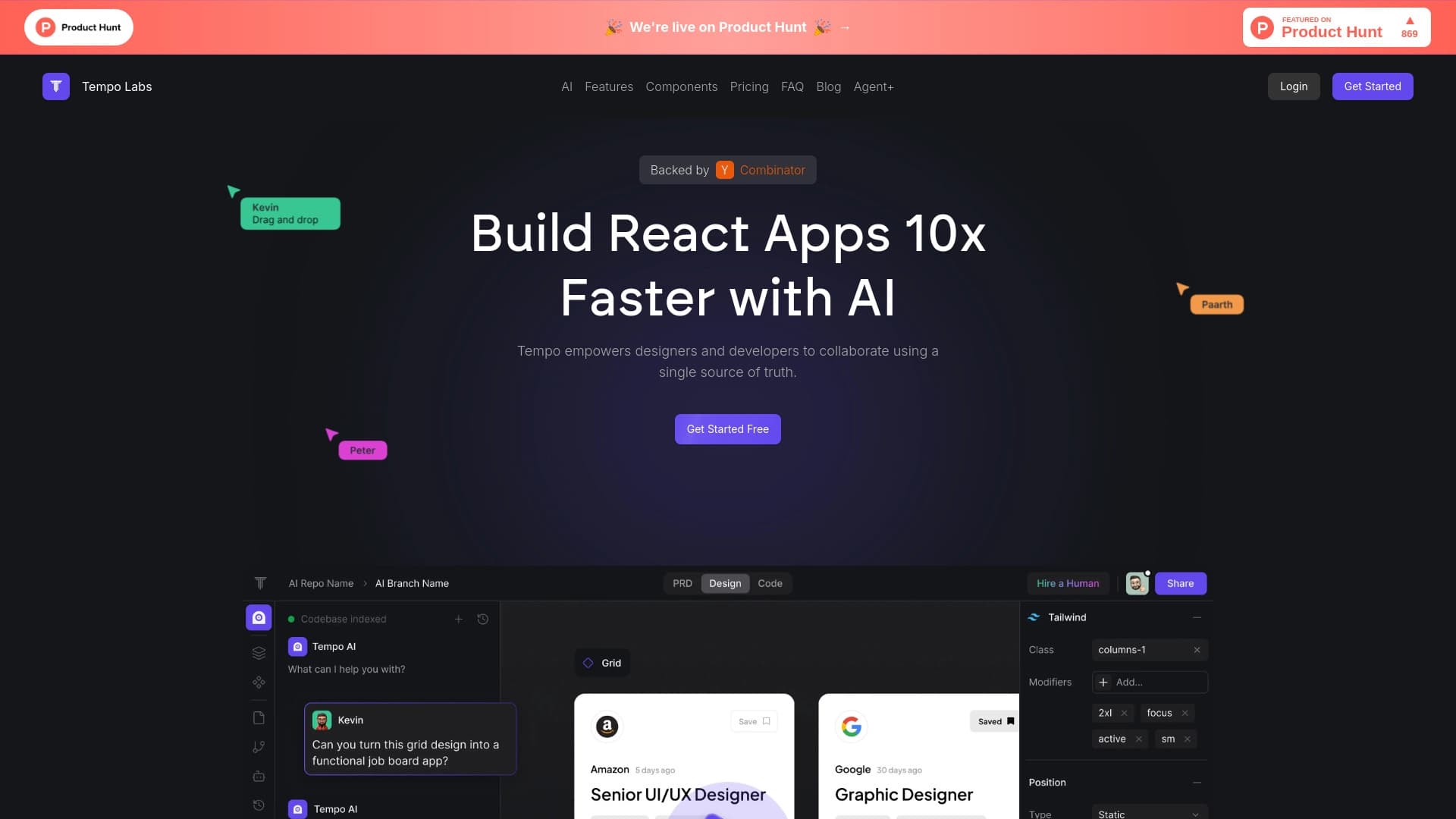
Tempo — это платформа для визуальной разработки React-интерфейсов, которая объединяет дизайн и программирование в одном рабочем пространстве. Инструмент позволяет дизайнерам и разработчикам работать над одними и теми же компонентами, не тратя время на перенос макетов в код и обратно.
Главная идея Tempo — сократить разрыв между дизайном и разработкой. Вместо того чтобы создавать макет в одном инструменте, а затем вручную переносить его в код, команды могут работать с живым React-приложением прямо в редакторе. Все изменения, сделанные визуально, мгновенно отражаются в кодовой базе проекта.
Визуальный редактор и код
Tempo предлагает drag-and-drop редактор, который работает напрямую с React-кодом. Это означает, что дизайнер может перетаскивать компоненты, менять их расположение и свойства, и каждое действие автоматически обновляет соответствующий код. Такая синхронизация устраняет необходимость в ручной переделке макетов силами разработчиков.
Работа с существующими проектами
Инструмент подключается к уже существующим React-проектам, поэтому не нужно начинать работу с нуля. Дизайнеры и разработчики могут продолжать развивать уже созданные приложения, внося изменения во внешний вид и структуру интерфейса прямо в привычном окружении.
Характеристики Tempo
| Характеристика | Значение |
|---|---|
| Тип | AI-платформа для визуального дизайна и правки React-кода |
| Категории | Ассистенты для кода, дизайн-ассистенты и макеты |
| Веб-сайт | www.tempolabs.ai |
| Основное назначение | Связывание визуального дизайна и разработки React-приложений |
Для кого подходит нейросеть Tempo?
Tempo ориентирована на команды, которые создают и поддерживают интерфейсы на базе React. Инструмент особенно полезен там, где дизайн и разработка тесно связаны между собой.
Дизайнеры
Для дизайнеров интерфейсов Tempo — способ вносить правки в компоненты напрямую, без ожидания разработчика. Визуальный редактор позволяет экспериментировать с макетом в реальном времени и видеть результат сразу в контексте работающего приложения.
Разработчики React
Разработчикам платформа упрощает процесс реализации дизайна: изменения, внесённые в визуальном редакторе, автоматически превращаются в актуальный код. Это уменьшает объём рутинной работы по вёрстке и переносу макетов.
Совместные продуктовые команды
Для команд, где дизайнеры и разработчики работают бок о бок, Tempo предоставляет единое пространство, в котором обе стороны говорят на одном языке и взаимодействуют с одним и тем же кодом и интерфейсом.
Как использовать нейросеть Tempo?
Начать работу с Tempo можно как с чистого листа, так и на базе уже готового проекта.
Подключение существующего React-проекта
Один из ключевых способов использования — интеграция Tempo с текущим React-проектом. Это позволяет сразу приступить к правке интерфейса, не переводя проект в новую среду и не начиная разработку заново.
Работа с компонентами через drag-and-drop
Внутри редактора дизайнеры работают с компонентами с помощью перетаскивания. Любое изменение расположения, размеров или свойств тут же отражается в коде, поэтому процесс прототипирования становится быстрым и наглядным.
Взаимодействие с дизайн-системами
Tempo поддерживает импорт компонентов из Storybook и помогает формировать собственную библиотеку компонентов всего за несколько минут. Это удобно для поддержки и развития дизайн-систем в рамках проекта.
Основные функции Tempo
- Визуальный drag-and-drop редактор, работающий напрямую с React-кодом.
- Импорт существующих компонентов из Storybook для повторного использования.
- Генерация собственной библиотеки компонентов за короткое время.
- Подключение к уже существующему React-проекту без необходимости начинать разработку с нуля.
Преимущества Tempo
Ускорение разработки интерфейсов
За счёт прямой синхронизации визуального редактора с кодом разработка React-интерфейсов значительно ускоряется: дизайнеры вносят правки сами, не дожидаясь программистов.
Совместная работа в одном пространстве
Дизайнеры и разработчики работают над одним проектом в одном инструменте, что снижает количество недопониманий и повторных передач макетов между специалистами.
Отражение изменений в кодовой базе
Любое изменение, сделанное в редакторе, мгновенно попадает в код. Это исключает расхождения между макетом и фактическим состоянием приложения.
Сокращение разрыва между дизайном и разработкой
Платформа устраняет традиционный барьер между этапами проектирования и программирования, позволяя согласовывать и проверять дизайн прямо в коде.
Недостатки Tempo
В исходных данных недостаточно сведений о недостатках платформы. Можно предположить, что, как и многие визуальные редакторы кода, Tempo может накладывать ограничения на сложные, нетипичные сценарии разработки, однако точных подтверждений этому в предоставленных материалах нет. Окончательная оценка ограничений требует практического знакомства с инструментом.
Какие задачи решает Tempo
- Проектирование и правка React-приложений в визуальной среде.
- Быстрое прототипирование интерфейсов без длительного переноса макетов в код.
- Создание и поддержка дизайн-систем благодаря работе с компонентами и Storybook.
- Согласование дизайна прямо в коде, что ускоряет обратную связь между дизайнером и разработчиком.
Цены Tempo
Точные сведения о тарифах и стоимости использования Tempo в предоставленных данных отсутствуют. Модель распространения инструмента не уточнена, поэтому информацию о ценах, наличии бесплатного плана и стоимости подписок стоит проверять непосредственно на официальном сайте платформы www.tempolabs.ai.
Условия использования Tempo
Подробные условия использования, требования к системе и ограничения сервиса в исходных материалах не описаны. Чтобы получить актуальную информацию о лицензиях, условиях применения и политике использования Tempo, рекомендуется обратиться к официальным документам на сайте компании.
Доступность Tempo
В предоставленных данных нет сведений о географии доступности платформы, поддерживаемых языках или ограничениях по регионам. За разъяснениями о доступности Tempo в вашей стране стоит обращаться на официальный ресурс www.tempolabs.ai.
Чем отличается Tempo от аналогов
Главное отличие Tempo от многих других инструментов — это неразрывная связь визуального редактора с реальным React-кодом. В то время как традиционные дизайн-инструменты создают лишь статичные макеты, а классические среды разработки требуют ручной вёрстки, Tempo позволяет дизайнерам править живой код через визуальный интерфейс с помощью drag-and-drop.
Кроме того, акцент на работе с существующими React-проектами и интеграция со Storybook выделяют Tempo среди инструментов, которые требуют начинать с пустого шаблона. Возможность подключаться к уже созданному приложению и сразу вносить изменения сокращает время адаптации и позволяет синхронизировать дизайн и разработку без радикальной смены рабочих процессов.
Заключение
Tempo — это платформа, объединяющая дизайнеров и разработчиков для ускоренной работы над React-интерфейсами. Благодаря визуальному редактору, который синхронизируется с кодом, и возможности подключаться к действующим проектам и Storybook, инструмент сокращает разрыв между дизайном и разработкой и позволяет быстрее создавать и поддерживать качественные пользовательские интерфейсы.
Часто задаваемые вопросы

Смотрите также


Онлайн-инструмент для создания дипфейков и редактирования изображений с помощью ИИ.


Набор инструментов для генерации и редактирования видео с помощью ИИ, включая аватары, липсинк и клонирование голоса.


Расширение для Chrome, которое помогает управлять вкладками, историей и закладками с помощью ИИ-ассистента.


Онлайн-редактор для удаления лишних объектов, текста и дефектов с фотографий с помощью нейросети.


Настольный AI-ассистент для macOS, Windows и Linux, который запускается по хоткею поверх всех окон и объединяет несколько языковых моделей в одном интерфейсе.

ИИ-агент для автоматизации клиентских коммуникаций и поддержки.

Сервис для создания персонализированных аватаров и фотосессий с помощью ИИ на основе загруженных селфи.


Боковая AI-панель, которая помогает отвечать на вопросы, работать с документами и генерировать изображения.