
Seedance 2.0
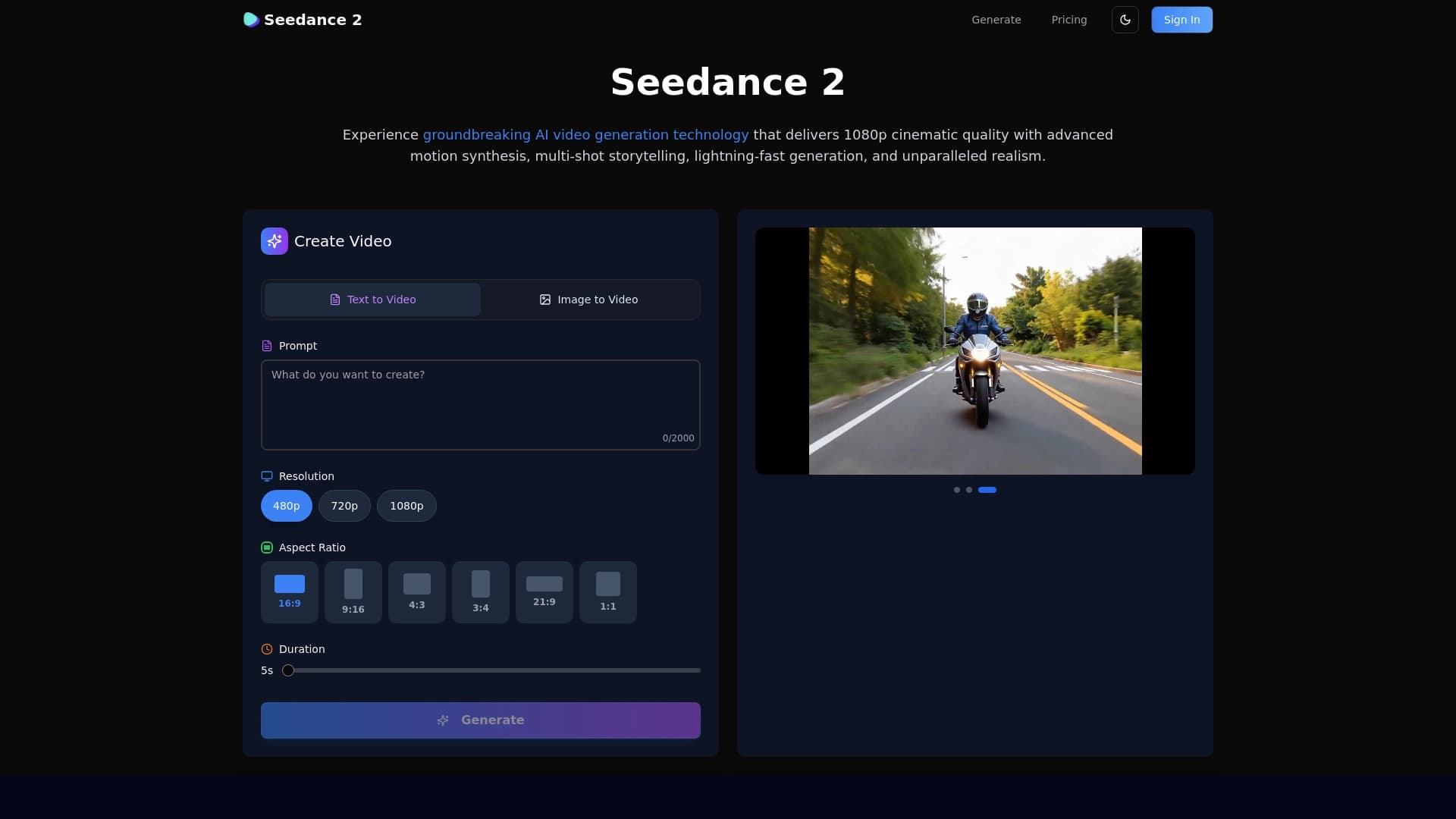
Генератор видеороликов в кинематографическом формате 1080p из текстовых описаний или изображений.
Место в рейтингах
Обзор
Seedance 2.0
Описание нейросети Seedance 2.0
Seedance 2.0 представляет собой генератор видеороликов, который создаёт контент в кинематографическом формате 1080p. Инструмент предназначен для превращения текстовых описаний или загруженных изображений в готовые видео. Разработчики сделали акцент на создании целостных видеоисторий: нейросеть использует продвинутый синтез движений и мультикадровый монтаж, чтобы результат выглядел как профессиональный короткометражный фильм, а не как хаотичный набор сменяющихся кадров.
Пользователю достаточно ввести текстовую подсказку или загрузить изображение, после чего Seedance 2.0 самостоятельно обрабатывает запрос и выдаёт готовый ролик. Качество картинки стремится к уровню кино, что отличает инструмент от многих простых генераторов, ориентированных на низкое разрешение или схематичные анимации.
Ключевая концепция: мультикадровый монтаж
В отличие от генераторов, создающих один непрерывный план, Seedance 2.0 способен выстраивать последовательность из нескольких кадров. Это позволяет рассказывать короткие истории с разными ракурсами и сценами в рамках одного видеоролика.
Технологическая основа: синтез движений
Для реалистичного отображения движения объектов в кадре используется продвинутый синтез. Нейросеть анализирует взаимосвязь между элементами сцены и генерирует плавные перемещения, избегая типичных артефактов, характерных для ранних версий генераторов видео.
Характеристики Seedance 2.0
| Характеристика | Значение |
|---|---|
| Разрешение выходного видео | 1080p (Full HD) |
| Входные данные | Текстовое описание или изображение |
| Режим создания | Из текста в видео, из изображения в видео |
| Формат представления | Кинематографический (мультикадровый монтаж) |
| Категории инструмента | Генерация видео, Текст в видео, Изображение в видео |
| Модель распространения | Freemium |
Для кого подходит нейросеть Seedance 2.0?
Видеопродюсеры и режиссёры
Профессионалы, работающие над созданием промо-роликов, тизеров или коротких сцен, могут использовать Seedance 2.0 для быстрой раскадровки идей. Инструмент позволяет визуализировать концепцию без привлечения съёмочной группы и дорогостоящего оборудования.
Контент-мейкеры и блогеры
Авторы, которым нужно регулярно выпускать видео для социальных сетей, получают возможность генерировать визуальный ряд на основе текста. Это сокращает время на поиск стоковых материалов или съёмку собственных кадров.
Маркетологи и специалисты по рекламе
Для создания продуктовых демонстраций, анонсов или имиджевых роликов не обязательно заказывать производство у студии — достаточно загрузить изображение товара или написать сценарий, и нейросеть сформирует видео в кинематографическом стиле.
Как использовать нейросеть Seedance 2.0?
Шаг 1: Выбор способа генерации
Перед началом работы определите, какой тип входа вы будете использовать: текстовое описание или готовое изображение. От этого зависит, как именно нейросеть построит финальное видео.
Шаг 2: Подготовка запроса
Если вы используете текст, составьте подробное описание желаемой сцены: укажите объекты, действия, атмосферу и желаемое освещение. Для генерации из изображения выберите фотографию или картинку, которая станет основой видеоряда.
Шаг 3: Запуск генерации и получение результата
Передайте подготовленные данные в интерфейс Seedance 2.0. Нейросеть обработает запрос и выдаст готовое видео в формате 1080p. После завершения генерации вы можете скачать ролик или использовать его в дальнейшей работе.
Основные функции Seedance 2.0
Генерация видео из текстового описания
Пользователь вводит текстовую подсказку, и нейросеть создаёт видеоряд, соответствующий сценарию. Система самостоятельно подбирает визуальные элементы, движение камеры и переходы между кадрами.
Генерация видео из изображения
Загрузив одно изображение, можно получить на его основе динамичное видео. Seedance 2.0 добавляет движение, изменяет ракурсы и монтирует сцены, сохраняя при этом узнаваемость исходного объекта.
Мультикадровый монтаж
Главная особенность — создание видеоистории, состоящей из нескольких сменяющих друг друга кадров. Это даёт более глубокий нарратив по сравнению с простой анимацией одного статичного плана.
Кинематографическое качество 1080p
Все сгенерированные видео имеют разрешение 1080p, что соответствует стандартам современных экранов и платформ. Детализация и цветопередача приближены к профессиональной видеосъёмке.
Преимущества Seedance 2.0
- Высокое разрешение — готовые ролики сразу пригодны для публикации на YouTube, в социальных сетях и на сайтах без дополнительного апскейла.
- Целостность сюжета — за счёт мультикадрового монтажа видео выглядит как законченный мини-фильм, а не как случайная последовательность картинок.
- Универсальность ввода — работать можно как с текстом, так и с изображениями, что расширяет сценарии использования.
- Быстрое прототипирование — идеи визуализируются за минуты, что ускоряет творческий процесс и согласование концепций.
Недостатки Seedance 2.0
На данный момент информация о недостатках инструмента ограничена. Как и многие генеративные нейросети, Seedance 2.0 может испытывать сложности с точным воспроизведением сложных сценариев с большим количеством персонажей или специфическими движениями. Также возможны ограничения на длину генерируемого ролика, характерные для моделей на основе freemium-распространения.
Какие задачи решает Seedance 2.0
- Создание визуального контента без съёмок — не требуется камера, свет, актёры и локации.
- Быстрое воплощение текстовых идей в видео — сценарий превращается в готовый ролик за короткое время.
- Оживление статичных изображений — фотографии и иллюстрации становятся динамичными, что полезно для презентаций и соцсетей.
- Производство промо-материалов — короткие кинематографичные ролики для маркетинга и рекламы.
Цены Seedance 2.0
Seedance 2.0 распространяется по модели freemium. Это означает, что базовый функционал доступен бесплатно, а для получения дополнительных возможностей (например, большего количества генераций, более длинных видео или приоритетной обработки) предусмотрена платная подписка. Конкретные тарифы и стоимость на данный момент не раскрыты — они уточняются на официальном сайте инструмента.
Условия использования Seedance 2.0
Точные условия использования Seedance 2.0 публикуются разработчиками на официальном ресурсе. Поскольку модель freemium подразумевает как бесплатный, так и платный доступ, условия могут различаться в зависимости от выбранного тарифа. Перед началом работы рекомендуется ознакомиться с лицензионным соглашением, чтобы уточнить правила коммерческого использования сгенерированных видео и ограничения по объёму генераций для бесплатного аккаунта.
Доступность Seedance 2.0
Инструмент доступен онлайн через веб-интерфейс. Для использования требуется устройство с выходом в интернет и современный браузер. Информация о поддержке мобильных устройств или наличии мобильного приложения на данный момент отсутствует.
Чем отличается Seedance 2.0 от аналогов
Главное отличие Seedance 2.0 — ориентация на создание целостных видеоисторий, а не отдельных анимированных фрагментов. Благодаря мультикадровому монтажу и продвинутому синтезу движений, нейросеть формирует сюжетную последовательность, а не просто оживляет одну сцену. Кроме того, фокус на кинематографическом качестве 1080p выделяет её среди инструментов, ориентированных на более низкое разрешение или стилизованную графику.
Многие конкуренты предлагают генерацию из текста или изображения, однако редко сочетают оба входа с возможностью многокадрового повествования и профессионального видеоряда. Seedance 2.0 также делает ставку на простоту: пользователю не нужно разбираться в тонкостях монтажа или анимации — достаточно ввести запрос.
Заключение
Seedance 2.0 — это генератор видео нового поколения, который переводит текстовые идеи и статичные изображения в кинематографические ролики с разрешением 1080p. Благодаря синтезу движений и мультикадровому монтажу, инструмент подходит для создателей контента, маркетологов и видеопрофессионалов, которым нужен быстрый способ получить качественное видео без сложного производственного процесса. Модель распространения freemium делает Seedance 2.0 доступной для тестирования, а при необходимости — для расширения возможностей за счёт платной подписки.
Часто задаваемые вопросы




Смотрите также

Каталог нейросетей и онлайн-инструментов для генерации изображений, анимаций и видео.

Облачная платформа для создания видео с помощью ИИ-аватаров, синтезированной речи и автоматического перевода роликов на десятки языков.


Набор инструментов для генерации и редактирования видео с помощью ИИ, включая аватары, липсинк и клонирование голоса.


Нейросеть для генерации коротких видео по текстовым описаниям или изображениям.
Каталог бесплатных видеоредакторов без водяных знаков для создания и обработки видео.


Многофункциональная платформа для создания и редактирования медиаконтента с помощью искусственного интеллекта.


ИИ-ассистент для создания текстового контента, изображений и работы с голосом, ориентированный на русскоязычных пользователей.

Набор мультимедийных AI-инструментов для редактирования и улучшения фото, видео и PDF-документов.