
Remove Background
Online service for automatic background removal from images using a neural network.
Overview
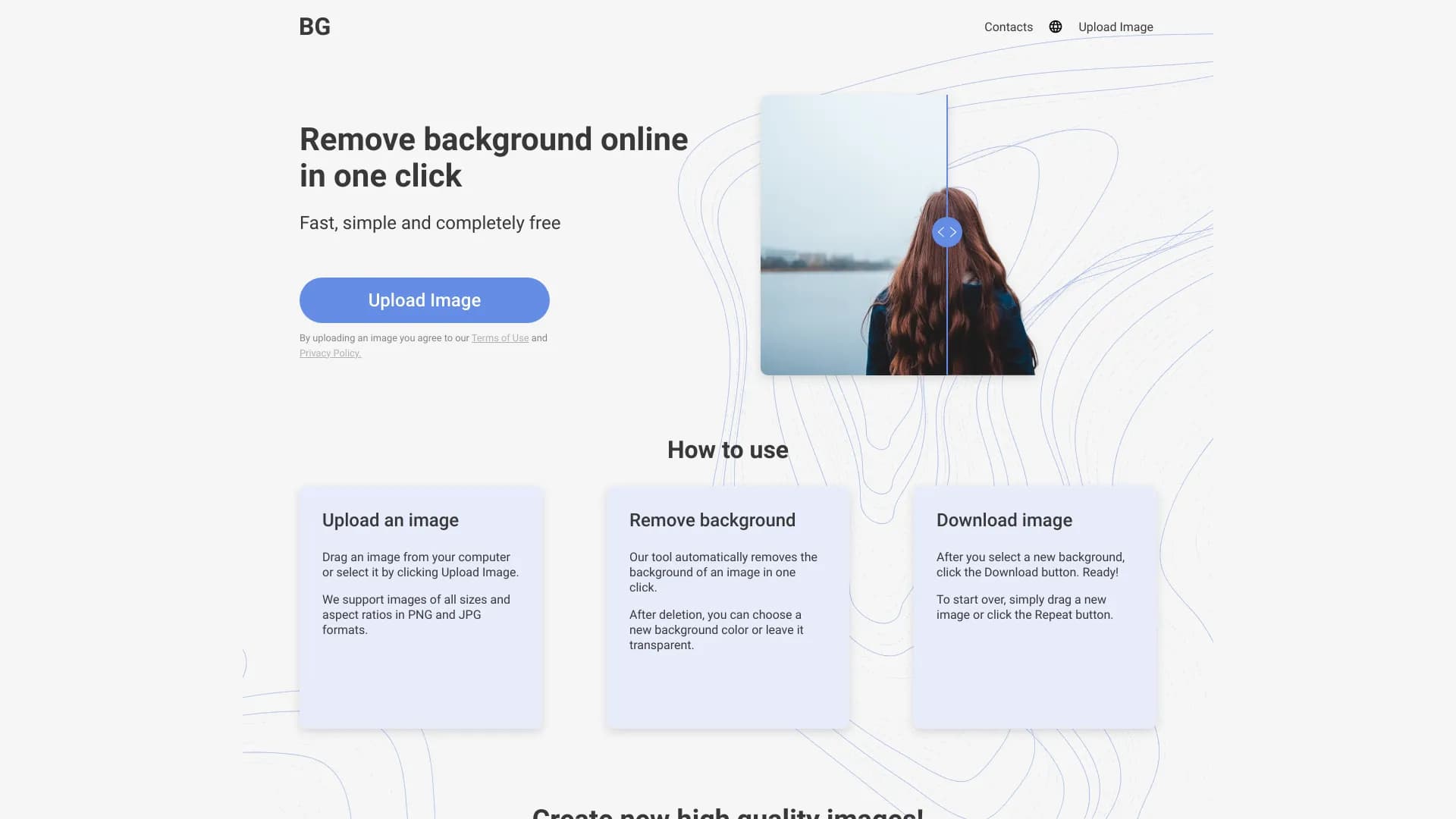
Remove Background is an online service that automatically removes backgrounds from images using a neural network. Instead of manually tracing an object in a graphics editor, users simply upload a photo in JPG or PNG format, and the algorithm separates the main object from the background on its own.
The service works entirely in the browser — no installation on a computer or account creation is required. After processing, the image can be saved with a transparent background or the backdrop can be replaced with a solid color. The process takes just a few seconds, making the service a convenient solution for quick graphics preparation.
Remove Background Features
| Feature | Value |
|---|---|
| Type | Online service |
| Category | Background removal tools |
| Developer | Background Remover Technologies |
| Free plan | Yes |
| Monthly visits | 2.3M |
| Platform | Website (works online) |
| Supported formats | PNG, JPG |
| Registration required | No |
| Works with photos of any size | Yes |
Who Is Remove Background Suitable For?
Business and Commerce
The service will be useful for entrepreneurs who need to quickly prepare product images for online stores, catalogs, or advertising materials. Instead of lengthy manual processing of each shot, the background can be removed in a couple of seconds, which is especially important with a large volume of products.
Creative Tasks
Remove Background is suitable for creating greeting cards, posters, business cards, and other print content. Designers and marketers won't have to spend time cutting out objects in Photoshop — the neural network will do it automatically.
Everyday Use
Regular users who need to quickly process photos without learning complex programs will also find the service convenient. It's suitable for preparing images for social media posts or personal projects.
How to Use Remove Background?
Step 1: Upload an Image
To get started, go to the service website and upload a photo in PNG or JPG format. No registration or account login is required.
Step 2: Automatic Processing
After uploading, the neural network will independently identify the object in the image and separate it from the background. The process takes a few seconds and requires no user intervention.
Step 3: Save and Download the Result
The finished image can be downloaded immediately with a transparent background, or a solid color can be chosen as a replacement. The final file will be ready to use without any additional adjustments.
Key Features of Remove Background
Automatic Background Removal
The service's neural network can recognize objects in images and carefully separate them from the backdrop, including working with fine details.
Background Replacement
Users can save the image with a transparent background or replace it with a solid color — the choice is available immediately after processing.
Support for Common Formats
The service accepts images in PNG and JPG formats and works correctly with photos of any size and aspect ratio, including panoramic or square shots.
Advantages of Remove Background
High-Quality Object Extraction
The neural network carefully handles even fine details — object edges aren't "eaten away" and remain sharp after background removal. This sets the service apart from simple threshold algorithms.
Speed and Convenience
Processing is done online in a couple of seconds. The time savings are especially noticeable when processing a large number of photos.
Flexible Background Handling
Users can choose a transparent background or fill it with their own color directly in the service, without resorting to third-party editors.
No Registration Required
To get started, there's no need to create an account or enter personal data — simply upload an image.
Disadvantages of Remove Background
Errors on Complex Backgrounds
On images with blurred or busy backdrops, the neural network may make inaccuracies: background fragments may remain, or part of the object may disappear.
No Manual Editing
After background removal, the result cannot be manually corrected within the same service. For complex cases, an additional graphics editor will be needed.
Dependence on Source Quality
The quality of the input image directly affects the final result. Blurry, dark, or low-contrast shots may produce artifacts and blending of the object with the background.
What Tasks Does Remove Background Solve?
Preparing Images for Commerce
The service helps quickly prepare product photos for online stores, product cards, catalogs, and advertising banners.
Creating Graphics for Social Media and Print
Background removal is needed when creating content for social networks, as well as when developing posters, greeting cards, business cards, and other print materials.
Batch Photo Processing
Automatic operation without manual selection allows processing large numbers of images in sequence, which is especially relevant when preparing large batches of visual content.
Remove Background Pricing
Free Plan
Basic background removal features are available for free. The service's FAQ states that there are no limits on the number of processed images and no subscriptions are required.
Premium Plan
Includes unlimited image processing and priority handling.
Business Plan
Provides extended capabilities for teams and permits commercial use of the results.
Detailed information about the plans is available on the official Remove Background website.
Terms of Use for Remove Background
The service requires no registration — you can start working immediately after visiting the website. The entire process is performed online in the browser. The service's FAQ states that all features are free and have no limits on the number of processed images, although paid plans with unlimited access are present on the pricing page.
Availability of Remove Background
Remove Background is a web service that is available online. The page contains no mentions of interface languages, regional restrictions, or the need to use a VPN — the service can be opened from any browser with an internet connection.
How Remove Background Differs from Alternatives
The service page offers no direct comparison with competitors, but Remove Background is positioned as a simple and fast tool without complex settings. Its difference lies in a minimalist approach: the service performs one task automatically, without the need to understand additional options or manual configuration. This makes it a convenient choice for users who need quick and predictable background removal without learning professional software.
Conclusion
Remove Background is a practical online tool for automatically removing backgrounds from images that works without registration or installation. It's well suited for quickly preparing photos for catalogs, advertising, and social media, as well as for users who want to save time on manual processing. At the same time, the service has limitations: errors are possible on complex backgrounds, and there's no option for manual result correction. Nevertheless, for typical background removal tasks, it offers a simple and accessible solution.
Pricing
Frequently asked questions
See also


Generative platform for creating realistic images and short videos from text or images with control over style and camera movement.


A tool for generating 3D models based on text descriptions, images, or sketches.
AI-powered web service for upscaling images to 8K resolution without registration.


A tool for quickly generating and editing 4K images, supporting control over multiple reference images and a conversational mode.


Free tool for generating and editing images from text descriptions with simple controls.

AI platform for voice synthesis and cloning that converts text into realistic speech.


AI-powered platform for monitoring and aggregating market data, news, and social media discussions for investors.


AI-based platform for creating logos and brand identity.