
Recraft
Платформа для генерации и редактирования изображений, включая векторную графику и иллюстрации.
Место в рейтингах
Обзор
Recraft
Описание нейросети Recraft
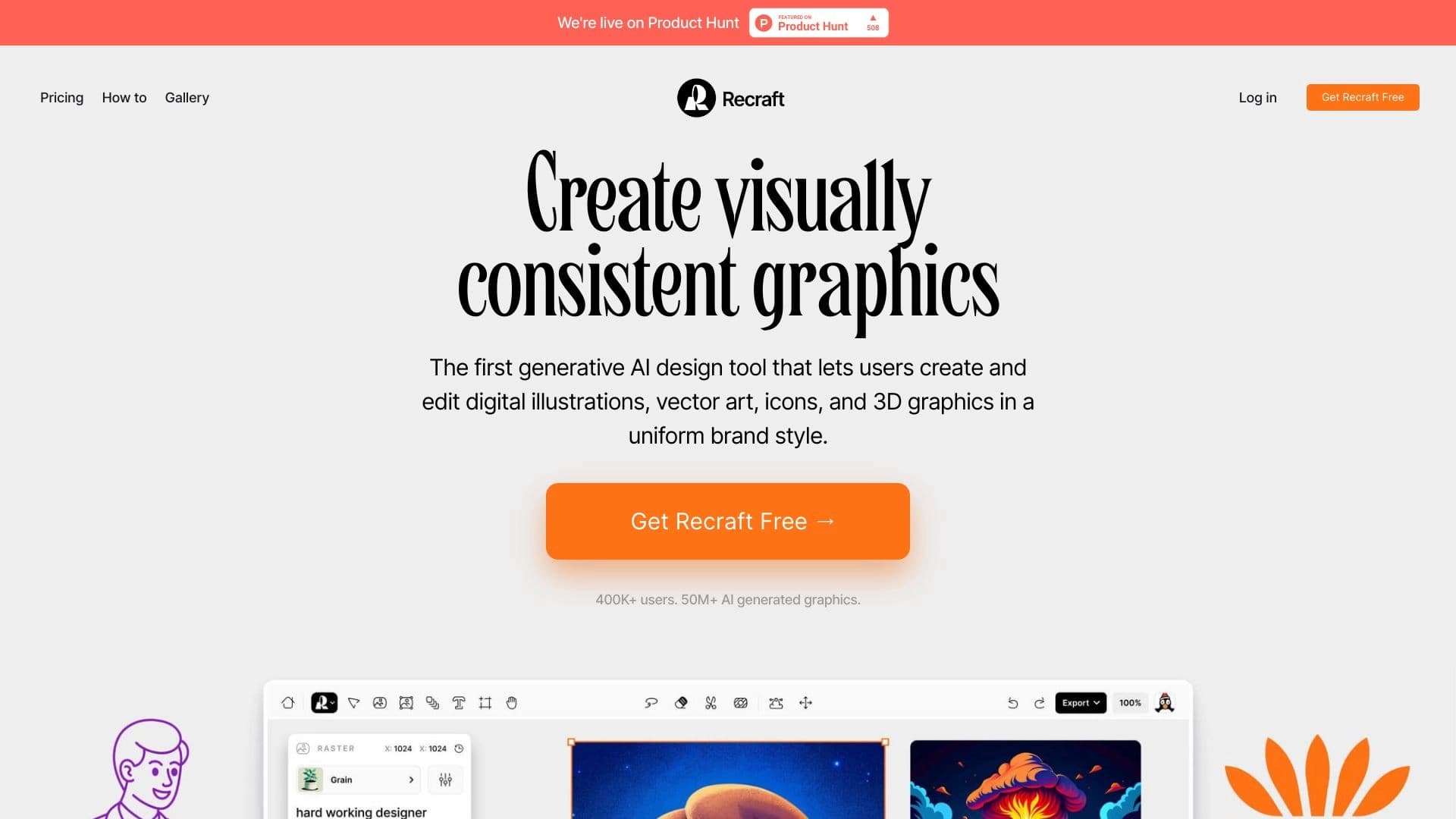
Recraft — это платформа для создания и редактирования изображений с помощью искусственного интеллекта. Сервис объединяет в себе генератор изображений, векторизатор, графический редактор и создатель мокапов, что делает его универсальным инструментом для работы с визуальным контентом.
Ключевая особенность Recraft — поддержка векторной графики и иллюстраций, а также аккуратное размещение текста внутри изображения. Платформа позволяет переносить стиль по референсу, редактировать изображения по текстовому описанию и получать несколько вариаций одного визуала. Сервис работает с несколькими моделями генерации, включая собственные V4 и V4.1 (ранее была доступна V3, известная также как Red Panda AI, вышедшая в октябре 2024 года).
Инструмент ориентирован на поддержание единой визуальной системы бренда: можно задавать собственный стиль, сохранять цветовые палитры и наборы иллюстраций. Платформа доступна через веб-браузер, мобильные приложения и API, распространяется по модели freemium.
Характеристики Recraft
| Характеристика | Значение |
|---|---|
| Категории | Генерация изображений, векторная графика, редактирование изображений, генерация иллюстраций, графический дизайн |
| Тип | Генеративный дизайн, графический AI-редактор и генератор изображений |
| Платформы | Веб-браузер, мобильные приложения, API |
| Модель распространения | Freemium (есть бесплатный тариф) |
| Актуальные модели | Recraft V4 и V4.1 (V3, также известная как Red Panda AI, вышла в октябре 2024 года) |
| Форматы вывода | Растровые изображения, иллюстрации, иконки, векторная графика (SVG) |
| Языки интерфейса | Русский язык не поддерживается |
| Необходимость VPN для России | Данные противоречивы: в одних источниках указано, что VPN не требуется, в других — что доступ из России возможен только с VPN |
| Бесплатный тариф | Да, с ограниченным функционалом |
| Рейтинг | 4.4 из 5 (оценка редакции — 8.9 из 10) |
Для кого подходит нейросеть Recraft?
Профессиональные дизайнеры и иллюстраторы
Recraft в первую очередь ориентирован на профессиональных дизайнеров и иллюстраторов. Платформа даёт тонкий контроль над стилем и композицией, поддерживает векторную графику и позволяет создавать изображения в единой визуальной системе. Это делает её полезным инструментом для тех, кто регулярно работает с фирменными стилями, логотипами и иконками.
Маркетологи и продуктовые команды
Сервис подходит маркетологам и продуктовым командам, которым нужно быстро создавать рекламные материалы, постеры, упаковку, карточки для соцсетей и изображения с читаемым текстом. Возможность сохранять единый стиль бренда и работать в команде с комментариями делает Recraft удобной для совместных проектов.
Пользователи без глубоких знаний дизайна
Recraft доступен и тем, кто не имеет серьёзной подготовки в графическом дизайне, — блогерам и обычным пользователям. Интуитивно понятный интерфейс и библиотека шаблонов позволяют превращать идеи в качественные изображения без глубоких знаний, хотя стоит учитывать, что результат всё равно требует проверки и доработки.
Как использовать нейросеть Recraft?
Работа через веб-редактор
Основной способ работы с Recraft — веб-редактор в браузере. Через него можно генерировать изображения, загружать референсы, редактировать визуалы и скачивать результаты. Также платформа доступна через мобильные приложения и API для программной интеграции.
Выбор модели генерации
Перед созданием изображения стоит проверить, какая именно модель выбрана (V3, V4, V4.1 или сторонние модели вроде Nano Banana, GPT-4o, Flux, Seedream). В студии могут отображаться не только собственные модели Recraft, поэтому важно убедиться в правильном выборе перед генерацией.
Практические рекомендации
Официальной пошаговой инструкции по началу работы на странице сервиса не представлено — указана только ссылка на сам сервис. Для повторяемой работы рекомендуется сохранять параметры удачных генераций, чтобы воспроизводить нужный стиль и композицию. Надписи внутри изображений стоит вычитывать, так как модель может допускать ошибки в буквах и длинных фразах.
Основные функции Recraft
Генерация изображений и векторной графики
Recraft поддерживает создание растровых изображений, иллюстраций, иконок и векторной графики с возможностью скачивания в формате SVG. Сервис позволяет задавать собственный стиль, а также генерировать 3D-изображения и работать с несколькими моделями генерации. Поддерживается размещение текста внутри изображения с повышенной точностью.
Редактирование и улучшение изображений
Платформа предоставляет широкий набор инструментов для редактирования: изменение отдельных областей через inpainting, расширение кадра, замена или удаление фона, стирание объектов, upscale (увеличение разрешения) и ремикс изображений. Растровый результат можно преобразовать в вектор.
Работа с референсами и фирменным стилем
Recraft позволяет загружать изображение как референс для генерации и редактирования, переносить стиль, изменять фон и получать несколько вариаций по одному образцу. Доступна перекраска групп цветов с заданием точной палитры бренда, а также создание и сохранение фирменных стилей — наборов иллюстраций и цветовых палитр.
Дополнительные инструменты
В веб-редакторе доступны векторизация загруженных изображений, улучшение качества, клонирование стиля, создание мокапов профессионального качества и инструменты улучшения промпта. Платформа поддерживает совместную работу с комментариями и быстрыми итерациями, а также создание логотипов, персонажей, стоковых и рекламных изображений.
Преимущества Recraft
Точная типографика внутри изображений
Главное преимущество Recraft — более аккуратное размещение текста внутри изображения по сравнению с большинством аналогов. Это особенно ценно при создании постеров, упаковки, рекламных макетов и карточек для соцсетей, где важна читаемая типографика.
Управляемая графика и единый стиль
Платформа хорошо подходит для задач, требующих управляемой графики: векторные изображения, единый стиль, выверенная композиция. Возможность задавать палитру бренда и сохранять фирменные стили помогает поддерживать визуальную систему компании на протяжении долгого времени.
Гибкость и удобство использования
Recraft отличается интуитивно понятным интерфейсом, гибкими настройками генерации (стили, цвета, композиции) и большой библиотекой шаблонов. Наличие бесплатного тарифа, а также работа через браузер, мобильные приложения и API делают сервис доступным для широкой аудитории.
Недостатки Recraft
Ошибки в тексте и ограничения точности
Несмотря на улучшенную типографику, надписи в изображениях всё равно требуют проверки: модель может ошибиться в буквах, пунктуации, названиях брендов и длинных фразах. Сложные логотипы, длинные надписи, точные схемы и макеты могут потребовать нескольких попыток и ручной доработки.
Ограничения бесплатной версии
На бесплатном тарифе изображения публикуются в общей галерее сообщества и принадлежат сервису, с ограничениями на коммерческое использование. Также выделенные кредиты не переносятся на следующий месяц, что требует планирования расходов.
Прочие ограничения
Recraft не подходит для точного копирования изображений «один в один» и не заменяет полноценный графический редактор, ручную вёрстку и юридическую проверку материалов. Качество результата зависит от выбранной модели, промпта и языка текста. Некоторые источники отмечают необходимость VPN для доступа из России.
Какие задачи решает Recraft
Создание визуального контента для брендинга
Recraft помогает создавать логотипы, иконки, рекламные материалы, персонажей и стоковые изображения, а также генерировать визуальный контент для брендов, сайтов, соцсетей и маркетинговых кампаний. Сервис поддерживает единый стиль, что важно для поддержания визуальной идентичности.
Работа с изображениями по референсу
Платформа решает задачи создания похожих изображений по референсу, переноса стиля, изменения фона и получения нескольких вариантов визуала. Это удобно при необходимости сохранить направление, стиль, композицию или визуальную систему бренда.
Дизайн и управляемая графика
Recraft применяется для генерации управляемой графики в дизайне: векторов, иллюстраций, значков и 3D-изображений в едином стиле. Сервис также используется для создания постеров, упаковки, рекламных макетов и социальных карточек с текстом.
Обработка и преобразование изображений
Инструмент решает задачи векторизации растровых изображений, улучшения качества, удаления фона, увеличения разрешения и точечного редактирования. Это позволяет превращать идеи в высококачественные изображения даже без глубоких знаний дизайна.
Цены Recraft
Бесплатный тариф
Recraft предоставляет бесплатную версию с ограниченным функционалом. Однако на бесплатном тарифе изображения принадлежат сервису, могут появляться в публичной галерее и не предоставляются для коммерческого использования. Кредиты на создание изображений не переносятся на следующий месяц.
Платные подписки
Премиум-планы доступны для индивидуальных пользователей и команд и предоставляют расширенные возможности, полные права собственности на изображения и возможность приватных генераций с коммерческим использованием. Точные цены подписок в веб-приложении на странице не указаны — их рекомендуется проверять перед оплатой, поскольку стоимость может меняться.
Цены на API
Для API модели V3 действуют фиксированные ставки: генерация растрового изображения — $0,04, векторного — $0,08. Редактирование растровых и векторных изображений тарифицируется по тем же базовым ставкам. При исчерпании лимита кредитов их можно получить через реферальную программу или докупить отдельно.
Условия использования Recraft
Права на контент
Условия использования результата зависят от выбранного плана. На бесплатном тарифе изображения принадлежат Recraft, могут появляться в публичной галерее сообщества и не предоставляются для коммерческого использования. На платных планах права передаются пользователю, разрешается коммерческое применение, а генерации могут быть приватными.
Лимиты и дополнительные возможности
Бесплатная версия предполагает публичное размещение контента и ограничения на коммерческое использование. Выделенные кредиты на создание изображений сгорают в конце месяца. При исчерпании лимита кредиты можно получить через реферальную программу или докупить отдельно.
Доступность Recraft
Платформы доступа
Recraft работает через веб-браузер (официальный сайт — recraft.ai), а также доступна через мобильные приложения и API для программной интеграции. VPN не является обязательным требованием по данным части источников.
Региональные особенности
Информация о доступе из России противоречива: одни источники указывают, что VPN не требуется, другие отмечают, что доступ возможен только с его помощью. Русский язык интерфейса не поддерживается, поэтому пользоваться сервисом придётся на английском языке.
Чем отличается Recraft от аналогов
Точность размещения текста
Главное отличие Recraft от аналогов — более точное размещение текста внутри изображения. Для задач, где читаемая типографика важнее художественной вариативности, Recraft выделяется среди других генераторов изображений, поддерживающих точный текст и макет.
Ориентация на управляемую графику
В отличие от многих универсальных генераторов изображений, Recraft сфокусирован на управляемой графике для дизайна: векторы, единый стиль, композиция и поддержание визуальной системы бренда. Возможность работы с векторными форматами и создания фирменных стилей выделяет его среди аналогов.
Собственные модели генерации
Recraft развивает собственные модели генерации (V3, V4 и V4.1), при этом поддерживает и сторонние (Nano Banana, GPT-4o, Flux, Seedream). Платформа не заменяет полноценный графический редактор и требует проверки текста на ошибки, поэтому при выборе стоит учитывать конкретные задачи — создание точных макетов или художественных изображений.
Заключение
Recraft — мощная и гибкая платформа для создания и редактирования изображений, особенно сильная в задачах, где нужна управляемая графика для дизайна: векторная графика, единый стиль, выверенная композиция и короткий читаемый текст. Сервис объединяет генератор изображений, векторизатор, редактор и создатель мокапов, сочетает инновационные технологии с интуитивно понятным интерфейсом и доступен по модели freemium. Однако пользователям стоит учитывать ограничения бесплатной версии (публичное размещение и отсутствие коммерческих прав на контент), необходимость проверки надписей на ошибки, а также то, что Recraft не заменяет полноценный графический редактор и ручную вёрстку. Если ваша задача требует сохранения визуальной системы бренда и аккуратной типографики внутри изображений, Recraft — обоснованный выбор, тогда как для свободного художественного творчества подойдут более универсальные генераторы.
Тарифы
Часто задаваемые вопросы


Смотрите также


AI-агент для помощи в программировании и оптимизации рабочего процесса разработки.


ИИ-платформа для быстрого создания сайтов и управления процессами малого бизнеса.
Интеллектуальный помощник от Microsoft, встроенный в поисковую систему Bing и браузер Edge на базе GPT-4.

Веб-платформа для генерации изображений и кинематографичных видео с помощью ИИ, включающая инструменты для студийного редактирования.

Платформа на базе искусственного интеллекта для генерации и улучшения изображений, видео и логотипов в реальном времени.


Сервис на базе ИИ для автоматической генерации текстового контента различного формата.

Платформа для генерации изображений, видео и аудио с помощью искусственного интеллекта по текстовым описаниям.


Онлайн-редактор для удаления лишних объектов, текста и дефектов с фотографий с помощью нейросети.