

Parseur
Service for automatic data extraction from documents using AI and OCR.
Ranked in
Overview
Parseur AI Description
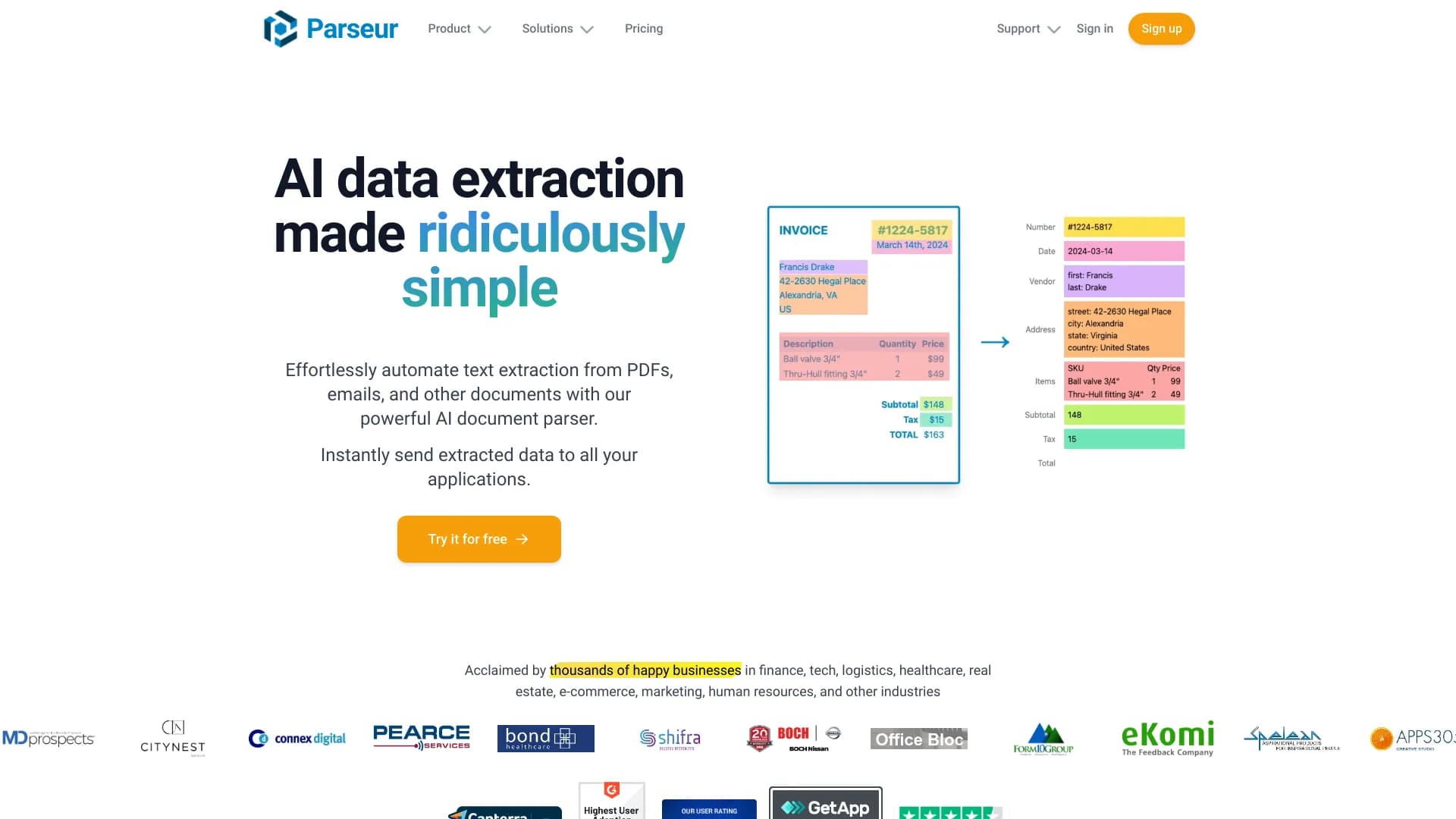
Parseur is a cloud-based data entry automation service that uses artificial intelligence and optical character recognition (OCR) technologies to extract information from documents. Instead of manually transferring data from PDF files, emails, or spreadsheets into databases and accounting systems, users delegate this task to Parseur's algorithms.
The service operates on a "upload a document — get structured data" principle. The system recognizes text, identifies meaningful fields, and normalizes them into a consistent format. Users don't need to write code or have programming skills — they just need to configure an extraction template for a specific document type.
The workflow is like a pipeline: a document enters the system, goes through the recognition stage, then artificial intelligence interprets the content and produces a result as a table or structured output that can be exported to other applications. The platform can handle large volumes of files, making it a useful tool for companies with heavy document workflows.
Parseur Characteristics
| Characteristic | Value |
|---|---|
| Category | Text recognition (OCR), PDF and documents, Email and communications |
| Website | parseur.com |
| Publication date | August 3, 2025 |
| Distribution model | Freemium (free tier with limitations + paid subscriptions) |
| Operating model | Cloud service, no software installation required |
| Core technologies | Artificial intelligence, OCR (optical character recognition) |
Who is Parseur AI suitable for?
Companies with heavy document workflows
Parseur is aimed at businesses where processing incoming documents takes up a significant portion of working time. These may be departments that receive invoices, waybills, acts, contracts, and other standard paperwork on a daily basis. Automation reduces the workload on employees and cuts document processing time from minutes to seconds.
Industries with regular data entry
The service brings the most value to companies in finance, logistics, and retail. For financial organizations, the service helps process statements and payment orders; for logistics — track shipping manifests and transport documents; for retailers — accept orders and reconcile deliveries. The tool is also useful in insurance and accounting outsourcing, where similar forms arrive constantly.
Teams without technical specialists
A key feature of Parseur is that no programming is required. The template configuration interface is intuitive, so an employee without an engineering background can create a data extraction rule on their own. This makes the service accessible to small and medium-sized businesses without a dedicated IT department.
How to use Parseur AI?
Step 1: Adding a document
The user needs to upload a file to the system. Parseur accepts PDFs, emails, spreadsheets, and unstructured text files. It's important that the document matches the type for which the template is being configured.
Step 2: Selecting or creating a template
After uploading a document, the user can either choose an existing template from the library or create a new one. At this stage, the user specifies which fields need to be extracted — for example, invoice number, date, amount, counterparty. The system remembers the layout and format of the data so it can automatically recognize them in similar documents in the future.
Step 3: Reviewing results and integration
Parseur displays the recognized data in a structured format. The user verifies the accuracy of extraction and adjusts the template if necessary. The result can then be sent to external systems — CRM, accounting software, or databases. The service supports automated data transfer configuration, which can completely eliminate manual entry.
Key Parseur Features
Automatic data extraction
The service automatically recognizes information in documents without human involvement. The system finds the required fields, reads their values, and normalizes them into a unified structured format. This works with both printed text and handwritten notes when OCR is enabled.
Support for various file formats
Parseur works with PDF files, emails (including attachments), spreadsheet-type documents, and unstructured data. Users are not limited to a single format and can send documents from different sources — from scans to digital files.
Template configuration
Instead of writing code, users work with a visual template builder. They can specify which fields to extract, in what order, and with what data types. Templates are saved and automatically applied to new incoming documents.
Use of AI and OCR
Artificial intelligence analyzes the document structure, while OCR recognizes characters on scans and images. The combined work of these technologies allows processing documents with complex layouts, tables, and variable structures.
Integration with external applications and large data volumes
Parseur can send extracted data directly to third-party services without intermediate steps. The platform is designed for streaming processing — it handles thousands of documents by queueing them without losing performance.
Parseur Advantages
- Works with different document formats — a single entry point for PDFs, emails, spreadsheets, and unstructured files.
- Supports large data volumes — high throughput allows processing large batches of documents.
- High extraction accuracy — the combination of AI and OCR reduces recognition errors.
- Easy integration with external applications — data can be exported to CRM, accounting systems, and databases without manual transfer.
Parseur Disadvantages
- Time required to learn integrations — although the basic scenario is simple, more complex connections with external services require investigation and testing.
- Manual template setup for new document types — if a document differs from already configured ones, a new template must be created manually.
- New users need time to master the features — the first few days may involve learning the interface and experimenting with settings.
What tasks does Parseur solve?
Automating data extraction
The service's main task is to replace manual data entry from documents into accounting systems. Employees no longer need to retype data from PDFs and emails — the system does it automatically. This speeds up operational processes and reduces the risk of human errors.
Structuring information
Parseur converts "raw" data from various sources into a unified structured format. Disparate files — emails, scans, spreadsheets — are transformed into clean records with filled fields. Such data can be used directly in reports, analytics, and other business processes.
Parseur Pricing
Parseur operates on a freemium model. This means the service has a free tier with basic functionality that allows users to explore the platform's capabilities. Paid tiers unlock additional limits on the volume of processed documents and an expanded set of features. Exact pricing figures and specific terms of the tariff plans are not disclosed in public sources — for up-to-date information, visit the official website parseur.com.
Parseur Terms of Use
The service is provided on a subscription model. The free tier is available for evaluation and is limited in functionality or the number of processed pages. Paid subscriptions include an SLA (service level agreement) and technical support. Detailed information about the user agreement, privacy policy, and data processing terms is available on the platform's official website.
Parseur Availability
Parseur is a fully cloud-based solution. Users do not need to install software or allocate server capacity — all computing is performed on the service side. All that's needed is a browser and an internet connection. Access is via a web interface, which allows using the service from any device and anywhere in the world. The service was published on August 3, 2025.
How Parseur differs from alternatives
There are similar tools on the market, such as Mailparser and Docparser. All three services solve the common problem of automatic data extraction from documents, but Parseur stands out with several features.
Dynamic OCR
Unlike some competitors, Parseur uses dynamic optical character recognition. This means the system adapts to changes in the document layout. If a supplier slightly changes the design of an invoice or waybill, the service continues to extract data correctly, whereas static tools may fail at such a task.
Support for variable layouts
The platform can process documents that are not completely identical. Parseur templates allow variability in field placement, which provides an advantage when working with documents from different senders or when forms change frequently. This is a key difference from alternatives, which are more often designed for strictly fixed structures of incoming files.
Conclusion
Parseur is a practical tool for automating data entry that addresses companies' need for fast and accurate document processing. The combination of AI and OCR allows the service to work with PDFs, emails, spreadsheets, and unstructured files, while customizable templates make it accessible to users without a technical background. The platform also handles large data volumes and integrates easily with external systems. The freemium model allows testing the service before purchasing a subscription. The main limitations relate to manual template setup and the time needed to learn integrations, which is offset by the simplicity of the interface and the flexibility of processing documents with variable layouts.
Frequently asked questions
See also

AI agent for integrating data from various sources and managing knowledge within organizations.

TensorStax is an AI agent for management model-cycle machine learning simplifying theirs deployment and monitoring.
AI website builder from Hostinger for quickly creating websites based on a business description.

AI agent for automating customer communications and support.

Service for automatically creating mind maps from uploaded materials.

AI assistant for business that helps manage tasks and automate routine through dialogue.

Multimodal AI agents for automating customer service and sales via chat, voice, and video.
A neural network for document analysis that extracts key information, creates summaries, and answers questions about the contents of uploaded files.