

MindlyFlow
Браузерная платформа с набором ИИ-инструментов для обработки фото и видео, включая генерацию изображений, оживление фотографий и замену лиц.
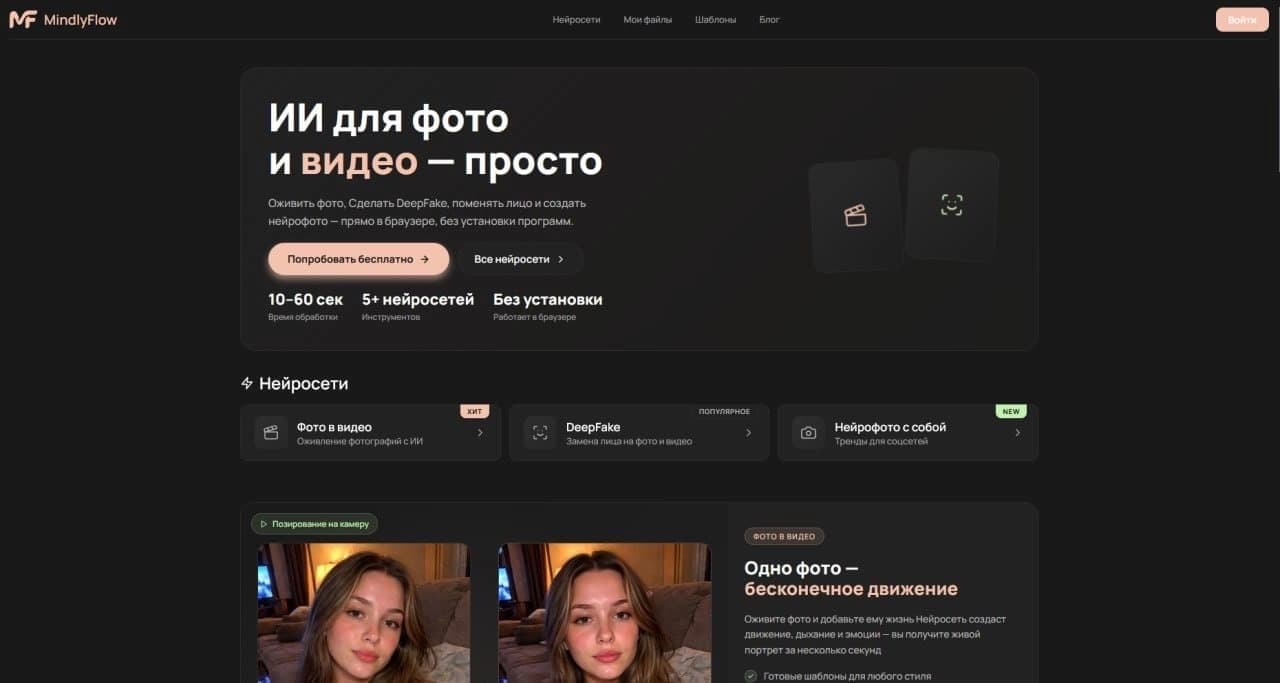
Обзор
MindlyFlow
Описание нейросети MindlyFlow
MindlyFlow — это браузерная платформа, которая объединяет несколько инструментов на базе искусственного интеллекта для работы с визуальным контентом. Вместо того чтобы устанавливать отдельные программы для каждой задачи, пользователь получает доступ к набору функций прямо в окне браузера.
Платформа ориентирована на широкий круг пользователей: от создателей контента до тех, кому нужно быстро обработать фото или видео без глубоких технических знаний. Ключевая идея MindlyFlow — универсальность: один сервис для генерации, анимации и редактирования медиафайлов.
Характеристики MindlyFlow
| Характеристика | Значение |
|---|---|
| Тип | ИИ-платформа для генерации и обработки фото и видео |
| Категории | Генерация видео, видео с заменой лица, генерация изображений |
| Доступность | Веб-браузер |
| Основные функции | Генерация изображений, оживление фото, замена лиц |
| Дополнительные функции | Другие медиа-инструменты для быстрых визуальных задач |
| Модель распространения | Не указана |
Для кого подходит нейросеть MindlyFlow?
Создатели контента
MindlyFlow может быть полезна блогерам, дизайнерам и маркетологам, которым регулярно требуется генерировать изображения или обрабатывать видео для публикаций. Инструмент позволяет работать с материалами без покидания браузера.
Пользователи без технического бэкграунда
Поскольку платформа работает в веб-браузере и объединяет несколько функций в одном интерфейсе, она подходит тем, кто не хочет разбираться в сложном программном обеспечении. Для выполнения базовых операций не требуется установка или настройка специализированных программ.
Специалисты по визуальным коммуникациям
Люди, которые часто выполняют однотипные задачи — создать изображение, оживить старую фотографию, заменить лицо на видео, — могут использовать MindlyFlow как единую точку доступа к этим операциям.
Как использовать нейросеть MindlyFlow?
Для работы с MindlyFlow не требуется специального программного обеспечения, кроме самого браузера. Пользователю достаточно открыть платформу и выбрать нужный инструмент из набора доступных функций. Сервис работает непосредственно в окне браузера, что исключает необходимость в установке приложений.
Рабочий процесс выстраивается вокруг задач: если нужно сгенерировать изображение — открывается соответствующий инструмент; если требуется анимировать снимок или заменить лицо в видео — активируется нужная функция. Все операции выполняются в рамках одной платформы, что упрощает рабочий процесс и сокращает время на переключение между разными сервисами.
Основные функции MindlyFlow
Генерация изображений
Платформа позволяет создавать новые изображения с нуля с помощью искусственного интеллекта. Это базовая функция, которая покрывает потребности в создании визуального контента различного характера.
Оживление фото
MindlyFlow дает возможность анимировать статичные фотографии — «оживлять» снимки, превращая их в короткие видеофрагменты для более выразительной подачи материала.
Замена лиц
Ключевая функция для видеоредактирования — возможность заменять лица на видео. Инструмент может использоваться как для креативных проектов, так и для практических задач, связанных с фото- и видеомонтажом.
Дополнительные медиа-инструменты
Помимо перечисленных функций, платформа включает другие инструменты, предназначенные для быстрых визуальных задач с фото- и видеоматериалами.
Преимущества MindlyFlow
- Универсальность. Один сервис закрывает потребности в генерации изображений, анимации фотографий и редактировании видео.
- Браузерный доступ. Для работы нужен только веб-браузер — не требуется устанавливать программы на компьютер.
- Комплексный подход. Объединение нескольких ИИ-инструментов в единой платформе сокращает время на поиск отдельных сервисов под каждую задачу.
- Простота использования. Интерфейс рассчитан на пользователей с разным уровнем подготовки, что снижает порог входа для начинающих.
Недостатки MindlyFlow
Поскольку платформа ориентирована на широкий спектр визуальных задач, возможно, что глубины специализированных функций будет недостаточно для профессионалов, которым требуются узкоспециализированные инструменты. Кроме того, производительность и удобство работы зависят от скорости браузера и качества интернет-соединения пользователя. Точные данные о дополнительных ограничениях в открытых источниках не раскрываются.
Какие задачи решает MindlyFlow
Генерация визуального контента
Платформа позволяет быстро получать новые изображения, не покидая браузер. Это удобно для задач, связанных с иллюстративным материалом, черновиками концепций или любыми другими сценариями, где требуется создание картинки «с нуля».
Обработка существующих медиа
Оживление статичных снимков и замена лиц на видео относится к задачам редактирования уже готовых материалов. MindlyFlow позволяет выполнять эти операции без необходимости использовать сложные видеоредакторы.
Выполнение быстрых визуальных операций
Формат «все в одном» делает платформу решением для скрытых и повседневных задач: быстро что-то сгенерировать, провести операцию по анимации или скорректировать видео с помощью встроенных медиа-инструментов.
Цены MindlyFlow
В открытых источниках не содержится информации о стоимости использования MindlyFlow. Модель распространения сервиса также не уточняется. Для получения актуальных данных о тарифах и условиях оплаты рекомендуется обращаться к официальным каналам платформы.
Условия использования MindlyFlow
Платформа доступна через веб-браузер, что накладывает минимальные технические требования — пользователю достаточно иметь современный браузер и стабильное интернет-соединение. Подробная информация о лицензионных соглашениях, ограничениях по использованию и правилах обработки данных в доступных источниках не приводится.
Доступность MindlyFlow
MindlyFlow распространяется как веб-сервис, доступный через браузер. Для начала работы не нужно загружать дополнительные программы на устройство — достаточно открыть платформу в веб-браузере и выбрать нужный инструмент. География доступности и региональные ограничения в исходных данных не указаны.
Чем отличается MindlyFlow от аналогов
Главное отличие MindlyFlow заключается в том, что это не узкоспециализированный инструмент, а объединенная платформа, сочетающая несколько категорий ИИ-функций: генерацию изображений, работу с видео и замену лиц. Вместо того чтобы переключаться между разными сервисами для каждой задачи, пользователь получает набор инструментов в одном месте.
Такой подход наиболее удобен для тех, кто предпочитает работать в браузере и не хочет устанавливать множество отдельных приложений. MindlyFlow ориентирована на комплексное решение визуальных задач, что отличает ее от специализированных сервисов, фокусирующихся на одной функции.
Заключение
MindlyFlow — это браузерная платформа, которая объединяет несколько инструментов искусственного интеллекта для работы с фото и видео в едином интерфейсе. Сервис позволяет генерировать изображения, оживлять фотографии и заменять лица на видео, что покрывает широкий спектр задач — от творческих до практических. Благодаря доступности через веб-браузер и отсутствию необходимости устанавливать дополнительные программы, платформа подходит как новичкам, так и пользователям со средним уровнем подготовки, а комплексный набор функций делает ее универсальным решением для быстрой работы с визуальным контентом.
Часто задаваемые вопросы


Смотрите также

AI-инструмент для обработки изображений товаров и генерации профессиональных фотографий с виртуальными моделями.


Сервис для виртуальной примерки одежды с помощью ИИ.

Онлайн-сервис для создания реалистичного клона голоса по короткой аудиозаписи и озвучивания текста.


Сервис для автоматической расшифровки аудио и видео в текст с поддержкой более 100 языков.


AI-помощник для быстрого создания и редактирования текстов в различных форматах.


Веб-сервис для генерации аниме-изображений по текстовым запросам с помощью ИИ.


Онлайн-инструмент для создания дипфейков и редактирования изображений с помощью ИИ.

Сервис для создания персонализированных аватаров и фотосессий с помощью ИИ на основе загруженных селфи.