

HelloSign
Service for electronic document signing and legally significant document workflow.
Ranked in
Overview
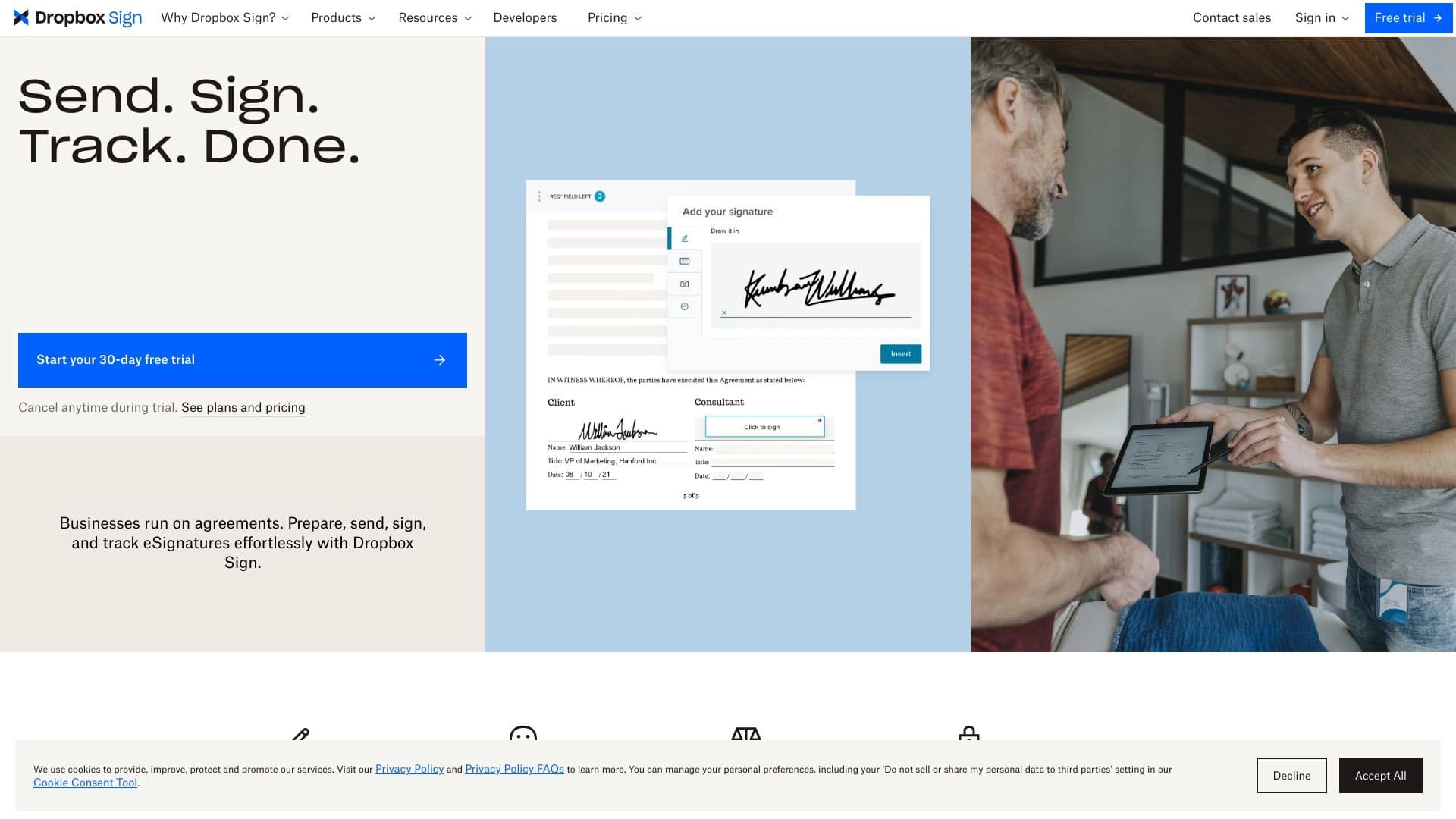
HelloSign is a cloud-based service for working with electronic signatures that shifts the document signing process from paper to digital. Instead of printing a contract, signing it by hand, and scanning it back, users send a file through the platform. The system allows placing signatures, initials, and dates in the required fields, then automatically distributes the finished document to all parties involved in the deal.
The main goal of the service is to make the exchange of legally significant documents fast and convenient. HelloSign is positioned as a solution for managing documents that require official approval. This applies both to internal approvals within a company and external deals with counterparties. The service eliminates the need for in-person meetings and courier delivery while maintaining the legal validity of signed files.
How the service works
The workflow revolves around uploading a source file (e.g., PDF or Word) and adding signature fields. The sender specifies where exactly the recipient should sign, sets the signing order, and sends the request. The recipient receives a notification, opens the document, adds their signature, and returns it. The entire process is tracked in the dashboard, where the status of each document is visible.
HelloSign Features
The table below summarizes the key parameters of the service that characterize it as a product for electronic document management.
| Feature | Value |
|---|---|
| Product type | SaaS platform for electronic signatures |
| Purpose | Online signing and approval of legally significant documents |
| Legal validity | Supports creating documents with legal force |
| Distribution model | Freemium (free tier with basic features) |
| Target audience | Businesses, individuals, lawyers, HR departments |
| Primary use case | Sending documents for signature, managing statuses, archiving |
| Management | Via web interface, integrations with other services |
Who is HelloSign suitable for?
For entrepreneurs and small businesses
Owners of small companies often need to quickly finalize a contract with a client or supplier. HelloSign allows this without printing and mailing paper copies. Simply upload a template, fill in the fields, and send a link to the counterparty — they can sign the document from any device.
For HR departments
HR professionals work with applications, orders, and employment contracts every day. The service simplifies the hiring and termination process by allowing documents to be sent to new employees for signature before their first day of work. All HR paperwork is stored in one place and is easy to find when needed.
For freelancers and individuals
Small orders, work completion certificates, consent forms for data processing — all of this can be signed remotely. Individual users don't need to understand complex legal nuances: the interface is designed so that even an unprepared person can send a document for signature in a couple of minutes.
How to use HelloSign?
Step 1: Registration and profile setup
To get started, you need to create an account. After registration, the user enters the dashboard where they can set up their profile, add their signature, and contact details. The signature can be drawn with a mouse, uploaded as an image, or generated automatically.
Step 2: Uploading a document and adding fields
The user uploads a file in PDF, DOCX, or another supported format. The system allows dragging fields for signatures, initials, dates, and text comments onto the document pages. These should be placed where the parties need to sign.
Step 3: Sending and tracking status
After setting up the fields, the document is sent to recipients via email. The dashboard shows who has opened the file, who has signed, and who has not yet responded. Reminders can be sent if necessary. Once all parties have signed the document, it is automatically finalized and available for download.
Key Features of HelloSign
One-click electronic signature
The core capability of the service is fast signature placement. Users can sign documents from both a computer and a mobile device. The system saves the signature sample and automatically inserts it where needed.
Template management
Templates can be created for frequently used documents, such as service agreements or non-disclosure agreements. When sending, simply fill in the variable fields (company name, amount, date) — and the document is ready.
Requesting signatures from multiple parties
If a document requires approval from several parties, the signing order can be configured: sequential or parallel. The system will automatically notify the next participant after the previous one has signed.
HelloSign Advantages
- Fast document exchange — no need to wait for mail or a courier; everything happens online within minutes.
- Ease of use — no special technical knowledge is required; the signing process is intuitive.
- Legal validity — created documents have legal force, confirmed by compliance with electronic signature legislation.
- Convenient tracking — all document statuses are visible in one window, simplifying deadline management.
- Mobility — documents can be signed from a phone or tablet anywhere with internet access.
HelloSign Disadvantages
Unfortunately, there is not enough information about the service's drawbacks in public sources for a detailed analysis. It can be assumed that, like any product with a freemium model, HelloSign has limits on the number of free documents per month. However, exact limits and possible technical restrictions are not specified in the source data. Users requiring large-scale document workflows should review the terms of paid plans before getting started.
What problems does HelloSign solve?
- Faster deals — contracts are signed in minutes rather than days or weeks.
- Remote approval — parties can be in different cities and countries, while signing remains legal.
- Going paperless — reduced costs for printing, office supplies, and storing paper archives.
- Process control — managers can see the stage of each document and intervene in time.
- Secure storage — all signed files are kept in one protected place and do not get lost in paper folders.
HelloSign Pricing
Exact rates and subscription costs are not disclosed in the source data. The service is known to operate on a freemium model, which implies a free tier with basic features and paid plans with extended capabilities. For current pricing information and plan comparisons, it is recommended to visit the official HelloSign website.
HelloSign Terms of Use
Like most cloud services, HelloSign operates on a subscription model with monthly or annual billing. The free tier allows users to explore the core features but imposes limits on the number of documents and access to advanced tools. For businesses, corporate plans with integration into existing workflows are likely available. Detailed terms of use, including the privacy policy and personal data processing, are published on the official website and may vary by user region.
HelloSign Availability
The service is fully cloud-based, so only a browser and a stable internet connection are required. HelloSign works on all popular operating systems — Windows, macOS, Linux — as well as on mobile devices through responsive web versions. Authentication is done via an account, allowing access to documents from any device. Russian language support and interface localization are not confirmed in the source data, so users who do not speak English should verify this when registering.
How HelloSign differs from alternatives
The main difference of HelloSign is its focus on simplicity and speed. Many competitors offer bulky platforms with dozens of settings that require employee training. HelloSign, in turn, is focused on quickly signing standard documents without unnecessary steps. The interface is minimalist: the user sees the document and signature fields, and this is the primary workflow. Additionally, the service is designed from the start to integrate with existing business processes, making it a convenient addition to already-used CRMs and cloud storage solutions.
Conclusion
HelloSign is an effective tool for moving document workflows into the digital space. The service solves the main problem of paper signatures — their slowness and inconvenience. Thanks to the freemium model, any user can try the product for free and assess how much it simplifies working with contracts and agreements. For businesses, it is a way to reduce operational costs and speed up deal closing, and for individuals, it is a convenient way to sign documents without unnecessary hassle.
Frequently asked questions
See also

AI agent for integrating data from various sources and managing knowledge within organizations.

TensorStax is an AI agent for management model-cycle machine learning simplifying theirs deployment and monitoring.

AI assistant for business that helps manage tasks and automate routine through dialogue.
AI website builder from Hostinger for quickly creating websites based on a business description.

AI agent for automating customer communications and support.


Service for automatically creating mind maps from uploaded materials.

Multimodal AI agents for automating customer service and sales via chat, voice, and video.

A neural network for document analysis that extracts key information, creates summaries, and answers questions about the contents of uploaded files.