
FaviCraft
Online service for creating and converting favicons with preview on various devices.
Overview
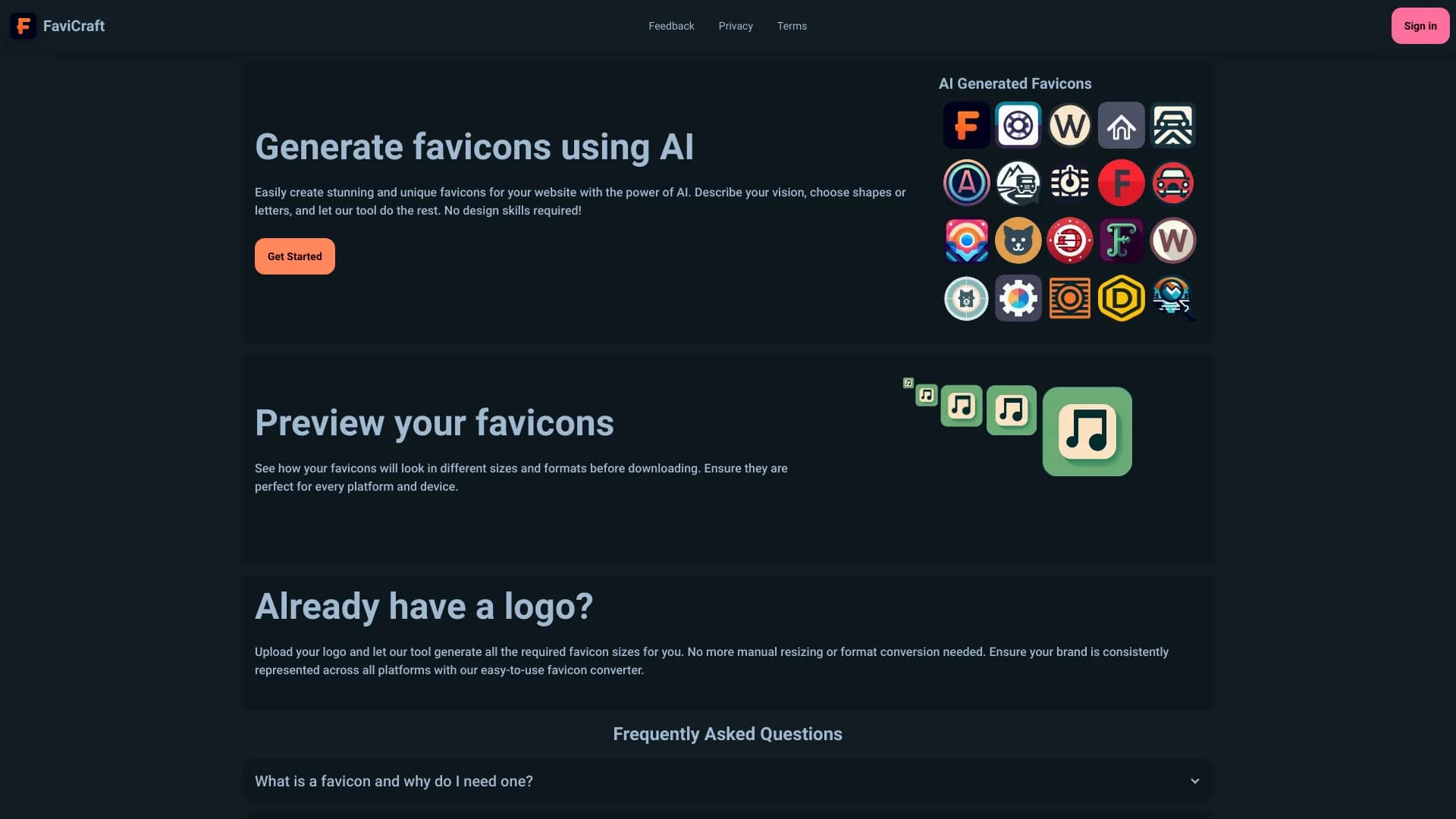
FaviCraft is an online service designed for working with favicons — small icons that appear in the browser tab, bookmark lists, and on mobile devices. The tool covers the full cycle of tasks: from creating an icon from scratch to converting an existing logo into the required format and checking how the result will look in real-world conditions.
The main feature of FaviCraft is combining a simple builder and converter in one place. You don't need to open multiple programs: upload an image, adjust it to standard sizes, preview it on different devices, and download the ready-made set. The service is focused on speed and convenience, allowing you to complete the task in minutes without learning complex software.
FaviCraft Features
| Feature | Value |
|---|---|
| Type | Online favicon editor and converter |
| Category | Icons and stickers |
| Website | favicraft.com |
| Author | Admin |
| Publication date | December 18, 2025 |
| Registration | Not required |
| Availability | Online tool, works in the browser |
Who is FaviCraft suitable for?
Website owners
If you are launching a new website or redesigning an existing one, you need a favicon that displays correctly in all browsers. FaviCraft lets you quickly prepare an icon without contacting a designer and without learning technical format requirements.
Designers and developers
For professionals, the service is useful as an auxiliary tool for quickly converting client logos into a set of favicons of various sizes. The preview feature helps verify how the icon will look in real scenarios before handing the result to the client.
Users without design experience
The FaviCraft interface is designed for beginners. Creating an icon requires no knowledge of graphic editors: the builder works on a drag-and-drop principle, and color and shape selection is done visually. This makes the service accessible to any website owner.
How to use FaviCraft?
Creating an icon from scratch
Open the built-in builder and assemble a favicon from basic elements: choose a shape, pick a background color, add text or a simple figure. All changes are displayed in real time, so you can immediately see the intermediate result.
Converting an existing image
Upload a logo or other image in one of the supported formats — PNG, JPG, SVG, or WEBP. The service will automatically adjust the image to standard favicon sizes and generate a set of icons for different devices and browsers.
Checking the result
After creating or converting, use the preview function. The service will show how the favicon looks in a browser tab, on a mobile device, and in bookmark lists. If you are satisfied with the result, download the ready-made set.
Key FaviCraft Features
Favicon builder from scratch
The built-in editor allows you to create icons without using external programs. Color, font, and basic shape selection are available, and elements can be dragged with the mouse. Suitable for quickly creating a simple but neat favicon.
Logo-to-favicon conversion
The service accepts images in PNG, JPG, SVG, and WEBP formats and automatically adjusts them to standard favicon sizes. This eliminates manual cropping and scaling in a graphic editor.
Device display check
A special preview mode shows how the icon will look in a browser tab, on mobile devices, and in bookmark lists. This allows you to spot readability or cropping issues in advance, before the favicon goes live on your site.
FaviCraft Advantages
FaviCraft stands out from other tools due to a number of practical benefits:
- No registration required. You don't need to create an account or verify your email to use the service — just open the site and start working.
- Works in the browser without installation. No programs, plugins, or complex settings. The tool is accessible from any device with an internet connection.
- Beginner-friendly interface. Controls are built on visual elements: dragging, color and shape selection. Users don't need graphic design experience to get a quality result.
FaviCraft Disadvantages
Public sources do not list any limitations or drawbacks of the service. There is no information about possible limits on the number of conversions, restrictions on uploaded file sizes, or watermarks in a free version. There is also no data on advanced features for professional designers, such as layer support or export to additional formats. If these parameters matter to you, it's worth checking them directly on the service's website.
What tasks does FaviCraft solve?
The tool covers several typical tasks related to favicon preparation:
- Creating and editing favicons from scratch. If you don't have a ready-made logo, the builder helps you assemble a simple icon from basic elements.
- Converting an existing logo into a favicon set. The uploaded image is automatically transformed into icons of the required sizes for different devices and browsers.
- Checking favicon display on different devices. The preview shows how the icon looks in a tab, on a mobile screen, and in bookmarks, helping you avoid mistakes.
- Quick icon preparation and testing when launching a site or redesigning. The entire process takes a few minutes and requires no additional software installation.
FaviCraft Pricing
Public sources do not contain information about FaviCraft pricing and plans. It is not specified whether the service is completely free, offers paid plans with extended features, or operates on a one-time payment model. To clarify current terms, you need to visit the official website favicraft.com.
FaviCraft Terms of Use
The main condition for using the service is that no registration is required. Users can visit the site and immediately start creating or converting favicons without creating an account. Additional terms, such as restrictions on commercial use of created icons, rules for storing uploaded files, or their deletion periods, are not disclosed in available sources.
FaviCraft Availability
FaviCraft is a fully online tool. All you need is a browser and an internet connection. The service requires no software installation on a computer or mobile device, ensuring access from any platform — Windows, macOS, Linux, as well as tablets and smartphones.
How FaviCraft differs from alternatives
There are several tools on the market for creating icons and stickers, such as AI Emoji Generator, PlusVector, VectorArt.ai, Newji, AnyMoji, and Asset Brain AI. Many of them focus on generating emojis, vector images, or stickers using artificial intelligence.
FaviCraft differs from these services through its narrow specialization in favicons. Instead of universal image generation, the tool solves a specific task: preparing an icon for a browser tab while accounting for technical requirements. Key differences include a built-in builder for creating icons from scratch, automatic conversion of popular formats into favicons, and a preview mode for different devices. FaviCraft requires no registration, which sets it apart from services where you need to create an account to save and download results.
Conclusion
FaviCraft is a simple and highly specialized online tool for creating, converting, and checking favicons. It requires no registration, works directly in the browser, and is designed for users without graphic design experience. The service covers the full cycle of tasks: from creating an icon from scratch to checking its display on different devices. It's a practical solution for website owners, designers, and developers who need to quickly prepare a quality favicon without unnecessary complications.
Frequently asked questions
See also


A neural network for generating short videos from text descriptions or images.

Anakin.ai is a low-code platform that combines various AI models for content creation and workflow automation without coding.


A tool for generating 3D models based on text descriptions, images, or sketches.


AI-powered virtual clothing try-on service.


Online image editor with AI-powered features for photo processing, design, and content generation.

Service for creating personalized avatars and photo shoots using AI based on uploaded selfies.


Free web tool from Google that uses machine learning to turn rough sketches into neat icons and illustrations.
AI tool for automatically removing backgrounds from images right in the browser.