
Decorify
Decorify is a tool for quickly redesigning interiors using artificial intelligence.
Overview
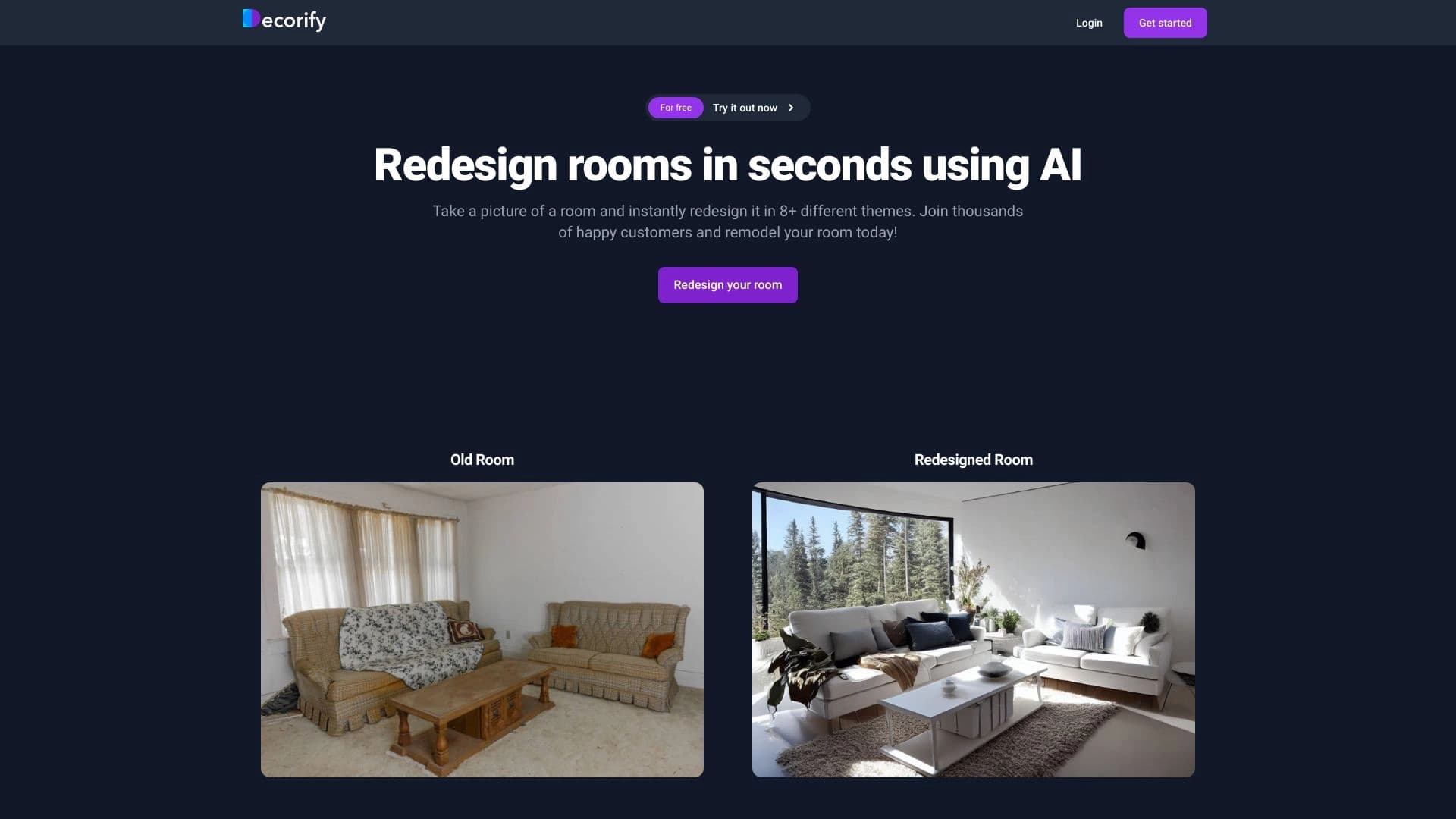
Decorify is an AI-powered tool that lets you quickly change an interior design. All you need to do is upload a photo of your space to get alternative design options. The neural network analyzes the original image and generates new visualizations, changing styles, color schemes, furniture arrangement, and decor. The service's main goal is to speed up the design selection process and visualize ideas without having to manually edit images or search through curated collections.
Decorify Features
| Feature | Description |
|---|---|
| Purpose | Quick interior redesign from a photo |
| Core working principle | Analysis of the original image and generation of new design options |
| Input | Photos of rooms |
| Output | Alternative visualizations with a different style, color palette, and furnishings |
| Target audience | A wide range of users interested in updating their interiors |
| Distribution model | Not specified (data unavailable) |
Who is Decorify for?
Homeowners and Renters
People thinking about renovation or rearranging can quickly see how a room would look in different styles. This helps them make decisions without costly experiments.
Interior Designers
Professionals use the tool as an aid to show clients possible design options. Photo-based redesign helps align on the direction faster and reduces the time needed to create initial concepts.
Real Estate Agents and Developers
Real estate professionals can show potential buyers how an empty or outdated space could look after an update. This makes the property more attractive and simplifies presentations.
Anyone Looking for Inspiration
Regular users who aren't planning a renovation but want to experiment with the look of their room can use Decorify for fun or to find ideas.
How to Use Decorify
Upload a Photo
To get started, prepare a photo of the room you want to change. The tool accepts images and uses them as the basis for generating designs.
Choose a Design Direction
After you upload the image, the system processes it and creates alternative design options with different styles, color schemes, and furnishings. You can review the results and pick the ones that fit best.
Evaluate and Apply Ideas
The generated visualizations can be used for inspiration, for discussions with family or a designer, and for planning future interior changes.
Key Features of Decorify
Photo-Based Redesign
The service's core capability is turning an ordinary room photo into new interior options with a changed layout and style.
Multiple Style Generation
The tool offers alternative visualizations covering different design directions — from classic to modern minimalism — with various color palettes.
Original Image Analysis
The neural network studies the room's structure, geometry, and features so the proposed design options look realistic and match the original layout.
Decorify Advantages
- Fast results: instead of searching for examples online or doing manual editing, you get ready-made options in a short time.
- No special skills required: the service doesn't require design knowledge or experience with graphic editors.
- Visual clarity: you can see how a room will change before any actual work or furniture purchases.
- Idea discovery: generating different styles helps you figure out which design direction suits you best.
Decorify Limitations
- Limited information: public sources lack detailed data on pricing, technical specifications, and service availability.
- Dependence on photo quality: the generated result may depend on the angle, lighting, and resolution of the uploaded image.
- Unknown service constraints: without information about versions, regional availability, and technical requirements, it's hard to assess the full range of capabilities and limitations.
What Problems Does Decorify Solve?
- Quick idea visualization: helps you imagine how a room would look in a new style or with different furniture.
- Less time spent on design selection: lets you rule out unsuitable directions without visiting stores or creating mockups by hand.
- Easier communication: makes it possible to clearly show others (family members, clients, or buyers) a proposed interior update.
- Better decision-making: visual alternatives let you compare different options and choose the best one.
Decorify Pricing
Currently, there is no information about Decorify's pricing in available sources. It's unclear whether the service offers a free tier, a subscription, or one-time payments. We recommend checking the tool's official website or documentation for up-to-date pricing details.
Decorify Terms of Use
Detailed terms of use are not disclosed in available materials. There is no data on registration requirements, account creation, limits on uploads or generations, or the policy for handling user-uploaded photos. For accurate information, you'll need to review the user agreement on the tool's official page.
Decorify Availability
Information about Decorify's availability is limited. It's not specified whether the service runs in a web browser, has mobile apps, or offers a desktop version. There is also no information about regional restrictions or the technical requirements for a user's device. The only way to check whether the service can be used is through the product's official website.
How Decorify Differs from Alternatives
Decorify stands out by focusing on quickly redesigning an existing room from a photo. Instead of working with templates or creating plans from scratch, the service transforms the space you already have — which is especially convenient for those who want to see an updated version of their own room. However, without detailed technical data and comparisons with competitors, it's hard to assess the tool's unique features. Based on the description, the key differentiator is the emphasis on simplicity and speed in getting alternative design options, making visualization accessible even to unprepared users.
Conclusion
Decorify is an AI-powered tool designed to speed up the process of finding interior update ideas. By uploading a photo of a room, users get several alternative design options with different styles, colors, and furnishings. The service targets a broad audience — from homeowners to professional designers. That said, official information about pricing, terms of use, and availability is currently missing, so it's worth checking the tool's official resource before getting started.
Frequently asked questions
See also

A platform for generating images, videos, and audio using artificial intelligence from text descriptions.


AI tool for creating presentations, documents, and web pages from a text description.

Cloud platform for creating videos using AI avatars, synthesized speech, and automatic translation of clips into dozens of languages.


An online service that recognizes text on manga and manhwa pages, translates it into different languages, and embeds it back into the image without damaging the original artwork.

Generator of personalized invitation texts and designs for various events.


BannsAi is an AI-powered service for quickly creating ad banners based on a text description or reference.

AI-powered coloring book generator that creates pages from text descriptions or uploaded images.


AI-powered platform for generating, editing images, and creating advertising creatives.