

DB Pilot
AI assistant for working with databases, combining an SQL editor, notebooks, and table editing.
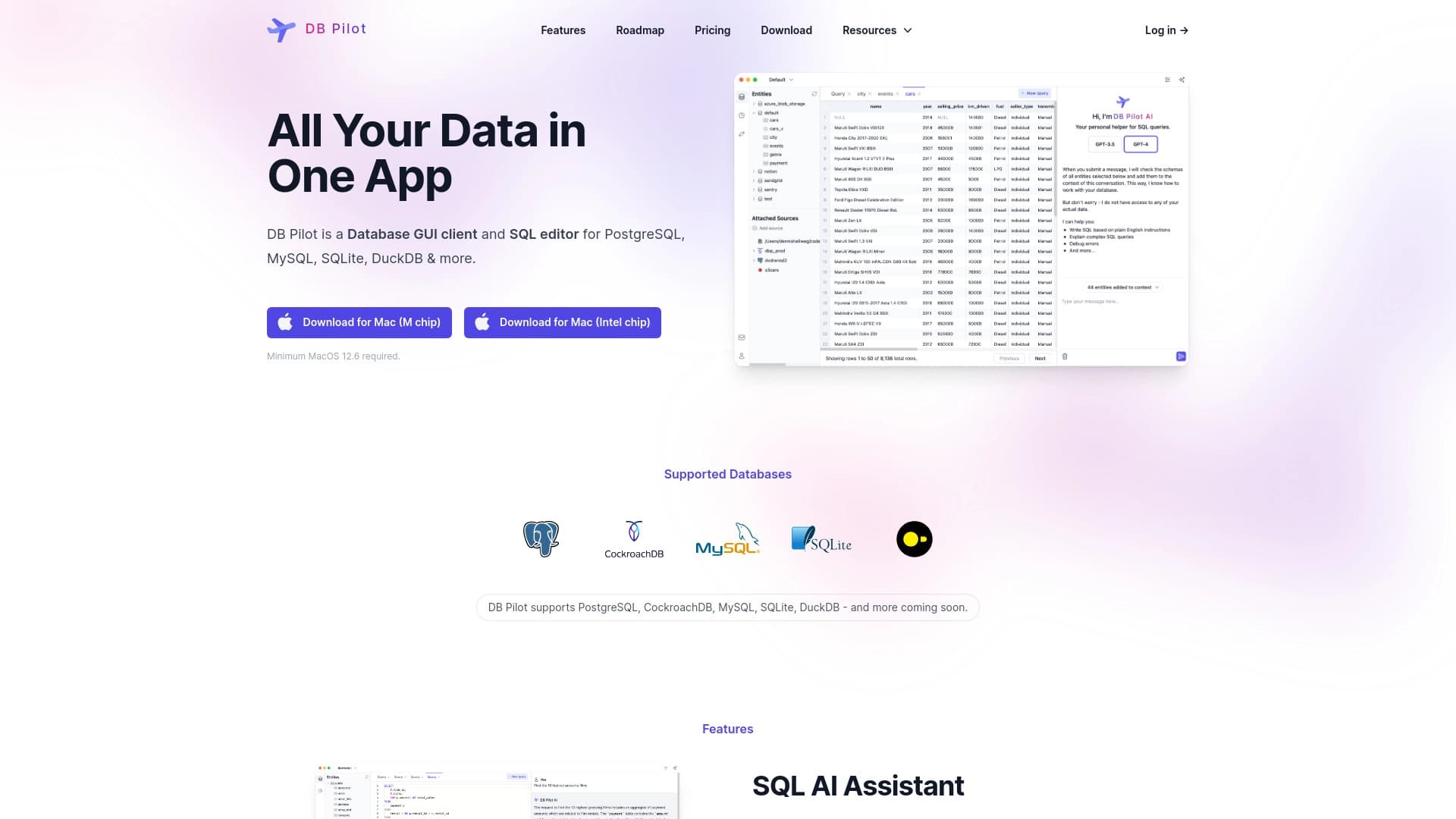
Overview
DB Pilot AI Description
DB Pilot is a desktop AI assistant for working with databases, designed for macOS users. The app combines several working environments in a single interface: an intelligent SQL editor with autocompletion that supports complex queries, notebooks for SQL and Python, and a record editing mode that resembles a familiar spreadsheet.
The tool's key feature is the ability to formulate database queries in natural language. Instead of manually writing syntactic constructs, users can describe a task in words, and the neural network handles SQL code generation, optimization, and validation. The app is powered by modern language models, including GPT-5, Claude 4.5, and Gemini 2.5 Pro.
DB Pilot Features
| Feature | Value |
|---|---|
| Type | AI tool for working with databases |
| Categories | SQL and database queries, code assistants |
| Platforms | macOS (ARM, starting from macOS 13) |
| Distribution model | Freemium |
| Supported AI models | GPT-5, Claude 4.5, Gemini 2.5 Pro |
| App format | Desktop application |
| Bank card requirement | Not required |
| Updates | Free |
Who Is DB Pilot AI For?
Engineers and Developers
The tool suits professionals who regularly work with databases and need to speed up routine operations. Autocompletion, syntax highlighting, and AI assistance with query writing help reduce time spent on developing and debugging SQL code.
Data Analysts
For analysts, DB Pilot is of interest as a data exploration environment. Support for SQL and Python notebooks enables analysis, visualization building, and hypothesis testing within a single workspace.
Business Owners
For certain categories of users without deep technical skills, the tool helps quickly obtain answers from corporate data. By formulating a query in natural language, one can extract the needed information without writing complex SQL constructs.
How to Use DB Pilot AI?
Getting Started
To launch the app, follow the link on the service's official website. Installation is available only on devices running macOS with ARM architecture and operating system version macOS 13 or higher.
First Steps in the App
After installation, users can connect their database and start working in one of the available modes: SQL editor, notebook, or table view. To use the AI assistant, simply describe the desired query in plain language in the corresponding field.
Key DB Pilot Features
Intelligent SQL Editor
The built-in SQL editor supports autocompletion, syntax highlighting, and handling of complex queries. The system helps avoid typical syntax errors and speeds up the code writing process.
Natural Language AI Assistant
Users can create queries without knowing SQL — just describe the task in words. The neural network not only generates code but also helps optimize it and warns about potential errors.
SQL and Python Notebooks
Notebook mode enables data exploration, dashboard building, and sharing interactive reports within a team. It is a full-fledged analytics environment combining code, execution results, and visualizations.
Table-Based Record Editing
The database editing mode resembles working in a spreadsheet. It is a convenient way to quickly make changes to records without writing UPDATE queries.
DB Pilot Advantages
- Combining a graphical interface, SQL editor, and notebooks in a single app — no need to switch between multiple tools.
- Quick insights from data without complex setup or lengthy training.
- Free updates and no need to link a bank card when using the service.
DB Pilot Disadvantages
- Limited platform availability: the app only works on macOS with ARM architecture (starting from macOS 13). Windows, Linux, or older Mac users will not be able to use the tool.
What Problems Does DB Pilot Solve?
SQL Query Generation and Optimization
With the AI assistant, users can generate correct queries based on natural language descriptions and improve existing code to make it more efficient.
Data Exploration and Dashboard Building
SQL and Python notebooks provide an environment for data analysis, allowing users to build clear metric panels and track key indicators.
Metric Visualization and Report Creation
Analysis results can be turned into interactive reports and shared with colleagues for collaborative work on projects.
Database Record Editing
Thanks to the table interface, users can quickly modify data in the database without writing SQL commands, significantly speeding up work with records.
DB Pilot Pricing
The official service page does not publish specific pricing plans or rates. However, developers note that app updates are free and no bank card is required to use it. The distribution model is marked as freemium, implying the availability of a free plan alongside paid features, but detailed pricing is not disclosed in the provided sources.
DB Pilot Terms of Use
The materials from the official website do not provide a detailed description of the service's terms of use. Publicly available information is limited to the statement that updates are provided free of charge and registration does not require bank card details. For complete information about usage rules, users are advised to refer to the app's official documentation.
DB Pilot Availability
The app is available exclusively for the macOS operating system with ARM architecture processors and system version macOS 13 or newer. No information about support for other operating systems, availability of interfaces in various languages, regional restrictions, or the need to use a VPN is mentioned in official sources.
How DB Pilot Differs from Alternatives
The service page does not provide a direct comparison with competitors. However, from the available description, the key feature of DB Pilot can be highlighted: combining several working environments (SQL editor, notebooks, and table mode) in a single app with an AI assistant. This approach allows users to perform the full cycle of working with data — from writing queries to visualization and record editing — without using third-party tools.
Conclusion
DB Pilot is a specialized AI assistant for working with databases, designed for macOS users with ARM architecture. The tool combines an SQL editor with autocompletion, notebooks for SQL and Python, and a table-based record editing interface. The main advantage is the ability to formulate queries in natural language using modern language models. The primary limitation is support for only macOS 13 and newer on devices with ARM processors. For engineers, analysts, and business users working in this ecosystem, DB Pilot can become a practical solution for accelerating database work.
Frequently asked questions
See also

AI assistant for business that helps manage tasks and automate routine through dialogue.


Platform for creating multi-agent AI systems and chatbots to automate customer support and lead generation.


A platform for creating and interacting with AI characters, each with their own personality and story.


AI toolkit for video generation and editing, including avatars, lip-sync, and voice cloning.

A platform for content creators that combines link management, email marketing, an online store, and analytics in a single visual editor without coding.


AI chatbot for automating customer communication and lead qualification.
Yandex's multimodal voice assistant powered by the YandexGPT neural network that answers questions, generates texts and images, analyzes files, and controls the smart home.


AI assistant for creating short summaries of videos, PDF documents, and web pages.