
CoDA
CoDA is an AI model for generating character animations that interact with objects.
Overview
CoDA Neural Network Description
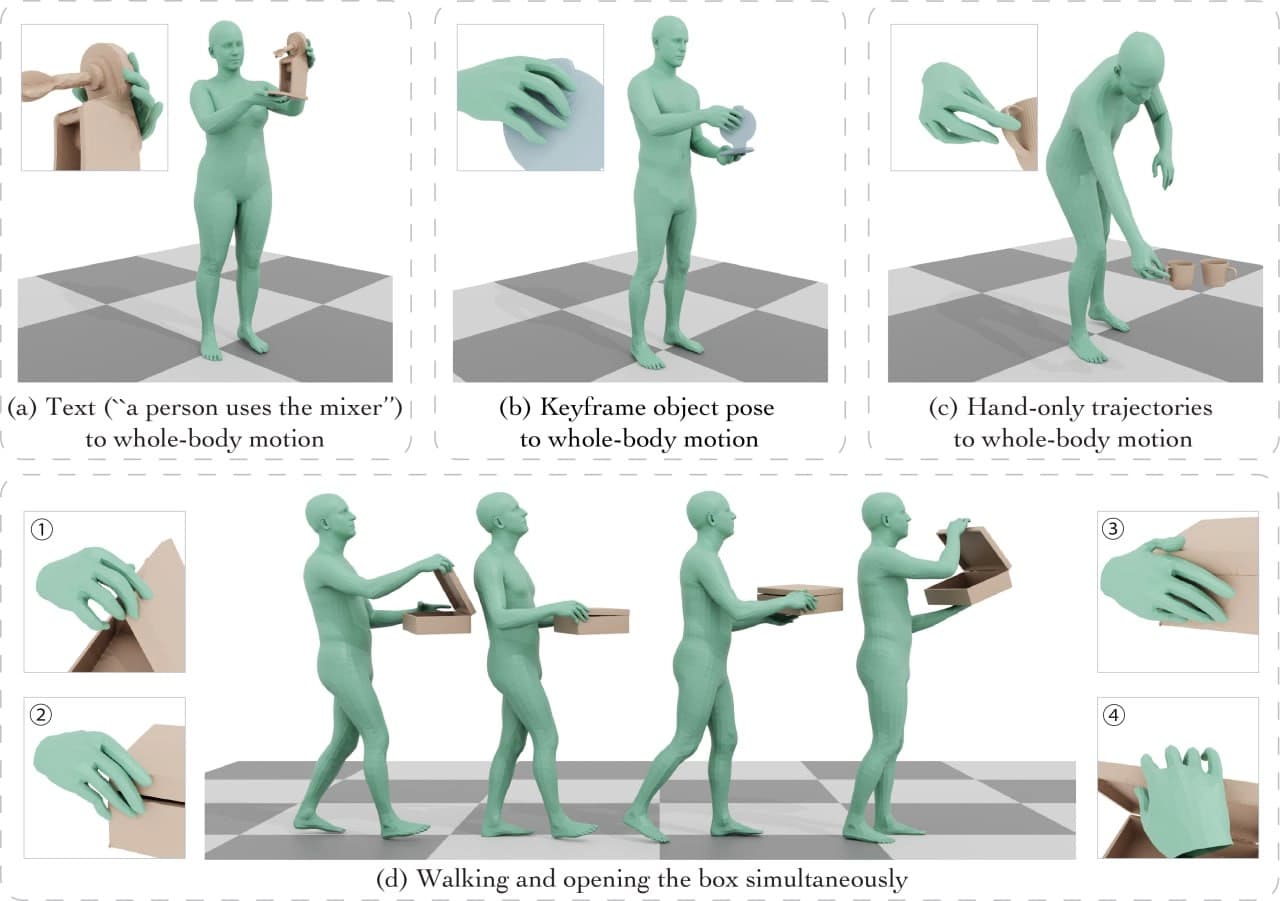
CoDA is an experimental AI model designed to generate animations of characters interacting with surrounding objects. Unlike classical systems that create either body movement or separate hand animation, CoDA unifies these processes into a single system.
The model's key feature is the use of three diffusion components: one handles the character's torso and legs, while the other two handle the left and right hands. This separation allows for high precision when hands come into contact with objects. To ensure fingers correctly grasp a cup, door handle, or box, BPS (Basis Point Set) is used — a unified representation of object geometry.
CoDA can reconstruct the full body pose from hand position data alone, simplifying work with mocap data. The model can also combine walking with manipulations — a character can simultaneously carry an object and move naturally. This is a technical tool designed for creating realistic interaction animations without manual frame-by-frame adjustment.
CoDA Characteristics
| Characteristic | Value |
|---|---|
| Type | AI tool for animation |
| Category | Experiments, Free |
| Business model | Free |
| Platform | GitHub (open access) |
| Tags | GitHub, experiments |
| Input data | Text description of action |
| Technology | Three diffusion components (body, left and right hand), BPS for object contact |
| Additional capabilities | Body pose reconstruction from hand data, combining walking and manipulations |
| Availability | Source code on GitHub |
Who is CoDA suitable for?
3D character developers and animators
CoDA is aimed at professionals creating characters for games, VR projects, and animated films. The tool handles the most labor-intensive part of the work — manual adjustment of hand-object contacts. The developer only needs to describe the action in text, and the model will generate a full-body animation accounting for interaction with the object.
Researchers and technical specialists
Since CoDA is distributed as open source on GitHub, it is of interest to researchers in computer graphics and machine learning. The model allows experimenting with diffusion approaches to animation and studying methods for coordinating body and hand movements.
How to use CoDA?
Text prompt as input
Working with CoDA is based on a text description of the action. The user formulates a prompt — for example, "a character picks up a cup from the table" or "opens a door" — and the model generates a full-body animation, including fingers. The text interface allows quickly iterating through movement variations without writing code.
Technical process
The model processes the description and generates a sequence of poses in which the torso, legs, and hands are coordinated. Separate diffusion components for the body and each hand work together, while the BPS representation ensures precise finger contact with the object's surface. The result can then be exported to standard 3D formats for use in game engines or animation packages.
Key Features of CoDA
- Generation of object interaction animations from text descriptions. The model takes a text prompt and creates a full-body animation accounting for contact physics.
- Three diffusion components for the body and each hand. Separate processing of the torso and limbs improves the realism of hand and finger movements.
- Unified representation via BPS. Ensures precise finger contact with objects regardless of their shape and size.
- Full body pose reconstruction from hand data alone. Allows completing torso and leg animation when only hand movements are known.
- Combining walking with object manipulations. A character can move naturally while holding or interacting with an object.
Advantages of CoDA
- Free and open access on GitHub. The source code is available for study, modification, and use in your own projects.
- Physically accurate hand and finger movements. The diffusion approach with separate hand components accurately conveys finger contact with objects.
- Automatic synchronization of locomotion and hand movements. The model itself coordinates steps and manipulations, eliminating manual animation adjustment.
- Elimination of manual tuning. Traditionally, animators spend significant time correcting contacts; here this process is automated.
Disadvantages of CoDA
The model's limitations are related to its experimental status. First, CoDA is not a finished commercial product: it is research code on GitHub that requires technical expertise from the user for installation and integration into a workflow. Second, generation quality directly depends on the wording of the text prompt — complex or ambiguous action descriptions can lead to less accurate results. Additionally, information about supported export formats and compatibility with specific 3D editors is not disclosed in the source data.
What problems does CoDA solve?
- Creating convincing object interaction animations. The model is suitable for scenes where a character picks up a cup, opens a door, carries a box, or performs other actions with objects.
- Generating natural full-body movements from text descriptions. The user describes the action in words, and the model builds a complete animation — from body pose to finger positions.
- Body pose reconstruction from hand position data. This feature is useful when working with motion capture when hand tracking is more accurate than full-body data.
- Synchronizing walking with object manipulations. The model solves the problem of combining locomotion with simultaneous object interactions, which often causes difficulties in classical animation pipelines.
CoDA Pricing
CoDA is distributed completely free of charge. The model has no paid tiers, subscriptions, or hidden fees. The source code is openly available on GitHub, allowing the tool to be used without financial costs.
CoDA Terms of Use
The tool is published on GitHub as open source. Users can freely download, study, and modify the model, as well as use it in their own developments. The specific license is not stated in the source data, but the open nature of the repository implies free use for research and commercial purposes in compliance with standard open-source project rules.
CoDA Availability
The source code is hosted on GitHub and available for download to everyone. However, it is important to note that CoDA is a developer tool, so running it requires setting up an environment and understanding the model's code.
How CoDA differs from alternatives
The main difference of CoDA is its architectural solution with three separate diffusion components. Most similar models generate animation as a whole, resulting in approximate hand and finger interactions with objects. CoDA processes the body, left hand, and right hand separately, achieving precise finger contacts.
The second significant difference is the use of BPS for a unified object representation. This technical solution ensures consistent contact quality regardless of the object's shape: a coffee cup, door handle, and cardboard box are all processed equally correctly.
The third difference is the model's ability to reconstruct the full body pose from hand data alone. This is a feature rarely found in commercial animation tools. Finally, CoDA can combine locomotion with manipulations, whereas many generative models create either movement or object interaction, but not both processes simultaneously.
Conclusion
CoDA is an open-source research model that solves one of the most challenging problems in procedural animation — realistic hand-object interaction. Thanks to three diffusion components and BPS representation, the model achieves precision unattainable for holistic generative approaches. The tool is free and available on GitHub, making it attractive for game developers, VR projects, and animation studios willing to work with experimental code. CoDA automates routine operations — from coordinating walking with manipulations to reconstructing full poses from hand data — reducing animation production time and opening new possibilities for automating 3D content.
Frequently asked questions
See also


Online publication covering news, reviews, and analysis of artificial intelligence.


AI anime image generator from text descriptions with template selection.

Open-source tool for quickly converting a single image into a 3D model.


AI-powered platform for generating and editing images and videos.

Platform for generating videos, images, and digital avatars using AI.


BannsAi is an AI-powered service for quickly creating ad banners based on a text description or reference.

Anakin.ai is a low-code platform that combines various AI models for content creation and workflow automation without coding.

Terminal AI agent for programming that dynamically adapts to developer tasks.