

ChatGOT
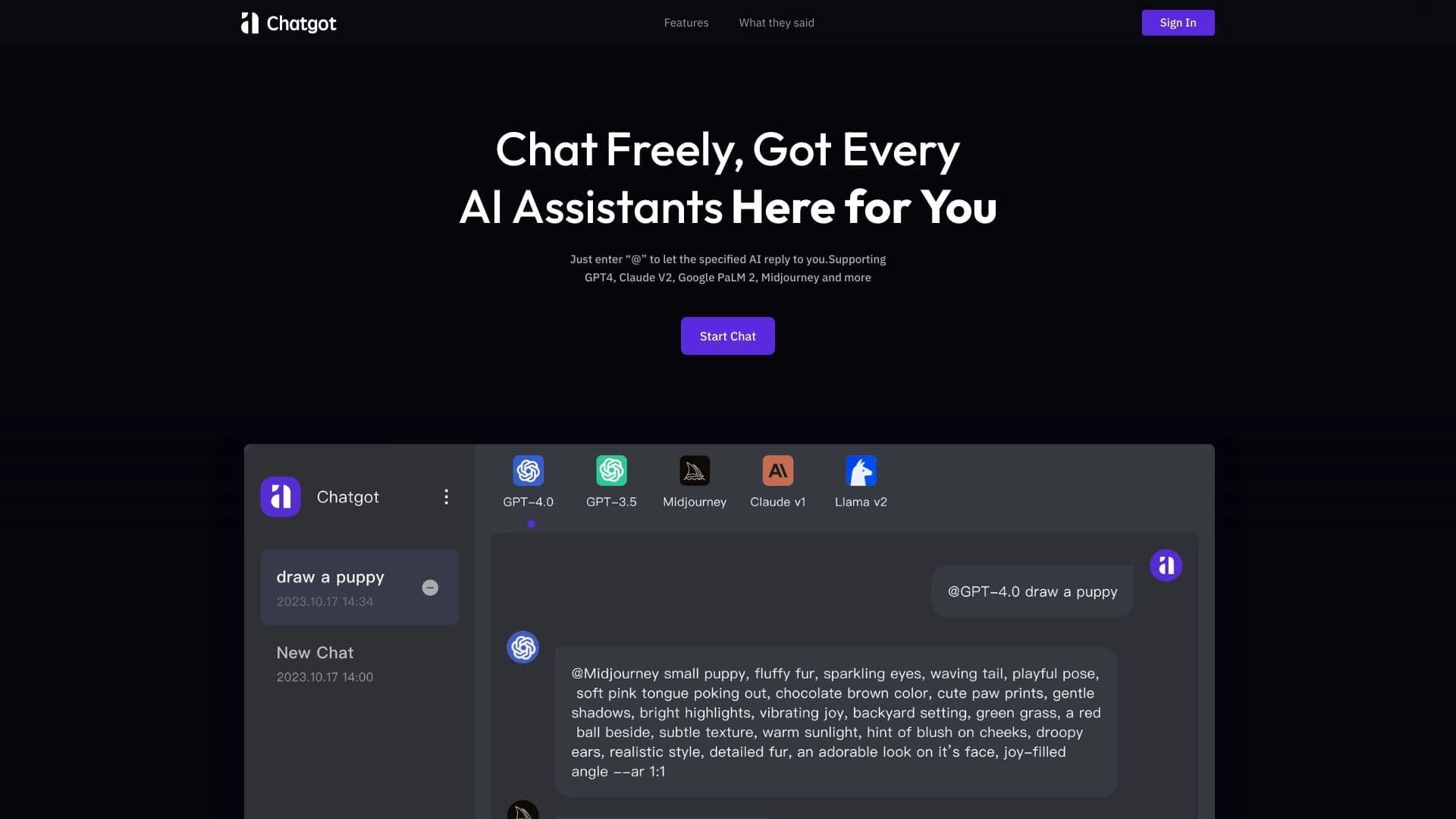
An online chatbot that combines several leading AI models for use directly in the browser or via an extension.
Overview
ChatGOT
Description of the ChatGOT neural network
ChatGOT is an online chatbot that combines several leading AI models in one interface. Instead of switching between different services, the user gets access to popular models, including GPT-5, Claude 4, and Gemini 2.5, in a single workspace.
The service runs directly in the browser, requires no mandatory registration, and is also available as an extension for Chrome and Edge. This approach makes the tool as accessible as possible: to get started, you simply open the website and ask a question.
Essentially, ChatGOT is positioned as a multifunctional aggregator of neural networks that covers a wide range of tasks — from simple answers to questions and working with texts to programming, document summarization, and image generation. In addition, the service offers ready-made roles that help tailor responses to specific life and work scenarios.
Characteristics of ChatGOT
| Characteristic | Value |
|---|---|
| Type | AI chatbot assistant |
| Category | Summarization |
| Models | GPT-5, Claude 4, Gemini 2.5, and others |
| Free plan | Yes (free multifunctional AI chatbot online) |
| Registration | Not required |
| Availability | Browser (online), extension for Chrome and Edge |
Who is the ChatGOT neural network suitable for?
Users who work with texts
ChatGOT is useful for those who regularly write articles, letters, or edit existing materials. The tool helps improve wording, correct style, and generate ideas, which will be useful for copywriters, bloggers, and office workers.
Programmers and developers
The service is suitable for developers who need help with code. ChatGOT can explain written code, suggest solutions, provide examples, and offer optimization options, making it a useful assistant for both beginners and experienced specialists.
People working with large volumes of information
Those who regularly study long documents, reports, and PDF files will find the summarization feature useful. ChatGOT helps quickly grasp the essence of lengthy materials, saving time on reading.
A broad audience without technical background
Thanks to the lack of mandatory registration and easy launch from the browser, the tool is also suitable for ordinary users. Built-in roles — such as career consultant, mental health assistant, or travel guide — make the service convenient for a wide range of everyday and life questions.
How to use the ChatGOT neural network?
Getting started
To start using ChatGOT, you don't need to register or configure complex settings. Just open the service website in your browser, and you can immediately ask your questions.
Using the extension
The service is also available as a free extension for Chrome and Edge browsers. This format allows you to access the tool without keeping a separate tab open all the time.
How it works
After opening the service, the user can simply formulate requests. Depending on the task, you can ask the model to answer a question, edit text, explain code, summarize a document, or generate an image — all of this is done through a single interface.
Main functions of ChatGOT
Working with multiple models
ChatGOT combines several powerful models in one interface, including GPT-5, Claude 4, and Gemini 2.5. This allows users to take advantage of different neural networks without switching between separate services.
Text capabilities
The service provides instant answers to questions, helps improve texts, write articles and letters, generate ideas, and correct style. This way, it covers almost all typical text-related tasks.
Technical assistance and document processing
The tool supports programming help: code explanation, suggesting solutions, optimization, and examples. It can also provide brief summaries of large texts and PDF files.
Image generation and ready-made roles
ChatGOT can create images using AI. Users also have access to ready-made roles — for example, career consultant, mental health assistant, or travel guide — which allow them to receive contextual answers for a specific task.
Advantages of ChatGOT
Accessibility and simplicity
The key advantage is that the service is free and requires no mandatory registration. You can start working without signing in or complex setup, which significantly lowers the entry barrier for new users.
Combining models in one place
ChatGOT gathers several powerful neural networks in a single interface. This saves users from having to navigate different services and switch between them.
Flexible usage formats
The tool is available both online in the browser and as an extension for Chrome and Edge. This variety allows the user to choose the most convenient way to access the service.
Disadvantages of ChatGOT
The source data does not list any explicit disadvantages of the service. That said, it is worth keeping in mind that, like many aggregators of neural networks, ChatGOT is likely dependent on the stability of the connected models and may have certain functional limitations. The exact technical limitations are not disclosed, so it is difficult to assess them fully.
What tasks does ChatGOT solve?
The service helps users get answers to a wide variety of questions — from everyday to professional ones. A significant portion of the functions is related to texts: improving and writing articles and letters, generating ideas, and correcting style.
For developers, the tool offers programming help — code explanation, solution suggestions, and optimization. Users working with large volumes of information will benefit from the summarization of large texts and PDF files.
In addition, ChatGOT supports image creation and provides contextual responses in different roles covering career, mental health, and travel. Thus, the service covers a wide range of tasks for almost any audience.
ChatGOT pricing
Free plan
ChatGOT provides free access to its multifunctional AI chatbot online. According to the available data, the service is completely free for users.
No paid details disclosed
Information about possible paid plans or limitations of the free mode is not disclosed in the source data. At the moment, the exact monetization terms and boundaries of free usage are not specified.
ChatGOT terms of use
No mandatory registration
The main condition for using the service is its availability without mandatory registration. The user can start working without signing in or complex settings, which greatly simplifies getting familiar with the tool.
Simple launch
Since using the service does not require creating an account or going through lengthy setup procedures, it is suitable even for those who encounter such tools for the first time. Just open the website and get to work.
ChatGOT availability
Browser format
ChatGOT runs directly in the browser online, so the service can be accessed from any device with an internet connection without installing additional software.
Extensions for Chrome and Edge
The tool is also available as a free extension for Chrome and Edge. This format allows you to integrate the chatbot into your regular browser and use it as needed during everyday work.
How ChatGOT differs from alternatives
Combining multiple models
The main difference between ChatGOT and many competing solutions is the concentration of several powerful models (GPT-5, Claude 4, Gemini 2.5) in a single interface. This saves users from having to subscribe to multiple services and switch between them.
Available without registration
Unlike many alternatives that require creating an account, ChatGOT offers full functionality without mandatory registration. This makes it more convenient and faster to adopt for a new audience.
Extension format
Being available as an extension for Chrome and Edge sets ChatGOT apart from services that work exclusively through a website. This approach organically integrates the tool into the user's everyday browser workflow.
Conclusion
ChatGOT is a free online chatbot that combines several leading AI models, including GPT-5, Claude 4, and Gemini 2.5, in one interface. With no mandatory registration and the ability to work directly in the browser or through an extension for Chrome and Edge, it covers a wide range of tasks: from working with texts and programming to document summarization and image generation. Thanks to ready-made roles and the combination of different models, the service becomes a convenient universal tool for both professionals and ordinary users.
Frequently asked questions

See also

AI platform for fast resume screening that helps recruiters select suitable candidates.
AI-powered online photo editor for creating, editing, and enhancing images directly in your browser.


A platform for chatting with virtual AI characters with image generation during the conversation.

AllChat is a universal platform that combines several popular language models in a single interface for communication, image generation, file analysis, and code execution.

AI tool for automated code review that analyzes changes in real time and suggests fixes.


An open platform for generating images and other visual content from text descriptions using AI.
AIJOURNEY is a catalog and search platform for discovering AI tools, updated daily.

An online service that lets you chat with PDF documents: ask questions and get concise answers with source attribution.