
ByteCap
AI-powered online service for automatically generating video subtitles.
Overview
ByteCap AI Description
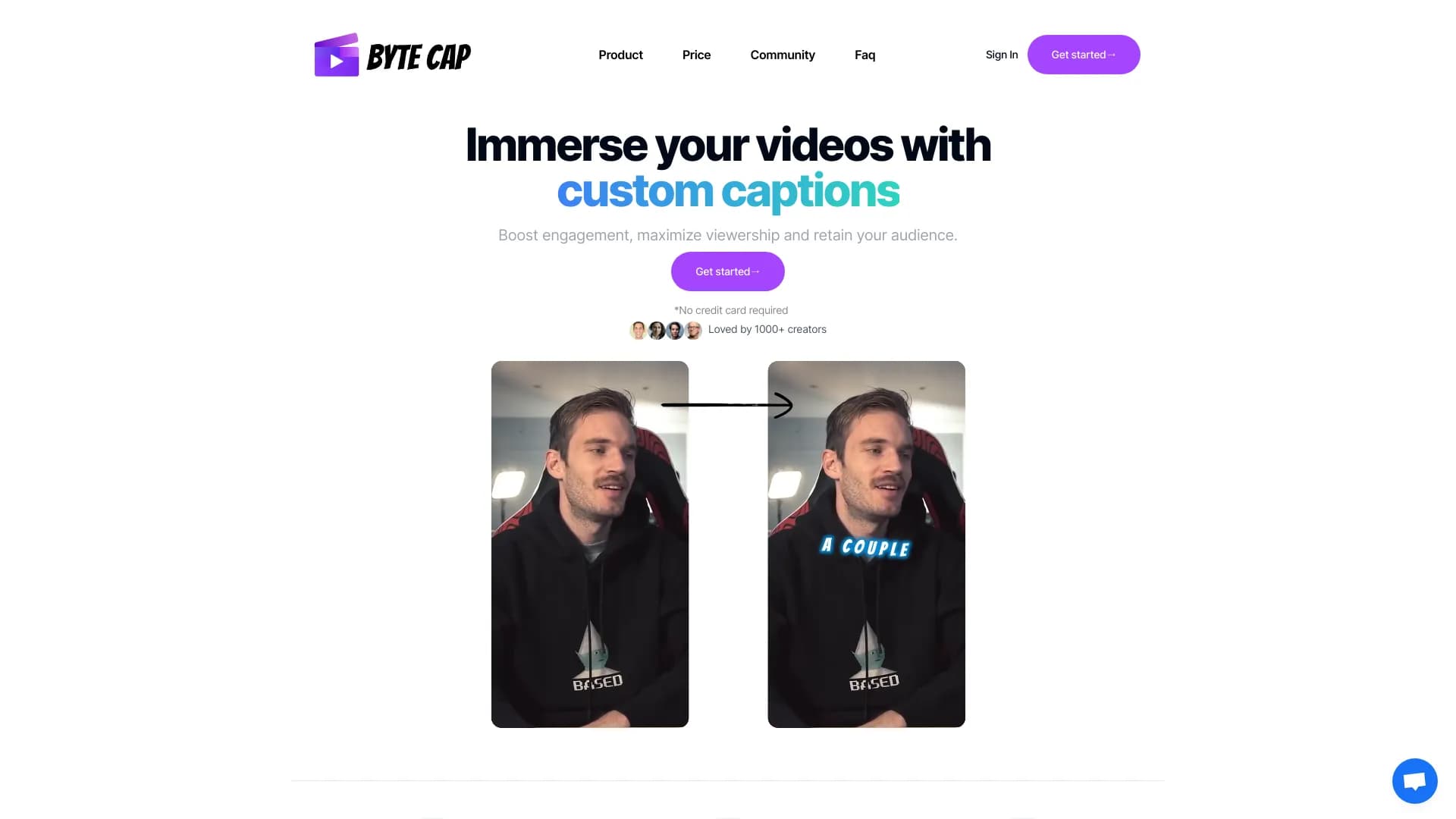
ByteCap is a specialized online service powered by artificial intelligence, designed for automatically creating subtitles for videos. The tool uses automatic speech recognition technology, allowing it to generate text captions with a claimed accuracy of up to 99%. The service is aimed at content creators who want to boost audience engagement and make their videos more accessible to a wide range of viewers.
Automation and Accuracy
ByteCap's main goal is to simplify the routine process of adding subtitles. Instead of manually typing text, users simply upload a video, and the neural network automatically recognizes speech and converts it into text. The high recognition accuracy reduces the need for subsequent manual corrections, although the tool does provide options for editing and styling the finished subtitles. This approach significantly saves time and resources when preparing video materials for publication.
Accessibility and Audience Growth
Thanks to support for multiple languages, the service allows users to create multilingual subtitles. This helps video bloggers and companies expand their audience reach without needing to hire professional translators. Text captions for videos also make content accessible to people with hearing impairments, which is an important aspect of inclusivity. Additionally, the presence of subtitles often positively influences viewer behavior metrics, increasing watch time.
ByteCap Features
The service's key technical and functional parameters are summarized in the table below.
| Feature | Value |
|---|---|
| Type | Neural network / online service for creating subtitles |
| Categories | Video, Automatic subtitles, Audio transcription, Speech recognition, Universal |
| Platforms | Web (online service) |
| Speech recognition accuracy | 99% (claimed) |
| Languages | Multiple languages supported |
| Editorial rating | 8.9 out of 10 |
| User rating | 4.8 out of 5 |
| Distribution model | Not specified (data unavailable) |
Who is ByteCap AI for?
ByteCap will be useful for anyone who regularly works with video content and needs high-quality text captions, but the tool has its own primary target audience.
Video Bloggers and Content Creators
First and foremost, the service is aimed at authors on YouTube and other video platforms. With its help, they can quickly add subtitles to their episodes, making them more convenient to watch without sound or in public places. This increases viewer retention and positively impacts channel statistics.
SMM Managers and Marketers
Promotion specialists who manage corporate blogs or create advertising videos will also find ByteCap useful. Automatic subtitles allow the same video to be adapted for different advertising platforms, speeding up the content preparation process.
Podcasters and Video Editors
The service's application scope extends to podcasts and video streams. Editors can use the tool for quick draft transcriptions of interviews or for cutting clips with text overlays. This simplifies the workflow and optimizes routine operations.
Versatility
Despite the highlighted categories, the service is also suitable for users in other fields where adding captions to videos is required, from educational projects to corporate presentations.
How to Use ByteCap AI?
Working with the service requires no special video editing knowledge; just a few simple steps are enough.
Step 1: Upload a Video with Clean Audio
The first step is to upload a video file to the service's website. It's important that the audio track is reasonably clean, without excessive noise or background conversations — this directly affects the final speech recognition accuracy. It is recommended to use the original recording in high quality.
Step 2: Select Language and Process
Before processing begins, you need to specify the language of the speech in the video. This must be done in advance so the neural network applies the correct language model for recognition. After setting the parameters, the automatic subtitle generation process starts.
Step 3: Editing and Styling
After generation, the user receives text tracks that can be edited. The tool provides styling templates, allowing changes to the font, color, text position on screen, and other parameters. Using ready-made templates helps speed up work, and the website offers step-by-step instructions and tutorials for new users.
Step 4: Export the Result
Finished subtitles can be exported in various formats compatible with popular video platforms. This makes it easy to integrate the resulting file into a primary video editor or upload it directly to a hosting service, for example, as an SRT file.
Key ByteCap Features
The service's functionality is centered around creating and managing subtitles.
Automatic Speech Recognition
At the core of ByteCap is automatic speech recognition technology. The neural network listens to the audio track and generates a text file without human involvement. The claimed accuracy of this process reaches 99%, allowing the service to be used for professional tasks.
Generation and Language Support
The tool supports processing videos of any format and working with multiple languages. This distinguishes the service from simple converters and makes it a flexible solution for international projects or content localization. The ability to generate subtitles in different languages becomes a significant advantage for promotion.
Styling and Custom Captions
Users are not limited to the standard appearance of subtitles. ByteCap allows customizing the text's visual style, adapting it to a channel's brand identity or simply making it more readable. There is also a feature for adding custom captions, which opens up additional possibilities for video design.
Export in Various Formats
The service provides the ability to save the finished result in different file formats. This ensures compatibility with the vast majority of video editors (Premiere Pro, Final Cut, DaVinci Resolve, etc.) and players, making the tool a versatile link in the production cycle.
ByteCap Advantages
Using the service offers several significant benefits for content creators.
Increased Engagement and Reach
The presence of subtitles directly impacts viewer engagement. Many users watch videos without sound in public places, and subtitles keep their attention. Furthermore, multi-language support expands audience reach, allowing you to attract viewers from other countries, which would be impossible without translation.
Accessibility and Ease for Beginners
The service's intuitive interface requires no special editing skills. Users of any skill level can get subtitles for their videos in a short time. Flexible customization of subtitle appearance and the use of templates speed up the workflow.
Content Accessibility and Trending Sounds
Subtitles make content more accessible to people with hearing impairments, which is an important social aspect. Special mention should be made of support for trending sounds — this allows creating subtitles for viral videos and clips, increasing the chances of a video being recommended.
ByteCap Disadvantages
Despite the obvious advantages, the service has several limitations that potential users should be aware of.
Internet and Platform Requirements
Since ByteCap is an online service, a stable internet connection is required for it to work. Uploading videos to a remote server and processing them can take time and depend on connection speed. The service works only through a website, ruling out the possibility of using offline desktop versions.
Integration Limitations and Learning Curve
Integration with popular video platforms and editors is limited, which may require manual file export and import. Despite the intuitive interface, new users may experience a slight learning curve when first getting acquainted with subtitle parameter settings and choosing the optimal template.
Regional Restrictions
An important limitation for some users is the service's unavailability in certain regions without using a VPN. This adds extra complications and potential risks when working with the tool.
What Problems Does ByteCap Solve?
The tool is designed to address specific tasks related to video processing.
Automating Subtitle Creation
The main task is to fully automate the subtitle creation process. The service eliminates the need for manual text entry, saving hours of work for editors and bloggers. This is especially relevant for those who publish videos daily or in large volumes.
Improving Video Accessibility
The service addresses the task of improving content accessibility. Creating subtitles makes videos viewable by people with hearing impairments, as well as those who prefer watching videos without sound. This improves the user experience and builds a loyal audience.
Expanding the Audience
Through multi-language support, ByteCap helps expand the viewer audience. Content creators can attract international viewers by creating subtitles in different languages, ultimately leading to subscriber growth and increased views.
ByteCap Pricing
The exact cost of using ByteCap varies depending on the chosen subscription plan and feature set. Current information about pricing and the availability of a free trial period is not disclosed in official sources. It is recommended to visit the service's website for detailed information about prices and available subscription options.
Terms of Use for ByteCap
To use the service, users need access to the internet and a web browser. The service is designed for processing video files uploaded to the online platform. No special conditions or hardware configuration requirements have been stated.
ByteCap Availability
ByteCap is a web service accessible through an internet browser. Currently, it has no mobile apps or desktop versions; all functionality is concentrated on the website.
Connection Stability
Since all data processing happens in the cloud, the service requires a stable and fast internet connection. In the event of an unstable network, the video upload or processing process may be disrupted.
How ByteCap Differs from Alternatives
There are many subtitle creation tools on the market, but ByteCap has several distinctive features.
Support for Trending Sounds
One of ByteCap's main differentiators from competitors is its ability to work with trending sounds. This allows videographers and bloggers to quickly create subtitles for clips made to popular music excerpts, which often go viral.
Flexible Visual Customization
Unlike many services offering standard presets, ByteCap provides advanced options for customizing subtitle appearance. Users can meticulously refine text style, animation, and placement, allowing full alignment with a channel's visual concept.
Balanced Feature Set
While tools like ChatGPT, Charla, or Bukvitsa can also be used for text-related work, ByteCap is a more specialized solution that combines high recognition accuracy (99%), web accessibility, and a focus specifically on automatic subtitle generation, distinguishing it from universal AI platforms.
Conclusion
ByteCap is a reliable, specialized AI tool for automatically creating subtitles with a claimed accuracy of 99%. It is aimed at content creators, SMM managers, and editors seeking to boost audience engagement and expand video reach. Key advantages include flexible styling and multi-language support. The main limitations are its operation exclusively through a web interface and the requirement of a stable internet connection. Overall, ByteCap is a practical solution that significantly simplifies the process of adding custom captions to videos.
Frequently asked questions
See also

AI platform for fast website creation and small business process management.
Platform for planning publishing automation into social net using artificial intelligence.

AI-powered tool for generating character images and avatars.

Multimodal AI agents for automating customer service and sales via chat, voice, and video.
Browser extension and web service with AI assistant features: answering queries, summarizing videos and documents, and translating text.

AI-powered platform for generating and editing images and videos.
AI logo generator that creates unique variations in minutes.

AI-powered online platform for quickly creating text content, including blogs, articles, and social media posts.