

Artbreeder
Платформа для генерации и редактирования изображений с помощью нейросетей, где можно смешивать картинки и настраивать их параметры.
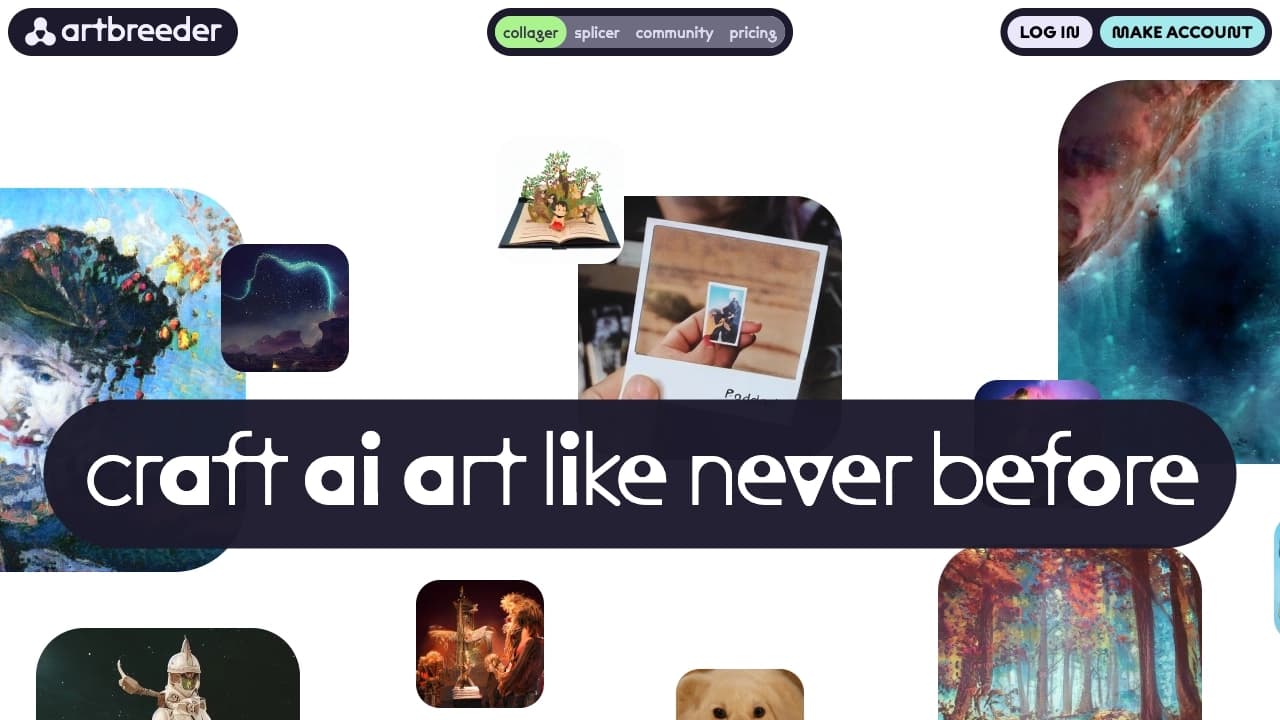
Обзор
Artbreeder
Описание нейросети Artbreeder
Artbreeder — это онлайн-платформа для генерации и редактирования изображений с использованием генеративных нейросетей. Сервис позволяет создавать уникальные визуальные работы путём смешивания нескольких картинок и тонкой настройки их параметров. Пользователи могут управлять такими аспектами, как стиль, цветовая палитра, форма и текстура, постепенно изменяя изображение с помощью ползунков. Artbreeder работает с портретами, пейзажами, абстракциями и аниме-персонажами, а также позволяет редактировать загруженные фотографии.
Характеристики Artbreeder
| Характеристика | Значение |
|---|---|
| Тип | Нейросеть для генерации изображений |
| Категории | Генерация изображений, Редактирование изображений, Генерация аватаров, Фотография, Арт, Помощник дизайнера |
| Платформа | Сайт (онлайн-сервис) |
| Разработчик | Artbreeder Inc. |
| Модель распространения | Freemium |
| Наличие бесплатного тарифа | Есть |
| Ежемесячные посещения | 388.9K |
| Дата публикации | 25 марта 2025 |
Для кого подходит нейросеть Artbreeder?
Профессиональные дизайнеры и художники
Artbreeder ориентирован на профессиональных дизайнеров, концепт-артистов и художников, которым требуется быстро генерировать варианты персонажей, пейзажей или абстракций для дальнейшей работы.
Новички и любители цифрового искусства
Сервис подходит пользователям без глубоких знаний в графическом дизайне или программировании. Управление ползунками интуитивно понятно и не требует специальной подготовки.
Команды и совместные проекты
Платформа позволяет работать в группе: делиться изображениями, дорабатывать их совместно и обмениваться вариантами прямо на сайте.
Как использовать нейросеть Artbreeder?
Регистрация и вход
Для начала работы необходимо создать учётную запись на официальном сайте www.artbreeder.com или войти по существующему аккаунту. После входа открывается доступ к библиотеке изображений сообщества и всем инструментам.
Выбор режима работы
На главной странице нужно нажать на значок плюса и выбрать один из доступных режимов. Режим «Коллажер» позволяет создать коллаж из простых форм и фото с последующей AI-обработкой. Режим «Splicer» даёт возможность комбинировать существующие изображения и изменять их «генетическую» информацию. «Mixer» предназначен для смешивания изображений и текстов. «Outpainter» — для растягивания и дополнения изображений.
Настройка параметров
В режиме Splicer можно регулировать пропорции смешивания до шести изображений одновременно или использовать ползунки для изменения параметров: возраст, цвет волос, форма носа, настроение, текстуры, цветовые гаммы. Результат меняется в реальном времени. Готовое изображение можно сохранить или скачать.
Основные функции Artbreeder
Генерация изображений с нуля
Сервис позволяет создавать персонажей с регулировкой черт лица и выражения, пейзажи (горы, леса, города) и абстракции. Все параметры настраиваются ползунками в реальном времени.
Смешивание нескольких изображений
Artbreeder поддерживает смешивание до шести изображений в одно. Пользователь может комбинировать «родительские» картинки, анализируя черты лица, цветовую гамму и стиль каждого, чтобы получить гибрид.
Редактирование и трансформация
Доступно редактирование загруженных изображений с изменением параметров и добавлением эффектов. Инструмент Outpainter позволяет растягивать и дополнять изображения за их исходные границы.
Создание анимаций и коллажей
Платформа поддерживает настройку простых анимаций и коротких видеороликов. Режим «Коллажер» предназначен для сборки изображений из простых форм и фотографий с последующей AI-обработкой.
Преимущества Artbreeder
Простота использования
Artbreeder не требует глубоких знаний в графическом дизайне или программировании. Управление ползунками интуитивно понятно и напоминает работу в аудиоредакторе. Быстрый результат: вместо часов в фотошопе генерация занимает секунды.
Разнообразие инструментов и стилей
Сервис предлагает разные способы генерации: смешивание, коллажирование, эксперименты с параметрами. Поддерживается работа с портретами, пейзажами, аниме-персонажами и абстракциями. Можно создавать реалистичные портреты несуществующих людей.
Совместная работа
Платформа позволяет работать командой на одной платформе: делиться идеями и дорабатывать их совместно. Доступна публичная галерея работ с возможностью ремикса чужих изображений.
Недостатки Artbreeder
Ограниченная уникальность шаблонов
Порой работы получаются похожими — база шаблонов и «генов» ограничена. Для получения уникального результата может потребоваться доработка вручную.
Зависимость от интернета
Artbreeder — это онлайн-сервис, который работает только через сайт. Для использования требуется стабильное интернет-соединение.
Вопросы с авторскими правами
Есть потенциальные проблемы с авторскими правами, если изображение собрано из чужих работ или взято за основу не своё. Это особенно актуально при коммерческом использовании.
Какие задачи решает Artbreeder
Создание уникальных персонажей
Artbreeder позволяет собрать собственного персонажа: подкрутить черты, экспериментировать со стилями, смешивать разные варианты. В итоге получается уникальный герой для игры, аватарки или концепт-арта.
Генерация вариантов для дизайна
Сервис помогает визуализировать, как мог бы выглядеть гипотетический ребёнок от двух людей, или создать множество вариантов персонажа для концепт-арта без длительной ручной отрисовки.
Создание арт-работ
Платформа подходит для генерации реалистичных или стилизованных портретов, пейзажей, аниме-персонажей и абстракций. Пользователь может комбинировать художественные стили для получения изображений, приближенных к живописи.
Цены Artbreeder
Artbreeder работает по модели Freemium — есть как бесплатный, так и платные тарифы. Бесплатный тариф предоставляет доступ к основным функциям генерации. Базовый тариф стоит 999 рублей в месяц и включает неограниченное количество изображений и расширенные инструменты. Премиум-тариф стоит 2352 рубля в месяц и даёт максимальные возможности генерации, приоритетную поддержку и коммерческое использование.
Условия использования Artbreeder
Для работы с сервисом необходима регистрация на официальном сайте или вход по существующему аккаунту. Бесплатное использование возможно с ограничениями по функционалу. Платные тарифы открывают расширенные возможности, включая коммерческое использование изображений.
Доступность Artbreeder
Artbreeder — это онлайн-сервис, который работает через сайт. Для доступа не требуется скачивать или устанавливать дополнительное программное обеспечение. Сервис доступен пользователям с любым уровнем подготовки.
Чем отличается Artbreeder от аналогов
Основное отличие Artbreeder от аналогов, таких как Midjourney, Leonardo.ai или Kandinsky, заключается в подходе к созданию изображений. Artbreeder работает как «миксер для изображений»: пользователь комбинирует до шести картинок, регулируя пропорции смешивания, и получает гибрид. В отличие от генерации по текстовому описанию, Artbreeder фокусируется на визуальном смешивании и тонкой настройке «генов» изображения с помощью ползунков. Также платформа поддерживает совместную работу и ремикс чужих работ, что реже встречается в других сервисах.
Заключение
Artbreeder — это онлайн-платформа для создания и редактирования изображений с помощью ИИ, предлагающая несколько инструментов (Mixer, Collager, Splicer, Outpainter) и гибкую настройку параметров. Сервис подходит как профессионалам, так и новичкам, не требует навыков программирования и позволяет быстро получать результаты. Однако стоит учитывать ограничения по уникальности шаблонов, зависимость от стабильного интернета и потенциальные вопросы с авторскими правами при коммерческом использовании.
Тарифы
Часто задаваемые вопросы
Похожие нейросети






Смотрите также


Браузер со встроенными ИИ-инструментами для общения с нейросетями, генерации текстов и изображений, перевода и суммаризации страниц.


AI-платформа для автоматизации видеоредактирования, включая замену лиц, перевод видео и создание аватаров.

Каталог нейросетей и онлайн-инструментов для генерации изображений, анимаций и видео.


Онлайн-редактор для удаления лишних объектов, текста и дефектов с фотографий с помощью нейросети.


BannsAi — сервис с использованием ИИ для быстрого создания рекламных баннеров по текстовому описанию или референсу.


AI-инструмент для создания презентаций, документов и веб-страниц из текстового описания.

Облачная платформа для создания видео с помощью ИИ-аватаров, синтезированной речи и автоматического перевода роликов на десятки языков.


Сервис для виртуальной примерки одежды с помощью ИИ.