

AI Watermark Remover
Онлайн-инструмент для удаления водяных знаков, логотипов и текста с фотографий прямо в браузере.
Обзор
Описание нейросети AI Watermark Remover
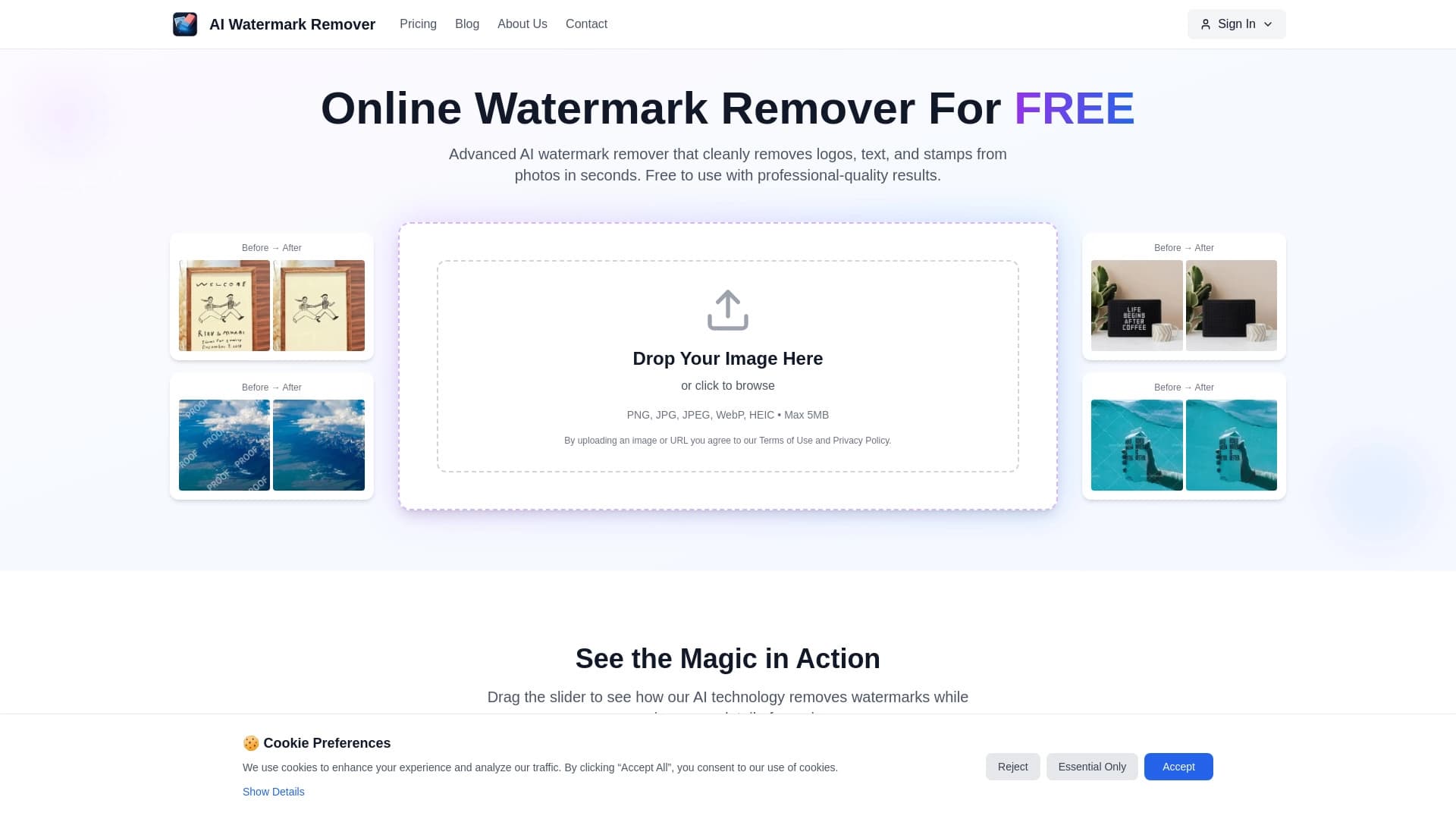
AI Watermark Remover — это веб-сервис, предназначенный для очистки фотографий от посторонних элементов: водяных знаков, логотипов, текстовых надписей и штампов. Инструмент работает полностью в браузере, что избавляет пользователя от необходимости устанавливать дополнительное программное обеспечение на компьютер.
Принцип действия сервиса основан на нейросетевых алгоритмах. После загрузки изображения искусственный интеллект анализирует структуру фона в зоне размещения водяного знака и автоматически восстанавливает скрытые участки. Благодаря этому после обработки не остается видимых артефактов, а результат выглядит аккуратно и натурально.
Для работы с сервисом достаточно открыть сайт в браузере и загрузить нужное изображение. Весь процесс занимает несколько секунд и не требует специальных технических навыков.
Характеристики AI Watermark Remover
| Характеристика | Значение |
|---|---|
| Тип | Онлайн-инструмент для удаления водяных знаков |
| Категория | Удаление объектов и водяных знаков, обработка фото |
| Поддерживаемые форматы | PNG, JPG, JPEG, WebP, HEIC |
| Максимальный размер файла | 5 МБ |
| Регистрация | Не требуется |
| Платформа | Веб-браузер |
Для кого подходит нейросеть AI Watermark Remover?
Фотографы и ретушеры
Специалисты, работающие с большим количеством снимков, часто сталкиваются с необходимостью убрать с кадров авторские знаки, подписи или случайно попавшие в кадр объекты. Инструмент позволяет быстро очистить изображения без использования громоздкого профессионального софта.
Дизайнеры и контент-менеджеры
При подготовке макетов, презентаций, иллюстраций и публикаций для социальных сетей часто нужны «чистые» изображения без каких-либо наложений. AI Watermark Remover справляется с этой задачей за считанные секунды, что существенно ускоряет рабочий процесс.
Обычные пользователи
Любой человек, который хочет убрать водяной знак с личной фотографии или скачанного изображения, может воспользоваться сервисом без регистрации и оплаты.
Как использовать нейросеть AI Watermark Remover?
Шаг 1: Загрузка изображения
Перейдите на сайт сервиса через веб-браузер. Загрузите файл одним из двух способов: перетащите изображение в специальную область на странице или выберите его через стандартный диалог выбора файла с диска компьютера. Поддерживаются форматы PNG, JPG, JPEG, WebP и HEIC.
Шаг 2: Автоматическая обработка
После загрузки нейросеть автоматически начнет анализ изображения и удаление водяных знаков. Пользователю не нужно выполнять никаких дополнительных действий — процесс полностью автоматизирован и занимает несколько секунд.
Шаг 3: Получение результата
Когда обработка завершится, вы получите готовое изображение с восстановленным фоном. Файл можно сразу использовать для дальнейшей работы или скачать на устройство.
Основные функции AI Watermark Remover
Удаление различных типов объектов
Сервис эффективно справляется с удалением логотипов, текстовых надписей, штампов и водяных знаков различных размеров и степени прозрачности.
Восстановление фона
Главная особенность нейросети — интеллектуальная реконструкция фона под удаленным элементом. Алгоритм анализирует окружающие пиксели и заполняет образовавшуюся пустоту так, что следы вмешательства становятся практически незаметными.
Поддержка популярных форматов
Сервис работает с основными форматами изображений: PNG, JPG, JPEG, WebP и HEIC. Это покрывает большинство потребностей пользователей при работе с фотографиями.
Преимущества AI Watermark Remover
Простота использования
Интерфейс сервиса предельно минималистичен. Для получения результата нужно совершить всего одно действие — загрузить файл. Отсутствие сложных настроек делает инструмент доступным для пользователей любого уровня подготовки.
Скорость обработки
Нейросеть обрабатывает изображения за несколько секунд. Это особенно ценно при работе с большим количеством файлов, когда ручная ретушь заняла бы часы.
Качество результата
Алгоритмы восстановления фона показывают стабильные результаты даже при сложных текстурах и неоднородном фоне. В большинстве случаев после обработки не остается видимых следов удаления.
Недостатки AI Watermark Remover
Как и любой другой инструмент, сервис имеет определенные ограничения, которые стоит учитывать при работе. В первую очередь это связано с техническими параметрами обработки: лимит на размер загружаемого файла составляет 5 МБ. Для изображений с высоким разрешением или тяжелых по весу файлов это ограничение может стать препятствием.
Также, как и у большинства автоматических решений, качество восстановления зависит от конкретного изображения. При работе со сложными текстурами или мелкими деталями результат может быть менее идеальным, чем при ручной обработке в профессиональном графическом редакторе.
Какие задачи решает AI Watermark Remover
Подготовка контента для публикации
Инструмент помогает быстро подготовить иллюстрации, презентации, макеты и публикации для социальных сетей, убирая с них лишние элементы.
Массовая обработка изображений
Благодаря скорости работы и отсутствию необходимости в регистрации, сервис удобен для подготовки большого количества файлов к использованию.
Экономия времени
Автоматическая обработка заменяет кропотливую ручную ретушь водяных знаков, позволяя сосредоточиться на более важных задачах.
Цены AI Watermark Remover
Сервис распространяется по бесплатной модели. Для использования AI Watermark Remover не требуется оплата или оформление подписки. Отсутствие регистрации также делает сервис полностью бесплатным для всех категорий пользователей.
Условия использования AI Watermark Remover
Для работы с сервисом регистрация не требуется. Основное ограничение — размер загружаемого файла не должен превышать 5 МБ. Инструмент доступен для использования прямо в браузере, что исключает необходимость установки дополнительных программ на устройство.
Доступность AI Watermark Remover
Сервис доступен онлайн через любой современный веб-браузер. Для работы не требуется установка специального программного обеспечения. Достаточно иметь доступ к интернету и устройство с браузером: компьютер, ноутбук, планшет или смартфон.
Чем отличается AI Watermark Remover от аналогов
Главное отличие AI Watermark Remover от аналогичных решений — полное отсутствие барьеров для входа. Пользователю не нужно создавать аккаунт, устанавливать приложения или разбираться в сложных настройках. Процесс обработки максимально автоматизирован: загрузка файла и получение результата занимают не более нескольких секунд.
Сервис поддерживает популярные форматы изображений, включая HEIC, что может быть преимуществом для пользователей устройств Apple. При этом модель распространения free делает инструмент доступным для неограниченного круга пользователей без каких-либо финансовых обязательств.
Заключение
AI Watermark Remover — это практичное решение для быстрого удаления водяных знаков, логотипов и текста с фотографий. Основные достоинства сервиса — простота использования, скорость обработки и отсутствие необходимости в регистрации или установке программ. Он станет полезным помощником для фотографов, дизайнеров и всех, кто регулярно работает с визуальным контентом и нуждается в оперативной очистке изображений от посторонних элементов.
Часто задаваемые вопросы
Смотрите также


Онлайн-сервис на основе нейросети для превращения обычных фотографий в стилизованные художественные портреты и аватары.


Онлайн-редактор для удаления лишних объектов, текста и дефектов с фотографий с помощью нейросети.


ИИ-ассистент для создания текстового контента, изображений и работы с голосом, ориентированный на русскоязычных пользователей.


Онлайн-инструмент для создания дипфейков и редактирования изображений с помощью ИИ.

Сервис для создания персонализированных аватаров и фотосессий с помощью ИИ на основе загруженных селфи.

Набор мультимедийных AI-инструментов для редактирования и улучшения фото, видео и PDF-документов.


Онлайн-сервис, который распознаёт текст на страницах манги и манхвы, переводит его на разные языки и встраивает обратно в изображение без повреждения оригинального рисунка.


Нейросеть Google для генерации и редактирования изображений по текстовому описанию на базе моделей Gemini.