
AI Text Humanizer
An online service that reworks text created by a neural network to make it sound natural and undetectable by AI detectors.
Overview
AI Text Humanizer
Description of the AI Text Humanizer neural network
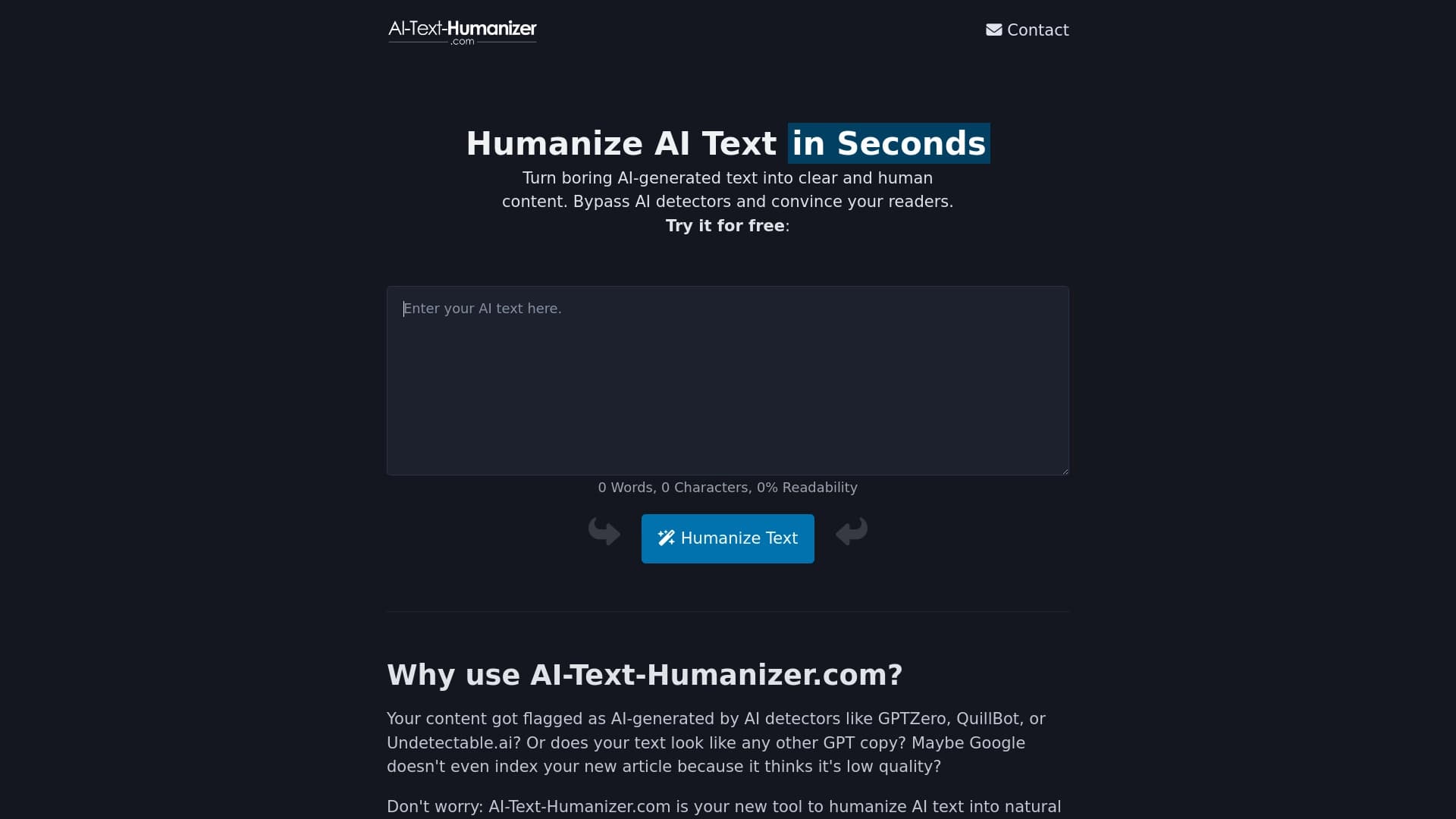
AI Text Humanizer is an online service that reworks AI-generated text, making it more natural and human-like. The main goal of the tool is to make generated content undetectable by AI detection systems while improving readability.
The service runs in the browser, supports more than 50 languages, and requires no additional software installation. Its privacy policy is also worth noting: processed texts are not stored or used to train other models. The tool uses a freemium model — you can use the basic functionality without paying, while advanced features are available via paid plans.
AI Text Humanizer characteristics
| Characteristic | Value |
|---|---|
| Type | Online tool for converting AI text into human-like text |
| Platform | Website (works online, no installation required) |
| Developer | vidiludi software |
| Categories | Text paraphrasing, text improvement, AI detectors, copywriting, text generation |
| Supported languages | More than 50 |
| Free plan | Yes (basic, with limitations) |
| Registration | Not required for basic access |
| API integration | Available for the PRO version |
| Privacy | Data is not stored or used to train AI |
| Monthly visits | 388.9 thousand |
Who is the AI Text Humanizer suitable for?
Marketers and copywriters
The tool will be useful for those who regularly work with AI-generated content and want it to look lively and natural. Marketers and copywriters can use the service to give materials a more human touch before publication.
Students and editors
Students working with drafts and editors who proofread large volumes of text will also find the tool useful. The service helps transform machine-written text into a more readable form and mask fragments that look generated.
SEO specialists and freelancers
SEO professionals working with large amounts of content and freelancers who process texts for agencies and companies can use the service for bulk content processing. The tool makes it possible to turn dull machine-written text into something more lively and engaging.
How to use the AI Text Humanizer?
Step-by-step guide
To use the service, simply go to the website, paste AI-generated text into the text field, and click the humanize button. In a couple of seconds, you will get a reworked version that sounds more natural.
No registration required
For basic use, no registration is needed — you can start right after opening the site. Extended access and additional features may require creating an account or purchasing a paid subscription.
Key features of AI Text Humanizer
Transforming artificial text
The main function of the service is to rework machine-written text so that it looks human-written. The tool changes phrasings, removes formulaic constructions, and makes the text more natural.
Readability assessment
The service shows the readability level of the processed text and counts the number of words. This helps evaluate how clear and easy to read the resulting material is.
Processing large volumes
The tool quickly processes large amounts of text. You can upload several materials at once and get the result in a couple of minutes, which is convenient for mass content work.
Working with multiple languages
The service supports more than 50 languages, including Russian, English, and many others, making it suitable for international tasks.
Advantages of AI Text Humanizer
Bypassing AI detectors
The reworked text becomes similar to human-written content, making it possible to pass automated AI content checks. This is a key advantage for those who do not want their materials to look generated.
Improving readability
In addition to masking the machine origin, the service makes the text clearer: sentences become shorter and more logical, with repetitions, formulaic phrases, and bureaucratic language removed.
Multilingual support
Support for more than 50 languages allows you to process texts for an international audience without additional tools.
Privacy
Texts uploaded to the service are not stored or shared with third parties. The data is not used to train other AI models.
Disadvantages of AI Text Humanizer
Imperfect handling of complex styles
The service does not always adapt well to complex or unusual writing styles. Highly specific or niche topics may not be processed perfectly.
Dependence on the source text
The result depends heavily on the quality of the input material: raw, unedited text will produce a raw result. Sometimes the reworked text can still "smell" like a neural network — an experienced reader may suspect AI.
Average-sounding results
The author's individual style is not preserved during processing — the text ends up sounding generic. The service is also not suitable for tasks where precise stylistic presentation matters.
Free version limitations
The free plan has limits on volume and functionality. Unlimited use requires a paid subscription or registration.
Copyright concerns
Using the service to hide the fact that text was generated by AI may raise copyright questions.
What tasks does AI Text Humanizer solve?
Makes AI content brighter and easier to read
The tool turns formulaic machine-written text into livelier, more understandable material that is more pleasant to read.
Helps bypass AI detectors
The service reformats text so that it does not look AI-generated, helping it pass automated AI content checks.
Enables bulk text processing
It suits agencies, companies, and freelancers who need to process large numbers of materials quickly.
AI Text Humanizer pricing
The service operates on a freemium model. Different sources list different pricing plans, so it is best to check the current information on the official website.
According to one source: the basic plan is free (access to text transformation), premium is a paid monthly plan with advanced features and priority support, and professional is a higher-tier paid plan with maximum performance and unlimited capabilities.
According to another source: the free plan includes the core features, the basic plan is a paid subscription with expanded capabilities and no text volume limits, and the premium plan is a paid tier with maximum access and batch text processing.
For exact terms and current prices, it is best to check the service's website directly.
Terms of use for AI Text Humanizer
The service does not store user data: uploaded texts are not saved or shared anywhere and are not used to train AI models. No registration is required for basic use. Extended functionality is available after registration or purchasing a paid subscription. There is a free version with limitations.
Availability of AI Text Humanizer
The service works as an online website — nothing needs to be downloaded or installed; just open it in your browser. More than 50 languages are supported, including Russian and English. A stable internet connection is required because processing happens on the service side.
How AI Text Humanizer differs from alternatives
The main difference is the combination of free access without registration, support for more than 50 languages, and privacy guarantees, since texts are not stored or used to train AI. Unlike many similar detectors and checking tools, this service focuses not only on detecting AI content but also on actively transforming text into a more natural, human-like form.
At the same time, the service has limitations that some alternatives do not: the processing result is not always ideal for complex styles, the author's individual style is not preserved, and the free version has restrictions. For tasks where precise stylistics or unlimited use are critical, other tools from the same category may be more suitable.
Conclusion
AI Text Humanizer is a free online tool for turning AI text into human-like content, suitable for marketers, copywriters, students, and SEO specialists. The service helps bypass AI detectors, improves content readability, supports more than 50 languages, works without registration, and does not store user data. However, the result depends on the quality of the source text, the author's individual style is not always preserved, and the free version has limitations, so you should consider these factors and compare the service with alternatives before choosing.
Pricing
Frequently asked questions
Similar AI tools



See also

AI-powered platform for automatically generating ad banners, texts, and videos optimized for conversion.


AI tool for automating social media marketing, including content generation, post scheduling, and analytics.

Online service for rewriting texts to make them look human-written and bypass AI detectors.

A tool for creating diagrams and mind maps from text descriptions in natural language.


Service for live AI conversations, including text generation, voice, and speech recognition.


AI marketing assistant that helps create promotion strategies and optimize advertising campaigns.


AI assistant for quickly creating and editing texts in various formats.


AI tool for creating SEO-optimized multilingual content.