

AI Renamer
AI Renamer автоматически переименовывает файлы, анализируя их содержимое с помощью нейросетей.
Обзор
Описание нейросети AI Renamer
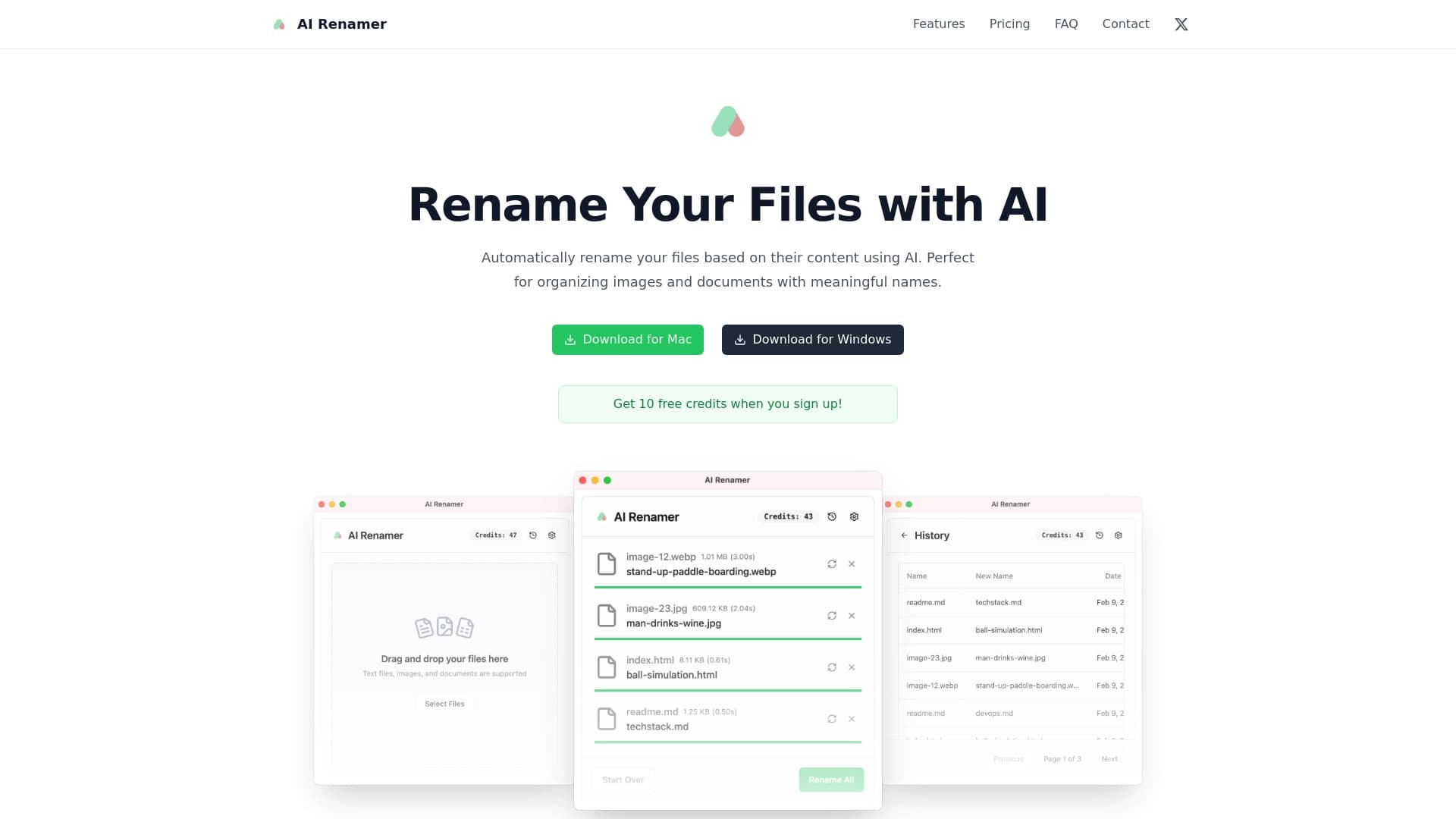
AI Renamer — это десктопное приложение, которое решает давнюю проблему хаотично названных файлов. Вместо того чтобы вручную переименовывать каждый скриншот, сканированный документ или фотографию с камеры, вы делегируете эту задачу нейросети. Инструмент анализирует содержимое каждого файла — будь то изображение, текстовый документ или сканы — и генерирует для него логичное, понятное название.
Ключевая особенность AI Renamer — использование локальных нейросетей. Это означает, что все процессы анализа и генерации имен происходят прямо на вашем устройстве, без отправки данных на облачные серверы. Такой подход решает вопросы конфиденциальности: чувствительные документы и личные фотографии не покидают пределы компьютера. Приложение ориентировано на пакетную обработку и включает этап предварительного просмотра, что дает пользователю контроль над финальным результатом перед применением изменений.
Характеристики AI Renamer
| Характеристика | Значение |
|---|---|
| Тип | Приложение |
| Категории | Инструменты для распознавания изображений, Инструменты для управления файлами |
| Разработчик | AI Renamer |
| Ежемесячные посещения | 92.6K |
| Модель распространения | Не указана |
| Начальная цена | 450 рублей в месяц |
| Популярный тариф | 900 рублей в месяц |
| Профессиональный тариф | 1800 рублей в месяц |
| Наличие бесплатного тарифа | Нет (только платные кредиты) |
Для кого подходит нейросеть AI Renamer?
Пользователи с большими объемами файлов
AI Renamer в первую очередь будет полезен тем, кто регулярно сталкивается с необходимостью наводить порядок в папках со множеством однотипных файлов. Фотографы, дизайнеры, юристы, бухгалтеры или просто люди, которые десятками сохраняют скриншоты и сканы, оценят возможность переименовать целую папку за пару кликов.
Специалисты, ценящие конфиденциальность
Поскольку обработка данных происходит локально, приложение подходит для работы с документами, содержащими коммерческую или личную информацию. Если вы не готовы загружать свои файлы в облачные сервисы для анализа, локальная архитектура AI Renamer становится значимым преимуществом.
Пользователи, уставшие от рутины
Инструмент ориентирован на тех, кто тратит значительное время на вручную задаваемые имена файлов. AI Renamer берет на себя этот механический труд, позволяя сосредоточиться на более важных задачах.
Как использовать нейросеть AI Renamer?
Шаг 1: Установка и загрузка файлов
Для начала работы необходимо скачать и установить приложение. После запуска нужно загрузить или указать папки с файлами, которые требуется переименовать. Поддерживаются различные типы данных, включая изображения и документы.
Шаг 2: Анализ и предложение новых имен
ИИ автоматически анализирует содержимое каждого загруженного файла и генерирует для него новое название. Этот этап не требует участия пользователя — нейросеть самостоятельно определяет ключевые элементы содержимого и формирует на их основе логичные имена.
Шаг 3: Просмотр и применение изменений
Перед тем как финализировать процесс, пользователю показывается список предложенных имен. На этом этапе вы можете отредактировать любое из них вручную или сразу применить изменения ко всей папке одним кликом.
Основные функции AI Renamer
Автоматическое переименование на основе содержимого
Вместо набора цифр или случайных символов имена файлов отражают то, что внутри. AI Renamer анализирует объекты, текст и другие элементы содержимого, превращая абстрактные названия в осмысленные описания.
Пакетная обработка файлов
Приложение поддерживает одновременную работу с множеством файлов. Это ключевая функция для крупных проектов: вместо того чтобы обрабатывать файлы по одному, вы можете переименовать сотни единиц за один проход.
Широкая поддержка форматов
AI Renamer работает с популярными типами файлов — от изображений (JPG, PNG, WEBP) до текстовых документов и сканов. Это делает его универсальным инструментом для разных сценариев использования.
Локальная обработка данных
Вся работа нейросетей происходит на устройстве пользователя, без передачи данных на внешние серверы. Это гарантирует полную конфиденциальность и безопасность обрабатываемой информации.
Преимущества AI Renamer
Существенная экономия времени
Переименование сотен файлов вручную может занять часы. AI Renamer справляется с этой задачей за пару минут, при этом не требуя от пользователя детального погружения в каждый файл.
Логичная и понятная файловая структура
Благодаря умному распознаванию содержимого, новые имена файлов становятся информативными. Это облегчает последующий поиск, сортировку и каталогизацию данных.
Универсальность форматов
Широкая поддержка типов файлов — от фотографий до текстовых документов — покрывает большинство повседневных сценариев использования и позволяет использовать один инструмент для разных задач.
Недостатки AI Renamer
Ошибки при работе с редкими форматами
Приложение может ошибиться или вовсе отказаться переименовывать файлы нестандартных или редких форматов. В таких случаях пользователю придется решать вопрос вручную.
Зависимость от качества распознавания
Если содержимое файла нестандартное или неоднозначное, нейросеть может сгенерировать странные, нелогичные или повторяющиеся названия. Качество результата напрямую зависит от того, насколько легко распознать содержимое.
Платная модель доступа
AI Renamer не предоставляет бесплатного безлимитного доступа. Пользователям приходится покупать платные кредиты, что при частом использовании может оказаться финансово затратным.
Какие задачи решает AI Renamer
Быстрая сортировка фотографий и документов
Инструмент позволяет упорядочить большие коллекции изображений и файлов, заменяя бессмысленные названия вроде "IMG_4521.jpg" на информативные, отражающие суть содержимого.
Присвоение названий по содержанию
Вместо ручного ввода каждого имени, нейросеть сама определяет, что изображено на фото или написано в документе, и формирует соответствующее название.
Наведение порядка в однотипных папках
Папки с большим количеством похожих файлов (например, сканов, скриншотов или фото с камеры) становятся структурированными и удобными для навигации. Пользователю больше не нужно открывать каждый файл, чтобы понять, что внутри.
Цены AI Renamer
AI Renamer работает по подписочной кредитной модели и предлагает три тарифных плана.
Начальный тариф — 450 рублей в месяц
Включает 100 кредитов. Подходит для редкого использования или небольших объемов файлов.
Популярный тариф — 900 рублей в месяц
Включает 200 кредитов. Оптимальный вариант для регулярной работы с файлами.
Профессиональный тариф — 1800 рублей в месяц
Включает 400 кредитов. Рассчитан на активных пользователей с большими массивами данных.
Во все тарифы входит поддержка всех типов файлов и продвинутое переименование с помощью ИИ. Важно отметить, что купленные кредиты не имеют срока действия, поэтому они не сгорят, даже если вы временно не пользуетесь приложением.
Условия использования AI Renamer
Для работы с инструментом требуется покупка кредитов. Бесплатного безлимитного доступа не предусмотрено — даже для тестирования функционала необходимо приобрести платный тариф. Кредитная система не подразумевает подписочного списания: вы покупаете определенный объем, который можно расходовать по мере необходимости, учитывая, что кредиты бессрочны.
Доступность AI Renamer
AI Renamer представляет собой приложение, однако точная платформа (Windows, macOS, Linux) в официальных источниках не указана. Судя по доступной информации, речь идет о десктопном решении, которое требует установки на компьютер. Сведения о поддерживаемых регионах и языках интерфейса также отсутствуют в открытых данных.
Чем отличается AI Renamer от аналогов
На рынке существует немало инструментов для работы с изображениями — такие как Leonardo.ai, Nano Banana, Kandinsky, Midjourney, Flux.1, Yandex Art (Шедеврум). Однако большинство из них являются генеративными сервисами, создающими изображения по текстовому описанию. Их основная задача — генерация визуального контента.
AI Renamer занимает узкую нишу: он не создает, а распознает и преобразует. Его функция — анализ уже существующего файла и присвоение ему осмысленного имени. В отличие от облачных генераторов, здесь нет риска утечки данных, так как все процессы выполняются локально на устройстве пользователя. AI Renamer решает прикладную задачу организации файловой системы, тогда как большинство аналогов сфокусированы на творческой генерации визуального контента.
Заключение
AI Renamer — это практичный инструмент для автоматизации рутинной задачи переименования файлов. Он эффективно решает проблему хаотичной файловой системы, экономя время пользователей, работающих с большими массивами данных. Локальная обработка информации обеспечивает конфиденциальность, а поддержка множества форматов делает приложение универсальным решением. Однако платная кредитная модель и возможные сбои на нестандартных или редких файлах могут стать ограничивающими факторами. В целом, AI Renamer стоит рассматривать как специализированный помощник для тех, кто ценит порядок и время, но важно трезво оценивать его ограничения при работе с нестандартным контентом.
Тарифы
Часто задаваемые вопросы
Смотрите также


ИИ-платформа для быстрого создания сайтов и управления процессами малого бизнеса.

AI-клавиатура для устройств Apple, которая ускоряет набор текста с помощью исправлений, перевода и генерации ответов.

Набор мультимедийных AI-инструментов для редактирования и улучшения фото, видео и PDF-документов.

ИИ-агент для автоматизации клиентских коммуникаций и поддержки.


Онлайн-сервис, который распознаёт текст на страницах манги и манхвы, переводит его на разные языки и встраивает обратно в изображение без повреждения оригинального рисунка.

AI-ассистент для бизнеса, который помогает управлять задачами и автоматизировать рутину через диалог.


Настольный AI-ассистент для macOS, Windows и Linux, который запускается по хоткею поверх всех окон и объединяет несколько языковых моделей в одном интерфейсе.

AllChat — это универсальная платформа, объединяющая несколько популярных языковых моделей в одном интерфейсе для общения, генерации изображений, анализа файлов и выполнения кода.