
AI Real Time Drawing: Live Art
Мобильное приложение, превращающее обычные фотографии в художественные изображения с помощью ИИ.
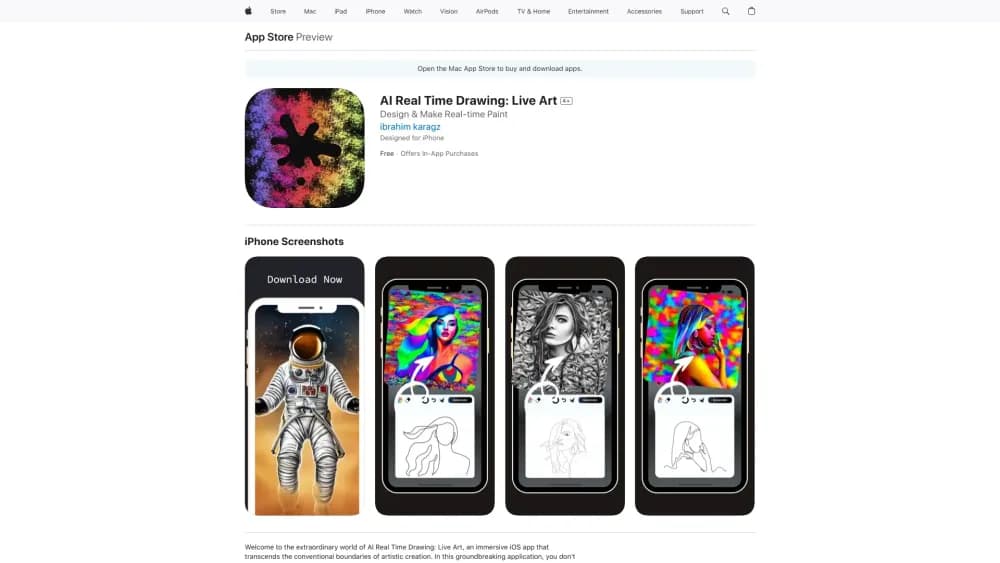
Обзор
Описание нейросети AI Real Time Drawing: Live Art
AI Real Time Drawing: Live Art — это мобильное приложение для iOS, которое преобразует обычные фотографии в художественные изображения с помощью искусственного интеллекта. Принцип работы максимально прост: пользователь загружает снимок из галереи, выбирает один из доступных художественных фильтров, и нейросеть за несколько секунд создает стилизованную версию изображения. Сервис спроектирован с расчетом на мгновенный результат и не требует от пользователя никаких навыков работы в графических редакторах.
Приложение выступает в роли генератора цифрового искусства и инструмента для быстрого редактирования фото. Помимо однократной обработки снимков, оно предлагает функцию рисования на экране с мгновенным изменением результата. Готовыми работами можно делиться с другими пользователями внутри встроенного сообщества, что превращает приложение в социальную платформу для обмена творчеством.
Характеристики AI Real Time Drawing: Live Art
| Характеристика | Значение |
|---|---|
| Категория | Генераторы изображений и фото, инструменты для редактирования и улучшения фотографий, графический дизайн, генераторы цифрового искусства |
| Тип | Приложение |
| Разработчик | Creative Art Apps |
| Платформы | iOS (App Store) |
| Ежемесячные посещения | 47.3K |
| Наличие бесплатного тарифа | Есть (бесплатная версия с ограничениями) |
| Языки интерфейса | Не указано |
| Стоимость подписки | Недельная — 499 руб., месячная — 1499 руб., годовая — 3499 руб. |
Для кого подходит нейросеть AI Real Time Drawing: Live Art?
Новички без опыта в фоторедакторах
Приложение создано для людей, которые не умеют и не хотят осваивать сложные инструменты вроде Photoshop. Здесь нет слоев, масок и кривых — весь процесс сводится к загрузке фото и выбору фильтра. Это идеальный вариант для тех, кто хочет получить красивую картинку без технических знаний.
Дизайнеры и творческие специалисты
Несмотря на простоту, приложение может быть полезно дизайнерам и художникам для быстрого создания необычных цифровых работ. Оно подходит для генерации идей, поиска вдохновения или создания контента для портфолио. Скорость обработки позволяет экспериментировать с разными стилями за короткое время.
Пользователи социальных сетей
Люди, ведущие активную деятельность в соцсетях, могут использовать приложение для создания необычных визуальных эффектов для сторис и постов. Превращение обычных снимков в арт помогает выделить контент на фоне других публикаций.
Как использовать нейросеть AI Real Time Drawing: Live Art?
Пошаговый процесс работы
Процесс использования приложения предельно прост и состоит из трех шагов. Сначала необходимо загрузить фотографию в приложение. Затем пользователь выбирает подходящий художественный стиль или фильтр из предложенного набора. После этого нейросеть обрабатывает изображение, и уже через минуту пользователь получает готовый результат. Обработка происходит онлайн.
Обмен результатами
Готовым изображением можно сразу поделиться. Приложение поддерживает публикацию работ для мирового сообщества пользователей, что позволяет демонстрировать свои творения и смотреть на работы других участников.
Работа в реальном времени
Помимо обработки готовых снимков, приложение поддерживает режим рисования на экране. В процессе творчества результат меняется мгновенно, что дает возможность видеть трансформацию изображения в реальном времени.
Основные функции AI Real Time Drawing: Live Art
Превращение фото в художественные произведения
Главная функция приложения — применение ИИ-фильтров к фотографиям. Нейросеть обрабатывает любое загруженное изображение независимо от его возраста или качества, создавая стилизованную художественную версию. Результат зависит от выбранного пользователем стиля.
Рисование с мгновенной обратной связью
Приложение предоставляет возможность рисовать и творить прямо на экране. Ключевая особенность — мгновенное изменение результата в процессе рисования. Это позволяет пользователю наблюдать за тем, как его действия преобразуются в художественное изображение.
Обработка в реальном времени
Система обеспечивает генерацию изображения в реальном времени, что заметно ускоряет рабочий процесс. Нейросеть выдает картинку высокого разрешения практически мгновенно после запроса.
Сообщество и обмен работами
Встроенное дружелюбное сообщество позволяет делиться созданными работами с другими пользователями по всему миру. Это дает возможность получать обратную связь и черпать вдохновение из работ других участников.
Преимущества AI Real Time Drawing: Live Art
Скорость и простота
Главное преимущество приложения — быстрое превращение фото в арт без необходимости осваивать профессиональные инструменты. Управление сведено к минимуму: загрузил, кликнул, получил результат. Это экономит время и силы.
Отсутствие порога входа
Для работы с приложением не нужно специальных навыков или образования в области дизайна. Интерфейс понятен на интуитивном уровне, а весь процесс обработки автоматизирован.
Доступ к сообществу
Наличие мирового сообщества для обмена работами — значительное преимущество для тех, кто ищет вдохновение и хочет показывать свои творения широкой аудитории.
Недостатки AI Real Time Drawing: Live Art
Шаблонность результатов
Творчество пользователя может быть ограничено набором встроенных фильтров. Результат обработки может оказаться стандартным и предсказуемым, что не всегда устраивает профессионалов, ожидающих большего контроля.
Требование стабильного интернета
Сервис полностью зависит от интернет-соединения. Без стабильного подключения приложение не работает, что создает неудобства в поездках и местах с плохой сетью.
Вопросы приватности
При использовании приложения фотографии загружаются на сервер. Пользователю не всегда понятно, насколько защищены его данные и как они используются, что вызывает обоснованные вопросы о конфиденциальности.
Какие задачи решает AI Real Time Drawing: Live Art
Быстрое редактирование фотографий
Одно из ключевых назначений инструмента — быстрое редактирование и улучшение фотографий без использования сложного программного обеспечения. Это решает задачу оперативной обработки снимков «на ходу».
Создание цифрового искусства
Приложение позволяет создавать цифровое искусство из обычных снимков. Пользователи могут получать необычные визуальные эффекты для сторис, постов и других целей, связанных с соцсетями.
Эксперименты со стилями
Инструмент дает возможность экспериментировать с художественными стилями. Быстрая генерация художественных версий фото позволяет подбирать наиболее подходящее визуальное решение для различных задач — от личного блога до портфолио.
Цены AI Real Time Drawing: Live Art
Бесплатная версия
Приложение распространяется по модели freemium. Бесплатная версия доступна с ограничениями: пользователь может пользоваться базовым функционалом, но часть возможностей будет недоступна.
Премиум-подписки
Стоимость подписки: недельная — 499 рублей, месячная — 1499 рублей, годовая — 3499 рублей. Премиум-статус предоставляет доступ к безлимитному созданию эмодзи, отключает рекламу и позволяет скачивать изображения в высоком разрешении.
Условия использования AI Real Time Drawing: Live Art
Сервис работает полностью онлайн. Для использования требуется загрузка фотографий на сервер, что является необходимым условием для обработки изображений нейросетью. Для работы необходимо установить приложение из App Store. Наличие регистрации в описании не упоминается, однако она, вероятно, потребуется для оформления подписки и участия в сообществе.
Доступность AI Real Time Drawing: Live Art
Приложение доступно в виде мобильного клиента для платформы iOS и устанавливается через App Store. Информация о поддерживаемых языках интерфейса и регионах распространения не указана в доступных источниках. Для корректной работы приложения требуется стабильное интернет-соединение.
Чем отличается AI Real Time Drawing: Live Art от аналогов
Ключевое отличие приложения от конкурентов — акцент на простоте и скорости. Пользователю не требуются никакие навыки редактирования: весь процесс осуществляется в один клик, что выгодно выделяет сервис на фоне более сложных профессиональных инструментов. Приложение ориентировано на немедленный результат и активный обмен работами в сообществе. Это решение для тех, кто ценит время и не хочет разбираться в тонкостях графического редактирования.
Заключение
AI Real Time Drawing: Live Art — это простой и быстрый способ превращать обычные фотографии в художественные изображения с помощью искусственного интеллекта. Приложение идеально подходит для новичков благодаря своей доступности и скорости работы, позволяя получить впечатляющий результат буквально за один клик. Встроенное сообщество добавляет социальный аспект, способствуя обмену идеями и вдохновением. Однако профессиональным пользователям может не хватить глубины настройки и контроля над результатом, а вопросы приватности и зависимость от интернет-соединения являются существенными ограничениями при выборе данного сервиса.
Тарифы
Часто задаваемые вопросы
Смотрите также


AI-платформа для создания и редактирования видео, работающая прямо в браузере Chrome.
Простой и удобный редактор фото с интуитивно понятным интерфейсом.


Открытая платформа для генерации изображений и другого визуального контента по текстовым описаниям с помощью ИИ.

Онлайн-инструмент для замены лиц на фото, видео и GIF без регистрации и водяных знаков.


ИИ-ассистент для создания текстового контента, изображений и работы с голосом, ориентированный на русскоязычных пользователей.

Мобильное приложение для обработки фото и создания стилизованных аватаров с помощью ИИ.


Многофункциональный AI-ассистент для генерации текстов, изображений и аудио.


Онлайн-инструмент для создания дипфейков и редактирования изображений с помощью ИИ.