

AI Localizer
AI Localizer is a tool for automatic localization of iOS and macOS apps, using AI to translate the interface into multiple languages.
Overview
AI Localizer Neural Network Description
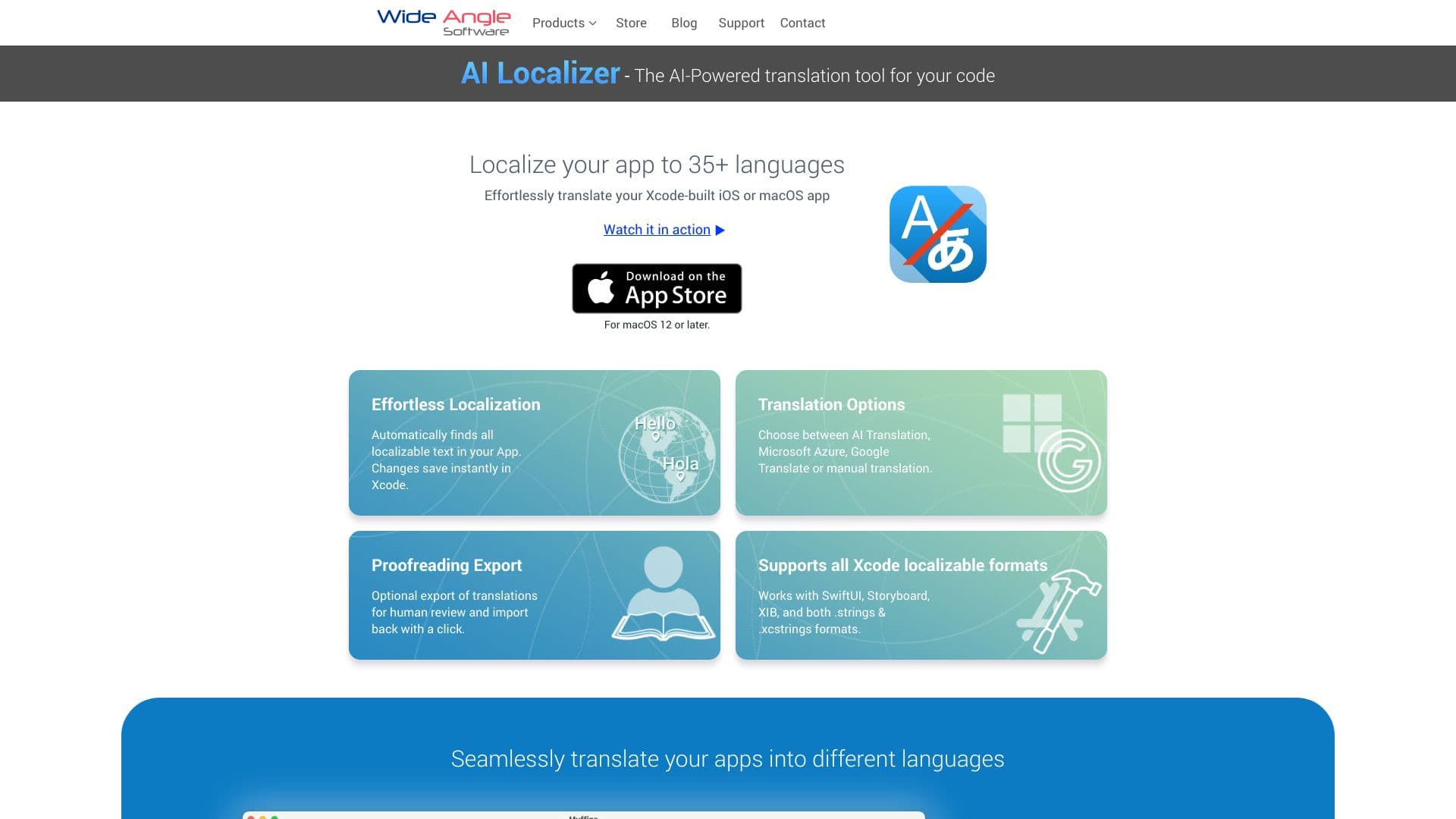
AI Localizer is a specialized tool for automatic localization of iOS and macOS applications, built directly into the Xcode development environment. The neural network automates the routine process of interface translation: it finds text strings in the project's code and resources, translates them into dozens of languages, and generates ready-to-use localization tables that can be immediately applied in the app.
The tool is developed by Wide Angle Software Ltd and is aimed at developers who want to bring their products to international markets without manually translating every screen. AI Localizer works with existing Xcode projects without requiring changes to the code architecture, making it a universal solution for both new and already published applications. Users can choose between the built-in AI engine, Microsoft Azure, or Google Translate, and can also combine automatic translations with manual editing directly in the interface.
AI Localizer Features
| Feature | Value |
|---|---|
| Type | Translation tools |
| Category | App localization |
| Platforms | Xcode (macOS) |
| Number of languages | 37+ (up to 35+ depending on version) |
| Developer | Wide Angle Software Ltd |
| Free tier | Yes (for small projects and evaluation) |
| Publication date on site | September 10, 2025 |
| Monthly site traffic | 83.2K |
| Translation engines | Built-in AI, Microsoft Azure, Google Translate |
Who is the AI Localizer neural network for?
Mobile app developers
AI Localizer is designed for iOS and macOS app developers working in the Xcode environment. The tool is useful for both individual specialists and teams that regularly release updates and need to quickly add new languages to their products.
Teams expanding into international markets
The tool is particularly valuable for studios planning international expansion. The ability to translate an app into 37+ languages in just minutes allows quick adaptation of the product for different regions and testing of new markets without significant time investment.
How to use the AI Localizer neural network?
Setting up translation in Xcode
To start working with AI Localizer, a developer needs to select the source language of the project and specify the target languages into which the interface should be translated. The tool automatically processes code strings and resources, generates localization tables, and fills them using the selected translation engine.
Fine-tuning and editing
After automatic translation generation, the developer can configure translator settings: choose the built-in AI, Microsoft Azure, or Google Translate, and also connect their own third-party service account. All translated strings can be edited directly in the Xcode interface — the tool supports combining automatic options with manual corrections.
Working with existing projects
AI Localizer does not require changes to the code architecture and works with existing Xcode projects. This means the tool can be integrated into any current project without rewriting it from scratch or making structural changes.
Key Features of AI Localizer
Automatic text search in the project
The tool independently finds interface strings in the code and resources of an Xcode project, saving the developer from manually copying text for translation. After finding the strings, localization tables are generated and filled with translations.
Translation into 37+ languages
AI Localizer supports interface translation into 37+ languages. Several engines are used: built-in AI, Microsoft Azure, or Google Translate. The developer can choose a preferred service or combine them to achieve the best quality.
Support for various Xcode project formats
The tool is compatible with various file formats used in Xcode projects. This allows working with both standard localization tables (.strings, .stringsdict) and other project resources containing text strings.
CSV export
Translated strings can be exported to CSV format for further use or handoff to a translation team. This is convenient for collaborative work and additional quality control.
Advantages of AI Localizer
Time savings and routine automation
The main advantage of the tool is significant time savings. Localizing an app into multiple languages takes minutes, not days. The tool automates the routine copying of strings and speeds up adding new languages when releasing updates.
Direct integration with Xcode
AI Localizer works directly inside Xcode, so developers don't need to switch between different programs. The entire localization process — from finding strings to editing translations — happens in the familiar development environment.
Flexibility and privacy control
Users can flexibly configure the translation source and connect their own Microsoft Azure or Google Translate account. The tool ensures privacy control: only text strings are sent for processing, without source code or user data.
Simplified updates
AI Localizer simplifies and speeds up translation fixes and updates. When new strings are added to an app, developers don't need to go through the entire localization process again — the tool quickly processes the changes.
Disadvantages of AI Localizer
Translation errors
Like any AI translator, AI Localizer can make mistakes. The neural network may translate too literally, especially complex terms, jokes, or idiomatic expressions. Manual quality review of translations is required.
Cultural nuances and context
The tool does not always account for cultural nuances and language context. Some phrases may sound unnatural or inappropriate in a certain culture, requiring manual refinement.
Dependence on external services
When using Microsoft Azure or Google Translate, the tool depends on the stability of these external services. If they experience outages, some AI Localizer features may become unavailable.
What problems does AI Localizer solve?
Fast app localization
The main purpose of the tool is fast localization of iOS and macOS apps into dozens of languages. AI Localizer automatically adds translated texts to the Xcode project, eliminating the need for manual translation of every screen.
Entering international markets
The tool allows developers to enter international markets without hiring professional translators or spending weeks on manual localization. 37+ languages cover most major global markets.
Update support
AI Localizer speeds up adding new languages during app updates and eliminates manual copying of strings for translation. Developers can focus on logic and interface rather than translation routine.
AI Localizer Pricing
AI Localizer offers three pricing plans:
- Free plan — for small projects and getting familiar with the tool's functionality.
- Starter plan — includes extended functionality for individual use.
- Professional plan — provides maximum capabilities for teams and large projects.
AI Localizer Terms of Use
AI Localizer is distributed under a freemium model: any developer can start with the free plan to evaluate the tool's capabilities. As needs grow, users can upgrade to a paid plan — Starter for individual use or Professional for teams.
The Xcode development environment on macOS is required to work with the tool. If a developer wants to use Microsoft Azure or Google Translate as the translation engine, they will need their own account with the respective service — AI Localizer supports connecting external translators for those who need special control over quality.
AI Localizer Availability
AI Localizer works as a plugin or integration within the Xcode development environment on macOS. The tool is compatible with existing Xcode projects and does not require changes to their architecture.
Three translation options are supported: the built-in AI engine, Microsoft Azure, and Google Translate. The tool is available to iOS and macOS developers worldwide.
How AI Localizer differs from alternatives
AI Localizer stands out among alternatives due to its narrow specialization. Unlike universal AI tools such as ChatGPT, Gemini, or DeepSeek, AI Localizer is created specifically for localizing Xcode projects and is integrated directly into the development environment. This means developers don't need to manually copy strings from the project to a third-party service and back.
The second key difference is working with multiple translation engines. Users can choose between the built-in AI, Microsoft Azure, and Google Translate, combine them, and connect their own accounts. Most alternatives do not offer this level of flexibility.
The third difference is the focus on privacy. AI Localizer sends only interface text strings for processing, without source code or user data. This is an important aspect for developers of commercial applications who cannot disclose their source code.
Conclusion
AI Localizer is a specialized tool for automating the localization of Xcode projects, translating apps into 37+ languages using built-in AI or third-party services. It saves developers time, integrates directly into the development environment, and works with existing projects without changing their architecture. The main limitations are possible translation errors and dependence on external services, so combining automatic translations with manual review and editing is recommended to achieve high localization quality. The tool will be a valuable asset for iOS and macOS developers planning to enter international markets.
Frequently asked questions
See also

Multifunctional AI platform for content creation, combining speech synthesis, text generation, avatar creation, and video editing.

A platform for aggregating world news using AI to analyze and reduce bias.


Project management platform with task assignment, time tracking, and employee workload monitoring features.
Tool for translating text directly in images while preserving the original design.


An online service that recognizes text on manga and manhwa pages, translates it into different languages, and embeds it back into the image without damaging the original artwork.

Cloud platform for creating videos using AI avatars, synthesized speech, and automatic translation of clips into dozens of languages.


Platform for creating multi-agent AI systems and chatbots to automate customer support and lead generation.


AI toolkit for video generation and editing, including avatars, lip-sync, and voice cloning.