

AI LinkedIn Banners
Генерирует персонализированные баннеры для профиля LinkedIn на основе загруженного резюме.
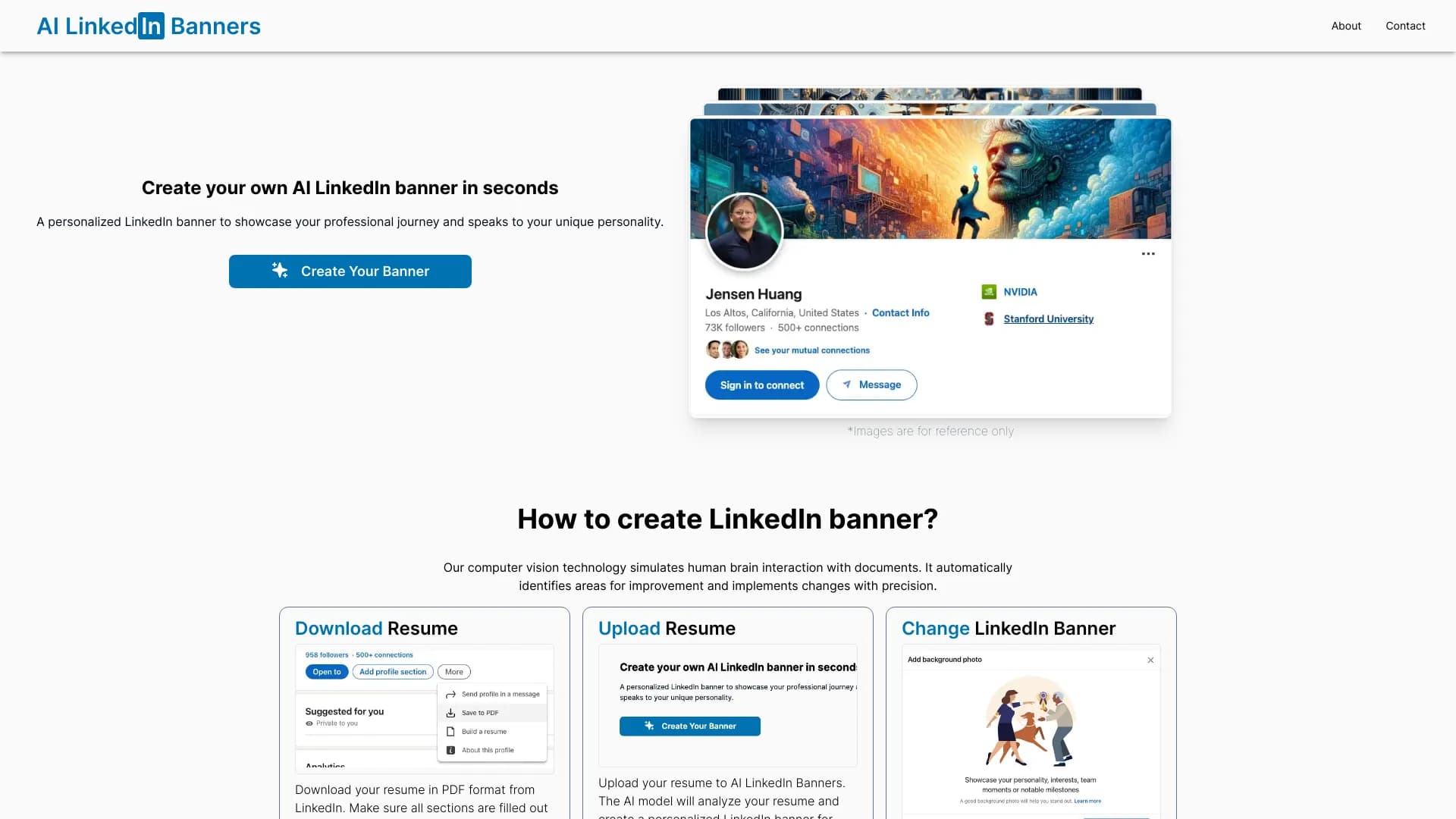
Обзор
Описание нейросети AI LinkedIn Banners
AI LinkedIn Banners — это специализированный веб-сервис, который автоматизирует создание графических баннеров для профиля LinkedIn. Вместо того чтобы вручную подбирать изображения и текст, пользователь просто загружает свое резюме в формате PDF или выгружает данные из LinkedIn, а нейросеть анализирует этот материал и превращает его в визуальную композицию для шапки профиля.
Главная задача инструмента — избавить пользователя от необходимости обладать навыками дизайна. Алгоритм изучает ключевые навыки, профессиональный опыт и достижения, упомянутые в документах, а затем предлагает несколько вариантов баннера, которые можно скачать и установить в профиль за пару кликов.
Принцип работы сервиса
Работает это просто: вы загружаете файл, нейросеть обрабатывает информацию о вашей карьере и предлагает готовые визуальные решения. Весь процесс занимает считанные секунды. Однако стоит учитывать, что итоговое качество баннера напрямую зависит от того, насколько подробно и структурированно составлено резюме.
Ключевая идея
Инструмент ориентирован на быстрое улучшение визуального восприятия профиля. Баннер, созданный искусственным интеллектом, призван подчеркнуть вашу профессиональную специализацию и сделать страницу более цельной и запоминающейся для рекрутеров и деловых партнеров.
Характеристики AI LinkedIn Banners
| Характеристика | Значение |
|---|---|
| Тип | Генератор баннеров |
| Категории | Инструменты для создания резюме, Помощники для дизайна, Генераторы изображений и фото, Инструменты для графического дизайна, Генераторы баннеров, Инструменты для био-ссылок, Помощники для соцсетей |
| Платформа | Сайт (веб-приложение) |
| Язык интерфейса | Не указан (предположительно русский) |
| Разработчик | AI LinkedIn Banners |
| Входные данные | Резюме в формате PDF или данные из профиля LinkedIn |
| Результат | Персональный баннер для профиля LinkedIn |
| Ежемесячные посещения | ~22.3K |
| Бесплатный тариф | Не указан |
| Цена | От 89 рублей за базовый баннер |
Для кого подходит нейросеть AI LinkedIn Banners?
Активные пользователи LinkedIn
Сервис предназначен для людей, которые регулярно ведут свой профиль на LinkedIn и хотят, чтобы он выглядел профессионально. Если вы ищете работу, ведете переговоры или просто строите личный бренд, качественный баннер поможет произвести правильное первое впечатление.
Специалисты без дизайнерских навыков
Далеко не каждый умеет работать в Photoshop или других графических редакторах. Данный инструмент решает эту проблему: вам не нужно ничего рисовать или верстать. Достаточно загрузить готовое резюме, и алгоритм предложит варианты оформления на основе ваших реальных данных.
Занятые профессионалы
Для тех, у кого нет времени возиться с настройкой макетов и подбором изображений, такой сервис станет спасением. Вместо нескольких часов работы в редакторе вы тратите пару минут на загрузку файла и выбор понравившегося варианта.
Как использовать нейросеть AI LinkedIn Banners?
Шаг 1: Подготовка резюме
Вам потребуется резюме. Сервис работает с файлами в популярных форматах (например, PDF), либо позволяет импортировать данные напрямую из профиля LinkedIn. Чем более подробным и структурированным будет документ, тем точнее получится результат.
Шаг 2: Загрузка и анализ
Загрузите выбранный документ на сайт ailinkedbanners.com. После загрузки нейросеть автоматически просканирует резюме, выделяя ключевые навыки, опыт работы, сферу деятельности и профессиональные достижения.
Шаг 3: Генерация и скачивание
Через несколько секунд вы получите предложенные варианты баннеров. Выберите тот, который вам нравится больше всего. После этого изображение можно скачать на компьютер или телефон. Далее готовую картинку останется только загрузить в настройках оформления вашего профиля LinkedIn.
Основные функции AI LinkedIn Banners
- Автоматический анализ резюме: Сервис извлекает из документа информацию о навыках, опыте и специализации пользователя.
- Генерация персонализированных баннеров: На основе полученных данных ИИ создает уникальные изображения, отражающие профессиональный профиль.
- Создание баннеров за пару кликов: Процесс занимает считанные секунды — от загрузки документа до получения готового изображения.
- Визуализация карьерного пути: Инструмент помогает наглядно продемонстрировать вашу специализацию и отрасль в шапке профиля.
Преимущества AI LinkedIn Banners
Релевантность контента
Баннер создается не на основе случайных шаблонов, а на основе вашего реального резюме. Видеоряд и текст логически связаны с вашим опытом, что снижает риск нерелевантного или несоответствующего оформления.
Высокая скорость работы
Весь цикл — от загрузки до генерации — занимает не более пары минут. Это значительно быстрее, чем создание баннера вручную в графическом редакторе.
Улучшение профессионального имиджа
Готовый баннер делает профиль более цельным и аккуратным. Он наглядно демонстрирует посетителям страницы ваши ключевые компетенции и сферу деятельности.
Недостатки AI LinkedIn Banners
Ограниченный выбор шаблонов
Количество вариантов оформления ограничено. Это значит, что пользователи могут получать похожие по стилю баннеры, поскольку алгоритмы используют схожие наборы визуальных решений.
Зависимость от качества резюме
Конечный продукт сильно зависит от содержания загруженного документа. Если резюме составлено плохо, содержит мало информации или общие фразы, баннер может получиться блеклым или неточным.
Невозможность восстановления
Сервис не хранит историю ваших запросов. Если вы случайно не сохранили оплаченный баннер, восстановить его будет невозможно — придется заново загружать резюме и оплачивать генерацию.
Какие задачи решает AI LinkedIn Banners
- Автоматизация дизайна баннера: Освобождает пользователя от необходимости вручную подбирать шрифты, цвета и компоновку элементов.
- Создание профессионального баннера: Позволяет быстро получить приличное визуальное оформление, отражающее карьерный путь пользователя.
- Повышение визуальной целостности профиля: Помогает связать баннер с содержимым резюме, делая профиль более гармоничным и профессиональным.
Цены AI LinkedIn Banners
Стоимость зависит от выбранного уровня баннера. Сервис предлагает несколько тарифных планов, которые различаются по сложности дизайна и стоимости:
- Базовый баннер — 89 рублей.
- Профессиональный баннер — 179 рублей.
- Премиальный баннер — 249 рублей.
Стоит учитывать, что информация о бесплатном тарифе или пробном периоде на сайте не указана.
Условия использования AI LinkedIn Banners
Для начала работы необходимо загрузить резюме. Важный нюанс: сервис не сохраняет историю генераций и не хранит старые изображения. Если после оплаты вы не сохранили готовый файл на свое устройство, восстановить его не получится. В этом случае придется заново загружать резюме и создавать баннер с нуля, повторно оплачивая услугу.
Доступность AI LinkedIn Banners
Инструмент доступен в виде веб-сайта по адресу ailinkedbanners.com. Работает он через браузер как на компьютере, так и на мобильных устройствах. Информация о региональных ограничениях, необходимости использования VPN или доступных языках интерфейса официально не заявлена. Судя по ценам в рублях, сервис ориентирован на русскоязычную аудиторию, но круг потенциальных пользователей не ограничен.
Чем отличается AI LinkedIn Banners от аналогов
Главное отличие этого сервиса — тесная связь генерируемого изображения с содержанием резюме. Многие инструменты для создания баннеров работают по принципу «выбери шаблон и вставь текст», здесь же алгоритм сам вычленяет ключевую информацию и строит на ее основе визуальную композицию. Это позволяет избежать безликих решений и сделать баннер более персональным.
Основной конкурентный недостаток — небольшой набор шаблонов. Универсальные генераторы изображений, такие как Midjourney или Perplexity AI, могут создать бесконечное количество вариантов по текстовому запросу, но они не имеют специализации под LinkedIn и требуют вручную составленных промптов. AI LinkedIn Banners, напротив, автоматизирует этот процесс, но ограничивает творческую свободу пользователя.
Заключение
AI LinkedIn Banners — это практичный и быстрый инструмент для создания персонализированных баннеров профиля на основе резюме. Он идеально подходит тем, кто хочет выделиться на LinkedIn без погружения в дизайн. Сервис берет на себя всю работу по анализу ваших данных и визуализации, экономя время и силы. Однако потенциальным пользователям стоит учитывать ограниченный выбор шаблонов и полную зависимость качества результата от качества загруженного резюме. Инструмент решает конкретную нишевую задачу и делает это хорошо, хотя и не претендует на звание полноценного конструктора графики.
Тарифы
Часто задаваемые вопросы
Смотрите также


AI-генератор аниме-изображений по текстовому описанию с выбором шаблона.


BannsAi — сервис с использованием ИИ для быстрого создания рекламных баннеров по текстовому описанию или референсу.

Платформа для генерации видео, изображений и цифровых аватаров с помощью ИИ.


Платформа для генерации и редактирования изображений и видео на основе искусственного интеллекта.


Платформа на основе ИИ для создания логотипов и фирменного стиля.
Онлайн-фоторедактор на базе ИИ для создания, редактирования и улучшения изображений прямо в браузере.

Anakin.ai — это low-code платформа, объединяющая различные AI-модели для создания контента и автоматизации рабочих процессов без программирования.

Генератор раскрасок, создающий контурные рисунки из фотографий или текстовых описаний.