
AI Gallery
AI Gallery — это онлайн-сервис для генерации изображений по текстовому описанию и преобразования фотографий в цифровое искусство.
Обзор
Описание нейросети AI Gallery
AI Gallery — это онлайн-сервис, который объединяет два ключевых направления работы с изображениями: генерацию картинок по текстовому описанию и преобразование загруженных фотографий в цифровое искусство. Пользователь может ввести текстовый запрос или загрузить собственный снимок, а нейросеть возьмёт на себя всю остальную работу по созданию арта.
Сервис ориентирован на скорость и простоту: не требуется разбираться в сложных параметрах или профессиональных редакторах. Достаточно загрузить фото или написать запрос, и через несколько секунд вы получите готовое изображение. При этом сервис включает встроенную галерею для просмотра созданных работ, панель управления и ряд предустановленных параметров, которые можно настраивать под себя.
Характеристики AI Gallery
| Характеристика | Значение |
|---|---|
| Тип | Нейросеть для генерации и преобразования изображений |
| Категории | Генерация изображений, цифровое искусство, преобразование фото, создание обложек и контента |
| Платформа | Веб-сайт, онлайн-сервис |
| Разработчик | InStyleAI |
| Бесплатный тариф | Да, доступны базовые функции генерации изображений |
| Платные тарифы | Стандартный — 747 руб./мес., Премиум — 1499 руб./мес. |
| Доступ из России | Только с VPN |
| Оценка редакции | 7.9 из 10 |
| Рейтинг пользователей | 4.5 |
Для кого подходит нейросеть AI Gallery?
Художники и дизайнеры
AI Gallery будет полезна художникам и дизайнерам, которым требуется быстро создавать эскизы, искать вдохновение или экспериментировать с художественными стилями. Сервис позволяет получать оригинальные изображения без длительной ручной работы.
Любители креатива и обычные пользователи
Инструмент рассчитан и на тех, кто не имеет профессиональной подготовки. Если вы хотите быстро получить необычную картинку для социальных сетей, презентации или личного проекта — сервис справится с этой задачей без сложных настроек и обучения.
Специалисты по контенту
AI Gallery подойдёт тем, кто регулярно создаёт визуальный контент: обложки, иллюстрации, арты для постов. Благодаря скорости обработки можно подготовить несколько вариантов изображений за короткое время.
Как использовать нейросеть AI Gallery?
Генерация изображения по текстовому описанию
Вы формулируете текстовый запрос, описываете желаемый объект, сцену или стиль, и нейросеть создаёт изображение на основе вашего описания. После генерации работу можно посмотреть в галерее и при необходимости повторить попытку с изменёнными параметрами.
Преобразование загруженной фотографии
Второй сценарий — загрузка собственного снимка на сайт. Нейросеть самостоятельно подбирает стиль обработки и за пару секунд выдаёт готовое арт-изображение. Можно экспериментировать с разными фотографиями — каждый раз результат будет оригинальным.
Настройка параметров
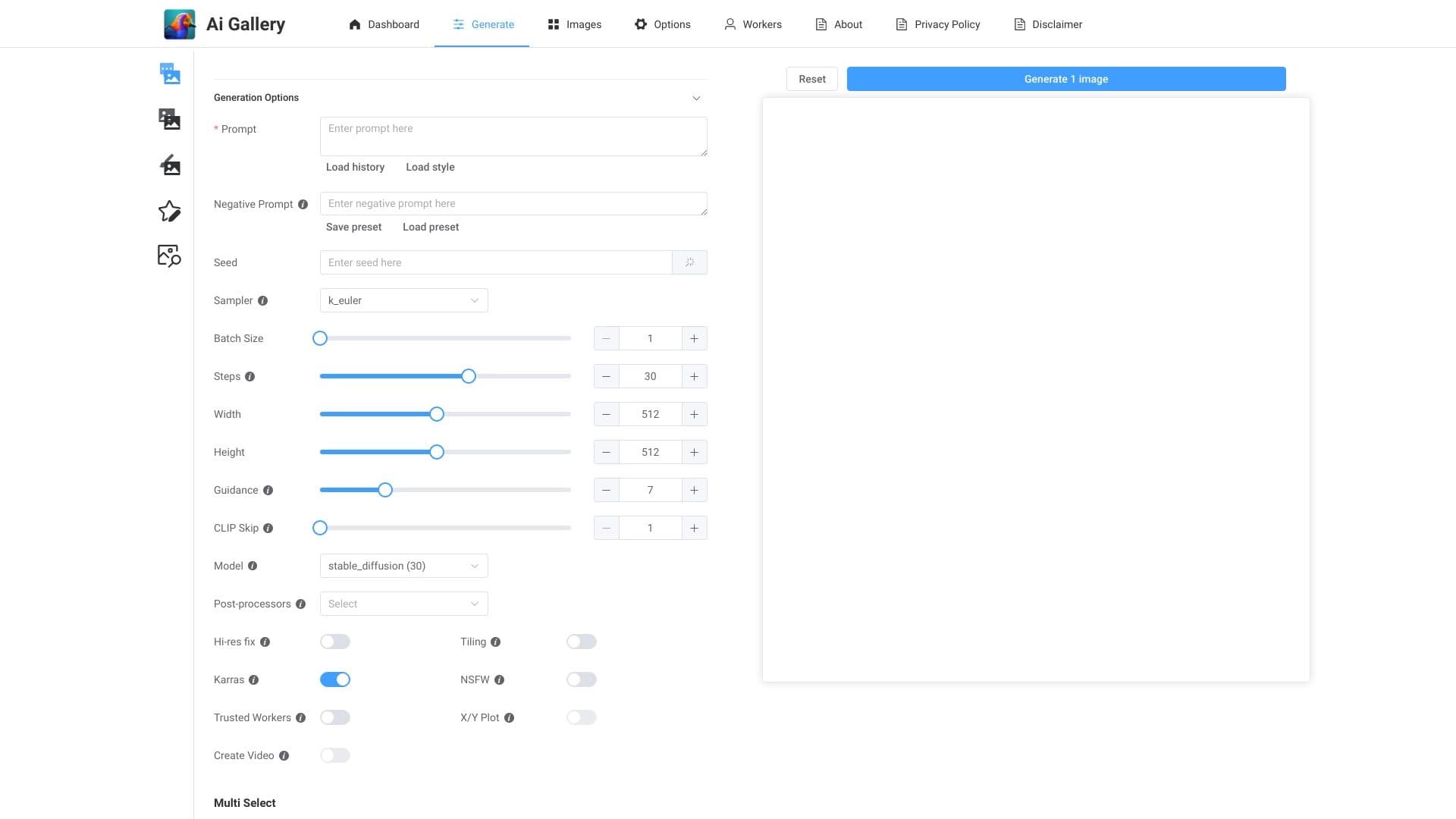
Хотя сервис ориентирован на простоту, пользователям доступна панель управления с предустановленными и настраиваемыми параметрами создания изображений. Это позволяет частично влиять на итоговый результат, не углубляясь в профессиональные инструменты.
Основные функции AI Gallery
Быстрое создание произведений искусства
Ключевая функция сервиса — молниеносная обработка. Фото превращается в стильную картину за несколько секунд, генерация по тексту тоже происходит практически мгновенно.
Преобразование любых изображений
Вы можете загружать любые картинки, главное — чтобы исходник был достаточно чётким. Нейросеть превращает обычный снимок в необычное цифровое искусство, подбирая художественный стиль автоматически.
Встроенная галерея
Все созданные работы сохраняются во встроенной галерее, где их можно просматривать, сравнивать и при необходимости возвращаться к ранее созданным изображениям.
Предустановленные параметры
Сервис содержит готовые наборы настроек для создания изображений, а также возможность изменять параметры вручную. Это упрощает работу для новичков и даёт определённую гибкость тем, кто хочет влиять на процесс.
Преимущества AI Gallery
Картина за секунды
Главное преимущество — скорость. Пользователю не нужно настраивать сложные алгоритмы или ждать долгую обработку: загрузка, обработка и результат занимают буквально пару секунд.
Оригинальный результат каждый раз
Даже похожие снимки превращаются в разные арты. Нейросеть каждый раз выдаёт новые художественные решения, что позволяет получать уникальные изображения даже при повторной работе с похожими исходниками.
Простота использования
Для работы не нужно разбираться в настройках или обладать навыками дизайнера. Весь процесс автоматизирован, а интерфейс понятен на интуитивном уровне.
Простор для экспериментов
Можно пробовать разные фотографии и стили, комбинировать их и наблюдать, как нейросеть интерпретирует исходный материал. Это открывает широкие возможности для творческих экспериментов.
Недостатки AI Gallery
Мало ручных настроек
Почти всё делает нейросеть, а выбор параметров ограничен. Если вам требуется точный контроль над каждым элементом изображения, сервис может не подойти.
Возможные повторы в работах
Иногда работы могут быть похожи друг на друга — в результате встречаются узнаваемые элементы или повторяющиеся художественные приёмы.
Зависимость от качества исходного фото
Конечный результат напрямую зависит от загруженного снимка. На размытом или некачественном фото арт получится хуже, даже если нейросеть старается компенсировать недостатки.
Доступность из России
Сервис не работает из России напрямую — для доступа потребуется использовать VPN.
Какие задачи решает AI Gallery
- Генерация оригинальных арт-работ из своих фотографий. Превращение личных снимков в художественные изображения.
- Создание изображений по текстовому описанию. Быстрое получение картинки на основе текстового запроса.
- Добавление ИИ-эффектов в макеты и дизайн-проекты. Использование сгенерированных изображений в оформительских работах.
- Быстрое создание контента для соцсетей и презентаций. Получение визуального материала без длительной подготовки.
- Эксперименты с художественными стилями. Проверка того, как различные стили ложатся на конкретные фотографии.
Цены AI Gallery
Бесплатный тариф
AI Gallery предоставляет бесплатный доступ к базовым функциям генерации изображений. Подходит для знакомства с сервисом и выполнения простых задач.
Стандартный тариф
Стоимость — 747 рублей в месяц. Включает более быструю обработку изображений и расширенные настройки стиля.
Премиум-тариф
Стоимость — 1499 рублей в месяц. Предоставляет приоритетный доступ к новым функциям и индивидуальную поддержку пользователей.
Условия использования AI Gallery
Для работы с сервисом необходим веб-браузер и доступ к интернету — специального программного обеспечения устанавливать не требуется. Можно загружать любые изображения, но важно, чтобы исходные файлы были достаточно чёткими — от этого напрямую зависит качество итогового арта.
Бесплатный тариф даёт возможность пользоваться базовыми функциями, а платные подписки расширяют возможности за счёт скорости обработки, дополнительных настроек и приоритетного доступа к обновлениям. Точные лимиты бесплатного тарифа в открытых источниках не детализированы.
Доступность AI Gallery
Сервис доступен через веб-версию и работает как онлайн-инструмент. Для пользователей из России доступ ограничен — потребуется использование VPN. Платёжные тарифы указаны в рублях, что говорит об ориентации сервиса на русскоязычную аудиторию, однако технически доступ из России требует дополнительных действий.
Чем отличается AI Gallery от аналогов
Главное отличие AI Gallery — сочетание двух сценариев работы: генерация по тексту и преобразование загруженных фотографий. Многие аналоги, такие как Midjourney или Kandinsky, фокусируются в первую очередь на генерации изображений по описанию, тогда как AI Gallery уделяет серьёзное внимание обработке готовых снимков.
По сравнению с такими сервисами, как Leonardo.ai или Flux.1, AI Gallery выигрывает в простоте и скорости: она не требует вникать в детальные настройки и подходит для быстрого получения результата. В то же время пользователи, которым нужен глубокий контроль над процессом, могут найти больше возможностей в перечисленных аналогах.
Среди других похожих инструментов — Yandex Art (Шедеврум), Nano Banana, а также сервисы вроде Designs.ai и AiWriteArt. От них AI Gallery отличается встроенной галереей и панелью управления в веб-интерфейсе, а также гибкой системой тарифов с бесплатным стартовым уровнем.
Заключение
AI Gallery — это простой и быстрый онлайн-инструмент для создания цифрового искусства, который подойдёт как дизайнерам, так и обычным пользователям, желающим превратить свои фотографии в необычные арты или сгенерировать изображение по текстовому описанию. Сервис автоматизирует весь рабочий процесс, избавляя от сложных настроек, однако за это приходится платить ограниченным ручным контролем. Из России доступ возможен только через VPN, а для полноценной работы, вероятно, потребуется один из платных тарифов. В целом AI Gallery — достойный выбор для быстрого получения визуального контента и творческих экспериментов.
Тарифы
Часто задаваемые вопросы
Смотрите также


Сервис для автоматической расшифровки аудио и видео в текст с поддержкой более 100 языков.

Сервис для создания персонализированных аватаров и фотосессий с помощью ИИ на основе загруженных селфи.


Генеративная платформа для создания реалистичных изображений и коротких видео из текста или изображений с управлением стилем и движением камеры.

Сервис для создания презентаций, использующий несколько ИИ-агентов для сбора информации, дизайна и анализа данных.


Сервис для виртуальной примерки одежды с помощью ИИ.

Онлайн-сервис для создания реалистичного клона голоса по короткой аудиозаписи и озвучивания текста.


Онлайн-инструмент для создания дипфейков и редактирования изображений с помощью ИИ.


Бесплатный веб-инструмент от Google, который с помощью машинного обучения превращает грубые наброски в аккуратные иконки и иллюстрации.