
AI Disturbance Overlay
Сервис для защиты изображений от копирования нейросетями с помощью наложения специальных текстур.
Обзор
Описание нейросети AI Disturbance Overlay
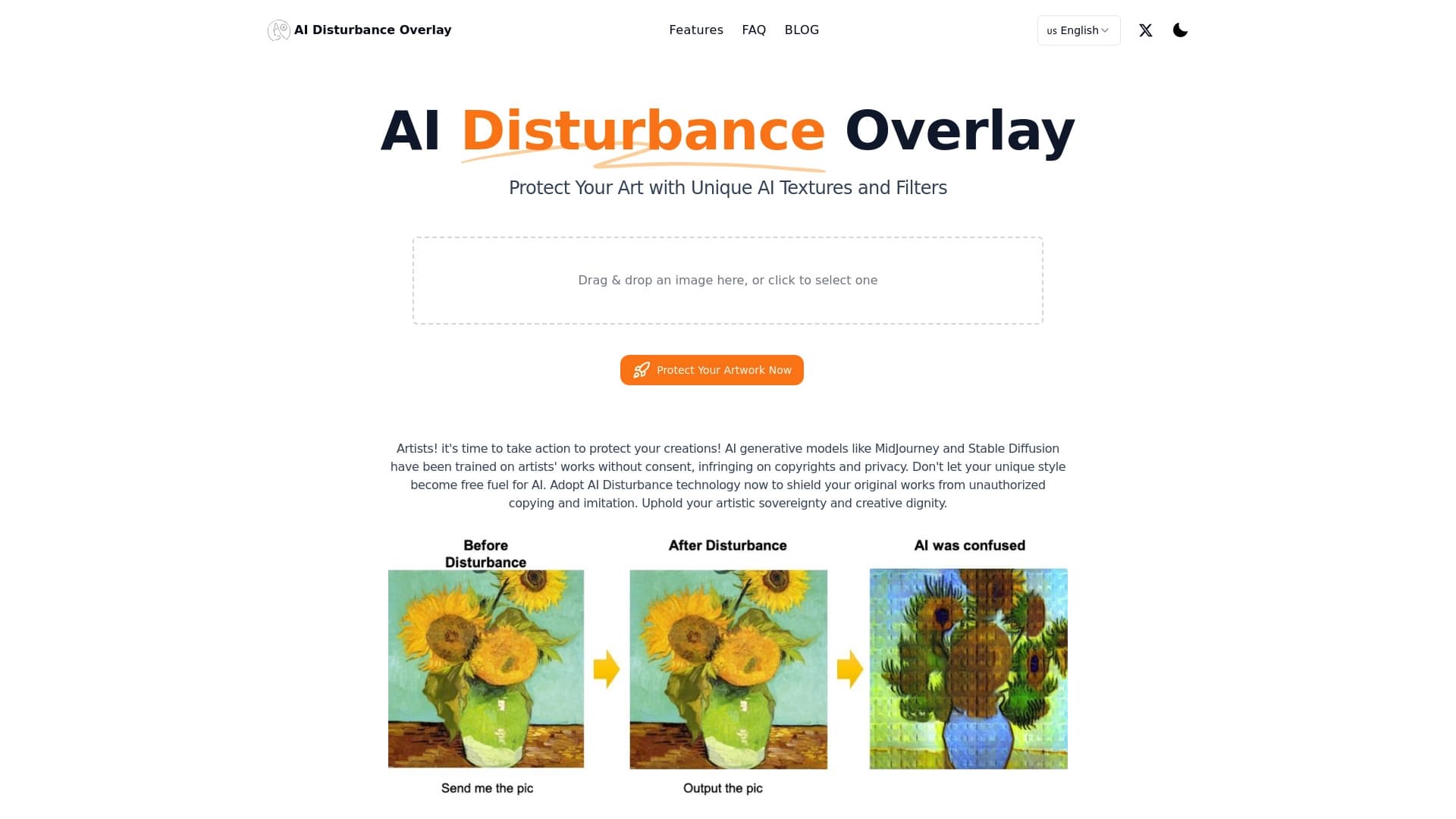
AI Disturbance Overlay — это веб-сервис, созданный для защиты цифровых изображений от несанкционированного копирования и анализа нейросетями. Принцип работы основан на наложении на изображение специальных микротекстур, которые практически неразличимы для человеческого глаза, но создают серьёзные помехи для алгоритмов машинного обучения. В результате нейросеть не может корректно проанализировать стиль, композицию и отдельные элементы работы, что затрудняет её использование для обучения моделей или генерации копий.
Сервис ориентирован в первую очередь на профессиональных художников, иллюстраторов и фотографов, чьи работы публикуются в открытом доступе и могут быть использованы ИИ без разрешения автора. Защита наносится онлайн за несколько минут и не требует от пользователя специальных технических навыков или установки дополнительного программного обеспечения.
Характеристики AI Disturbance Overlay
| Характеристика | Значение |
|---|---|
| Тип инструмента | Инструмент для защиты изображений от копирования ИИ |
| Категория | Универсальные детекторы проверки на ИИ, инструменты для выявления AI-контента |
| Платформа | Сайт (онлайн-сервис) |
| Разработчик | AI Disturbance Overlay Team |
| Бесплатная версия | Есть (10 кредитов, 1 генерация, базовая поддержка) |
| Стандартная версия | 990 ₽/мес (200 кредитов, расширенные функции, приоритетная поддержка) |
| Премиум версия | 3900 ₽/мес (1000 кредитов, все функции, приоритетные запросы на добавление функций) |
| Ежемесячные посещения | ~102,1K |
Для кого подходит нейросеть AI Disturbance Overlay?
Художники и цифровые иллюстраторы
AI Disturbance Overlay предназначен для авторов цифровых иллюстраций, которые выкладывают свои работы в открытый доступ — на онлайн-платформах, в соцсетях или на личных сайтах. Инструмент позволяет защитить результат труда от использования в качестве обучающих данных для генеративных нейросетей и от попыток копирования уникального стиля.
Фотографы и дизайнеры
Фотографы также входят в целевую аудиторию сервиса. Наложение защитных текстур на фотографии снижает риск того, что ИИ-алгоритмы смогут повторить кадр, обработать его в похожей стилистике или извлечь ключевые визуальные элементы для дальнейшего использования в других проектах.
Как использовать нейросеть AI Disturbance Overlay?
Чтобы воспользоваться сервисом, необходимо выполнить всего три шага:
- Перейти на сайт сервиса — AI Disturbance Overlay работает как сайт, поэтому не требует установки дополнительных программ или плагинов.
- Загрузить изображение — достаточно загрузить файл работы на платформу через стандартный интерфейс.
- Выбрать уровень защиты — после загрузки пользователь выбирает желаемую интенсивность наложения текстур, и сервис автоматически обрабатывает файл.
Процесс защиты занимает всего несколько минут и не требует специальной подготовки. Даже начинающий пользователь, не имеющий опыта работы с графическими редакторами, сможет справиться с задачей без затруднений.
Основные функции AI Disturbance Overlay
Наложение защитных текстур
Базовым функционалом сервиса является наложение на изображение специальных текстур, которые не видны человеческому глазу, но создают помехи для алгоритмов ИИ при анализе и воспроизведении стиля, цветовой гаммы и деталей работы.
Многоуровневая система защиты
Пользователь может выбрать подходящий уровень защиты в зависимости от конкретной работы и требований к её сохранности. Возможность регулировки интенсивности позволяет сохранить визуальное качество изображения, при этом обеспечивая достаточную степень защиты.
Сохранение устойчивости при обработке
Создатели сервиса отмечают, что защита остаётся работоспособной даже после попыток её снять — например, с помощью фоторедакторов, скриншотов или применения размытия. ИИ по-прежнему будет испытывать сложности с извлечением стилистических элементов работы.
Преимущества AI Disturbance Overlay
Незаметность для человека
Ключевое преимущество сервиса в том, что защитные текстуры абсолютно не влияют на визуальное восприятие изображения человеком. Качество картинки не страдает, мелкие детали остаются различимыми, а для зрителя работа выглядит точно так же, как и до обработки.
Эффективность против нейросетей
Технология создаёт значительные препятствия для ИИ при попытке скопировать стиль или отдельные элементы изображения. Алгоритмы сложнее запоминают структуру работы, что затрудняет массовое тиражирование и создание подделок.
Сохранение уникальности контента
После обработки каждое изображение остаётся уникальным, а попытки сгенерировать аналогичную работу с помощью ИИ заметно усложняются. Это особенно важно для художников, работающих в узнаваемой стилистике.
Недостатки AI Disturbance Overlay
Зависимость от актуальности алгоритмов
Эффективность защиты напрямую зависит от того, насколько регулярно разработчики обновляют свои алгоритмы. С появлением новых версий нейросетей текущая защита может частично устаревать, что потребует повторной обработки изображений.
Возможное ухудшение мелких деталей
В некоторых случаях, особенно при высоком уровне защиты, мелкие детали изображения могут незначительно смазываться. Это редко заметно на общем фоне, однако для работ с высокой детализацией может стать критичным фактором.
Необходимость следить за обновлениями
Пользователям приходится полагаться на своевременность действий команды разработчиков. Если развитие новых ИИ-моделей и обновления сервиса не будут происходить параллельно, защита может потерять свою эффективность.
Какие задачи решает AI Disturbance Overlay
Защита цифровых иллюстраций
Основная задача сервиса — предотвращение копирования цифровых иллюстраций нейросетями. Это касается как защиты общего стиля художника, так и отдельных элементов работ — композиционных решений, цветовых палитр и уникальных визуальных приёмов.
Защита фотографий от ИИ-обработки
Сервис также помогает фотографам, которые хотят предотвратить использование своих снимков нейросетями после скачивания. Наложенный фильтр мешает ИИ корректно анализировать структуру кадра, что снижает риск создания производных работ на основе исходной фотографии.
Цены AI Disturbance Overlay
Сервис предлагает три тарифных плана с системой кредитов:
| Тариф | Стоимость | Включено |
|---|---|---|
| Бесплатный | 0 ₽ | 10 кредитов, 1 генерация, базовая поддержка |
| Стандартный | 990 ₽/мес | 200 кредитов, расширенные функции, приоритетная поддержка |
| Премиум | 3 900 ₽/мес | 1 000 кредитов, все функции, приоритетные запросы на добавление функций |
Бесплатной версии достаточно для того, чтобы протестировать сервис на нескольких изображениях. Платные тарифы рассчитаны на регулярное использование и предоставляют большее количество генераций, а также доступ к расширенному функционалу и более оперативной поддержке.
Условия использования AI Disturbance Overlay
Точные условия использования сервиса зависят от выбранного тарифного плана. Бесплатная версия предусматривает незначительный лимит — 10 кредитов и одну генерацию, чего хватает лишь на тестирование возможностей инструмента. Подписчики стандартного и премиум-планов получают значительно больший объём работы — 200 и 1000 кредитов соответственно, а также доступ к дополнительным функциям и приоритетное обслуживание. Премиум-пользователи могут подавать запросы на добавление новых функций в приоритетном порядке. Более детальные условия, включая правила использования, политику возврата средств и ограничения, стоит уточнять непосредственно на сайте сервиса.
Доступность AI Disturbance Overlay
AI Disturbance Overlay доступен исключительно как веб-сервис — для работы с ним достаточно любого современного браузера и подключения к интернету. Конкретные языки интерфейса и список поддерживаемых регионов официально не указаны, однако судя по ценам в рублях, сервис ориентирован в первую очередь на русскоязычную аудиторию. Все процессы выполняются онлайн: пользователю не нужно загружать или устанавливать дополнительное программное обеспечение на своё устройство.
Чем отличается AI Disturbance Overlay от аналогов
AI Disturbance Overlay относится к достаточно специфической нише — большинство инструментов из категории AI-детекторов, такие как GigaCheck, GPTZero, Turnitin, Isgen, Originality.ai или ZeroGPT, решают обратную задачу: они определяют, был ли текст или изображение созданы искусственным интеллектом. В отличие от них, AI Disturbance Overlay занимается не детекцией, а защитой авторского контента от использования ИИ. Сервис действует превентивно: он усложняет задачу нейросетям ещё до того, как они получат доступ к изображению, в то время как детекторы лишь фиксируют факт использования алгоритмов после того, как контент уже создан. Это делает инструмент уникальным в своём роде и ставит его в отдельную категорию средств проактивной защиты интеллектуальной собственности художников и фотографов.
Заключение
AI Disturbance Overlay — нишевый инструмент, созданный для защиты цифровых изображений от копирования и анализа нейросетями посредством наложения невидимых для человека текстур. Сервис ориентирован на художников и фотографов, публикующих работы в открытом доступе, и предлагает как бесплатный тариф для тестирования, так и платные подписки с расширенными возможностями. К сильным сторонам относятся незаметность защиты и устойчивость к попыткам снять её через фильтры или скриншоты. Однако пользователям следует учитывать, что эффективность инструмента напрямую зависит от регулярности обновлений, а при интенсивной обработке возможна незначительная потеря мелких деталей.
Тарифы
Часто задаваемые вопросы
Смотрите также


Онлайн-редактор для удаления лишних объектов, текста и дефектов с фотографий с помощью нейросети.


ИИ-ассистент для создания текстового контента, изображений и работы с голосом, ориентированный на русскоязычных пользователей.

Набор мультимедийных AI-инструментов для редактирования и улучшения фото, видео и PDF-документов.


Онлайн-сервис, который распознаёт текст на страницах манги и манхвы, переводит его на разные языки и встраивает обратно в изображение без повреждения оригинального рисунка.

Сервис для создания персонализированных аватаров и фотосессий с помощью ИИ на основе загруженных селфи.

Cabina AI — это единая платформа для работы с разными генеративными нейросетями, позволяющая создавать тексты, изображения и видео.

Облачная платформа для создания видео с помощью ИИ-аватаров, синтезированной речи и автоматического перевода роликов на десятки языков.


Онлайн-сервис для создания аниме-изображений по текстовому описанию за несколько секунд.