
0PTIKUBE
AI tool for monitoring and optimizing Kubernetes clusters with metric visualization and recommendations.
لمحة عامة
الشبكة العصبية
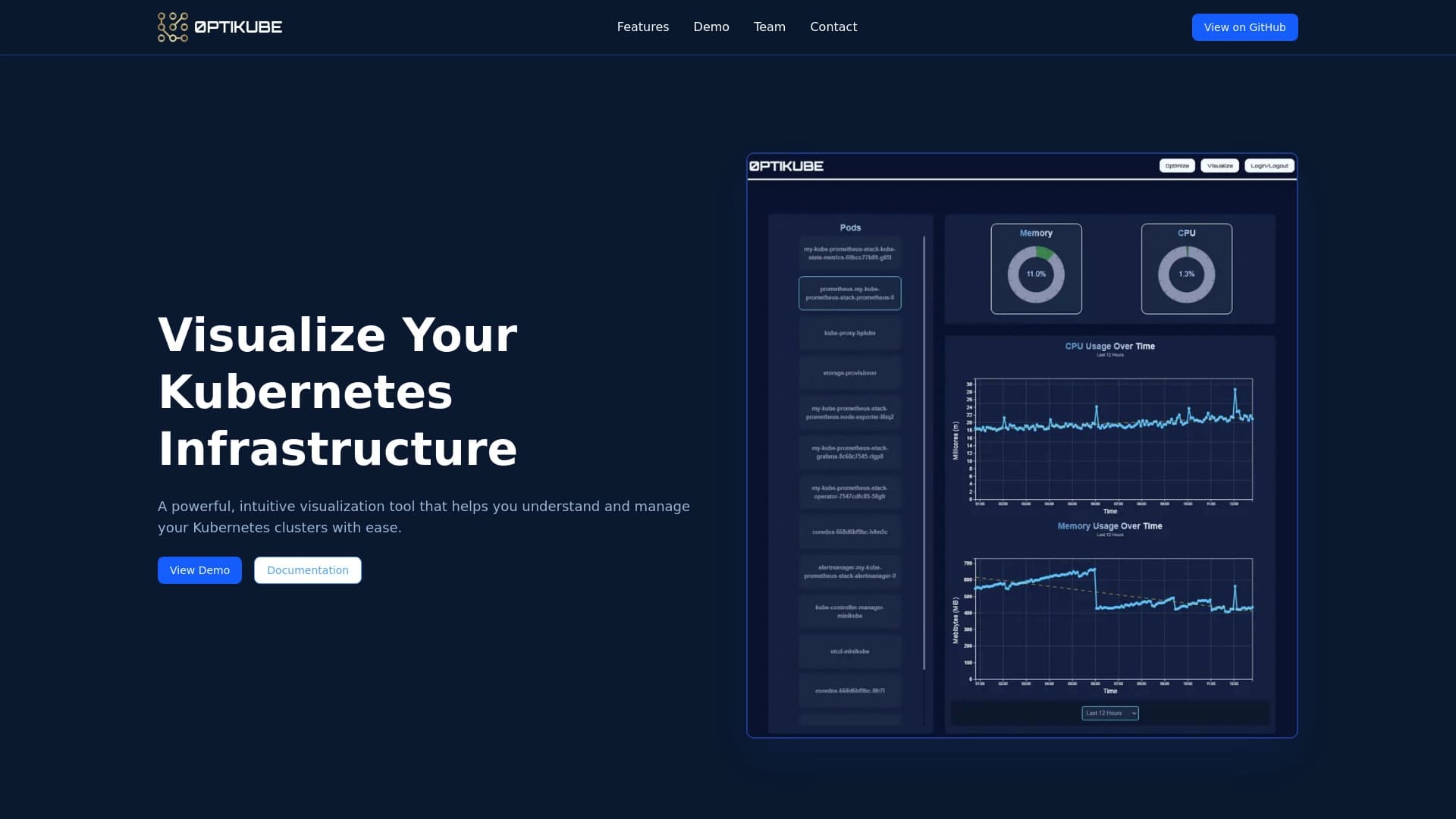
0PTIKUBE is a specialized AI tool for monitoring and optimizing Kubernetes clusters. وتربط هذه الخدمة بالهياكل الأساسية الخاصة بك، وتجمع وتحلل قياسات أداء المجموعات في الوقت الحقيقي، ثم تعرض البيانات في شكل مرئي - من خلال الخرائط والرسوم البيانية، ولوحات المتابعة الإعلامية. السمة الرئيسية للأداة هي ذكائها الاصطناعي المبني الذي لا يعرض الإحصاءات فحسب بل يضع أيضاً بشكل مستقل توصيات لتخصيص الموارد والقضاء على الاختناقات ويسمح هذا لمهندسي ديفوب برؤية الصورة الكاملة لأداء الهياكل الأساسية دون الحاجة إلى البحث يدويا في تفاصيل كل عنصر.
0PTIKUBE Characteristics
| الخصائص | القيمة |
|---|---|
| النوع | AI-powered Kubernetes visualization and optimization tool |
| Categories | أدوات الرصد والإبلاغ، وإدارة السجلات، ودعم أجهزة الشرطة |
| المطور | 0ptikube |
| المستوى الحر | نعم |
| الزيارات الشهرية | 13.6K |
| تاريخ النشر في الموقع | 10 أيلول/سبتمبر 2025 |
| التقديرات الصفحة | 10 أمثال، 356 رأيا |
| نموذج التوزيع | غير محددة |
من هو (تيكوبي) المناسب؟
فرق الشرطة ومهندسي المنصات
0PTIKUBE is designed primarily for DevOps teams and platform engineers who work with Kubernetes infrastructure on a daily basis. وستكون هذه الأداة مفيدة لأولئك الذين يرغبون في قضاء وقت أقل في التفاصيل التقنية لكل عنصر من عناصر المجموعات، مع رؤية الصورة العامة لكيفية عمل النظام ككل.
أخصائيون يقدرون الرؤية
والأداة مناسبة أيضا للمهندسين الذين يفضلون العمل باللوحات الضوئية والرسوم البيانية بدلا من السجلات الخام والبيانات البرمجية. لوح الـ 0PTIKUBE يسمح لك بتقييم صحة المجموعات بسرعة واتخاذ القرارات بناء على معلومات واضحة بصريا.
كيف أستخدم (تيكوبي)؟
التواصل مع مجموعة
لكي تبدأي بـ (تيكوبي) يجب أن تسجلي على موقع الخدمة وتربطي الأداة بمجموعتك ولا تتطلب عملية الاتصال تشكيلا معقدا - مجرد اتباع التعليمات التي توفرها الخدمة.
العمل مع لوحة التحكم
بمجرد أن يتم ربط لوحة التحكم حيث يتم عرض حالة المجموعة في الوقت الحقيقي ويمكن للمستعملين أن ينظروا إلى الخرائط والرسوم البيانية والمقاييس، وأن يروا على الفور المجالات التي تنطوي على مسائل أو اختناقات محتملة. The AI system automatically generates resource optimization recommendations that appear directly on the dashboard.
السمات الرئيسية لـ 0PTIKUBE
رصد المجموعات على الإنترنت
وتوفر الخدمة رصدا متواصلا في الوقت الحقيقي لمجموعة الكوبرنيت الخاصة بك. أي تغيرات في حالة البنية التحتية تنعكس على الفور على لوحة التحكم، مما يسمح لك بالكشف بسرعة عن الشذوذ والاستجابة لها.
تصور البيانات
ويقدم برنامج " تيكوب " عدة خيارات لعرض البيانات: مخططات لتحليل الاتجاهات والرسوم البيانية لفهم العلاقات بين العناصر. هذا يجعل المعلومات عن أداء المجموعات مفهومة بشكل مناسب حتى لمن لم يطلعوا على التفاصيل
AI optimization recommendations
وقد جمعت تحليلات الاستخبارات الاصطناعية التي تم بناؤها مقاييس وقدمت توصيات في الوقت الحقيقي لتعظيم الموارد. The system automatically generates advice on how to better redistribute load, which components require attention, and where costs can be reduced.
0PTIKUBE benefits
الإدارة المبسطة
0PTIKUBE significantly simplifies Kubernetes administration. ويجد مهندسو الشغب مشاكل أسرع بفضل التمثيل البصري، ويمكن القيام بمهام روتينية، وتحرير الوقت للعمل الأكثر أهمية.
وفورات الموارد
توصيات الخدمه تساعد على تخصيص الموارد ويوحي النظام نفسه حيثما يمكن تخفيض القدرة المفرطة، مما يساعدك على تجنب المبالغة في دفع رسوم الخواديم غير الضرورية وتخفيض تكاليف البنية التحتية العامة.
بسرعة على متن الطائرة
لوح الـ 0PTIKUBE غير ملائم: جميع القياسات الرئيسية تظهر على الخرائط والرسوم البيانية، ويمكنك فهم الواجهة خلال دقيقتين. هذا يخفض حاجز الدخول ويسرع في اعتماد الأداة في سير عملك
0PTIKUBE disadvantages
تعقيد التنفيذ
وتنفيذ برنامج " 0PTIKUBE " في مجموعة معقدة مهيأة بالفعل يستغرق وقتا. ويمكن أن يتطلب الربط بين الأداة وتدريب الفريق على العمل معها بذل جهود كبيرة ينبغي النظر فيها عند التخطيط.
عدم الشفافية في قرارات التنفيذ
The sense behind AI recommendations is not always obvious. في بعض الأحيان عليك أن تدقق بشكل يدوي في اقتراحات النظام لأنه ليس من الواضح دائما البيانات المحددة التي استخدمها الخوارزمي لتوليد توصية معينة
خطر فقدان السيطرة
ومع الثقة المفرطة في التشغيل الآلي، قد يفقد الفريق فهم تفاصيل عمليات المجموعات. هذا يخلق مخاطر معينة: إذا يعتمد المهندسون فقط على توصيات AI، قد يفتقدون المعاني التي لا يحسبها النظام.
ما هي المشاكل التي حلها (تيكوبي)؟
الرصد في الوقت الحقيقي
مهمة الخدمة الرئيسية هي توفير الرصد المستمر لمجموعات الكوبرنيت النظام يتتبع جميع القياسات الرئيسية ويحذر من الشذوذ
تحديد الاختناقات
ويساعد برنامج " PTIKUBE " على تحديد مجالات المشاكل والاختناقات في أداء الهياكل الأساسية. وتقوم الأداة بتحليل الحمولة وتحدد المكونات التي تعمل في حدودها أو، على العكس من ذلك، تستخدم استخداما ناقصا.
تخصيص الموارد على النحو الأمثل
وتقدم الدائرة توصيات محددة لإعادة توزيع الموارد بين عناصر المجموعات. ويتيح ذلك استخدام القدرات المتاحة على نحو أكثر كفاءة ويتجنب الإفراط في الإنفاق.
إدارة التشغيل الآلي
0PTIKUBE handles part of routine administration tasks by automatically generating tips and alerts, reducing the عبء العمل على المهندسين
تصور الهياكل الأساسية
وتقدم هذه الأداة حالة الهياكل الأساسية في شكل بصري - من خلال الخرائط والرسوم البيانية - مما يسهل الحصول على المعلومات اللازمة لحفر وتسريع عملية صنع القرار.
تسعير 0PTIKUBE
الخطة الأساسية
وتقدم الخطة الأساسية مجانا. إنها تشمل الوصول إلى الصور المصورة للمجموعات الأساسية والرصد مما يتيح لك استكشاف قدرات الخدمة الأساسية بدون أي التزام مالي
الخطة المهنية
وتكلف الخطة المهنية 11 دولارا في الشهر. ويشمل التقرير تقارير متطورة، وملامح تعظيم الموارد، والتكامل مع النظم الأخرى.
خطة المشاريع
وتبلغ تكلفة خطة المؤسسة 33 دولارا شهريا. وهو يوفر الدعم المكرس، والحلول العرفية المصممة لتلبية احتياجات محددة من العملاء، والملامح الأمنية المتقدمة.
مدة الاستخدام لـ 0PTIKUBE
وللبدء في استخدام هذه الخدمة، يلزم التسجيل على الموقع الشبكي الرسمي لشركة 0PTIKUBE. وبعد إنشاء حساب، تحتاج إلى ربط الأداة بمجموعتك من الكوبرنيتز - وعندئذ فقط تقوم بجميع سمات الرصد والتعظيم. ولا يكشف عن مصطلحات الاستخدام الإضافية، بما في ذلك سياسات تجهيز البيانات واتفاقات مستوى الخدمات، في المصادر المتاحة.
0PTIKUBE availability
(تيكوبي) متاح كخدمة على الإنترنت من خلال موقع المطور وهناك حاجة إلى وجود اتصال ثابت بالإنترنت ومصفوف لاستخدامه. ولا ترد في الصفحة الرسمية معلومات عن اللغات المدعومة، والمناطق المتوافرة، والحاجة إلى شبكة البرامج المواضيعية، ولذلك ينبغي لمستعملي مختلف البلدان التحقق من هذه التفاصيل بأنفسهم قبل البدء.
How 0PTIKUBE different from alternatives
0PTIKUBE occupies the niche of specialized Kubernetes monitoring solutions powered by artificial intelligence. وخلافاً لأدوات التنمية العامة الغرض (مثل الطيار غيت هوب، أو كورسور آي، أو ريبليت)، تركز شركة " TIKUBE " على مهام إدارة المجموعات حصراً. والفرق الرئيسي في البرامج الأوسع نطاقاً لأجهزة الحماية هو نظام المعلومات المسبقة عن علم الذي لا يجمع القياسات فحسب بل يفسّرها بشكل مستقل أيضاً اقتراح إجراءات ملموسة لتحقيق الحد الأمثل. وبالإضافة إلى ذلك، تشدد الدائرة على تمثيل البيانات البصرية: فالرسوم البيانية والرسوم البيانية تجعل المعلومات متاحة للفهم السريع، مما يميزها عن الأدوات التي تعمل أساساً مع البيانات والسجلات الرقمية.
خاتمة
0PTIKUBE is a niche AI tool for visualizing and optimizing Kubernetes clusters, aimed at DevOps engineers and platform specialists. وتساعد هذه الخدمة على تقليص الوقت المنفق على كشف المشاكل، وتقدم توصيات لتحقيق وفورات في الموارد، وتبسط الإدارة من خلال التمثيل البصري. ومع ذلك، ينبغي أن تنظروا في مدى تعقيد تنفيذها في الهياكل الأساسية القائمة وضرورة إجراء تقييم دقيق لتوصيات التنفيذ حتى يحافظ الفريق على فهم كامل للعمليات التي تجري داخل المجموعة.
الأسئلة المتكررة
انظر أيضا


AI agent for assisting with programming and optimizing the development work flow.

خدمة سحابية مجهزة بالشبكة العصبية لتوليد 3D نماذج وأجهزة نصية وصور متحركة.


تمديد الكروم الذي يساعد على إدارة التذاكر، والتاريخ، والعلامات الكتابية مع مساعد آي.


فريق (سايد آي) الذي يساعد على الإجابة عن الأسئلة والعمل مع الوثائق وتوليد الصور.


منبر إدارة المشاريع مع تخصيص المهام، وتتبع الوقت، وملامح رصد عبء العمل على الموظفين.


مجموعة أدوات AI لتوليد الفيديو والتحرير، بما في ذلك الأفاتار، ونظام الشفاه، وإستنساخ الصوت.


منبر لإنشاء نظم متعددة الوكلاء وأجهزة دردشة لدعم العملاء الآليين وتوليد الرصاص.

AI platform for voice synthesis and cloning that converts text into reality speech.