

SpeechGen
SpeechGen is an online service for converting text to speech using realistic AI voices.
Overview
SpeechGen
SpeechGen AI Description
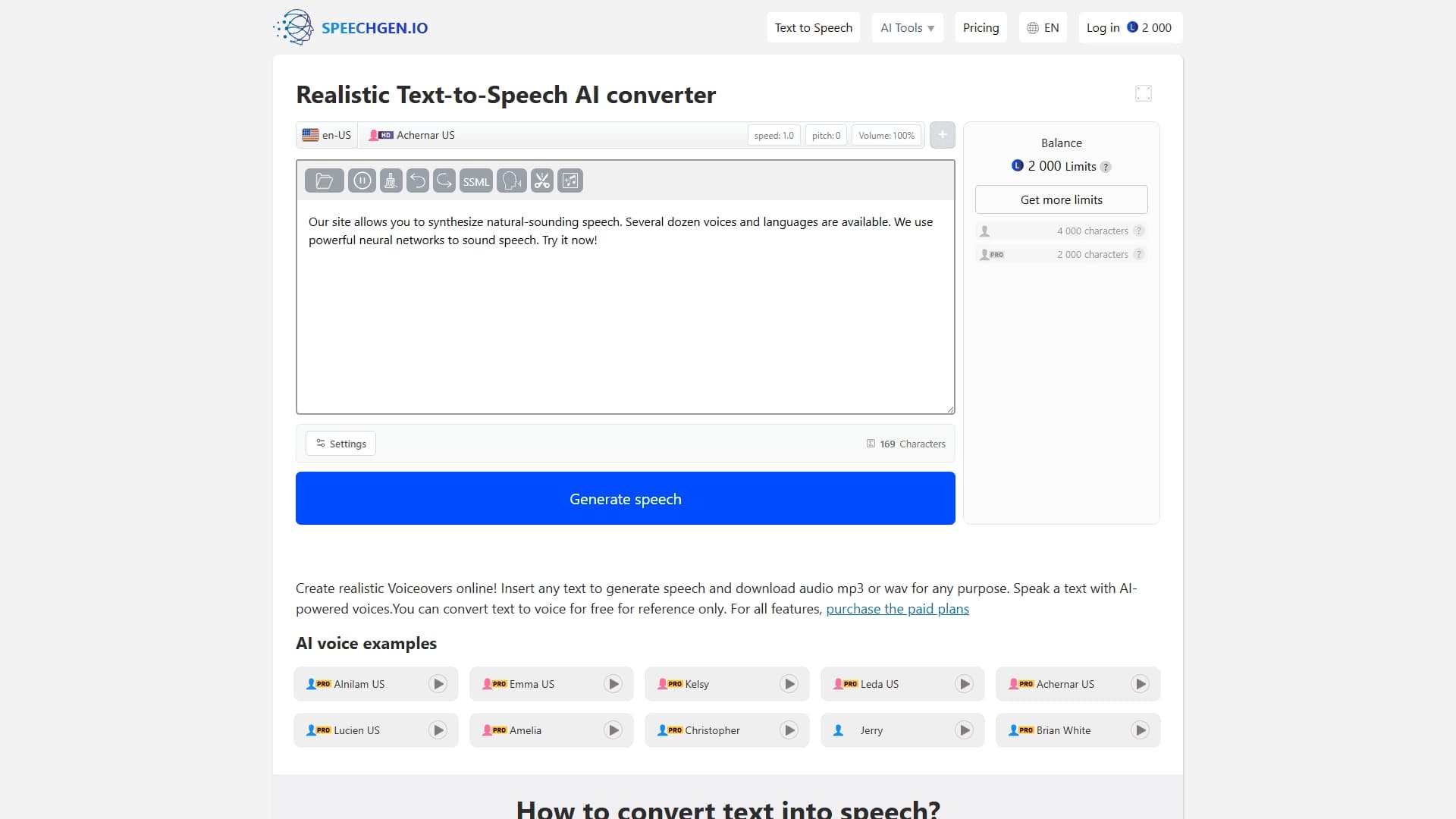
SpeechGen is an online AI-powered service that converts written text into realistic spoken speech. The platform allows you to create audio files from text materials using a library of more than 270 naturally sounding voices. With this tool, you can generate voiceovers for videos, podcasts, e-courses, advertising materials, and other projects that require high-quality voice content.
The service works entirely in a web browser, eliminating the need to install additional software. SpeechGen supports uploading text in various formats, including PDF and DOCx subtitles, and also provides the ability to adjust voice parameters to suit specific tasks. The generated result can be saved in one of popular audio formats.
SpeechGen Features
| Characteristic | Value |
|---|---|
| Tool type | AI text-to-speech converter |
| Categories | Text to Speech, Audio Processing, Voice Assistants, For Bloggers, Education |
| Platform | Web service |
| Pricing model | Pay-as-you-go (one-time packages), from $4.99 |
| Free plan available | Limited free generation for trial purposes |
| Credit card required | No |
| SSML support | Yes |
| Export formats | MP3, WAV, OGG |
| Number of voices | Over 270 |
| Multi-voice editor | Yes |
| Mobile apps | No |
| API | Not specified |
Who Is SpeechGen Suitable For?
Content Creators
Video bloggers, YouTubers, and podcast hosts can use SpeechGen to generate voiceovers or narrations for their videos without needing to hire professional voice actors. This is especially convenient for those who publish content regularly and need quick access to high-quality audio tracks.
Educators and Course Developers
Education professionals use the service to create voiceovers for e-courses, lectures, and learning materials. The ability to choose a voice and adjust speech rate helps adapt content to different age groups and skill levels.
Marketers and Entrepreneurs
For advertising videos, product presentations, and voice messages on social media, SpeechGen provides a fast way to get professional voiceovers. The service is also suitable for creating audio versions of articles and posts, expanding audience reach.
Accessibility Specialists
The tool is useful for creating audio versions of text materials, making information accessible to people with visual impairments or reading difficulties.
How to Use SpeechGen?
Step-by-Step Guide
The process of working with the service involves a few simple steps. First, go to the SpeechGen.io website. Then paste or enter text into the dedicated text field. Next, choose a suitable voice and voiceover language. Adjust the speed, pitch, and volume as needed. Press the speech generation button and wait for processing. Finally, download the resulting audio file in MP3 or WAV format.
Additional Customization Options
Besides basic settings, SpeechGen supports SSML tags for fine-tuning pronunciation. This allows you to precisely set pauses, stresses, and intonation, which is especially important when voicing complex texts or dialogues. The multi-voice editor lets you create a recording with multiple voices within a single text, which is convenient for scripted dialogues.
Key SpeechGen Features
AI Speech Generation
SpeechGen converts text into naturally sounding speech using artificial intelligence technologies. The voices in the service sound almost like real voice actors and support many languages and accents.
Voice Parameter Customization
Users can adjust speech rate, pitch, volume, and also emphasize individual words using SSML. This makes it possible to fine-tune the voiceover to match the nature of the content, from calm narrations to energetic advertisements.
Export to Audio Formats
Finished files can be downloaded in MP3, WAV, or OGG. This makes them compatible with most video and audio editing software, as well as popular players and content hosting platforms.
Cloud Storage
The service saves generation history and favorite voices in the cloud, allowing you to return to previously created files and reuse settings.
SpeechGen Advantages
Wide Selection of Voices
The library includes more than 270 naturally sounding voices in many languages and with different accents. This makes it possible to choose a voice that fits a specific audience and content style.
Flexible Pricing
The pay-as-you-go system lets you buy one-time character packages without signing up for a subscription. This is beneficial for users with irregular workloads. Discounts of up to 50% are available on some packages.
Commercial Use at No Extra Cost
Generated audio files can be used in commercial projects (videos, ads, courses) without needing to pay license fees for each project separately.
Multi-Voice Editor and Additional Format Support
Creating dialogues with several voices in one text does not require file merging. In addition, the service supports converting subtitles, PDF, and DOCx documents into audio.
Convenient Interface
The interface is clear and works directly in the browser, so there is no need to install software or learn complex tools.
SpeechGen Disadvantages
No Free Plan
Full use of the service requires purchasing a package. Free capabilities are limited and intended only for getting familiar with the functionality.
No Mobile Apps
SpeechGen does not have its own apps on Google Play or the Apple App Store. The service can be used on mobile devices only through a browser.
No Open Source Code
The platform does not provide access to its source code, which may be a limitation for developers who want to integrate the solution into their own products.
Limited Ecosystem Presence
There is no dedicated Chrome extension or Discord community. For some users, this may reduce the convenience of using the service in their usual working environment.
What Problems Does SpeechGen Solve?
Video Voiceovers
Creating narration for YouTube channels, promo videos, and video lessons. The service enables you to quickly get a finished track without recording in a studio.
Podcast Production
Generating voice for podcast episodes, including intro and outro segments, as well as voiceovers for interviews and monologues.
E-Learning
Voiceovers for lectures, simulators, tests, and instructions in distance learning systems. Adjusting the pace and tone helps make materials more accessible.
Advertising and Marketing Materials
Voice accompaniment for commercials, audio announcements, and social media content.
Accessibility
Creating audio versions of texts for people with disabilities, as well as converting PDF and DOCx documents into audio format.
SpeechGen Pricing
SpeechGen operates on a pay-as-you-go model — users purchase one-time credit packages without a subscription. Package prices:
- 25,000 credits — $4.99;
- 65,000 credits — $9.99;
- 200,000 credits — $24.99;
- 500,000 credits — $49.99.
Some packages are available with discounts of up to 50%. There is also free generation of a limited volume for getting familiar with the service. A lifetime plan is available with a one-time payment.
SpeechGen Terms of Use
Commercial Use
Generated voiceovers can be used in commercial projects at no extra cost. Users do not need to obtain separate licenses for publishing content with SpeechGen voices on monetization platforms.
Free Features
Limited free generation is available for testing the functionality. No credit card is required to use basic features, but the free credits are small, and regular use will require purchasing a package.
SpeechGen Availability
SpeechGen is available as a web service at speechgen.io. The platform works in any modern browser without additional installation. There are no dedicated mobile apps for Android and iOS, but the service displays and works correctly through mobile browsers. No Chrome extension or Discord integration has been officially released. No geographic availability restrictions or VPN requirements have been specified in the source data.
How SpeechGen Differs from Alternatives
The main difference between SpeechGen and services such as Google Text-to-Speech, Amazon Polly, IBM Watson Text to Speech, Microsoft Azure Text to Speech, and iSpeech is the pricing model. Instead of a monthly subscription, SpeechGen offers one-time packages that do not expire — you buy credits once and use them whenever you want. A lifetime plan is also available, which is rare in the TTS market.
Other features include a multi-voice editor that lets you create dialogues in a single text, SSML support, and cloud saving of history and favorites. At the same time, SpeechGen does not have an API, unlike its direct competitors. The number of voices in the service exceeds the stated 270 — according to some reports, more than 1,000 — which provides high variability. The ability to convert PDF, DOCx, and subtitles into audio also sets SpeechGen apart from alternatives.
Conclusion
SpeechGen is a convenient text-to-speech service with a broad library of AI voices, flexible parameter customization, and a one-time payment system. It suits content creators, educators, marketers, and accessibility specialists who want high-quality voiceovers without monthly commitments or additional license fees for commercial use. The main limitations of the service are the modest free limit, the lack of mobile apps, and the absence of API access. Otherwise, SpeechGen covers most voice generation needs for videos, podcasts, courses, and ads, offering one of the simplest terms for commercial use among alternatives.