

PicWish
AI tool for automatic photo processing: background removal, quality enhancement, and image retouching.
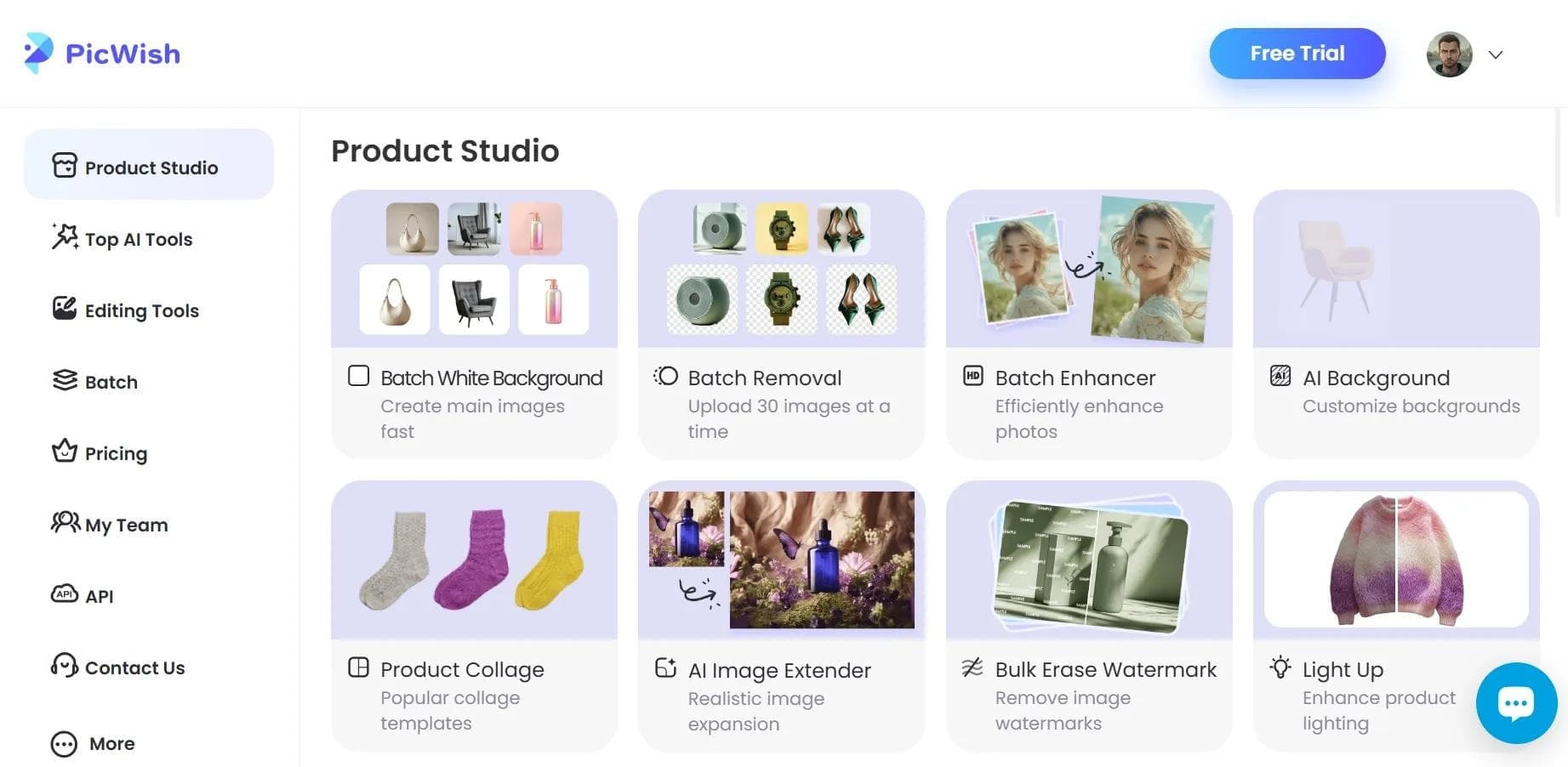
Overview
PicWish
Description of PicWish neural network
PicWish is an AI tool for automatic image processing developed by Wangxu Technology. The service solves a wide range of photo editing tasks: removing backgrounds from portrait and product photos, enhancing the sharpness of old and blurry images, removing unwanted objects, and restoring color to black-and-white photos.
The main feature of PicWish is its focus on simplicity and speed. The user doesn't need special graphic editor skills: just upload an image, select the desired tool, and get the result in seconds. The service is designed for both one-off tasks and regular work with large volumes of files — batch processing allows up to 30 images at once.
Key focus
PicWish emphasizes automation of routine editing tasks. Background removal, quality enhancement, retouching, and batch processing are performed by the neural network without manually configuring complex parameters, which is especially important for users who need to save time.
Distribution model
The service operates on a freemium model: upon registration, the user gets 10 free credits to try the tools, and further use is covered by purchasing credits or a paid subscription.
PicWish characteristics
| Characteristic | Value |
|---|---|
| Type | AI photo editor |
| Categories | Background removal, image editing, photo enhancement, photo restoration, object removal |
| Platforms | Web, iOS (App Store), Android, Windows, macOS |
| Interface languages | 36 languages, including Russian |
| Free plan | Yes (10 credits upon registration) |
| Distribution model | Freemium |
| Developer | Wangxu Technology |
| Website | picwish.com |
Who is PicWish suitable for?
PicWish is designed for a wide audience — from professional designers to everyday users who need to quickly process a few photos.
Designers and sellers
For designers and product sellers, the service is useful primarily for background removal and preparing images for online stores and marketing materials. The high accuracy of selecting complex objects such as hair or hollow objects delivers quality results without manual touch-up.
Everyday users
Improving the sharpness of old and blurry photos, restoring color in black-and-white images, and removing unwanted objects are useful for anyone who wants to organize their photo archive without learning professional editors.
Those who save time
Since all operations are automatic, the service suits those who want to get rid of routine manual image processing and achieve professional results without special skills.
How to use PicWish?
Using PicWish doesn't require installing complex software or special training — the entire process is designed to be as simple as possible.
Registration and first steps
The first step is to register on the website or download the app for your platform. Registration takes about 30 seconds, and right after it the user receives 10 free credits to explore the tools.
Uploading and processing an image
Open the editor, upload an image, select the appropriate processing tool (background removal, quality enhancement, object removal, etc.), adjust settings if needed, and save the result in the desired format. The finished file can be exported at original resolution.
Batch processing
For working with large numbers of images, PicWish supports batch processing — you can upload up to 30 files at once, and the service processes them automatically, saving significant time for users working with product catalogs or photo archives.
Key features of PicWish
Background removal
The service's core tool is background removal with precise selection of even complex objects, including hair and hollow objects. Processing takes just a few seconds, after which the user can place the image on a solid background or generate a new one.
Photo quality enhancement
Photo Enhancer improves image sharpness (sharpness can be increased several times over), retouches portraits and product shots, and restores blurry and underexposed photos. Color correction and colorization of black-and-white photos are also available.
Object removal and content generation
The built-in object removal tool deletes unwanted elements from photos without visible traces. In addition, the service can generate artificial backgrounds, create AI wallpapers and AI art, and recognize and extract text from images.
Advantages of PicWish
Accuracy and processing speed
One of the main strengths is high-accuracy background removal, including on complex objects. Processing takes little time, and the service's throughput is substantial — the system can handle up to 300,000 images per day.
Accessibility and simplicity for every user
The service is available on the web platform and as apps for iOS, Android, Windows, and macOS, and the interface is translated into 36 languages, including Russian. Professional results are achieved without special skills, and free credits are provided to get started.
Result quality and security
Finished images can be exported at original resolution, and features are updated every few months. Uploaded data is encrypted, ensuring protection of user files.
Disadvantages of PicWish
A detailed list of the service's limitations is not provided in the available data. It can be noted that free access comes with restrictions: users get only 10 credits upon registration, after which they need to purchase credits or subscribe to a paid plan to continue. As with many similar services, registration is required for full functionality.
What tasks does PicWish solve?
PicWish is designed as a tool for automating routine image operations, so it solves a wide range of practical tasks.
- Background removal — precise object cutout for portraits, product photos, and design layouts.
- Quality enhancement — increasing the clarity and sharpness of blurry photos, retouching portraits and product images.
- Photo restoration — color correction and colorization of black-and-white photos, improving old and underexposed images.
- Object removal — removing unwanted elements from images without visible traces.
- Volume processing — batch processing of many files (up to 30 at once).
- Content generation — creating artificial backgrounds, AI wallpapers, and AI art.
- Text extraction — recognizing and extracting text from images.
PicWish pricing
PicWish operates on a freemium model. Upon registration, users get 10 free credits for a first look at the service. Further use is covered in two ways: purchasing additional credits (the exact cost isn't listed on the source page) or subscribing to PicWish Pro.
PicWish Pro is a paid subscription that removes the limits of the free plan and gives access to the full set of service features.
Terms of use of PicWish
Using PicWish requires registration on the website or in the app — it takes about 30 seconds. When creating an account, users receive 10 free credits.
The service operates in accordance with the official Terms of Use and Privacy Policy. User-uploaded content is protected by encryption during transmission, ensuring the safety of processed images.
PicWish availability
PicWish is available in several formats, so users can choose the most convenient way to work. The primary one is the web version, available at picwish.com — it works in any browser without installing additional software.
In addition to the online version, the service is offered as native apps for mobile platforms iOS (App Store) and Android, as well as for desktop systems Windows and macOS. The interface is translated into 36 languages, including Russian, making the service convenient for users from different countries.
How PicWish differs from alternatives
PicWish stands out among other AI image editors primarily for its combination of speed and processing accuracy. The system's high throughput allows it to process up to 300,000 images per day, while background removal precisely selects complex objects such as hair and hollow objects.
Another distinguishing feature is the set of additional functions that go beyond classic editing. In addition to background removal and quality enhancement, the service offers batch processing of up to 30 files, color restoration of black-and-white photos, background and AI wallpaper generation, and text extraction from images.
Wide platform availability (web, iOS, Android, Windows, macOS) and support for 36 languages, including Russian, make the service convenient for users from different countries and on different devices. At the same time, the freemium model with free credits at registration lets you evaluate the main features before purchasing a subscription.
Conclusion
PicWish is a feature-rich AI photo editor that solves a wide range of automatic image processing tasks: background removal, quality enhancement, retouching, restoration of black-and-white photos, batch processing, and content generation. The service focuses on simplicity and speed: professional results are achieved without special skills, and batch processing of up to 30 files saves time when working with large volumes. Availability on all major platforms, Russian-language support, and a free plan make PicWish a reasonable choice for designers, sellers, and everyday users who need to quickly tidy up images.
Frequently asked questions
See also


Neural network from Alibaba for processing and generating product images for online stores.


Online photo editor with AI-powered features.


AI-powered web service for automatically removing backgrounds from images in seconds.

Online platform for photo editing, collage creation, and graphic design using AI tools.

Cross-platform video editor with AI features for creating and editing videos.


AI photo editor for online stores that automatically changes backgrounds, generates realistic models for clothing try-on, and enhances product images.

API for automatic photo background removal, tailored for e-commerce products.


Online video editor from Microsoft with AI-powered features for quick editing right in your browser.