

Krisp
AI tool for real-time noise suppression and audio processing during calls and video conferences.
Overview
Krisp
About the Krisp neural network
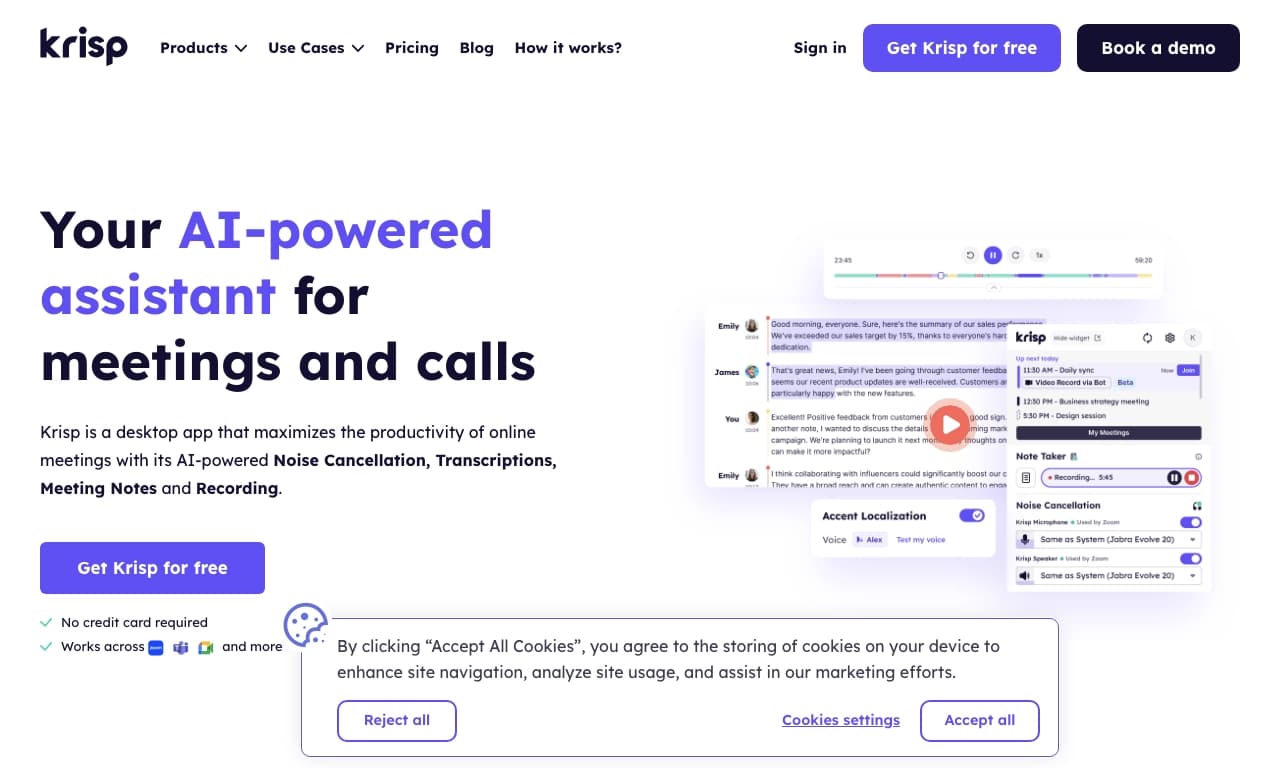
Krisp is an AI tool designed for real-time audio processing during calls and video conferences. The service's core function is intelligent noise suppression: the neural network removes background noise, extraneous voices, and echo from both sides of the conversation, ensuring voice clarity. Unlike many similar solutions, Krisp processes audio data locally on the user's device without sending it to remote servers, which enhances communication privacy.
In addition to noise suppression, the tool offers automatic transcription of conversations into text, note-taking on key meeting points, and real-time accent conversion for English pronunciation. Krisp integrates with popular video conferencing platforms, including Zoom, Microsoft Teams, and Google Meet, and operates at the operating system level, processing the audio stream before it reaches the call application.
Krisp characteristics
| Characteristic | Value |
|---|---|
| Tool type | Software, neural network for audio recording and transcription |
| Categories | Noise suppression, Audio processing, Audio enhancement, Speech to text, Transcription |
| Business model | Freemium (free with limitations) |
| Platforms | Microsoft Windows, Web |
| Free tier available | Yes (60 minutes of noise suppression per day) |
| Editorial rating | 9.3 out of 10 |
| User rating | 4.3 out of 5 (★★★★☆) |
| Availability | May be subject to regional restrictions |
| Transformations | Audio → audio, Speech → text |
Who is Krisp suitable for?
International teams and remote workers
The tool is suitable for anyone who works remotely or participates in online meetings. The accent conversion feature helps improve speech comprehension in international teams where participants speak English with different pronunciations.
Call center operators and customer support specialists
Krisp provides specialized tools for call centers: noise removal, accent conversion, and voice translation. This helps improve customer service quality, especially when working in noisy offices or at home.
Developers
Developers have access to an SDK that allows integrating voice isolation and noise suppression features into third-party applications. This makes Krisp a useful tool for building audio-related products.
Individual users and companies
Krisp suits both individuals who want to improve the quality of personal calls and organizations of any size that need professional audio processing.
How to use Krisp?
Installation and setup
To get started with Krisp, you need to visit the official website and register. The tool is available for download on the Microsoft Windows platform through the app store. After downloading, Krisp automatically connects to the device's audio system. Setup takes a few minutes and requires no special technical knowledge.
Use in communication applications
After installation, Krisp can be selected as the primary audio source in any calling application. The tool is compatible with all popular communication platforms, including Zoom, Microsoft Teams, and Google Meet. It works in real time, processing audio before it reaches the application.
Key features of Krisp
Intelligent real-time noise suppression
Krisp removes background noise, extraneous voices, and echo from both sides of the conversation. The system processes the audio stream locally on the device, ensuring low latency and privacy.
Automatic transcription and note-taking
The tool transcribes conversations into text in real time. The built-in assistant captures key discussion points and creates automatic meeting summaries. This data can be used for later analysis or as a replacement for manual note-taking.
Real-time accent conversion
For English-language conversations, Krisp adapts pronunciation, making speech more understandable for participants from different countries. This feature is especially useful for international teams.
Meeting recording
Krisp supports automatic call saving with the ability to listen back and transcribe.
SDK for developers
A dedicated SDK is available for integrating voice isolation and noise suppression features into third-party applications.
Advantages of Krisp
Privacy and security
Krisp processes audio data locally on the user's device without sending it to servers. This enhances communication privacy and reduces the risk of sensitive information leakage.
High noise suppression efficiency
The tool demonstrates high-quality removal of background noise, extraneous voices, and echo. Two-sided noise suppression improves audibility on both ends of the conversation.
Versatility and compatibility
Krisp integrates with all popular communication applications, including Zoom, Microsoft Teams, and Google Meet. It does not require adding third-party bots to conferences, which simplifies use.
Additional capabilities
Automatic transcription and note-taking eliminate the need to manually record meetings. The accent conversion feature improves communication in international teams.
Disadvantages of Krisp
High load on older devices
Due to the intensive computations required for neural networks to work, Krisp can place significant load on the processor. This may cause slowdowns on older or low-power devices.
Limited time in the free version
The free tier is limited to 60 minutes of noise suppression per day. For active users who spend a lot of time on calls, this may not be enough.
Limited availability
Krisp may be subject to regional availability restrictions, which can create additional difficulties for some users.
What tasks does Krisp solve?
Eliminating background noise and echo
The tool effectively removes household noises, street sounds, other people's voices, and echo during online meetings. This lets you focus on the conversation without being distracted by external irritants.
Automating meeting recording and transcription
Krisp handles recording conversations, automatically transcribing them into text, and structuring key discussion points. This removes the need to take notes manually.
Adapting English pronunciation
For international teams, the tool converts accents in real time, making English speech more understandable for all participants.
Improving audio quality in call centers
Specialized call center features help improve sound quality during customer conversations, raising the level of service.
Integrating voice isolation into third-party applications
Through the SDK, developers can implement noise suppression and voice isolation features into their own products.
Krisp pricing
Krisp operates on a freemium business model. Specific plans include three tiers:
- Free — up to 60 minutes of noise suppression per day, two notes, and unlimited transcriptions.
- Pro — $8 per month, unlimited noise suppression, unlimited notes, and call history.
- Enterprise — a customizable plan for large organizations with accent adaptation support and additional security features.
Specific pricing for corporate clients is not listed on the official pages and requires individual negotiation.
Krisp terms of use
The free version of Krisp has a limit of 60 minutes of noise suppression per day. Access to advanced features such as unlimited noise suppression, unlimited notes, and call history requires a paid Pro or Enterprise subscription. The tool may be subject to regional availability restrictions. Other terms of use are not specified on the official pages.
Krisp availability
Krisp is available for download on the Microsoft Windows platform through the app store, as well as through the web version on the official website. The tool integrates with popular communication applications, including Zoom, Microsoft Teams, and Google Meet. The service may be subject to regional availability restrictions. Information about support for other operating systems and languages is not specified on the official pages.
How Krisp differs from alternatives
Krisp stands out from its alternatives in several key ways. First, the tool processes audio data locally on the user's device, ensuring communication privacy — information is not transmitted to servers. Second, Krisp offers two-sided noise suppression, removing noise and echo from both sides of the conversation rather than just one. Third, in addition to the core noise suppression function, the tool provides extra capabilities: real-time accent conversion, automatic transcription and note-taking, as well as an SDK for integration into third-party applications. Alternatives include Whisper AI, Moises, PhonicMind, LALAL.AI, Dubbing AI, iMyFone MagicMic, Rave DJ, and OpenVoice AI, but none of them offers the full set of features available in Krisp.
Conclusion
Krisp is a multifunctional AI tool for improving audio quality on online meetings, offering intelligent real-time noise suppression, automatic transcription, accent conversion, and note-taking. The tool runs locally on the device, ensuring privacy, and integrates with all popular communication platforms. Krisp suits individual users, international teams, call center operators, and developers. The freemium distribution model lets you start free with a limit of 60 minutes of noise suppression per day, while the paid Pro and Enterprise subscriptions unlock unlimited capabilities.
Pricing
Frequently asked questions
Similar AI tools





See also
A service for generating music from text descriptions using latent diffusion models.

A text-to-speech service with hundreds of customizable voices in multiple languages.
A neural network for music generation that creates tracks from text descriptions, transforms audio and video into new compositions, and turns MIDI files into full-fledged arrangements.
Free online text-to-speech service with over 200 voices in multiple languages.
Open-source computer vision library for face analysis, recognition, and detection.
Online tool for generating drum loops and rhythmic patterns using a neural network.
Platform for automatic extraction and structuring of unstructured data from Amazon S3.

A platform for professional audio processing with AI features for track separation, mastering, and voice changing.