

GauGAN
Neural network from NVIDIA for creating realistic landscape images from simple sketches and text descriptions.
Overview
GauGAN
GauGAN Overview
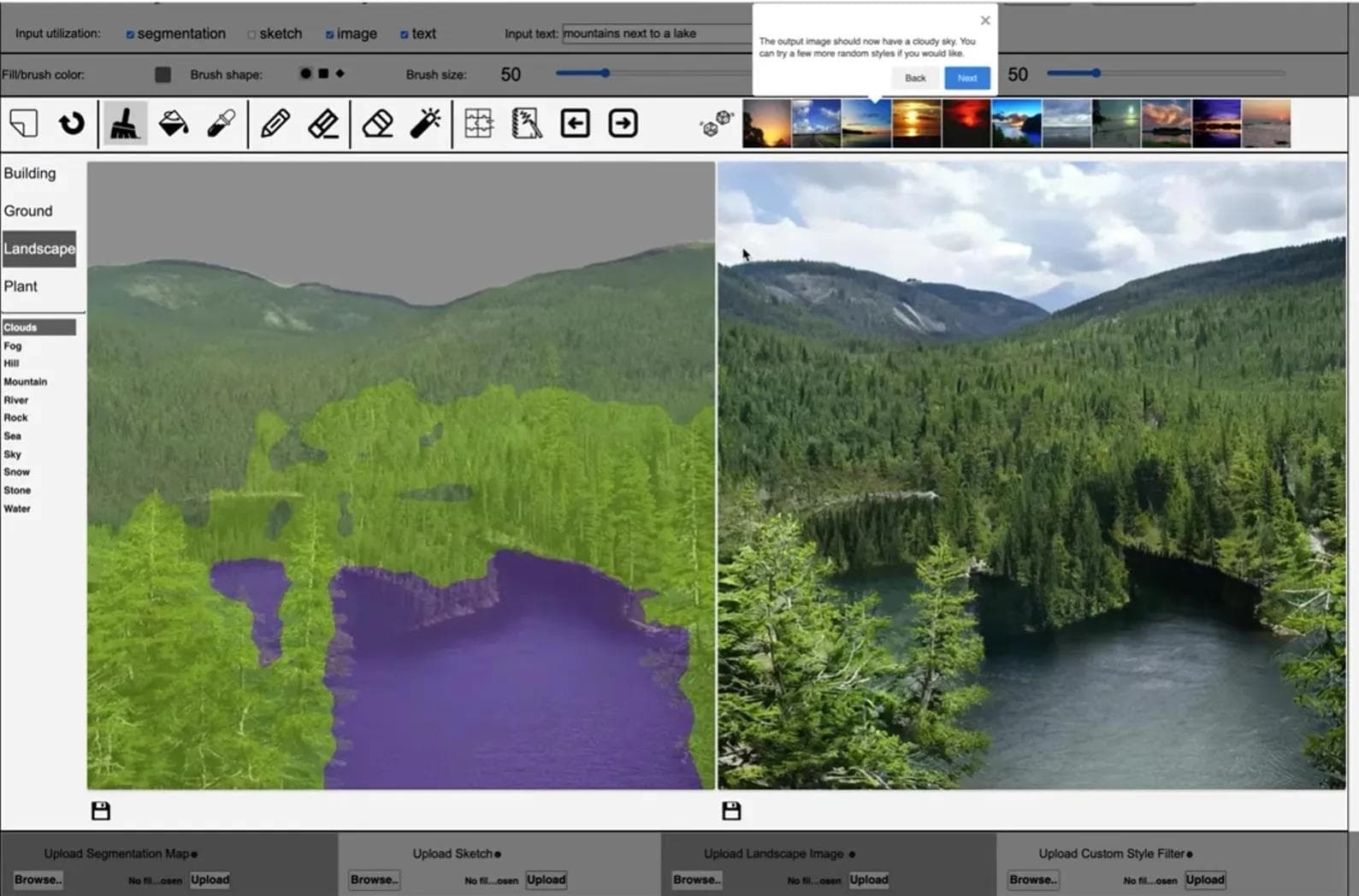
GauGAN is a neural network developed by NVIDIA for creating photorealistic images from simple sketches and text descriptions. The tool uses generative adversarial networks (GANs) and is trained on 10 million landscape images. GauGAN supports 15 object types, including grass, mountains, water, and sky, allowing users to quickly turn rough sketches into realistic nature scenes.
The first version of GauGAN was released in 2019, and in 2021 GauGAN2 added the ability to generate images from text prompts. In addition to the web app at gaugan.org, a desktop program called NVIDIA Canvas is available for Windows 10 and integrates with professional software.
GauGAN Specifications
| Specification | Value |
|---|---|
| Developer | NVIDIA |
| Type | Generative adversarial network (GAN) |
| Release year | 2019 (GauGAN), 2021 (GauGAN2) |
| Categories | Image generation, photorealistic images, drawings and sketches |
| Training | On 10 million landscape images |
| Maximum resolution | 512×512 pixels |
| Supported objects | 15 types (grass, mountains, water, etc.) |
| Interface language | English |
| Algorithm | SPADE |
| Export | PNG, ZIP |
| Integration | NVIDIA Canvas |
Who Is GauGAN For?
Artists and Designers
GauGAN is useful for artists, illustrators, and graphic designers who need to quickly create photorealistic landscape backdrops, references, or backgrounds for their work. Even with basic drawing skills, you can get high-quality results in a few seconds.
Game and VR Developers
The tool is suitable for specialists creating game worlds and VR environments. The ability to export results and integrate them with professional software speeds up the preparation of textures and background images for game scenes.
Marketers and Content Creators
With GauGAN, you can quickly generate unique visual materials for presentations, websites, or social media without needing to hire professional photographers or buy stock images.
How to Use GauGAN?
Via the Web App
The neural network is available through the gaugan.org website. To get started, scroll down to the terms of use agreement and check the box to confirm you accept the rules. After that, an interface with a set of tools—brush, pencil, and others—opens. The user draws a sketch, selects the object type (grass, sky, water, mountains, etc.), and the neural network turns the draft into a realistic image. In GauGAN2, you can also enter a text prompt for generation. The result is saved using the floppy-disk button and can be exported as PNG or a ZIP archive.
Via NVIDIA Canvas
For Windows 10, the desktop version NVIDIA Canvas is available and requires an NVIDIA RTX graphics card. The program offers more advanced features compared to the web version: multi-layer sketch support, real-time generation, and custom filters. Results can be exported and used in professional applications.
Key Features of GauGAN
Turning Sketches into Realistic Scenes
GauGAN's main function is transforming rough sketches into photorealistic images. The user draws simple shapes to mark object boundaries, and the neural network uses the SPADE algorithm to fill them in with textures and details.
Text-to-Image Generation
Starting with GauGAN2, the tool supports creating images from text descriptions. This lets users refine a scene or generate one from scratch without drawing a sketch.
Support for 15 Segmented Object Types
The neural network recognizes and correctly processes 15 object types: grass, sky, mountains, water, sand, rocks, trees, clouds, snow, and others. Each object type has its own visual characteristics that the model reproduces with high realism.
Export and Integration
Results can be exported as PNG or in a ZIP archive. The desktop version, NVIDIA Canvas, integrates with professional software, allowing generated images to be used in production projects.
Advantages of GauGAN
High Generation Speed
The neural network creates an image in 2–3 seconds. This makes it a convenient tool for rapid prototyping and iterative work on visual concepts.
Realistic Results
According to NVIDIA tests, GauGAN's image quality is 30% higher than previous approaches to landscape generation. The model is trained on 10 million images, ensuring detailed and believable output.
Text-Based Generation since 2021
Adding text prompts to GauGAN2 expanded the tool's capabilities: users can now control generation not only through drawing but also by describing the scene in words.
Regular Updates
The NVIDIA team releases updates for GauGAN approximately every 6 months, improving generation quality and adding new features.
Disadvantages of GauGAN
Hardware Requirements
The desktop NVIDIA Canvas app requires an NVIDIA RTX graphics card, with prices starting from $300. The web version has no such requirement, but its functionality is more limited.
Basic Drawing Skills Needed
Despite the simplified interface, GauGAN still requires the user to make sketches and define object boundaries. The base version does not offer fully automatic generation from scratch without a sketch.
English-Only Interface
The tool's interface is available only in English, which can be inconvenient for users who do not speak English.
What Problems Does GauGAN Solve?
Creating Photorealistic Images from Sketches
The tool quickly turns rough drafts into detailed landscapes, which is useful for concept art, game backgrounds, and advertising materials.
Generating Landscapes from Text Descriptions
GauGAN2 allows users to create an image from text: simply describe the scene in words, and the neural network generates the corresponding landscape.
Preparing Materials for Professional Software
Generated images can be exported and used in professional graphics editors, speeding up the preparation of textures, backgrounds, and references for further processing.
GauGAN Pricing
The web app at gaugan.org is free to use—you just need to accept the terms of use. To run the NVIDIA Canvas desktop program, you need to purchase an NVIDIA RTX graphics card, with prices starting from $300. The program itself requires no additional payment.
GauGAN Terms of Use
To use the web app, you must accept the user agreement by checking the corresponding box before you start. The desktop version, NVIDIA Canvas, has no additional conditions beyond NVIDIA's standard license agreements.
GauGAN Availability
The neural network is available through the web app at gaugan.org, which runs in a browser and requires no special hardware. There is also a desktop program, NVIDIA Canvas, for Windows 10, which requires an NVIDIA RTX graphics card. Both versions have an English interface.
How GauGAN Differs from Alternatives
Focus on Landscapes
Unlike universal image generators, GauGAN is focused exclusively on landscape scenes. This lets it achieve higher realism in its niche—the model is trained on 10 million landscape images and supports 15 types of natural objects.
Two Ways to Control Generation
GauGAN combines two approaches to image creation: drawing a sketch (as in the 2019 version) and using text prompts (added in GauGAN2). Most alternatives typically support only one of these methods.
Integration with NVIDIA Hardware
Unlike many competitors, GauGAN has a desktop version, NVIDIA Canvas, optimized for RTX graphics cards. This enables real-time generation and integration with professional software, making it a unique advantage for users in the NVIDIA ecosystem.
Conclusion
GauGAN is a specialized tool from NVIDIA for generating photorealistic landscape images from sketches and text descriptions. The neural network is trained on 10 million images, supports 15 object types, and produces results in 2–3 seconds. The main limitations are the need for basic drawing skills in the web version and the requirement of an RTX graphics card for the desktop NVIDIA Canvas program. The tool is available for free through the gaugan.org website and suits designers, game developers, and content creators who need high-quality landscape images quickly.