Dewatermark AI
AI-based web service for removing watermarks, logos, and unwanted text from images.
Overview
Dewatermark AI
Dewatermark AI Overview
Dewatermark AI is an AI-powered web service designed to remove watermarks, logos, signatures, text, and timestamps from images. The tool automatically detects and removes unwanted elements while preserving the quality of the original image. Users can upload high-resolution images up to 8K and manually refine the result with a brush. The service supports batch processing of up to 10 files and integrates with cloud storage. It is important to note that the developers recommend using the tool only on your own files or materials for which you have permission to edit.
Dewatermark AI Specifications
| Characteristic | Value |
|---|---|
| Type | AI tool for image cleaning |
| Category | Image editing, Object and watermark removal, Graphic design |
| Platforms | Web, iOS, Android |
| Interface languages | Russian, English, Chinese, and 7 more languages |
| Rating | 4.5 / 5 |
| Editorial score | 8.8 out of 10 |
| Maximum resolution | up to 8K |
| Processing time | 3-5 seconds |
| Supported formats | JPEG, PNG, WEBP, BMP, and 12 more formats |
| Batch processing | up to 10 files |
| API availability | Yes |
| Data protection | Images are not stored on the server |
| Distribution model | Freemium (completely free) |
Who is Dewatermark AI suitable for?
Photographers and designers
The tool is useful for photographers who need to clean watermarks left by stock platforms or previous editors. Designers can use the service to remove logos and text from reference images when preparing layouts.
Marketers and content professionals
Marketers often work with images from various sources. Dewatermark AI lets them quickly prepare visual materials for publication by removing unwanted elements without losing quality.
Regular users
The service suits anyone who values convenience and efficiency in photo editing. Hobbyists can use the tool to edit personal photos and remove dates and stamps from images.
How to use Dewatermark AI?
Step 1: Upload an image
Open the dewatermark.ai website or mobile app. Upload an image by dragging it into the browser window or selecting it via the file manager. The service supports JPEG, PNG, WEBP, BMP, and other formats.
Step 2: Automatic processing
After uploading, the neural network automatically detects and removes watermarks. The process takes 3-5 seconds. The algorithm, trained on 500,000 samples, can recognize complex multi-layered marks and elements blended with the background.
Step 3: Manual refinement
If needed, you can refine the result with a brush. This is useful in complex cases where automatic removal has left traces or affected important details of the image.
Step 4: Download the result
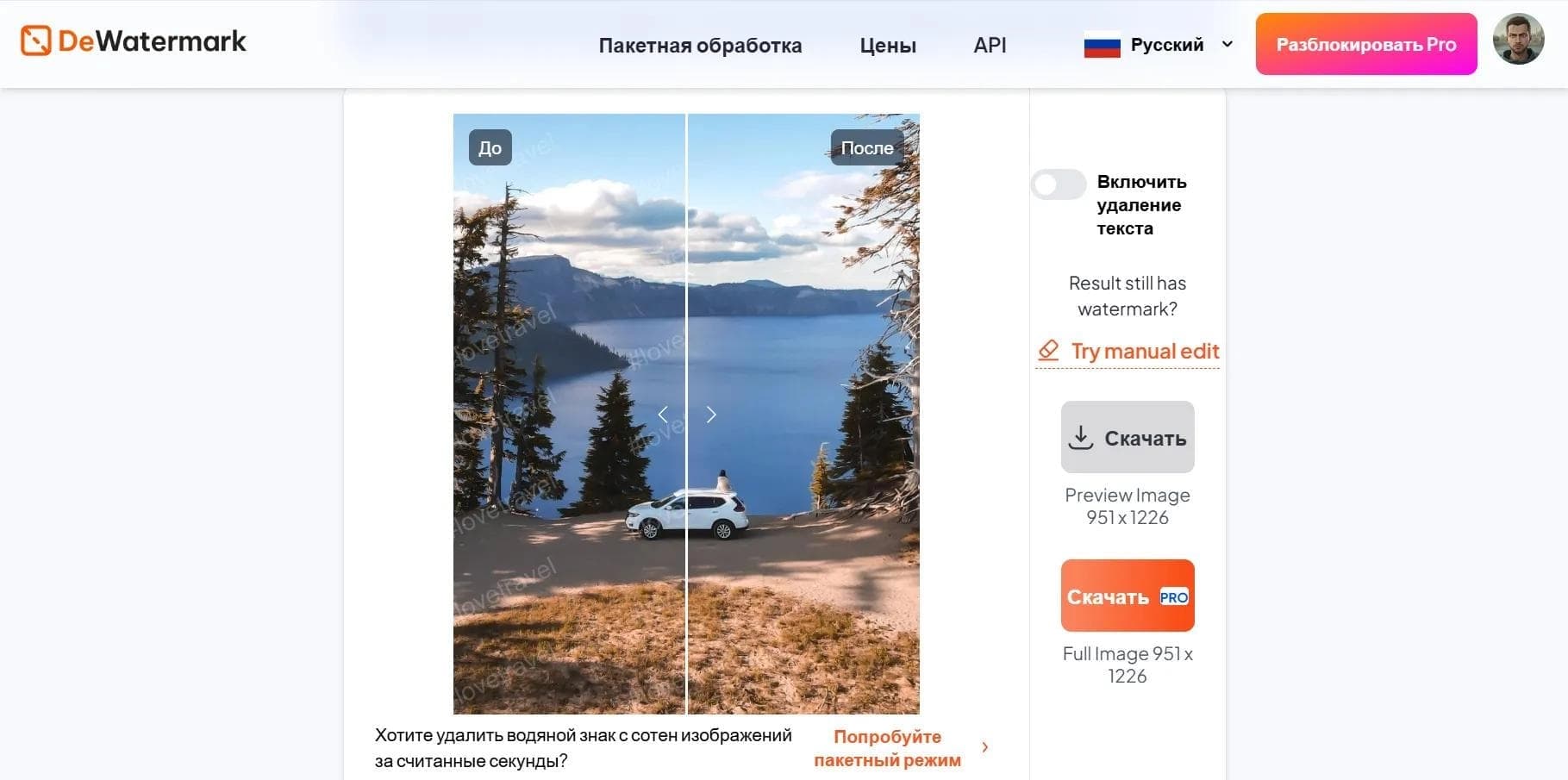
After processing, you can download the result in HD resolution or original quality. A before-and-after comparison of the images is available.
Key features of Dewatermark AI
Automatic detection and removal of watermarks
The neural network automatically finds and removes watermarks, logos, text, and other unwanted elements. The algorithm is trained on a large dataset and can handle multi-layered marks as well as elements that blend into the background.
Manual brush refinement
For complex cases, a manual correction feature is provided. Users can process areas where automatic removal was not accurate enough.
Batch processing of up to 10 files
The service supports uploading and processing up to 10 images at once. This is convenient when working with large batches of photos.
Cloud storage integration
Dewatermark AI integrates with cloud services, simplifying file upload and storage.
Advantages of Dewatermark AI
Completely free access
The service requires no subscriptions or hidden fees. All features are available free of charge, setting it apart from many competitors.
High processing quality
The tool supports images up to 8K and preserves EXIF data as well as the transparency of PNG files. Processing is done with minimal loss of detail.
Fast performance
Processing time for a single image is 3-5 seconds. This allows quick preparation of materials without long waits.
Data protection
User images are not stored on the server. The service guarantees the confidentiality and security of uploaded files.
Availability across platforms
The tool works in the browser on any device, including smartphones and PCs. Mobile apps for iOS and Android are also available.
Drawbacks of Dewatermark AI
No significant drawbacks have been identified: the tool runs stably, processing quality is high, and the feature set covers users' core needs.
What tasks does Dewatermark AI solve?
- Removing watermarks from images
- Removing logos and text from photos
- Cleaning images of multi-layered watermarks
- Batch processing of multiple files
- Editing and enhancing photos
- Removing timestamps and captions from images
Dewatermark AI pricing
Dewatermark AI is completely free. The service requires no subscriptions and has no hidden fees. All features are available with no limits on the number of processed files. The developers do not charge for using the tool, making it accessible to a wide range of users.
Dewatermark AI terms of use
The service requires no mandatory registration. Images uploaded by users are not stored on the server, which guarantees data protection. The developers specifically warn that the tool should only be used on your own files or materials for which you have permission to edit.
Dewatermark AI availability
Dewatermark AI is available as a web application in the browser and as mobile apps for iOS and Android. The interface is translated into Russian, English, Chinese, and 7 more languages. The service is used in 107 countries.
How Dewatermark AI differs from alternatives
Unlike WatermarkRemover.io, Dewatermark AI does not require registration and offers more free options. Compared to Remove.bg, this service specializes specifically in watermark removal rather than background removal. Dewatermark AI stands out thanks to being completely free, requiring no installation, and offering manual brush refinement. The algorithm, trained on 500,000 samples, ensures high-quality