Birdbanner
Online service for quickly creating Twitter banners using AI.
Overview
Birdbanner
Description of the Birdbanner AI
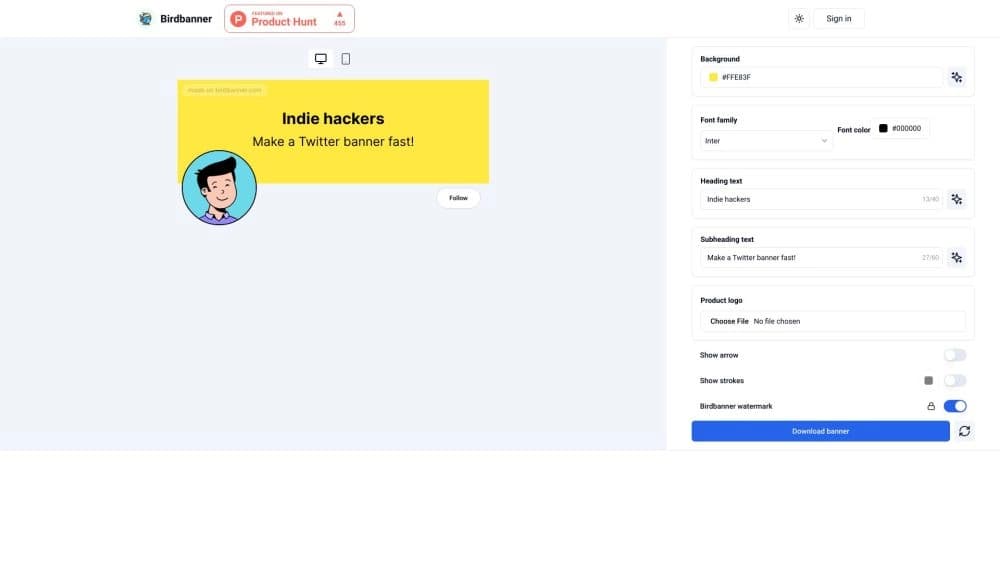
Birdbanner is an online service designed to quickly create banners for Twitter using artificial intelligence. The tool focuses on simplicity and speed: the user only needs to choose a suitable background or gradient, enter text, and the AI will take care of the design and offer interesting ideas for the content.
The core idea behind the service
The key concept of Birdbanner is to make creating social media graphics as simple as possible. Instead of opening complex editors and learning the intricacies of design, the user works in an intuitive online interface where the main actions take just a few clicks. Everything happens in the browser, with no need to install additional software.
What this tool is for
The AI service was created to solve a narrow but in-demand task: designing a Twitter (X) profile. A high-quality, eye-catching banner helps an account stand out, attract the audience's attention, and make the visual identity of a brand or personal blog more cohesive. Birdbanner automates this process, delivering a result almost instantly.
Birdbanner features
| Feature | Value |
|---|---|
| Tool type | AI-powered banner generator |
| Categories | Background image tools, banner generators, Twitter management helpers, social media assistants |
| Developer | Birdbanner |
| Distribution model | Freemium (free tier + paid subscriptions) |
| Free plan | Yes |
| Work format | Web service, online only |
| Monthly visits | 24.7K |
| Language support | Russian and, most likely, others (not explicitly stated) |
Who is Birdbanner AI suitable for?
Bloggers and store owners
The main target audience of the service is bloggers, online store owners, and entrepreneurs who are active on Twitter. They need to keep their profile visually appealing, but they are often short on time and lack deep graphic design knowledge. Birdbanner lets them solve this task without lengthy work.
Beginners with no design experience
The tool is perfect for those who have never worked with graphic editors. The interface is intuitive: pick a background, type your text, arrange the elements — done. The AI handles the main layout and styling work, so users don't need to understand complex color correction or typography settings.
Users who value speed
Birdbanner was made for those who don't want to waste time on routine tasks. If you need to quickly update a banner for a new promotion, event, or just change the look, the service does it in about a minute. The AI suggestion feature helps generate ideas for text and content, making the process even faster.
How to use Birdbanner AI?
Step-by-step banner creation process
Using Birdbanner requires no special skills. The whole process takes no more than a minute and consists of four simple steps:
- Open the online editor — go to the service website from any browser.
- Choose a background or gradient — pick a visual base for your banner from the built-in preset library.
- Enter text — add a heading or message, and the AI will help with wording and design.
- Save the finished banner — after adjusting the layout and appearance of the elements, simply download the image and upload it to your Twitter profile.
Flexible element customization
Despite the automation, there is still room for creativity. You can flexibly adjust the look of the resulting image: change the color scheme, choose backgrounds, edit text and its position. The service also lets you add arrows or additional images, making the banner more informative and unique.
Key features of Birdbanner
Collection of backgrounds and gradients
The service offers a rich library of backgrounds and gradients to suit any taste. With this variety, you can find an option for a travel blog, a clothing store, or a news channel — the banner style will match the theme of the profile.
AI help for text and ideas
An important feature of Birdbanner is its artificial intelligence, which actively participates in the creation process. The AI assists with text content, suggests ideas for the banner, and offers personalized design options. This is especially useful when you have a visual base but lack inspiration or the right wording.
Advantages of Birdbanner
High speed of creation
The most obvious advantage of the service is speed. The banner is generated automatically, almost without user input. While similar work in a full-featured graphic editor could take about an hour, here the result is ready in seconds.
Saves time and effort
You can flexibly customize the appearance: colors, backgrounds, text, and the AI offers personalized options. Users don't need to understand complex settings — the system does most of the work itself. This saves a huge amount of time on routine tasks, allowing you to focus on more important profile management activities.
Accessible for beginners
The service interface is clear and intuitive. Pick a background, type text, arrange elements — even a beginner can figure it out. There is no need to learn professional design tools, which makes Birdbanner an ideal choice for people without a design background.
Disadvantages of Birdbanner
Limited customization options
The main drawback of the service is the lack of settings. The presets limit creativity, and creating a truly unique banner from scratch is quite difficult. The user is restricted to the proposed templates and cannot go beyond them.
Generated images can look repetitive
Generated images often look similar and template-like. If many users choose the same backgrounds, the result may resemble other accounts' work. This reduces the service's value for those looking for truly distinctive visuals.
Internet dependence
The service works only online — it cannot be used without an internet connection. This imposes certain limitations on mobility, which can become critical during trips or with an unstable connection.
What tasks does Birdbanner solve
Quick banner creation for Twitter
The AI's main task is to let users create attractive banners for their Twitter pages in the shortest possible time. The tool removes the painful process of figuring out layout and composition by providing a ready-made solution.
Profile styling to match a personal style
The service allows users to customize the visual look of their profile to stand out from other accounts. With backgrounds, gradients, and text blocks, you can convey a mood, brand colors, or a key message, making the page more memorable and stylish.
Birdbanner pricing
The project operates on a freemium model, offering both free and paid plans:
| Plan | Price | Features |
|---|---|---|
| Free | Free | Core banner creation features |
| Starter | Paid plan | More features and expanded settings |
| Premium | Paid plan | Full access to all tools and templates |
Birdbanner terms of use
The service is a web application and does not require installing any additional software. To get started, you only need a modern browser and an internet connection. The free plan lets you evaluate the basic functionality, while users who need more advanced capabilities and unique designs can upgrade to paid subscriptions. There is no information in official sources about any need to use a VPN or special regional restrictions.
Birdbanner availability
Birdbanner is a fully cloud-based service that works exclusively through a browser. The lack of a desktop or mobile version is compensated by the fact that you only need internet access. The site supports a Russian-language interface, which makes it convenient for Russian-speaking users. The service runs stably and quickly, without requiring high performance from your device.
How Birdbanner differs from alternatives
There are many AI services for image generation on the market, including Leonardo.ai, Midjourney, Kandinsky, Flux.1, and others. The main difference between Birdbanner and these tools is its narrow specialization. Unlike universal image generators, this service is focused exclusively on creating banners for Twitter.
Birdbanner's competitive advantage is the combination of a large selection of ready-made backgrounds and gradients with an AI text generation feature. In addition, the ability to add arrows or images to the banner expands its functionality, something often missing from standard graphic services. Finally, built-in AI suggestions help you quickly settle on a design idea, which sets the tool apart from similar solutions where users have to think everything through from scratch on their own.
Conclusion
Birdbanner is a specialized online tool for quickly and easily creating Twitter banners. The service is ideal for bloggers, store owners, and anyone who wants to make their profile stand out without spending a long time learning design programs. Its main advantages are speed and built-in AI assistance that handles design and idea generation. However, limited customization flexibility and noticeable template-like results may not suit users seeking unique designs. That said, the availability of a free plan makes Birdbanner accessible to a wide audience and lets anyone easily refresh the visual look of their Twitter page.