Bigjpg
Online service for upscaling images using neural networks, preserving details and reducing noise.
Overview
Bigjpg
Bigjpg Neural Network Description
Bigjpg is an online service for upscaling images using neural networks, allowing you to enlarge photos, illustrations, and anime art without losing quality. The tool is built on convolutional neural networks (CNNs), which analyze the source image, remove noise and artifacts, and then upscale it while preserving sharpness and detail.
Users can adjust the upscale factor (from 2x to 16x) and the noise reduction level (from 0 to 3), as well as choose the image type for optimal results. The service supports JPG and PNG formats, works through a web interface, and is available on various platforms, including mobile apps for Android and iOS and desktop versions for Mac and Windows.
Bigjpg Characteristics
| Characteristic | Value |
|---|---|
| Tool type | Image upscaling and enlargement tool, AI Image Upscaler, AI Photo Enhancer |
| Categories | Photo editing, photo enhancement, image transformation, digital art generation, video enhancement, anime art generation |
| Technology | Convolutional neural networks (CNN), deep convolutional neural networks |
| Supported formats | JPG, PNG |
| Maximum upscale | Up to 16x the original size |
| Platforms | Web, Android, iOS, Mac, Windows |
| Free plan | Yes (with limitations: upload size up to 5 MB, slower processing speed) |
| Developer | Bigjpg |
| Monthly visits | 877.4K |
| API availability | Yes |
| Batch processing | Supported |
Who Is the Bigjpg Neural Network For?
Designers and Web Developers
For professionals working with visual content, Bigjpg allows you to quickly upscale images for websites, layouts, and presentations without losing quality. The tool is especially useful when you need to use low-resolution images in web design.
Photographers and Artists
Bigjpg is effective for restoring old pixelated photos and upscaling digital illustrations. Anime artists get high-quality results thanks to the neural network's optimization for this type of image.
Marketers
Marketing materials often require high-resolution images. Bigjpg lets you scale existing images for print, previews, and other promotional purposes without needing to hunt for high-quality originals.
How to Use the Bigjpg Neural Network?
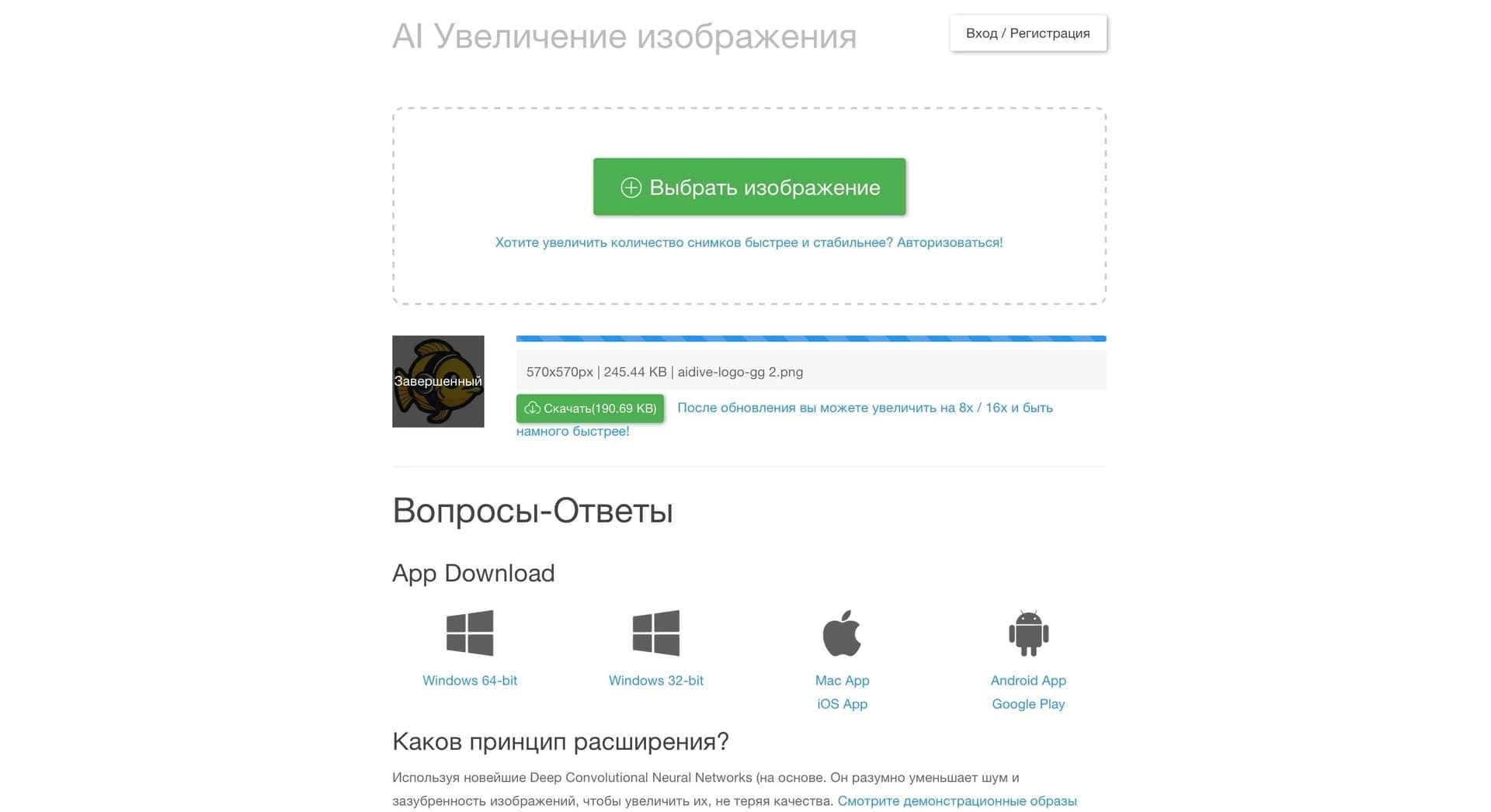
Registration and Image Upload
To get started, create an account on bigjpg.com or open the app. After logging in, select an image to upload — the service supports JPG and PNG formats. The free plan limits the uploaded file size to 5 MB.
Configuring Parameters and Processing
After uploading an image, set the upscaling parameters:
- Image type — choose "Anime/Illustration" or "Photo" for optimal results
- Upscale factor — from 2x to 16x the original
- Noise reduction level — from 0 to 3 (the higher the value, the stronger the noise reduction)
Click the "Upscale all images below" or "Start" button to run the process. Once it's finished, download the resulting image.
Core Features of Bigjpg
Quality-Preserving Upscaling
The neural network upscales images up to 16x the original size without turning the picture blurry — details, colors, and lines stay sharp. Deep convolutional neural network technology analyzes the image and reconstructs missing pixels.
Automatic Noise and Artifact Removal
Bigjpg automatically removes noise and artifacts during upscaling, with no manual tuning required. Users can further adjust the noise reduction level depending on the source image.
Batch Processing and API
The service supports batch processing of multiple images at once. An API is available for workflow automation — after registration, you can integrate the neural network into your own projects and process large numbers of images programmatically.
Advantages of Bigjpg
High-Quality Upscaling Without Loss of Sharpness
The image stays sharp even at high upscale factors thanks to refined neural network algorithms. The service is especially effective for anime and illustrations, where crisp lines and accurate color reproduction matter.
Ease of Use
The interface follows the "upload and get results" principle — no complex settings or technical skills required. Just choose an image, set the parameters, and start processing.
Privacy and Security
Bigjpg has a solid privacy policy: uploaded images are automatically deleted after processing, and data transfer is encrypted. This is important for users working with confidential content.
Drawbacks of Bigjpg
Free Plan Limitations
The free plan has limits on uploaded image size (up to 5 MB) and processing speed. A paid subscription is required for active use or working with large files.
Dependence on Internet and Server Loads
The service works only online and cannot be used without an internet connection. Processing speed depends on server load and time of day, and failures may occur under heavy network or server load.
Possible Artifacts on Complex Images
Despite the neural network's solid performance, some complex images may still show artifacts or lose detail. This is most noticeable in photos with fine textures or complex color transitions.
What Tasks Does Bigjpg Solve?
Upscaling Anime Art and Illustrations
Bigjpg is especially good at upscaling anime-style images and digital illustrations, preserving line sharpness, color accuracy, and detail. This is the primary use case the tool is optimized for.
Improving Low-Resolution Photos
The service lets you restore old pixelated photos by upscaling them to acceptable quality without losing detail. It is suitable for preparing images for print, web design, and other digital needs.
Enhancing Quality for Commercial Use
Designers and marketers can use Bigjpg to upscale images for print, websites, and advertising materials, getting results suitable for professional use.
Bigjpg Pricing
Bigjpg operates on a freemium model: core features are available for free, with limits on uploaded file size (up to 5 MB) and processing speed.
Paid plans are available on a monthly subscription basis:
- Basic
- Standard
- Premium — unlimited upscaling, priority processing
Detailed information about the plans and their features is available on the service's official website. No credit card is required for free use.
Bigjpg Terms of Use
Using the service requires registration and login — this is necessary for saving your processing history and accessing advanced features. The free plan has an upload size limit (5 MB) and a lower processing speed compared to paid plans.
Bigjpg automatically deletes uploaded images after processing and encrypts data in transit. The service is not open source and has no official communities on GitHub, Discord, or Telegram.
Bigjpg Availability
Bigjpg is available as a web service (online) at bigjpg.com, as well as mobile apps for Android and iOS and desktop versions for Mac and Windows. The service's main traffic comes from China (13.26%), Russia (11.23%), Mexico (9.65%), Peru (8.16%), and Indonesia (5.43%). No VPN is required.
How Bigjpg Differs from Alternatives
Bigjpg uses its own refined neural network algorithms, so details, colors, and lines are preserved better than with other online services, especially in illustrations and drawings. Unlike many alternatives, the service specializes in upscaling anime art