

Stylar
Инструмент на базе ИИ для генерации и редактирования изображений, а также мобильное приложение для примерки одежды на собственных фото.
Обзор
Stylar
Описание нейросети Stylar
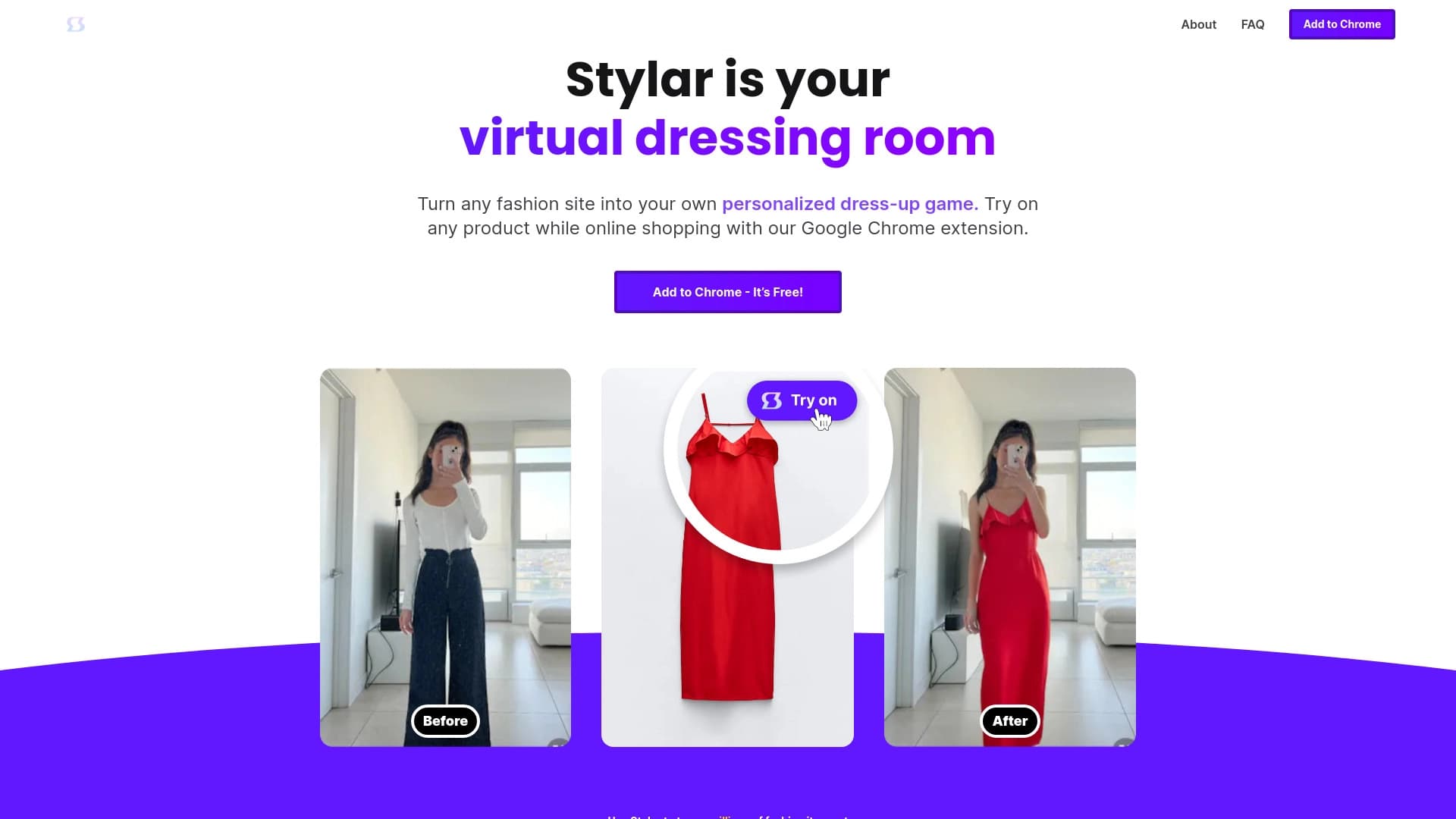
Stylar — это AI-инструмент, который объединяет два направления работы с изображениями и дизайном. С одной стороны, это продвинутая веб-платформа для генерации и редактирования изображений с высоким уровнем контроля над процессом. С другой — мобильное приложение для iOS и Android, ориентированное на подбор и примерку одежды на собственных фотографиях.
Веб-инструмент опирается на современные алгоритмы искусственного интеллекта и позволяет объединять разные элементы в единое целостное изображение, добиваясь согласованности стиля всех компонентов. Пользователи могут удалять фон, манипулировать объектами, создавать персонализированные аватары и превращать наброски в готовые дизайн-продукты.
Мобильное приложение Stylar работает иначе: пользователь загружает свои фотографии, а нейросеть генерирует варианты одежды, подстраивая их под фигуру человека. Взаимодействие построено вокруг свайпов — понравившиеся образы сохраняются, а непонравившиеся просто пролистываются, формируя личную подборку стилей.
Характеристики Stylar
| Характеристика | Значение |
|---|---|
| Тип | Мобильное приложение, веб-инструмент |
| Категория | Мода, стиль и образы; Подбор одежды; Генерация и редактирование изображений |
| Платформы | iOS и Android (мобильное приложение) |
| Бесплатный тариф | Не указано |
Для кого подходит нейросеть Stylar?
Тем, кто ищет новые идеи для гардероба
Приложение поможет людям, которые хотят освежить свой стиль, но не знают, с чего начать. Вместо того чтобы листать ленты соцсетей или журналы, можно увидеть трендовые вещи непосредственно на себе и быстрее определиться с подходящим направлением.
Ведущим соцсети и создателям контента
Для блогеров и инфлюенсеров Stylar может стать удобным инструментом для экспериментов с образами. Прежде чем покупать новые вещи или готовить съёмку, можно заранее посмотреть, как будут выглядеть разные стили и силуэты на собственной фигуре.
Профессионалам и новичкам в дизайне
Веб-версия рассчитана на широкий круг пользователей — и начинающих, и опытных дизайнеров. Благодаря контролю над деталями генерации и редактирования, она подходит для работы с эскизами, фонами и отдельными элементами изображений.
Как использовать нейросеть Stylar?
Использование мобильного приложения
Для работы с мобильной версией достаточно загрузить собственные фотографии в приложение. Нейросеть анализирует изображение и генерирует варианты одежды, нанося их прямо на фото. Дальше всё строится на свайпах: понравившийся образ сохраняется, непонравившийся — пролистывается.
Использование веб-инструмента
Веб-платформа работает с более широким набором задач. Пользователь загружает изображения, выбирает нужный инструмент — от удаления фона до манипуляций с отдельными объектами — и управляет процессом генерации или редактирования. Также доступно превращение простых эскизов в полноценные дизайны.
Формирование личной подборки
В процессе использования приложения сохраняются понравившиеся образы, из которых постепенно складывается персональная коллекция стилей. Это позволяет возвращаться к удачным идеям и использовать их как основу для будущих покупок или вдохновения.
Основные функции Stylar
Подбор трендовых образов на ваших фото
Главная функция мобильного приложения — генерация актуальных вариантов одежды и сочетаний прямо на фотографиях пользователя с учётом особенностей его фигуры. Акцент сделан на трендах и визуальной эстетике 2025 года.
Управление свайпами
Интерфейс организован так, чтобы просмотр вариантов был максимально быстрым и удобным. Свайпами можно пролистывать образы один за другим, мгновенно оценивая, подходит ли тот или иной стиль.
Инструменты веб-редактирования
На веб-платформе доступны удаление фона, манипуляции с объектами на изображении, создание персонализированных аватаров и преобразование эскизов в готовые дизайн-продукты. Все компоненты итогового изображения согласуются между собой по стилю.
Личная подборка стилей
Сохранённые во время свайпов образы формируют персональную коллекцию идей и вдохновляющих сочетаний, к которой можно возвращаться в любой момент.
Преимущества Stylar
Примерка «на себе», а не на моделях
Ключевое преимущество приложения — возможность увидеть, как трендовые вещи будут смотреться именно на вас, а не на моделях с нестандартными параметрами. Это даёт гораздо более реалистичное представление о будущем образе.
Экономия времени на шопинге
Дистанционная примерка позволяет существенно сократить время, которое обычно уходит на походы по магазинам и физическое примеривание вещей. Можно заранее отсеять неподходящие варианты и сфокусироваться только на том, что действительно подходит.
Доступность на популярных платформах
Мобильное приложение доступно пользователям iOS и Android, что охватывает большинство владельцев смартфонов. Веб-версия расширяет возможности работы с изображениями за пределами смартфона.
Недостатки Stylar
В открытых источниках не публикуется подробная информация о недостатках или ограничениях Stylar. Стоит учитывать, что, как и любой AI-инструмент, связанный с генерацией одежды на фотографиях, он может иметь ограничения в точности посадки виртуальной одежды на фигуру по сравнению с реальной примеркой. Также данные о бесплатном тарифе и условиях доступа в источниках отсутствуют, поэтому возможности бесплатного использования заранее неизвестны.
Какие задачи решает Stylar
Подбор и примерка одежды без физической примерки
Приложение позволяет примерить множество вариантов одежды, не выходя из дома и без затрат времени на реальные походы по магазинам. Это удобно тем, кто ценит скорость и хочет заранее отобрать подходящие вещи.
Поиск идей для гардероба
Сохраняя понравившиеся образы, пользователь постепенно формирует представление о том, какие вещи и сочетания ему подходят. Это помогает составить актуальный список покупок и не поддаваться импульсивным решениям.
Эксперименты со стилями и силуэтами
Stylar даёт возможность пробовать самые разные направления — от классики до смелых трендов — и оценивать, как они смотрятся на собственной фигуре. Такой подход снижает риск ошибочных покупок и помогает развивать чувство стиля.
Цены Stylar
В доступных источниках информация о стоимость тарифных планов Stylar отсутствует. Не указан также бесплатный тариф или его условия. Перед началом использования рекомендуется обратиться к официальным страницам продукта в магазинах приложений Apple App Store и Google Play, а также к веб-сайту инструмента для получения актуальной информации о ценообразовании.
Условия использования Stylar
Официальные условия использования и политика конфиденциальности Stylar не приведены в доступных источниках. Как и в случае с большинством сервисов, работающих с загружаемыми пользователями фотографиями, важно ознакомиться с правилами обработки личных данных и изображений перед загрузкой файлов. Актуальные условия стоит искать в тексте документов на официальном сайте или в приложении.
Доступность Stylar
Stylar доступен в двух форматах. Мобильное приложение выпущено для платформ iOS и Android и может быть установлено через соответствующие магазины приложений — App Store и Google Play. Веб-инструмент для генерации и редактирования изображений, судя по доступным данным, работает через браузер и может использоваться на компьютерах, что расширяет сценарии применения по сравнению с мобильной версией.
Чем отличается Stylar от аналогов
Двунаправленная структура
Большинство аналогичных сервисов сосредоточено либо на генерации изображений, либо на подборе одежды. Stylar объединяет оба направления: полнофункциональный веб-редактор для дизайнеров и простое мобильное приложение для примерки одежды.
Свайп-интерфейс в приложении
В отличие от многих конкурентов, которые используют сложные формы запросов и настройки, мобильная версия Stylar построена на интуитивном свайп-взаимодействии. Это делает процесс подбора образов быстрым и не требующим специальных знаний.
Контроль в веб-редактировании
Веб-инструмент делает акцент на управляемости процесса: пользователь может влиять на отдельные элементы, удалять фон, менять объекты и превращать эскизы в готовые дизайны, сохраняя при этом единство стиля итогового изображения.
Заключение
Stylar — это многофункциональный AI-инструмент с двумя направлениями работы. Мобильное приложение для iOS и Android позволяет примеривать трендовую одежду на собственных фотографиях, экономит время на шопинге и даёт возможность экспериментировать со стилем, а веб-платформа предоставляет продвинутые средства для генерации и редактирования изображений — от удаления фона до создания аватаров и превращения эскизов в готовые продукты. Инструмент может оказаться полезным как обычным пользователям, которые ищут новые идеи для гардероба, так и дизайнерам разного уровня подготовки.
Часто задаваемые вопросы


Смотрите также


Набор инструментов для генерации и редактирования видео с помощью ИИ, включая аватары, липсинк и клонирование голоса.


Платформа для увеличения органического трафика и создания контента с помощью ИИ и участия экспертов.


Сервис на базе ИИ для автоматического создания «безликих» коротких видео для TikTok, YouTube Shorts и других платформ.

Генератор музыки по текстовому описанию с настройкой стиля и настроения, а также экспортом отдельных дорожек.

Платформа для создателей контента, объединяющая управление ссылками, email-маркетинг, онлайн-магазин и аналитику в одном визуальном редакторе без программирования.

Онлайн-инструмент для замены лиц на фото, видео и GIF без регистрации и водяных знаков.


Сервис для превращения статичных изображений в видео с пением и синхронизацией губ с помощью ИИ.

Мобильное приложение для обработки фото и создания стилизованных аватаров с помощью ИИ.