

Pitch
Платформа для создания и совместного редактирования презентаций с возможностями искусственного интеллекта.
Место в рейтингах
Обзор
Pitch
Описание нейросети Pitch
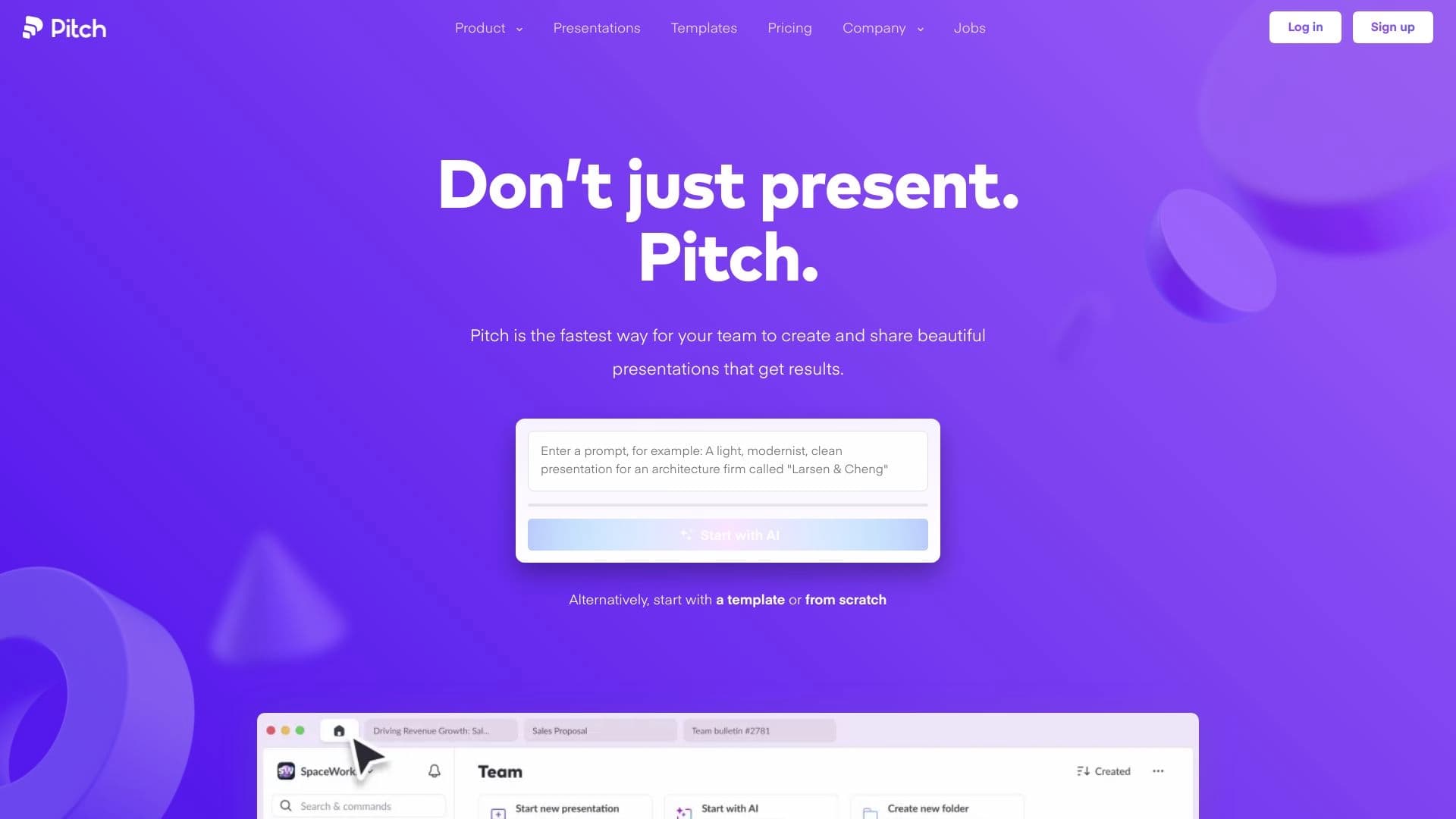
Pitch — это веб- и мобильная платформа для создания презентаций, ориентированная на командную работу и использующая возможности искусственного интеллекта. Сервис позволяет генерировать слайды на основе текстового описания, а также редактировать их совместно с коллегами в реальном времени. Платформа включает более 100 настраиваемых шаблонов, созданных профессиональными дизайнерами, поддерживает импорт существующих PPTX-файлов и предлагает интерактивные элементы — видео, опросы и формы. Готовые презентации можно экспортировать в PDF, PPTX и HTML5, а также отслеживать аналитику просмотров.
Характеристики Pitch
| Характеристика | Значение |
|---|---|
| Тип | Платформа для создания презентаций |
| Категория | Создание презентаций, Для маркетологов |
| Бизнес-модель | Freemium |
| Платформы | Веб-приложение, мобильное приложение (iOS, Android), Mac, Windows |
| Год основания | 2018 |
| Количество пользователей | 2,5 млн |
| Количество шаблонов | 100+ настраиваемых шаблонов (5-7 новых ежемесячно) |
| Библиотека изображений | 6 млн бесплатных изображений |
| Языки интерфейса | 182 языка, включая русский |
| Форматы экспорта | PDF, PPTX, HTML5 |
| Интеграции | HubSpot, Slack, Notion, Loom |
| Наличие бесплатного тарифа | Да (до 5 участников) |
Для кого подходит нейросеть Pitch?
Команды, готовящие питчи и продающие материалы
Pitch предназначен для команд, которые регулярно подготавливают презентации для питчей, продаж и внутренних встреч. Инструмент помогает быстро создавать качественные материалы, соблюдая фирменный стиль компании.
Маркетологи и дизайнеры
Платформа подходит маркетинговым и дизайнерским командам, которые ценят профессиональный дизайн и эффективную совместную работу. Возможность кастомизации шаблонов и использования корпоративных шрифтов и логотипов упрощает создание брендированных презентаций.
Стартапы и корпорации
Сервис используют как небольшие стартапы, так и крупные компании, включая Unsplash и Lumos. Для стартапов актуальна быстрая генерация материалов для инвесторов, для корпораций — возможность масштабирования и работы больших команд.
Как использовать нейросеть Pitch?
Этап 1: Старт — выбор шаблона или генерация
Процесс начинается с регистрации через email или Google-аккаунт (занимает около 30 секунд). После входа можно выбрать один из 100+ шаблонов, сгенерировать презентацию с помощью ИИ по текстовому запросу или загрузить существующий PPTX-файл. Также на этом этапе настраивается корпоративный стиль.
Этап 2: Редактирование
Пользователь создаёт слайды с текстом, изображениями и анимациями. Доступна совместная работа в реальном времени: несколько участников могут редактировать одну презентацию одновременно. Можно добавлять интерактивные элементы — видео, опросы и формы, а также использовать встроенную библиотеку из 6 млн бесплатных изображений.
Этап 3: Публикация
Готовая презентация распространяется через ссылку. Материалы можно собирать в «комнаты презентаций», использовать заметки для выступающего и таймер. Презентация автоматически адаптируется под мобильные устройства.
Этап 4: Аналитика
После публикации доступно отслеживание взаимодействия аудитории: просмотры слайдов, время взаимодействия и другие метрики. Это позволяет дорабатывать презентации на основе обратной связи.
Основные функции Pitch
ИИ-генерация презентаций
Платформа создаёт слайды на основе текстового запроса за 10 секунд. По умолчанию генерируется до 11 слайдов, включая обложку и финальный слайд. Пользователь может выбрать цветовую палитру и шрифт перед генерацией.
Коллекция шаблонов и мультимедиа
Более 100 настраиваемых шаблонов от профессиональных дизайнеров (ежемесячно добавляется 5-7 новых). Библиотека включает 6 млн бесплатных изображений, а также иконки и GIF. Встроенный AI-инструмент позволяет генерировать изображения.
Совместная работа и интерактивность
Редактирование в реальном времени с командой, возможность комментирования и добавления интерактивных элементов — видео (включая интеграцию с Loom), опросов и форм из Notion. Поддерживается синхронизация с HubSpot и Slack.
Экспорт и аналитика
Презентации можно экспортировать в PDF, PPTX и HTML5. Доступна аналитика просмотров слайдов и времени взаимодействия для каждого зрителя.
Преимущества Pitch
Скорость и качество
Нейросеть сочетает алгоритмы генерации контента с экспертными шаблонами дизайна, что позволяет командам быстрее готовить качественные презентации. Платформу используют 2,5 миллиона пользователей, включая стартапы и корпорации.
Профессиональные шаблоны
Большой выбор шаблонов от дизайнеров, которые регулярно обновляются в соответствии с трендами. Возможность полной кастомизации фирменного стиля — шрифты, логотипы, цветовые палитры.
Доступность
Бесплатный тариф с базовыми функциями и регистрация без кредитной карты. Поддержка 182 языков, включая русский, и работа через веб-браузер без установки дополнительного ПО.
Недостатки Pitch
Ограничения бесплатного тарифа
На бесплатном тарифе экспорт в PDF включает брендирование Pitch. Количество участников ограничено 5 пользователями и 2 внешними гостями. Для доступа ко всем функциям требуется регистрация.
Отсутствие продвинутых AI-функций
Несмотря на наличие ИИ-генерации, некоторые продвинутые AI-возможности не заявлены. Недостаточно информации об офлайн-доступе к презентациям.
Какие задачи решает Pitch
Быстрое создание презентаций
Pitch решает задачу ускорения подготовки качественных материалов для питчей, продаж и внутренних встреч. ИИ-генерация позволяет получить готовую структуру презентации за секунды.
Командная работа
Платформа упрощает совместное редактирование презентаций: несколько участников могут одновременно вносить изменения, оставлять комментарии и добавлять интерактивные элементы.
Отслеживание вовлечённости
Аналитика просмотров помогает определить, какие слайды вызывают наибольший интерес у аудитории, и дорабатывать материалы на основе данных.
Цены Pitch
Бесплатный тариф
Включает до 5 участников, неограниченное количество презентаций, ИИ-создание, кастомные шаблоны и другие базовые функции. Регистрация без кредитной карты.
Платные тарифы
- Pro: от €17/мес при годовой оплате или €20/мес помесячно (до 25 участников). По данным другого источника — $20/мес (2 редактора).
- Business: €68/мес или $80/мес (до 200 участников, до 5 редакторов).
- Enterprise: индивидуальная цена, безлимит участников, выделенный менеджер.
Скидка 15% при годовой оплате.
Условия использования Pitch
Freemium-модель: для доступа к некоторым функциям требуется регистрация на сайте через email или Google-аккаунт. Бесплатный тариф не требует указания кредитной карты.
Доступность Pitch
Платформа доступна как веб-приложение через браузер, так и в виде мобильного приложения для iOS и Android. Также поддерживаются настольные версии для Mac и Windows. Интерфейс переведён на 182 языка, включая русский. Аналитика трафика показывает большую долю пользователей из США и Великобритании, региональных ограничений не указано.
Чем отличается Pitch от аналогов
Pitch сочетает в себе функции классического презентационного ПО (PowerPoint, Google Slides) с возможностями ИИ-генерации и акцентом на командную работу. В отличие от аналогов, платформа предлагает:
- встроенную аналитику просмотров и взаимодействия;
- поддержку 182 языков;
- «комнаты презентаций» для сбора материалов;
- интеграцию с HubSpot, Slack, Notion и Loom.
Среди альтернатив — Microsoft PowerPoint, Google Slides, Keynote, Prezi, Canva, а также специализированные AI-инструменты: Beautiful.ai, 1min.AI, AI Time Machine.
Заключение
Pitch — это freemium-платформа для командного создания презентаций с ИИ-генерацией, профессиональными шаблонами, совместной работой и аналитикой. Сервис подходит для питчей, продаж и внутренних встреч, помогает быстрее готовить качественные материалы и отслеживать вовлечённость аудитории. Бесплатный тариф позволяет начать работу без финансовых вложений, а платные версии открывают доступ к расширенным возможностям для больших команд.
Тарифы
Часто задаваемые вопросы


Смотрите также

Онлайн-сервис, который позволяет общаться с PDF-документами в чате: задавать вопросы и получать краткие ответы с указанием источника.

Генерация рекламных UGC-роликов с виртуальными актерами без реальных съемок.


Онлайн-инструмент для создания дипфейков и редактирования изображений с помощью ИИ.


Платформа для создания корпоративных чат-ботов на основе собственных документов без программирования.


Сервис для виртуальной примерки одежды с помощью ИИ.


Многофункциональный ИИ-ассистент для чата, генерации текста и изображений, перевода и помощи в программировании.


AI-помощник для быстрого создания и редактирования текстов в различных форматах.


Платформа для генерации и редактирования изображений и видео на основе искусственного интеллекта.