

HeyPhoto
Online editor for AI-powered face and age correction in photos.
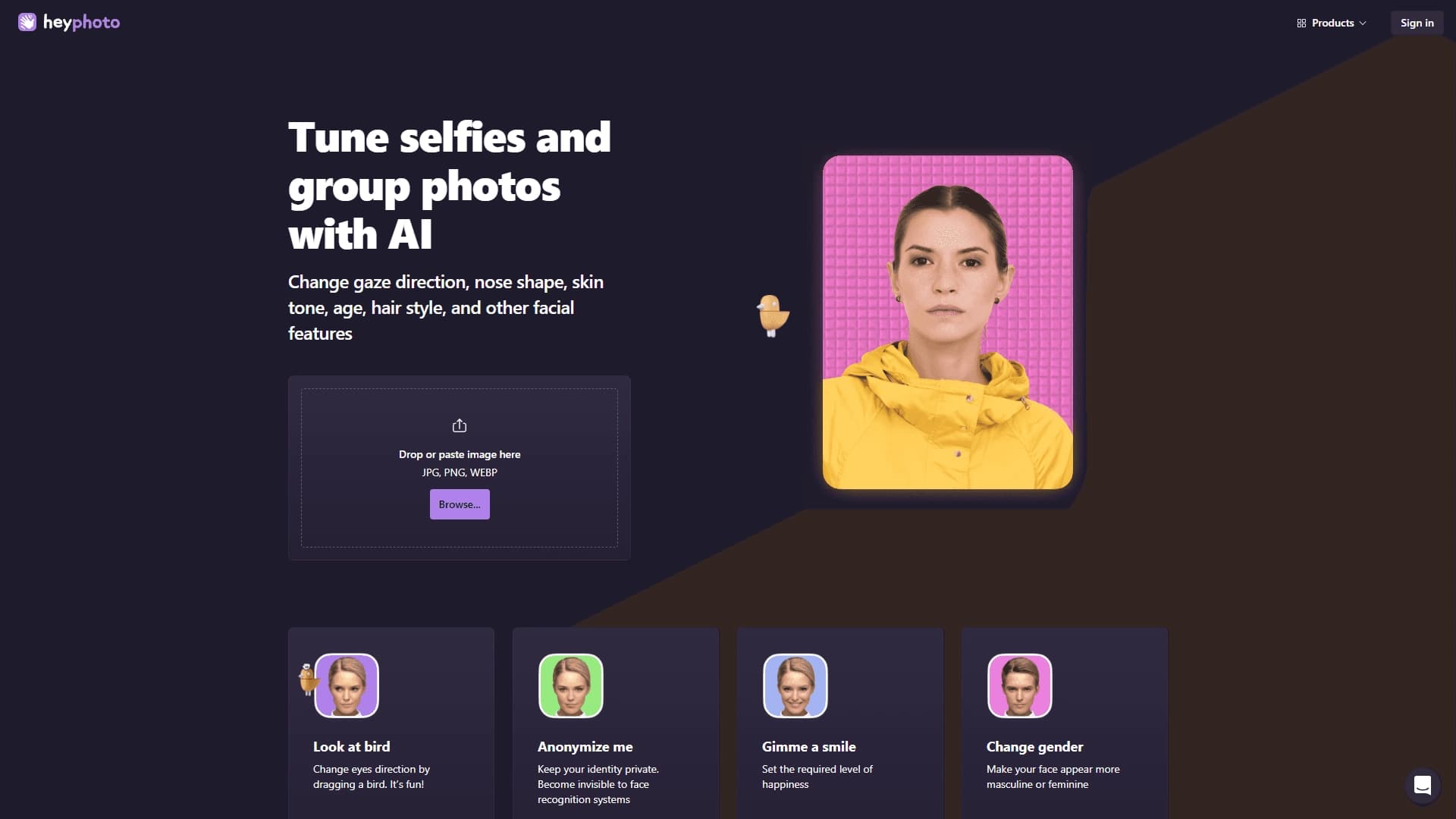
Overview
HeyPhoto
Description of the HeyPhoto neural network
HeyPhoto is an online photo editor that uses artificial intelligence to adjust faces and age in images. The service works directly in the browser, so no additional software installation is required to use it.
The tool lets you change facial expressions, add a smile, and adjust individual features. In addition, users can experiment with hairstyles, makeup, and visual age changes — all available in a few clicks. The service positions itself as a free AI tool for quick photo retouching and styling.
HeyPhoto features
| Feature | Value |
|---|---|
| Type | Online AI face and age editor |
| Categories | Face and age replacement, photo processing |
| Image formats | JPG, PNG, WEBP |
| Works | Directly in the browser |
| Free plan | Yes (positioned as free) |
Who is the HeyPhoto neural network suitable for?
Users with no experience in photo editors
HeyPhoto is suitable for those who want to quickly edit a photo but are not familiar with complex image processing programs. The service requires no special skills — all changes are made in a couple of clicks.
Fans of selfies and group shots
The tool is designed for users who need to quickly process selfies or group photos. With it, you can change facial expression, age, or makeup on an existing image without resorting to complex editors.
How to use the HeyPhoto neural network?
Opening the service
To get started, simply open the service website in your browser. There is no need to install or download additional software — everything happens in the web interface.
Uploading an image
The user needs to drag and drop an image into the workspace. The service supports files in JPG, PNG, and WEBP formats.
Applying changes
After uploading a photo, the needed edits are applied in a couple of clicks. All that remains is to choose the desired change — emotion, age, makeup, or another effect — and wait for the result.
Key features of HeyPhoto
Working with emotions and gaze
The service allows you to add a smile and other emotions to a photo, as well as change the direction of a person's gaze in the image.
Facial feature correction
HeyPhoto lets you adjust the shape of the nose and other facial features, as well as change skin tone and add makeup.
Styling your look
The tool allows you to change age in an image and try on different hairstyles and hair styles to experiment with your look.
Advantages of HeyPhoto
Free and accessible
The service is positioned as a free online tool and works directly in the browser without installing additional programs. This makes it accessible to a wide range of users.
Speed and simplicity
Edits are made in a couple of clicks, allowing you to quickly get the desired result even without experience with photo editors. The service helps "bring a portrait to life" by adding emotions or changing image details.
Disadvantages of HeyPhoto
There are no detailed details about the service's disadvantages in the available source data. As with many free online editors, users should keep in mind possible limitations in functionality and processing quality compared to professional programs, but specific details are not specified in the collected information.
What tasks does HeyPhoto solve?
Retouching selfies and group photos
The service allows you to quickly retouch both individual selfies and group shots, carefully fixing details without using complex editors.
Experiments with your look
The tool lets you change facial expression on an existing image, as well as experiment with age, makeup, and hairstyle to find a new look.
Preparing photos for your profile
HeyPhoto is suitable for preparing images for publication in a profile — you can choose the most flattering facial expression and do neat retouching in a couple of clicks.
HeyPhoto pricing
The service is positioned as a free AI photo editor. Detailed information about paid plans and their cost is not available in the source data, so you can check possible paid usage terms directly on the service website.
Terms of use for HeyPhoto
The service operates on a freemium distribution model, which includes free features. The exact terms of use, as well as possible limitations of the free plan, are not disclosed in the collected data, so you should review the full rules on the tool's official website.
HeyPhoto availability
HeyPhoto is a web service that runs in the browser. No additional software installation is required to use it, and access to the tool is via the website on any device with a browser.
How HeyPhoto differs from alternatives
HeyPhoto stands out from similar solutions due to its operating model: it is a free online tool for face and age correction that requires no installation and lets you make edits in a few clicks. The focus is on quick and simple retouching of selfies and group shots, as well as on experiments with emotions, age, makeup, and hairstyle.
Tools with similar tasks include Kolors by Kuaishou, Pixlio AI, AI Image Combiner, Gemini Watermark Remover, Phygital+, and a solution for Copilot+ PCs. The key difference of HeyPhoto is its intuitive browser interface and focus on easy face and age correction without the complex functionality of professional editors.
Conclusion
HeyPhoto is a free online AI editor that lets you quickly edit faces in photos directly in the browser. The service lets you change emotions, age, makeup, and other image details in a couple of clicks without requiring the installation of complex programs. The tool will be a convenient solution for those who want to neatly retouch selfies or group photos and experiment with their look without deep knowledge of photo processing.