GeniusReview
AI-powered service for creating 360-degree employee performance reviews with customizable evaluation parameters.

Overview
GeniusReview AI Description
GeniusReview is an AI-powered service designed to automate the employee evaluation process. Its key task is to generate so-called 360-degree employee performance reviews. This approach means that feedback is collected not only from the direct manager but also from colleagues, subordinates, and includes the employee's own self-assessment.
Instead of manually collecting and analyzing responses from many people, an HR specialist or manager enters basic data about the employee, and the neural network handles the rest. The system automatically generates a structured personal review, making the evaluation process faster and less subjective.
How the Service Works
The AI algorithm processes the data entered by the user and generates a final assessment document. Users can influence the final result: they can choose the tone of the feedback (e.g., constructive or more critical) and add their own evaluation questions. This turns a standard procedure into a flexible tool adapted to the needs of a specific organization or even department.
GeniusReview Features
| Feature | Value |
|---|---|
| Type | AI service for employee evaluation |
| Category | Human Resources Management |
| Business Model | Free |
| Primary Purpose | Generating 360-degree performance reviews |
| Customization Options | By employee role, skills scale, custom questions, feedback tone |
| Target Audience | Managers, HR specialists |
Who Is GeniusReview For?
The tool is useful for those who regularly need to conduct employee evaluations and spend significant time on this process.
Department Managers
For team leads and managers, the service becomes a way to quickly prepare feedback for each team member. Instead of spending hours writing text, they can focus on analyzing the generated review and having personal conversations with employees.
HR Specialists and Teams
HR managers can use GeniusReview as part of their evaluation system. The tool helps unify the process of collecting feedback from different participants (manager, colleagues, subordinates) and ensures a consistent format for final documents. This simplifies comparing results across different departments and employees, and reduces the administrative burden on the HR department.
How to Use GeniusReview?
The process of working with the service is designed to be simple and requires no special technical knowledge.
Step-by-Step Process
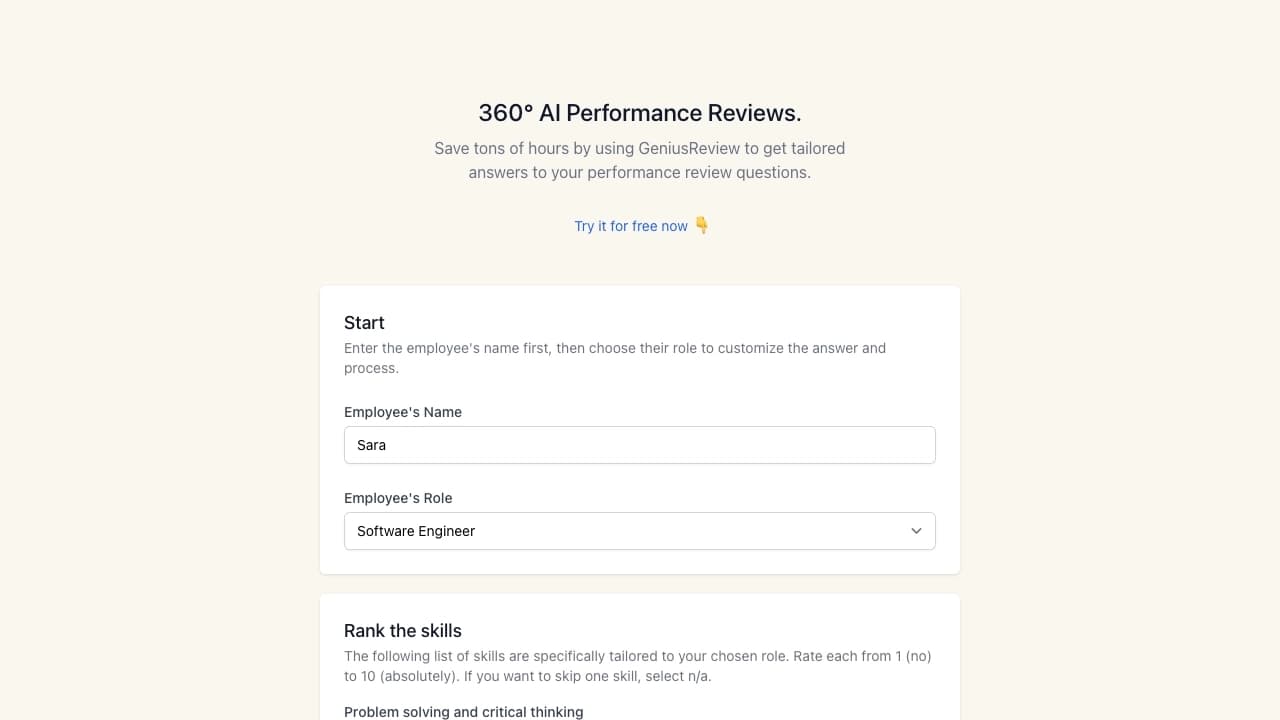
- Enter basic data. First, enter the employee's name and select their role in the organization. The set of suggested skills for evaluation will depend on the selected role.
- Configure evaluation parameters. The user rates the employee's skills on a scale from 1 to 10 (e.g., problem-solving, programming, communication). At this stage, you can also add custom questions that are important for a specific team or project.
- Generate the review. After filling in the required fields and selecting the desired feedback tone, the system will automatically create a ready-made performance review based on the provided data.
Key Settings
Before generating a report, it's worth paying attention to the parameters that affect the final document. The ability to choose the feedback tone and add custom questions allows you to get not a template text but a personalized document that reflects the specifics of a particular person's work.
Key Features of GeniusReview
GeniusReview offers a set of features covering the main needs of the employee evaluation process.
Generating 360-Degree Reviews
This is not just a manager's assessment but a comprehensive review that takes into account the opinions of colleagues, subordinates, and the employee's self-assessment. The AI compiles this data into a single structured document.
Customization by Role and Skills
The system allows adapting the evaluation process to a specific position. Users can rate skills on a standard scale from 1 to 10 and add individual questions, making the evaluation more accurate and relevant.
Tone Control and Personalized Responses
The service allows choosing the tone of the final review, making it possible to adjust how critical or lenient the wording is. Additionally, GeniusReview generates personalized responses to performance evaluation questions, making each report unique.
Advantages of GeniusReview
- Significant time savings. Automatic review generation saves many hours that were previously spent writing texts manually.
- Objectivity through the 360-degree approach. Considering multiple perspectives reduces the influence of one person's personal bias.
- Flexible customization. The ability to adapt evaluation templates to the requirements of a specific position or company.
Disadvantages of GeniusReview
The official service page does not contain information about any limitations or drawbacks. Possible but unconfirmed disadvantages could include: dependence on how correctly the user configures the evaluation parameters, and a possible limitation on the number of generations in the free version. However, this data is not available in open sources.
What Problems Does GeniusReview Solve?
The service is aimed at solving several key tasks in the field of human resources management.
Automating Routine Processes
GeniusReview handles the mechanical work of collecting and structuring feedback. This simplifies the employee evaluation process, reducing the number of manual operations and standardizing the format.
Collecting and Considering All Perspectives
The tool allows collecting feedback from the manager, colleagues, subordinates, and the employee themselves. The system takes all these opinions into account when generating the final review, making the result more comprehensive.
Creating Personalized Reports
Thanks to role-based customization and the ability to add custom questions, the service generates not abstract but personalized performance reviews. This allows seeing the strengths and growth areas of a specific specialist.
GeniusReview Pricing
Currently, GeniusReview is distributed under a free business model. The catalog lists the Free plan, which implies using the service without payment. Details about possible paid plans or limitations of the free version are not presented on the service page.
Terms of Use for GeniusReview
Getting started with the service does not require complex registration or downloading additional software. You just need to enter the employee's name and select their role in the system, after which you can start configuring the evaluation parameters. More detailed terms of use are not disclosed on the page.
GeniusReview Availability
The official service page does not specify information about available platforms (web, mobile apps), the list of supported interface languages, or any regional restrictions or VPN requirements. Most likely, the service is a web application accessible through a browser.
How GeniusReview Differs from Alternatives
The key difference between GeniusReview and many other tools is deep customization while remaining completely free. The service doesn't just offer a template to fill in; it allows adapting the evaluation to a specific employee role using a skills scale and adding custom questions. The ability to choose the feedback tone is another feature that allows controlling the style of the final document.
While many HR evaluation platforms are built around complex integrations and customizable questionnaires that require time to implement, GeniusReview looks like a more lightweight and faster solution focused on generating a ready-made text review based on entered data. It is this approach — a balance between customization and instant results — that sets it apart from competitors.
Conclusion
GeniusReview is a free AI service that solves the relevant problem of simplifying 360-degree employee evaluation. It allows managers and HR specialists to save time through the automatic generation of personalized performance reviews. Flexible settings for a specific role, the ability to add custom questions, and adjust the feedback tone make the tool convenient for use in teams with different corporate cultures. The service is a practical solution for those looking for a simple and fast way to get a structured and multi-faceted assessment of their employees' work.
Frequently asked questions
See also

AI agent for assisting with programming and optimizing the development workflow.

Online tool for quickly creating professional PowerPoint presentations based on ready-made themes and entered text.

A presentation creation service that uses multiple AI agents for information gathering, design, and data analysis.

Chrome extension that helps manage tabs, history, and bookmarks with an AI assistant.

Desktop AI assistant for macOS, Windows, and Linux that launches via hotkey above all windows and combines multiple language models in one interface.

AI platform for voice synthesis and cloning that converts text into realistic speech.

AllChat is a universal platform that combines several popular language models in a single interface for communication, image generation, file analysis, and code execution.

AI service for meal planning, recipe generation, and automatic grocery list creation.