

Fellow AI
AI assistant for meeting management that automatically records, transcribes, and analyzes online meetings, helping teams boost productivity.
Overview
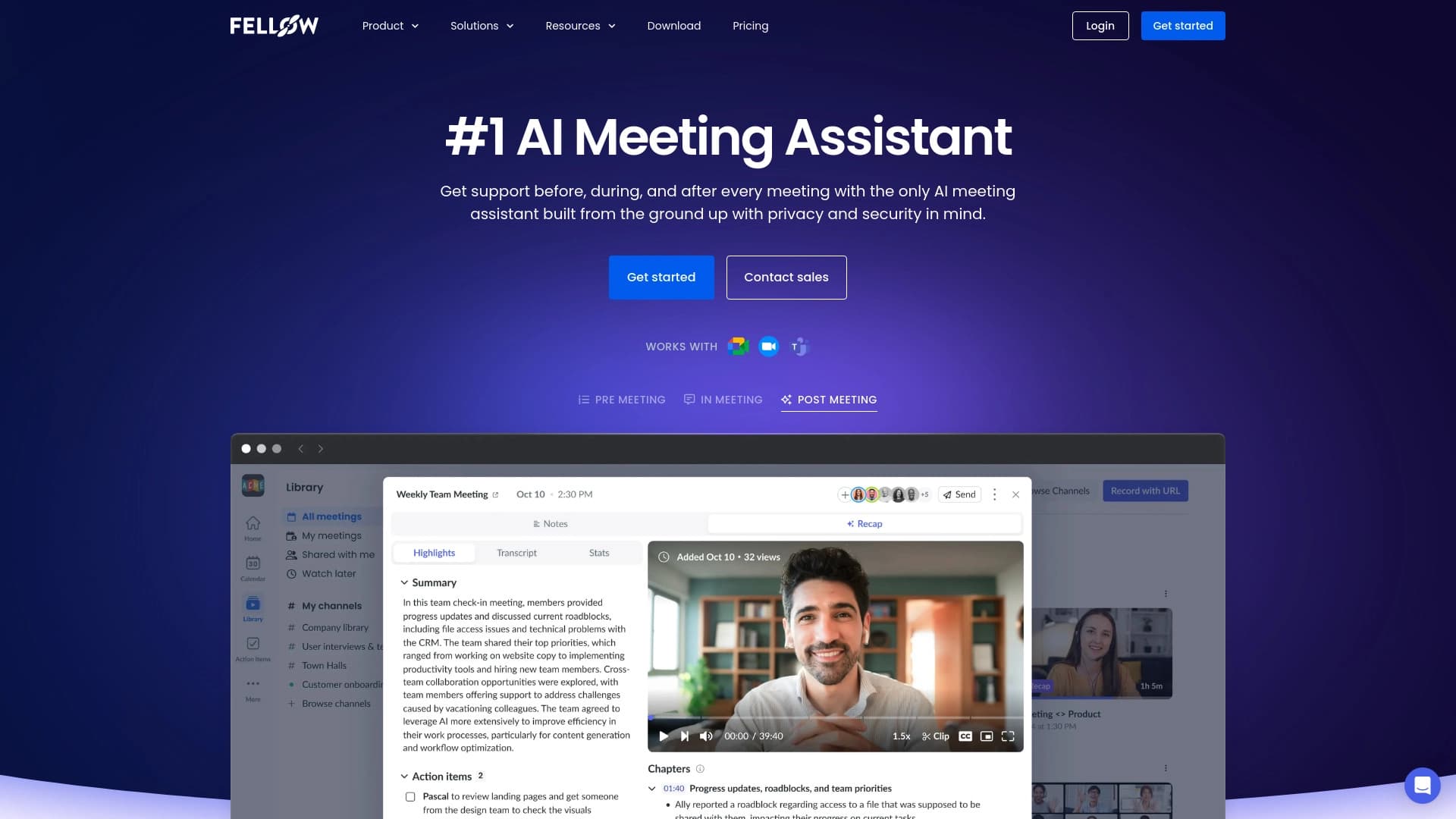
Fellow AI is an artificial intelligence assistant designed to automate the management of online meetings. The service connects to your calendar and popular video conferencing platforms, automatically records meetings, creates text transcriptions, and highlights key information. The main goal of the tool is to free participants from routine tasks: taking notes, recording agreements, and manually creating task lists.
In addition to basic recording and transcription, Fellow AI can analyze the content of discussions. After a meeting ends, the user receives a structured result: brief conclusions for each agenda item, formulated tasks, and even answers to specific questions through the built-in assistant, Ask Fellow. This allows participants to avoid re-listening to long recordings to recover conversation details.
Fellow AI Features
| Feature | Value |
|---|---|
| Type | Service for automating work with online meetings |
| Business model | Freemium |
| Category | Productivity |
| Platform integrations | Zoom, Google Meet, Microsoft Teams |
| CRM support | Salesforce, HubSpot (on business plans) |
| Core technology | AI for speech recognition, text analysis, and conclusion generation |
| Work format | Cloud service, calendar integration |
| Additional integrations | Project management systems (on the Team plan) |
Who is Fellow AI suitable for?
Fellow AI is aimed at teams and professionals who regularly hold online meetings and want to reduce time spent on organizational matters. The tool will be useful in several scenarios:
- Managers and project leads: receive automatic meeting summaries and ready-made task lists for each employee, simplifying the tracking of agreed-upon actions.
- Sales departments: the service integrates with CRM systems (Salesforce, HubSpot), allowing automatic updates to client data after calls and storing negotiation history without manual entry.
- Product and agile teams: built-in templates for planning, retrospectives, and other meeting types standardize the process of discussion and decision recording.
- HR and administrative specialists: keyword tracking and communication pattern analysis help assess employee engagement and meeting effectiveness.
How to use Fellow AI?
To get started with the service, you need to follow several sequential steps:
Connection and setup
The first stage is integrating the service with your calendar (Google Calendar, Outlook, etc.) and your video conferencing account (Zoom, Google Meet, Microsoft Teams). After synchronization, you will need to choose which meetings Fellow AI should process automatically. The service offers flexible settings: you can allow recording of all meetings or only specific events.
Automatic work during meetings
After setup, the assistant automatically joins scheduled meetings at the designated time: it records the audio and video stream, recognizes speech, and creates a real-time transcription. Participants do not need to take any additional actions — the entire process happens in the background. Uploading pre-recorded audio and video files is also supported if the recording was made outside the platform.
Using the results
At the end of a meeting, the system generates a final report: the conversation text, highlighted key points, brief conclusions, and a generated task list assigned to responsible individuals. To find information, you can simply ask the Ask Fellow assistant a question — the AI will locate the relevant fragment and provide an answer without needing to listen to the entire recording. If necessary, you can use ready-made templates for different meeting formats (sales, planning, retrospectives) to predefine the structure for analysis.
Key Features of Fellow AI
The service's functionality covers the full meeting management cycle:
- Automatic recording and notes: the assistant captures the meeting's progress without user involvement, simultaneously creating structured notes.
- Speech recognition and transcription: high-accuracy conversion of spoken language into text, available for subsequent editing and searching.
- Highlighting key moments: AI analyzes the conversation and identifies the most significant fragments — decisions, discussions, disagreements.
- Formulating conclusions and tasks: based on discussions, the algorithm generates brief summaries for each agenda block and compiles a task list.
- Ask Fellow — intelligent search: users ask questions about meeting content, and the assistant finds answers in the transcription.
- Uploading external files: the service accepts audio and video recordings for processing if the meeting took place outside integrated platforms.
- Meeting templates: ready-made scenarios for typical formats (sales, planning, retrospectives) speed up meeting preparation.
- CRM integration: on paid plans, automatic updates to client cards in Salesforce or HubSpot after a call ends are possible.
- Communication analytics: tracking keywords and patterns in participant behavior to assess team interaction dynamics.
- Administration: on the enterprise plan, access rights management and security settings are available at the organizational level.
Advantages of Fellow AI
Key benefits users highlight:
- Full automation of routine tasks: the service automatically joins meetings, records, and processes them — participants don't need to remember to start recording or take notes.
- Low entry barrier with a free plan: you can test basic features without financial commitment, using the allocated recordings.
- Time savings on information retrieval: thanks to Ask Fellow, there's no need to review long recordings — just ask a question and get a targeted answer.
- Comprehensive approach: the combination of recording, transcription, analysis, and task generation covers all key meeting-related needs in one tool.
- Integration with business tools: synchronization with CRM and project systems allows embedding meeting results into existing workflows.
Disadvantages of Fellow AI
Despite its broad functionality, the service has limitations:
- Significant limit on the free plan: users only get 5 meeting recordings per month, which is insufficient for active teams.
- Limitation on the Team plan: even when upgrading to the entry-level paid plan, the limit only increases to 10 recordings per month, which may require a more expensive plan for intensive use.
- Payment required for full functionality: access to CRM integrations and unlimited recording is only available on higher-tier plans.
What problems does Fellow AI solve?
The service addresses several key needs for business teams:
- Meeting recording and transcription: converting spoken discussions into text format for storage, search, and analysis.
- Automatic creation of notes and task lists: generating structured documents with assigned responsibilities, eliminating lost agreements.
- Meeting content analysis and information retrieval: quick access to relevant conversation fragments through the Ask Fellow assistant.
- Updating CRM data after calls: automatic synchronization of negotiation results with the client database, eliminating manual entry.
Fellow AI Pricing
The service operates on a freemium model with four pricing tiers:
| Plan | Price per user per month | Main included features |
|---|---|---|
| Free plan | $0 | 5 meeting recordings per month |
| Team | $7 | 10 recordings + project management system integrations |
| Business | $15 | Unlimited meetings + CRM integrations (Salesforce, HubSpot) |
| Enterprise | $25 | Advanced security settings and administration |
Terms of Use for Fellow AI
To use the service, you need an active account on one of the supported video conferencing platforms (Zoom, Google Meet, or Microsoft Teams) and a connected calendar. The user must grant Fellow AI permissions to access the schedule and the ability to join meetings. The enterprise plan includes additional administrative settings — user role management and restricting access to meeting data. The freemium business model means basic features are available for free, but for full use (removing limits, CRM integrations, enhanced security), you need to upgrade to a paid subscription.
Fellow AI Availability
Fellow AI integrates with three major video conferencing platforms: Zoom, Google Meet, and Microsoft Teams. The service also syncs with popular CRM systems (Salesforce, HubSpot) and project management tools — depending on the chosen plan. Information about supported interface languages and regional availability is not disclosed on official pages; you can only assess whether it meets your requirements through testing.
How Fellow AI differs from alternatives
Fellow AI stands out from competitors due to its comprehensive combination of recording, transcription, and task management features. Unlike simple voice recorders or built-in video conferencing recording functions, the service creates structured final documents: it highlights key points, formulates conclusions, and automatically generates a task list distributed among participants. The ability to ask the Ask Fellow assistant questions simplifies navigation through long transcriptions — a notable difference from competing solutions where search is only keyword-based.
An additional competitive advantage is deep CRM integration, which allows automatic recording of call results in Salesforce or HubSpot without employee involvement. The availability of templates for various meeting types and communication pattern analytics is also rarely found among direct competitors. However, it's worth noting that recording limits on entry-level plans are significantly restricted, which may force teams to overpay for a more expensive plan even with moderate activity.
Conclusion
Fellow AI is a practical tool for automating online meetings, covering the entire workflow: from recording and transcription to analysis and task assignment. It will be useful for teams looking to reduce time spent on organizational routine and streamline the storage of information about held meetings. The availability of a free plan allows you to evaluate the basic functionality, but regular use will require a subscription with an appropriate limit. Thanks to integrations with video conferencing and CRM systems, the service fits seamlessly into existing business processes, making it a solution worth considering for improving team productivity.
Pricing
Frequently asked questions
See also


AI platform for creating and editing videos, working directly in the Chrome browser.


Online AI speech synthesis platform that allows generating audio with voices of famous characters and celebrities.

AI travel planner that creates personalized itineraries and helps you choose flights, accommodation, and activities in a chat.


A multifunctional AI assistant for generating texts, images, and audio.


AI platform for automatic workday planning, task management, and prioritization.

Platform for increasing organic traffic and creating content with the help of AI and expert participation.

Catalog of AI tools with educational materials and guides for selecting neural networks.


A platform for creating corporate chatbots based on your own documents without coding.