

Excelmatic
एक्सेल में प्राकृतिक भाषा के माध्यम से डेटा विश्लेषण का उपकरण।
रैंकिंग में स्थान
अवलोकन
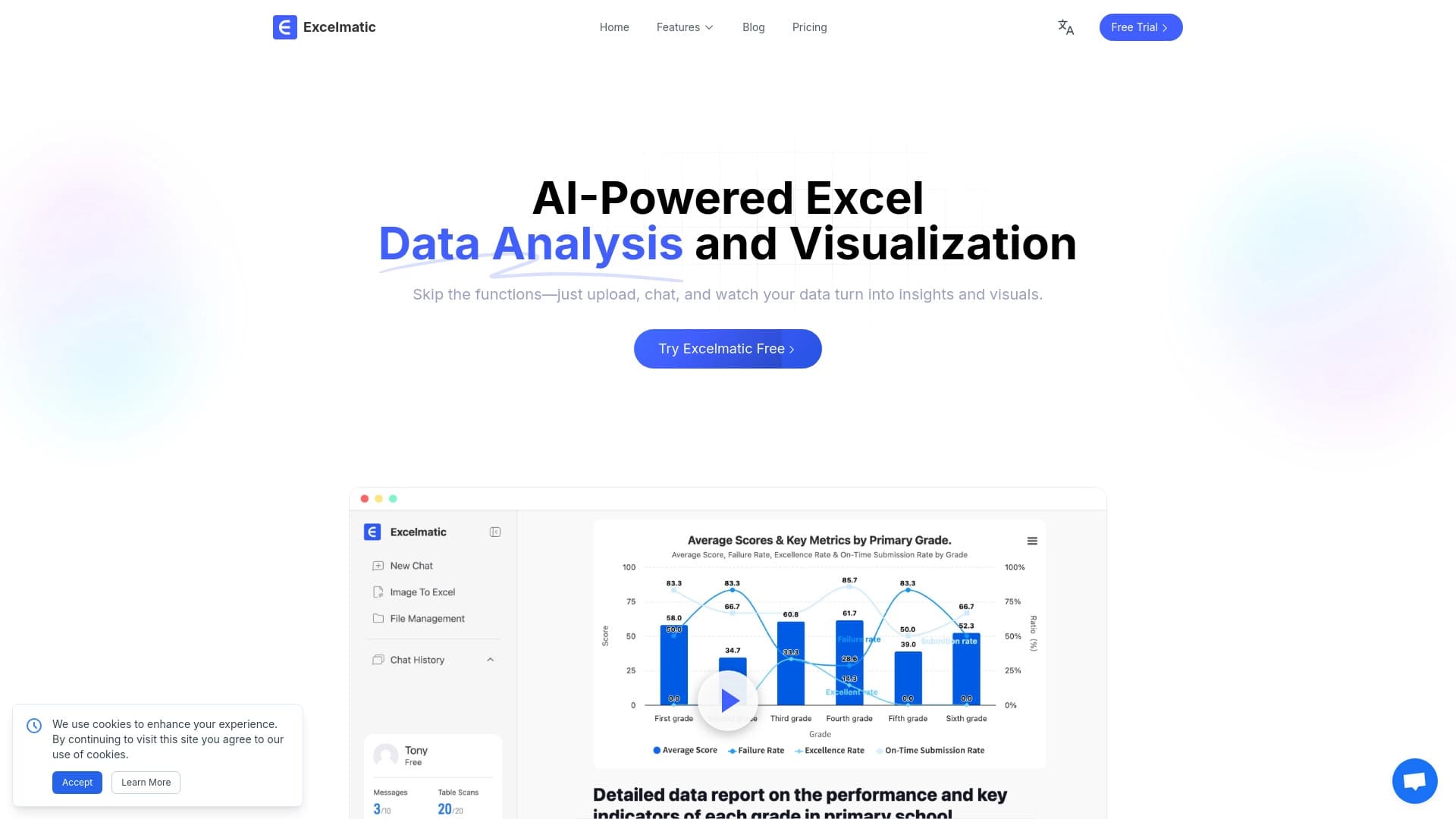
Excelmatic एक ऐसा उपकरण है जो आपको प्राकृतिक भाषा प्रश्नों का उपयोग करके एक्सेल स्प्रेडशीट में डेटा का विश्लेषण करने देता है। मैन्युअल रूप से जटिल सूत्रों का निर्माण करने या फ़ंक्शन वाक्यविन्यास करने के बजाय, आप केवल एक प्रश्न को वाक्यांश दे सकते हैं जिस तरह से आप किसी अन्य व्यक्ति से पूछेंगे और स्प्रेडशीट की सामग्री के आधार पर उत्तर प्राप्त कर सकते हैं।
सिस्टम स्वचालित रूप से आपकी क्वेरी की व्याख्या करता है, दस्तावेज़ में डेटा को संसाधित करता है, और परिणाम को एक आसान-से-समझ प्रारूप में लौटा देता है। यह समय पर कटौती नियमित कार्यों जैसे कि योग, औसत, फ़िल्टरिंग पंक्तियों, या स्पॉटिंग पैटर्न पर खर्च होता है। सेवा का मुख्य लक्ष्य डेटा के साथ जितना संभव हो उतना सरल और सुलभ बनाना है, तकनीकी बाधा को हटाने के लिए प्रत्येक Excel फ़ंक्शन के लिए वाक्यविन्यास को याद रखने के लिए।
यह अपने मूल में कैसे काम करता है
मुख्य सिद्धांत स्प्रेडशीट के साथ काम करने के लिए प्रोग्रामेटिक कमांड में प्राकृतिक भाषा को बदल रहा है। आप बताते हैं कि आप क्या चाहते हैं, और एक्सेलमैटिक व्याख्या और गणना को संभालती है। यह विशेष रूप से उपयोगी है जब आपको अलग-अलग स्तंभों में मध्यवर्ती गणना की स्थापना के बिना एक-बंद प्रश्न के लिए त्वरित उत्तर की आवश्यकता होती है।
स्वचालन दृष्टिकोण
उपकरण सही कोशिकाओं और श्रेणियों का पता लगाने में शामिल काम का नियमित हिस्सा लेता है। आपको सटीक डेटा निर्देशांक निर्दिष्ट करने या त्रुटि-handling तर्क लिखने की आवश्यकता नहीं है - बस शब्दों में कार्य का वर्णन करें। यह दृष्टिकोण गलत सूत्र वाक्यविन्यास के कारण होने वाली त्रुटियों की संभावना को कम करता है और डेटा विश्लेषण को कम थकाऊ बनाता है।
एक्सेलमेटिक विशेषताएं
| फ़ीचर | मूल्य |
|---|---|
| उद्देश्य | Excel में डेटा का विश्लेषण और प्रसंस्करण |
| इनपुट विधि | प्राकृतिक भाषा (पाठ क्वेरीज़) |
| लक्ष्य मंच | एक्सेल स्प्रेडशीट |
| लर्निंग वक्र | कम (कोई सूत्र ज्ञान की आवश्यकता नहीं) |
| आउटपुट प्रारूप | स्प्रेडशीट डेटा के आधार पर क्वेरी का जवाब |
| कोडिंग की आवश्यकता | नहीं |
कौन है Excelmatic?
Excelmatic उन लोगों के लिए उपयोगी है जो नियमित रूप से सारणीबद्ध डेटा के साथ काम करते हैं लेकिन एक एक्सेल विशेषज्ञ नहीं है। उपकरण उन उपयोगकर्ताओं के लिए है जो समय बचाने और जटिल कार्यों को सीखने से बचना चाहते हैं।
तकनीकी पृष्ठभूमि के बिना पेशेवर
विपणन, बिक्री, मानव संसाधन, या वित्त में काम करने वाले लोगों को अक्सर रिपोर्टों से त्वरित निष्कर्षों की आवश्यकता होती है लेकिन हमेशा यह नहीं याद करते कि सही सूत्र कैसे बनाया जाए। उनके लिए, यह उपकरण कार्य को निर्धारित करने और समाप्त संख्या प्राप्त करने के बीच एक पुल के रूप में कार्य करता है।
वित्तीय और व्यापार विश्लेषक
विशेषज्ञ जो Excel में बहुत समय बिताते हैं, नियमित चेक और प्रारंभिक विश्लेषण को गति प्रदान कर सकते हैं। VLOOKUP या SUMIFS के साथ जटिल निर्माण लिखने के बजाय, वे बस पूछ सकते हैं "अंतिम क्वार्टर क्षेत्र के लिए क्या राजस्व था? और सही उत्तर प्राप्त करें।
Excelmatic का उपयोग कैसे करें
सेवा का उपयोग कुछ सरल चरणों में किया जा सकता है जिसके लिए कोई विशेष तैयारी की आवश्यकता नहीं है।
- स्प्रेडशीट खोलें: एक एक्सेल दस्तावेज़ के साथ काम करना शुरू करें जिसमें आपको आवश्यक डेटा शामिल है।
- अपनी क्वेरी तैयार करनाउदाहरण के लिए, सादे भाषा में एक प्रश्न लिखें, "जनवरी के लिए कुल बिक्री को खोजें"।
- परिणाम प्राप्त करें: उपकरण क्वेरी को संसाधित करता है और उत्तर को आउटपुट करता है या स्प्रेडशीट में परिणाम की कल्पना करता है।
अपने प्रश्नों को परिष्कृत करना
अधिक सटीक उत्तर के लिए, प्रश्नों को वाक्यांश देने की सिफारिश की जाती है ताकि वे विशिष्ट स्तंभों, समय अवधियों या शर्तों को शामिल कर सकें। अधिक सटीक विवरण, अधिक प्रासंगिक परिणाम। उपकरण को याद करने की आवश्यकता नहीं है, लेकिन डेटा का तार्किक विवरण सिस्टम को सही कोशिकाओं को तेज़ी से ढूंढने में मदद करता है।
Excelmatic की मुख्य विशेषताएं
उपकरण डेटा संचालन की एक श्रृंखला को कवर करता है, उन्हें स्वचालित रूप से निष्पादित करता है।
- समग्र मूल्यों के साथ काम करना: निर्दिष्ट श्रेणियों पर कुलों, योगों और अंकगणित औसतों की गणना करना।
- तुलना और फ़िल्टरिंग: स्थितियों के आधार पर डेटा का चयन करना, विभिन्न समूहों या अवधियों में मैट्रिक्स की तुलना करना।
- रिश्तों का पता लगाना: पैटर्न की पहचान करना, मूल्यों को सॉर्ट करना, और डेटा सेट में अधिकतम और न्यूनतम प्राप्त करना।
- संदर्भ व्याख्या: प्रश्न के अर्थ को समझना, जो न केवल व्यक्तिगत कोशिकाओं बल्कि तार्किक रूप से पंक्तियों के सेट को संसाधित करने की अनुमति देता है।
Excelmatic के लाभ
तंत्रिका नेटवर्क का उपयोग करने से उपयोगकर्ताओं को अपने दैनिक काम में कई व्यावहारिक लाभ मिलते हैं।
समय बचत
मुख्य लाभ गति है। संचालन जो एक जटिल सूत्र लिखने के लिए कई मिनट लेने के लिए उपयोग किया जाता था या अब एक पिवट तालिका स्थापित करने के लिए सेकंड ले। यह तेजी से डेटा संचालित निर्णयों की अनुमति देता है।
प्रवेश के लिए कम बाधा
कार्य वाक्यविन्यास सीखने के लिए नहीं, उपकरण को व्यापक दर्शकों के लिए सुलभ बनाता है। कोई भी कर्मचारी जो अपने विचारों को व्यक्त कर सकता है, उन्हें मदद के लिए तकनीकी विशेषज्ञों को पूछने के बिना आवश्यक डेटा प्राप्त कर सकता है।
Fewer त्रुटियों
स्वचालित क्वेरी व्याख्या गलतियों को गलत तरीके से निर्दिष्ट करने से संबंधित गलतियों को समाप्त करती है सेल रेंज या फ़ंक्शन नामों में टाइप करें। सिस्टम खुद यह निर्धारित करता है कि कौन से डेटा गणना के लिए इस्तेमाल किया जाना चाहिए।
Excelmatic की सीमा
किसी भी प्रौद्योगिकी उपकरण की तरह, Excelmatic में कुछ सीमाएं हैं जो ध्यान में रखने के लिए महत्वपूर्ण हैं।
गैर मानक संरचनाओं के साथ कठिनाई
यदि स्प्रेडशीट में डेटा एक मानक फ्लैट संरचना से काफी भिन्न होता है (उदाहरण के लिए, इसमें डबल हेडर के साथ विलय कोशिकाएं या लेआउट शामिल हैं), तो सिस्टम क्वेरी को गलत तरीके से व्याख्या कर सकता है। ऐसे मामलों में स्प्रेडशीट को सामान्यीकृत करने की आवश्यकता हो सकती है।
Frasing पर निर्भरता
उत्तर की गुणवत्ता सीधे इस बात पर निर्भर करती है कि प्रश्न किस प्रकार है। Ambiguous या overly सामान्य phrasing गलत परिणाम के लिए नेतृत्व कर सकते हैं। आपको कुछ प्रयासों की आवश्यकता हो सकती है ताकि सही जवाब मिल सके।
Excelmatic क्या कार्य करता है?
Excelmatic को उन परिचालन कार्यों की एक विस्तृत श्रृंखला को संभालने के लिए डिज़ाइन किया गया है जो स्प्रेडशीट के साथ काम करते समय आते हैं। जब आपको गणना के विवरण में डाइविंग के बिना त्वरित उत्तर की आवश्यकता होती है तो टूल अनिवार्य है।
उपकरण त्वरित बिक्री सारांश उत्पन्न करने, सूची स्तर की जाँच करने, उपस्थिति का विश्लेषण करने या औसत ऑर्डर मूल्य की गणना करने के लिए प्रभावी है। यह प्रबंधक सरल डेटा खींचने के लिए विश्लेषकों को दूर खींचने के बिना अपने आप में नेतृत्व से सवालों का जवाब देता है। यह सेवा गहन विश्लेषण से पहले प्रारंभिक डेटा प्रोसेसिंग के लिए भी उपयोगी है, डेटासेट को साफ करने और प्रमुख मैट्रिक्स पर ध्यान केंद्रित करने में मदद करता है।
Excelmatic मूल्य निर्धारण
वर्तमान में, सेवा का उपयोग करने की लागत के बारे में जानकारी सार्वजनिक स्रोतों से उपलब्ध नहीं है। यह स्पष्ट नहीं है कि उत्पाद को सीमित कार्यक्षमता के साथ एक मुक्त स्तर के रूप में वितरित किया जाता है, सदस्यता द्वारा पेश किया जाता है, या एक बार भुगतान की आवश्यकता होती है। मूल्य निर्धारण और उपलब्ध योजनाओं पर अद्यतन जानकारी के लिए, डेवलपर की आधिकारिक वेबसाइट या संपर्क उत्पाद समर्थन की जांच करने की सलाह दी जाती है।
Excelmatic के लिए उपयोग की शर्तें
सेवा की शर्तों को उपलब्ध सामग्रियों में प्रकाशित नहीं किया गया है। हालांकि, जैसा कि इस वर्ग के उपकरणों के लिए विशिष्ट है, मानक आवश्यकताएं आमतौर पर लागू होती हैं: एक क्लाउड सेवा के साथ काम करते समय एक्सेल स्थापित (या वेब संस्करण तक पहुंच) और एक स्थिर इंटरनेट कनेक्शन होना। लाइसेंस समझौते की विशिष्ट शर्तें, संसाधित डेटा की मात्रा पर सीमाएं और परियोजना के आधिकारिक संसाधनों पर सॉफ्टवेयर के साथ काम शुरू करने से पहले उपयोगकर्ताओं को गोपनीयता नीति को समझाया जाना चाहिए।
Excelmatic उपलब्धता
जिस प्लेटफॉर्म और क्षेत्रों में सेवा उपलब्ध है, उसके बारे में जानकारी सीमित है। उत्पाद की उपलब्धता इस बात पर निर्भर करती है कि क्या उपकरण विंडोज और मैकओएस के लिए एक्सेल के डेस्कटॉप संस्करण के साथ एकीकरण का समर्थन करता है, या क्या यह विशेष रूप से ब्राउज़र में वेब एप्लिकेशन के रूप में कार्य करता है। कार्यालय सूट के मोबाइल संस्करणों के लिए समर्थन भी अज्ञात है। यह संभावना है कि अगर रिमोट सर्वर पर प्रश्नों को संसाधित किया जाता है तो इंटरनेट एक्सेस को सेवा का उपयोग करने की आवश्यकता होगी। समर्थित ऑपरेटिंग सिस्टम और ब्राउज़र आवश्यकताओं की सूची को स्पष्ट करने के लिए, आपको डेवलपर के संसाधनों का दौरा करने की आवश्यकता होगी।
कैसे Excelmatic विकल्प से अलग है
Excelmatic और Excel में काम करने के मानक तरीकों के बीच महत्वपूर्ण अंतर, साथ ही कई अन्य ऐड-ऑन, प्राथमिक इंटरफ़ेस के रूप में बातचीत प्राकृतिक भाषा पर इसका ध्यान केंद्रित है। अधिकांश कार्यक्रम और ऐड-ऑन को उपयोगकर्ता को विशिष्ट कमांड, पैरामीटर्स, या कम से कम इमारत सूत्रों के तर्क को समझने की आवश्यकता होती है।
इसके विपरीत, एक्सेलमेटिक सीखने की आवश्यकता को कम करता है। जबकि प्रतिस्पर्धा समाधान दृश्य क्वेरी बिल्डरों या व्यापक कार्य पुस्तकालयों की पेशकश करते हैं जिन्हें जानबूझकर विकल्पों की आवश्यकता होती है, यह उपकरण एक कम्प्यूटेशनल ऑपरेशन में एक सरल प्रश्न का अनुवाद करने के बौद्धिक कार्य को लेता है। यह उपकरण को व्यवसाय की समस्या को हल करने के लिए सीखने से ध्यान केंद्रित करता है, जिससे डेटा विश्लेषण किसी भी उपयोगकर्ता के लिए सहज प्रक्रिया बन जाती है।
निष्कर्ष
Excelmatic Excel में डेटा के साथ काम को सरल बनाने के लिए एक आधुनिक समाधान है। इसका मुख्य मूल्य उन लोगों के लिए विश्लेषण सुलभ बनाने में निहित है जो प्राकृतिक भाषा में संवाद कर सकते हैं। उपकरण विशिष्ट स्प्रेडशीट संचालन करते समय समय समय बचाने और संज्ञानात्मक भार को कम करने में मदद करता है। जबकि मूल्य निर्धारण और उपलब्धता के बारे में विस्तृत जानकारी आधिकारिक चैनलों के माध्यम से पुष्टि की जानी चाहिए, दृष्टिकोण स्वयं — एक गणना में एक पाठ क्वेरी मोड़ — कार्यालय सॉफ्टवेयर के विकास में एक आशाजनक दिशा की तरह लग रहा है।
अक्सर पूछे जाने वाले प्रश्न
यह भी देखें

व्यवसायों के लिए AI सहायक जो संवाद के माध्यम से कार्यों को प्रबंधित करने और दिनचर्या को स्वचालित करने में मदद करता है।

एआई एजेंट जो विभिन्न स्रोतों से डेटा एकीकृत करने और संगठनों में ज्ञान प्रबंधन के लिए है।
प्रस्तुतियाँ और स्लाइड शो स्वचालित रूप से बनाने के लिए AI सेवा, विषय या संक्षिप्त विवरण के आधार पर।

होस्टिंगर का AI वेबसाइट बिल्डर, जो व्यवसाय के विवरण के आधार पर तेज़ी से वेबसाइट बनाने में मदद करता है।

ग्राहक संचार और सहायता को स्वचालित करने के लिए AI एजेंट।

TensorStax एक AI एजेंट है जो मशीन लर्निंग मॉडल के जीवनचक्र को प्रबंधित करता है, उनकी तैनाती और निगरानी को सरल बनाता है।


मल्टीमॉडल AI एजेंट जो चैट, वॉयस और वीडियो के माध्यम से ग्राहक सेवा और बिक्री को स्वचालित करते हैं।


डेस्कटॉप एआई सहायक मैकओएस, विंडोज और लिनक्स के लिए जो सभी खिड़कियों के ऊपर हॉटकी के माध्यम से लॉन्च करते हैं और एक इंटरफेस में एकाधिक भाषा मॉडल को जोड़ते हैं।.