

Cron AI
Бесплатный онлайн-инструмент, который преобразует текстовые описания на английском языке в cron-выражения для Unix-систем.
Обзор
Cron AI
Описание нейросети Cron AI
Cron AI — это бесплатный онлайн-сервис, который преобразует текстовые описания на естественном английском языке в cron-выражения для Unix-систем. Например, фраза «every Monday at 9am» превращается в готовое cron-выражение, которое можно напрямую использовать в системном планировщике.
Инструмент ориентирован на тех, кто не хочет углубляться в синтаксис cron, но нуждается в быстром создании расписаний для автоматизации. Благодаря минималистичному интерфейсу весь процесс сводится к нескольким действиям: ввод описания задачи и мгновенное получение результата. Сервис подходит для запуска скриптов, отправки уведомлений и выполнения других действий в заданное время.
Характеристики Cron AI
| Характеристика | Значение |
|---|---|
| Тип | Генерация cron-выражений |
| Категории | Планирование и встречи, Генерация кода |
| Язык интерфейса | Английский |
| Наличие бесплатного тарифа | Да |
| Модель распространения | Free (бесплатная) |
Для кого подходит нейросеть Cron AI?
Разработчики и администраторы
Cron AI предназначен для разработчиков и системных администраторов, которым регулярно приходится настраивать периодические задачи и работать с планировщиками Unix-систем. Инструмент позволяет сократить время на создание корректных расписаний.
Пользователи без опыта работы с cron
Сервис будет особенно полезен тем, кто не знает синтаксис cron, но хочет автоматизировать свои задачи. Вместо изучения правил записи выражений достаточно описать нужное расписание простыми словами на английском языке, и инструмент сам сформирует правильное выражение.
Специалисты, ценящие простоту
Благодаря бесплатному доступу и отсутствию регистрации, инструмент подходит каждому, кому нужно быстро получить cron-выражение без лишних настроек и настройки учётных записей.
Как использовать нейросеть Cron AI?
Шаг 1. Откройте сайт сервиса
Cron AI доступен как веб-сервис, работающий через интернет через браузер. Для начала работы достаточно открыть сайт инструмента — регистрация или создание учётной записи не требуется.
Шаг 2. Введите описание задачи
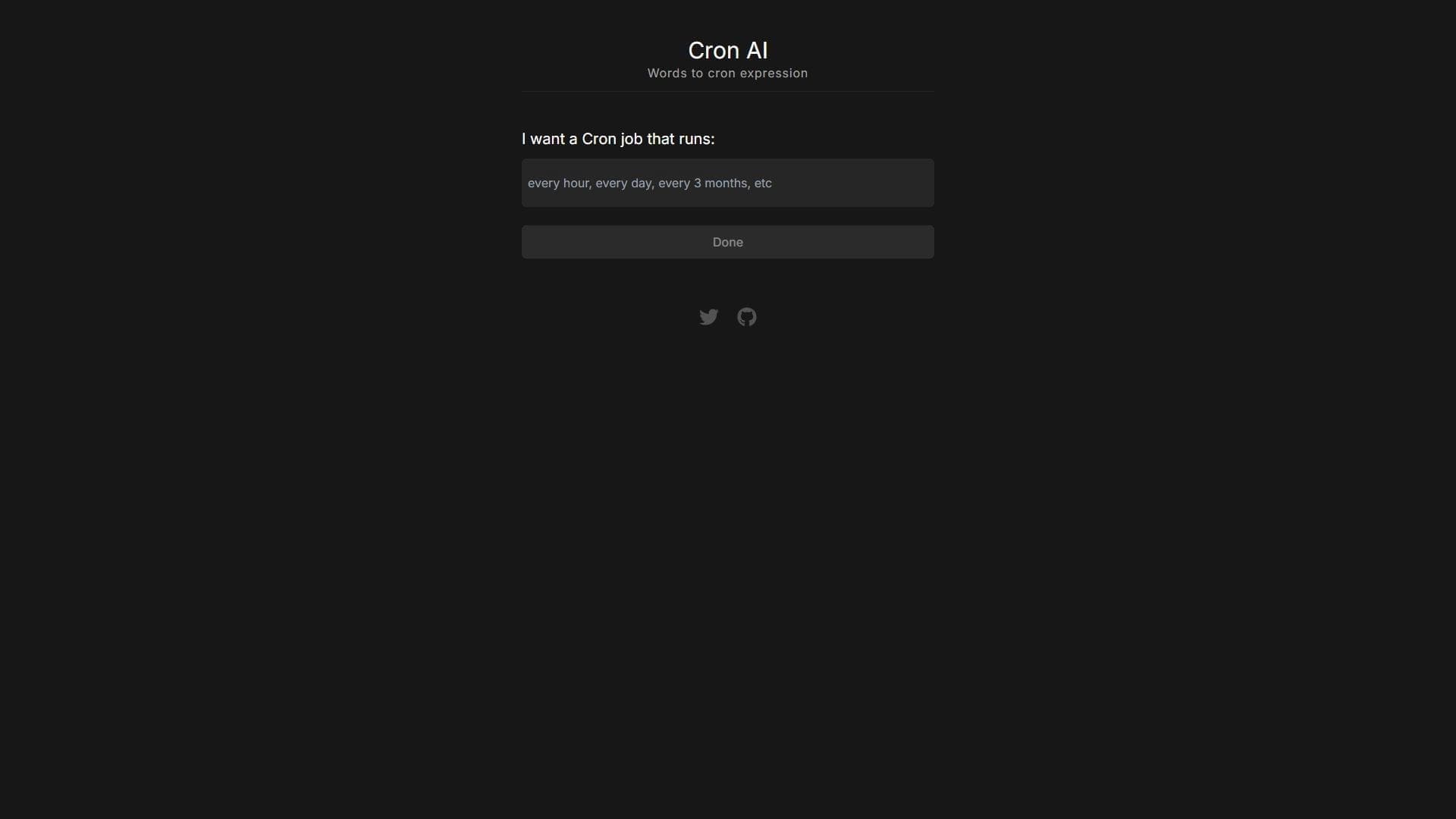
В поле ввода необходимо указать текстовое описание расписания на английском языке. Например, можно написать «every Monday at 9am», чтобы задать выполнение задачи каждый понедельник в 9 утра.
Шаг 3. Получите и скопируйте результат
После ввода описания инструмент моментально формирует готовое cron-выражение. Результат отображается в области вывода, откуда его можно скопировать и использовать в своей системе для автоматизации задач.
Основные функции Cron AI
Генерация cron-выражений из текста
Главная функция сервиса — преобразование текстовых описаний на английском языке в корректные cron-выражения для Unix-систем. Инструмент понимает естественные формулировки расписаний и переводит их в синтаксис планировщика.
Минималистичный интерфейс
Интерфейс сервиса состоит из поля для ввода описания и области вывода результата. Такая простая структура делает работу максимально быстрой и понятной — пользователю не приходится разбираться в сложных элементах управления.
Моментальное получение результата
Cron AI выдаёт готовое выражение сразу после ввода текста. Это позволяет разработчикам и администраторам не тратить время на ручной расчёт расписаний и проверку синтаксиса.
Преимущества Cron AI
Не требует регистрации
Один из ключевых плюсов сервиса — отсутствие необходимости создавать учётную запись. Это упрощает доступ и позволяет мгновенно начать использовать инструмент.
Бесплатный доступ
Cron AI распространяется по бесплатной модели, поэтому все пользователи могут пользоваться его возможностями без оплаты.
Простой и понятный интерфейс
Минималистичный дизайн с полем ввода и областью вывода делает инструмент интуитивно понятным даже для новичков, которые впервые сталкиваются с созданием расписаний.
Недостатки Cron AI
Работа только с английским языком
Инструмент принимает описания исключительно на английском языке, что может ограничить его использование для русскоязычных пользователей без знания английского.
Отсутствие прямой интеграции
Сервис только выдаёт текст cron-выражения и не интегрируется с системами напрямую. Пользователю необходимо вручную скопировать результат и внести его в свой планировщик.
Ограниченная поддержка сложных сценариев
Cron AI не поддерживает сложные сценарии и вложенные условия. Для простых периодических задач инструмент подходит отлично, но для более гибких и многоуровневых расписаний его возможностей может не хватить.
Какие задачи решает Cron AI
Автоматизация резервного копирования по расписанию
Инструмент помогает быстро создавать cron-выражения для запуска регулярного резервного копирования данных в заданное время.
Настройка периодических скриптов для серверов
Администраторы могут использовать Cron AI для быстрого формирования расписаний запуска периодических скриптов на серверах, не отвлекаясь на проверку правильности синтаксиса.
Создание cron-выражений без изучения синтаксиса
Основная задача сервиса — избавить пользователей от необходимости изучать правила записи cron-выражений, позволяя описывать расписания простыми словами на английском языке.
Цены Cron AI
Cron AI полностью бесплатен. Сервис не предусматривает платных тарифов и доступен всем пользователям без ограничений по стоимости.
Условия использования Cron AI
Для работы с сервисом не требуется регистрация — инструмент доступен только онлайн. Пользователю достаточно открыть сайт через браузер, ввести текстовое описание задачи на английском языке и скопировать полученное cron-выражение.
Доступность Cron AI
Cron AI — это веб-сервис, работающий через интернет. Интерфейс доступен только на английском языке. Для использования инструмента необходимо подключение к сети, поскольку вся работа происходит в онлайн-режиме в браузере.
Чем отличается Cron AI от аналогов
Отсутствие регистрации и платы
В отличие от многих сервисов автоматизации, Cron AI не требует создания учётной записи и полностью бесплатен. Пользователь может открыть сайт и сразу приступить к созданию расписаний.
Ориентация на простые расписания
Инструмент сфокусирован на быстром преобразовании простых текстовых описаний в cron-выражения. В то время как более сложные аналоги могут поддерживать интеграции и комплексные сценарии, Cron AI делает упор на простоте и скорости.
Только веб-интерфейс
Сервис работает исключительно как веб-приложение с минималистичным интерфейсом на английском языке, без прямой интеграции с системами пользователя — результат выдаётся только в виде текста.
Заключение
Cron AI — это удобный и бесплатный онлайн-инструмент для разработчиков и администраторов, которые хотят быстро создавать cron-выражения без изучения их синтаксиса. Простой интерфейс, отсутствие регистрации и моментальная выдача результата делают его практичным решением для настройки периодических задач, резервного копирования и запуска скриптов. При этом инструмент имеет ограничения: работает только с английским языком, не поддерживает сложные сценарии и не интегрируется с системами напрямую, что важно учитывать при выборе подходящего сервиса.
Часто задаваемые вопросы

Смотрите также


ИИ-платформа для быстрого создания сайтов и управления процессами малого бизнеса.


Боковая AI-панель, которая помогает отвечать на вопросы, работать с документами и генерировать изображения.


Набор инструментов для генерации и редактирования видео с помощью ИИ, включая аватары, липсинк и клонирование голоса.

ИИ-агент для автоматизации клиентских коммуникаций и поддержки.


Расширение для Chrome, которое помогает управлять вкладками, историей и закладками с помощью ИИ-ассистента.

AI-ассистент для бизнеса, который помогает управлять задачами и автоматизировать рутину через диалог.


Настольный AI-ассистент для macOS, Windows и Linux, который запускается по хоткею поверх всех окон и объединяет несколько языковых моделей в одном интерфейсе.


Облачная AI-платформа для автоматизации контроля чистоты в офисах и мониторинга действий сотрудников.