
Craiyon
Бесплатный генератор изображений по текстовому описанию, не требующий регистрации.
Место в рейтингах
Обзор
Craiyon
Описание нейросети Craiyon
Craiyon (ранее известный как DALL·E mini) — это бесплатный генератор изображений по текстовому описанию, работающий на основе собственной модели искусственного интеллекта. Главная особенность сервиса — возможность создавать сразу девять вариантов картинок по одному запросу без необходимости регистрации. Нейросеть подходит как для быстрых творческих экспериментов, так и для более осмысленного создания визуальных концептов. Craiyon поддерживает выбор стилей (арт, фото, рисунок), а также предоставляет базовые функции редактирования: удаление фона, добавление и исключение деталей.
Характеристики Craiyon
| Характеристика | Значение |
|---|---|
| Тип | Генератор изображений по текстовому описанию |
| Категория | Иллюстрация, Реклама и SMM, Арт, Помощник дизайнера |
| Преобразование | Текст в изображение |
| Задачи | Создать изображение |
| Наличие бесплатного тарифа | Да |
| Наличие API | Да |
| Статус оплаты | Платные, Бесплатные |
| Бизнес-модель | Платный (есть бесплатная версия) |
| Количество изображений за запрос | 9 вариантов |
| Время генерации (бесплатная версия) | 1–2 минуты |
| Регистрация | Не требуется для базовой версии |
| Язык интерфейса | Мультиязычный (русский, английский) |
| Популярность на странице | Популярно |
Для кого подходит нейросеть Craiyon?
Творческие люди и студенты
Craiyon идеально подходит для тех, кто хочет быстро визуализировать идеи без затрат. Художники могут использовать нейросеть для поиска вдохновения, а студенты — для создания иллюстраций к учебным проектам и презентациям.
Малый бизнес и создатели контента
Предприниматели и маркетологи могут применять Craiyon для генерации изображений для социальных сетей, рекламных материалов и визуального контента. Создатели контента получают возможность быстро получать уникальные визуальные эффекты для сопровождения текстов.
Любители экспериментов
Сервис подходит всем, кто хочет попробовать себя в создании изображений с помощью искусственного интеллекта, экспериментировать с необычными комбинациями и стилями без необходимости платить или разбираться в сложных настройках.
Как использовать нейросеть Craiyon?
Процесс генерации изображения
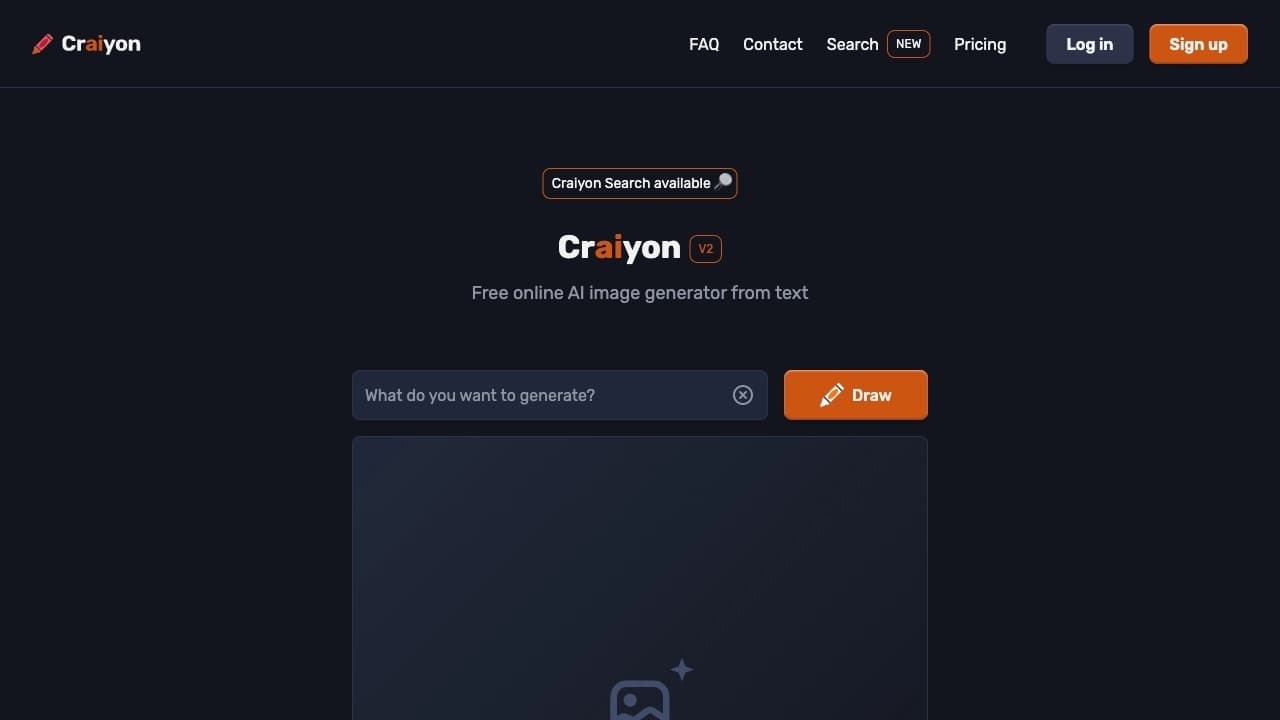
Для создания изображения достаточно перейти на сайт craiyon.com, ввести текстовый запрос в соответствующее поле и нажать кнопку «Draw». Чем детальнее описание, тем точнее результат. Рекомендуется начинать с главного объекта, затем добавлять действие, окружение и атмосферу, указывать жанры или ссылаться на художников.
Настройка запроса
После завершения генерации пользователь может просмотреть 9 сгенерированных вариантов и выбрать подходящий. Для получения изображения без автоматической стилизации используется режим Raw, который даёт полный контроль над стилем. В Pro-версии доступна функция ретуши текстом: в поле Retouch можно описать, что изменить в уже готовом изображении.
Сохранение и публикация
Готовые изображения можно бесплатно скачать на устройство или поделиться результатами в социальных сетях. Также доступна возможность распечатать работы на футболках или опубликовать их на форуме сервиса.
Основные функции Craiyon
Генерация изображений по тексту
Основная функция Craiyon — создание до 9 изображений за один запрос на основе текстового описания. Нейросеть поддерживает множество художественных направлений: от реализма до аниме, от мультяшного до абстрактного стиля.
Режим Raw и ретушь текстом
Режим Raw позволяет получить полный контроль над стилем изображения без автоматических фильтров. В Pro-версии доступна функция ретуши текстом, которая позволяет изменять готовые изображения с помощью текстового описания — например, добавлять или удалять объекты, менять фон.
Инструменты редактирования
Craiyon предоставляет возможность удаления фона с сохранением сложных краёв (волосы, шерсть), а также инструмент «Исключения», который позволяет убрать нежелательные элементы из сгенерированного изображения. После генерации можно вносить изменения в картинки, добавляя или модифицируя отдельные детали.
Преимущества Craiyon
Доступность и простота
Craiyon не требует оплаты за стандартное использование и работает без регистрации. Интерфейс простой и интуитивно понятный, что делает сервис доступным для новичков. Мультиязычная поддержка позволяет работать с запросами на разных языках.
Скорость и количество вариантов
За один запрос нейросеть выдаёт сразу 9 вариантов изображений, что экономит время и даёт возможность выбора. Время генерации в бесплатной версии составляет 1–2 минуты, а в платных тарифах процесс ускоряется до 45 секунд.
Гибкость использования
Craiyon подходит для личных, учебных и коммерческих проектов (при соблюдении условий использования). Сервис позволяет не только создавать изображения с нуля, но и редактировать уже готовые, а также скачивать результаты и делиться ими.
Недостатки Craiyon
Качество и детализация
Качество изображений, создаваемых Craiyon, уступает платным аналогам, таким как Midjourney и Stable Diffusion. Картинки получаются меньшего размера и с упрощённым стилем, что делает сервис менее подходящим для сложных и детализированных проектов.
Ограничения бесплатной версии
В бесплатной версии генерируемые изображения содержат водяные знаки, а также анонимно добавляются в поисковую базу сервиса. Отсутствуют некоторые продвинутые функции, доступные в платных тарифах, такие как ретушь текстом и приватные изображения.
Какие задачи решает Craiyon
Создание визуальных концептов
Craiyon позволяет быстро создавать изображения по текстовому описанию для визуализации идей в творчестве, учёбе или малом бизнесе. Сервис помогает экспериментировать с необычными комбинациями и стилями, получая сразу несколько вариантов по одному запросу.
Редактирование и доработка изображений
Нейросеть решает задачи по изменению готовых изображений без навыков работы в графических редакторах. С помощью текстовых запросов можно добавлять или удалять объекты, менять фон, а также убирать нежелательные элементы из сгенерированной картинки.
Практические бизнес-задачи
Craiyon подходит для создания логотипов в векторном стиле, генерации предметов для интернет-магазинов, а также для подготовки графических материалов для рекламы и социальных сетей. Сервис позволяет быстро получать уникальные визуальные эффекты для сопровождения контента.
Цены Craiyon
Бесплатная версия
Базовая версия Craiyon предоставляется бесплатно и включает генерацию изображений с рекламой, время обработки 1–2 минуты. Созданные работы анонимно добавляются в поисковую базу сервиса. Ограничений на количество запросов нет.
План Supporter
Стоимость — $5 в месяц при годовой оплате. Тариф включает отсутствие рекламы, ускорение генерации до 45 секунд, а также возможность создавать приватные изображения, которые не попадают в поисковую базу.
План Professional
Стоимость — $20 в месяц при годовой оплате. Предоставляет максимальную скорость генерации, приоритетную поддержку, а также функцию улучшения разрешения изображений. Pro-версия также открывает портретный и альбомный форматы, убирает водяные знаки и позволяет добавлять текст.
Условия использования Craiyon
Бесплатный доступ
Для использования базовой версии Craiyon регистрация не требуется. Однако в бесплатной версии созданные работы анонимно добавляются в поисковую базу сервиса. Изображения могут содержать водяные знаки.
Коммерческое использование
Для коммерческого использования созданных изображений необходимо соблюдение условий использования сервиса. Бесплатная версия генерирует только базовые изображения с ограниченным функционалом. Платные тарифы предоставляют больше возможностей и приватность создаваемого контента.
Доступность Craiyon
Веб-версия и языки интерфейса
Craiyon доступен через веб-сайт craiyon.com. Интерфейс поддерживает множество языков, включая русский и английский. Запросы можно вводить на естественном языке, что упрощает использование сервиса.
Региональная доступность
Для бесплатного доступа регистрация не требуется. Информация о региональных ограничениях и необходимости использования VPN на официальной странице не указана. Сервис работает через браузер на любом устройстве с доступом в интернет.
Чем отличается Craiyon от аналогов
Отличие от Midjourney
В отличие от Midjourney, который требует оплаты и работы через Discord, Craiyon полностью бесплатен в базовой версии, прост в использовании и не имеет ограничений на количество запросов. Однако качество и детализация изображений у Craiyon уступают Midjourney.
Отличие от Stable Diffusion
Stable Diffusion требует технических знаний и настройки для локального использования, тогда как Craiyon работает через браузер без установки и регистрации. Craiyon менее гибок в настройках, но значительно проще для новичков.
Общие отличия
Craiyon ориентирован на быстрые эксперименты и простоту, тогда как платные аналоги предлагают более высокое качество, детализацию и контроль над результатом. Craiyon подходит для творческих задач начального уровня, в то время как профессиональные проекты требуют более мощных инструментов.
Заключение
Craiyon — это простой, бесплатный и быстрый инструмент для генерации изображений по тексту, не требующий регистрации и доступный каждому. Он идеально подходит для творческих экспериментов, студентов и малого бизнеса, предлагая 9 вариантов картинок за один запрос и базовые функции редактирования. Однако качество изображений уступает платным аналогам, что ограничивает его применение в сложных и детализированных проектах. Для быстрой визуализации идей и знакомства с возможностями ИИ-генерации Craiyon является отличным выбором.
Тарифы
Часто задаваемые вопросы
Похожие нейросети










Смотрите также
AI-инструмент для автоматического создания комиксов и манги из текстовых сценариев и историй.
Объединенный API для доступа к более чем 100 популярным AI-моделям для разработчиков.


AI-сервис для автоматического подбора музыки под настроение видео, изображений или текста с легальными лицензиями.
Сервис для автоматизации первого контакта с клиентами в продажах.


Онлайн-редактор изображений с функциями на базе ИИ для обработки фото, дизайна и генерации контента.


Платформа для автоматизации разработки ПО с помощью визуального конструктора ИИ-агентов.

AI-инструмент для обработки изображений товаров и генерации профессиональных фотографий с виртуальными моделями.


Нейросеть Google для генерации и редактирования изображений по текстовому описанию на базе моделей Gemini.