Coda
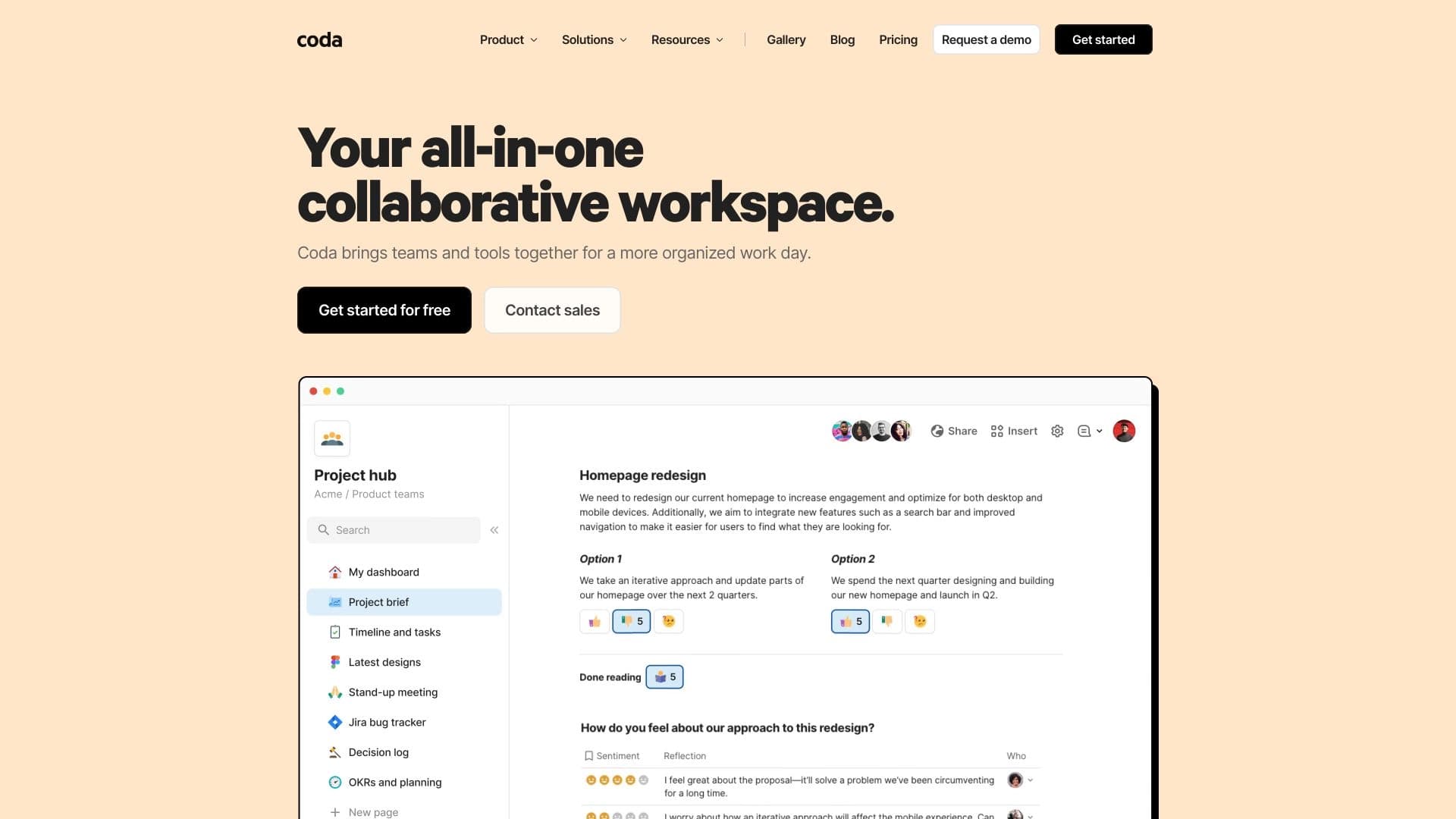
Coda is a document creation platform that combines text, spreadsheets, and automation with a built-in AI assistant.

Ranked in
Overview
Coda Neural Network Overview
Coda is a work platform that combines the capabilities of a text editor, spreadsheets, and lightweight applications in a single space. The project's main feature is a built-in AI assistant that works directly inside the document. This means you don't need to switch between a dozen tabs and windows: the entire workflow is concentrated in a unified interface.
Smart Editor and Automation
Instead of manually configuring complex formulas and scripts, users can give commands to the assistant in plain text, as if in a chat. The neural network analyzes the document's contents (from budget spreadsheets to colleagues' comments) and helps complete tasks that previously required manual work.
Coda Brain
The Coda Brain feature deserves special attention. It's an intelligent search that works across all connected services and documents. You can find the information you need without leaving the workspace — the assistant will gather data from various sources on its own.
Coda Characteristics
| Characteristic | Value |
|---|---|
| Platform Type | Universal workspace (documents + spreadsheets + applications) |
| Built-in AI | Yes, AI assistant is built into the editor |
| AI Interaction Principle | Natural language commands (no programming required) |
| Key Feature | AI Column — turns spreadsheet columns into a content generator |
| Search | Coda Brain — search across documents and connected services |
| Integrations | Figma, Google Sheets, and over 600 other tools |
| Templates | Ready-made templates with pre-configured automation available |
| Distribution Model | Freemium (free tier with expansion options) |
| Required Skills | No programming skills required |
Who Is Coda Neural Network For?
The tool is designed for a broad audience but is especially useful for those tired of multitasking and looking to simplify their routine.
Teams Without Programmers
Coda is built for users without a technical background. Thanks to natural language commands, a manager, marketer, or HR specialist can handle it when they need to automate processes without involving developers.
Small and Medium Businesses
The platform suits small companies for whom purchasing dozens of different subscriptions is expensive. Coda lets you replace many separate tools with a single workspace, saving budget and simplifying project management.
How to Use the Coda Neural Network?
Working with Coda is based on the "document is an application" principle. You don't just write text — you create an interactive environment controlled by artificial intelligence.
Set Tasks in Text
To get started, simply describe the task to the assistant in a text field. For example, ask it to "reconcile debits and credits" or "make a weekly plan" — the AI will understand the request and perform the action by analyzing data from your spreadsheet.
Use the Ready-Made Base
If you don't want to start from scratch, use the template library. Coda has ready-made document structures with automation already configured, which you can adapt to your tasks in a couple of clicks.
Connect External Services
For full functionality, it's worth integrating Coda with your core tools (Figma, Google Sheets, etc.). After setting up the connections, the assistant will be able not only to see data inside the document but also to pull in information from external sources.
Core Coda Features
The platform's functionality is aimed at reducing time spent on routine operations and freeing up resources for creative tasks.
AI Column
This is one of the key options. It turns a regular column in a spreadsheet into a dynamic content generator. For example, you can create a column that automatically generates summaries for each row of data without entering information manually.
Content Generation Based on Structure
The assistant doesn't just answer scattered questions — it "holds onto" the document's framework. The AI generates text based on the logic and structure of your file, making results more relevant to the context.
Data Analysis
The neural network can process everything in the document: from numerical indicators to employees' text comments. This allows you to quickly get summaries from large volumes of information and use them for decision-making.
Coda Advantages
- A single window instead of a dozen tabs. You stop switching between Google Docs, Excel, and specialized services — all tools are gathered in one interface.
- Processing any data. The assistant analyzes information equally well from structured spreadsheets and free-form comments.
- Accessible to beginners. No programming skills are needed to get started. Complex logic is implemented with simple text commands.
- Deep integration ecosystem. Connecting over 600 external services expands the basic capabilities of documents and automation.
Coda Disadvantages
Despite all the advantages, the platform also has limitations worth knowing about in advance. The main challenge is that when migrating processes from classic office suites, it may take time to restructure your thinking and get used to the new "all-in-one" logic. Also, since this tool replaces an entire fleet of specialized software, the depth of individual features (for example, complex financial analysis) may fall short of specialized programs. However, specific data on performance limitations depends on the plan version and the complexity of the documents being created.
What Tasks Does Coda Solve?
The platform handles a wide range of everyday tasks related to organizing work and information.
Project Management
In Coda, you can maintain knowledge bases, Kanban boards, and task trackers. Automation allows you to assign responsible parties, set deadlines, and send notifications without a manager's involvement.
Routine Automation
The assistant handles repetitive actions: from filling out similar forms to compiling reports. This frees up employees' time for more important tasks.
Working with Finance and Content
With AI Column, you can create financial models where calculations are performed automatically. The tool is also effective for creating content drafts: from marketing texts to internal policies generated based on spreadsheet structures.
Coda Pricing
Coda operates on a Freemium model — meaning the platform has a free version with a basic set of tools. It allows you to get familiar with the interface and core features. For expanded capabilities (increased limits, more complex automation, and team collaboration), paid plans are available, but the source data does not specify exact pricing figures. We recommend checking current prices and plan comparisons on the product's official website.
Coda Terms of Use
In official descriptions, Coda is positioned as a platform that requires no technical skills to operate. The terms of use involve working with team documents in the cloud, providing access to materials from different devices. It's important to note that full use of all features may require creating an account and accepting a standard user license. Detailed data processing and privacy rules are outlined in the public offer agreement on the provider's website; detailed information about them is not available in the source data.
Coda Availability
The service is a web-based platform that works through a browser. This ensures availability across different operating systems without installing specialized software. Coda is designed for the international market and supports integrations with popular global services such as Google Sheets and Figma. Information about Russian language support and a localized interface version is not mentioned in the provided data.
How Coda Differs from Alternatives
The "Document Is an Application" Philosophy
Unlike classic text editors (such as Microsoft Word) and spreadsheets (Excel), Coda uses the concept of a "living" document. You don't just write text or calculate numbers — you build interactive logic where data, formulas, and automation are interconnected.
Combining Tools in One Place
There are many note-taking services (Notion) and spreadsheet tools (Google Sheets) on the market. The key difference of Coda AI is that it's not just a knowledge base or a spreadsheet processor. It's a hybrid that lets you run lightweight applications inside a document and manage them through AI without code. While alternatives often require installing plugins or using special builders for automation, Coda does this with plain text in a chat interface.
Built-in Neural Network for Tasks
The AI assistant in Coda is not a separate "one-click" feature. It's deeply integrated into working with spreadsheets (via AI Column) and general search (Coda Brain). This creates a unified environment where AI doesn't just "chat" in a conversation but actively participates in creating and analyzing structured data.
Conclusion
Coda is a modern solution for teams and professionals seeking to optimize their workflow through the convergence of documents, spreadsheets, and automation. The built-in AI assistant removes the entry barrier for users without technical knowledge, allowing them to automate routine tasks with simple commands. Thanks to extensive integrations and built-in templates, the platform can become a unified hub for project and knowledge management, replacing several specialized tools at once. However, before choosing, it's worth considering that switching to Coda requires changing work habits and embracing the new logic of building "living" documents.
Frequently asked questions
See also

Catalog of neural networks and online tools for generating images, animations, and videos.

AI-powered platform for automated API security testing and vulnerability discovery in code and cloud infrastructure.

Neural network that generates images and illustrations based on a text description.

BannsAi is an AI-powered service for quickly creating ad banners based on a text description or reference.

AI-powered platform for automated video clip creation, editing, and translation.

AI-based platform for creating logos and brand identity.

Terminal AI agent for programming that dynamically adapts to developer tasks.

Russian-language GPT-based AI chatbot for information retrieval and text generation.