

BeautyPlus
AI-редактор для фото и видео с фокусом на улучшение портретов и селфи.
Место в рейтингах
Обзор
BeautyPlus
Описание нейросети BeautyPlus
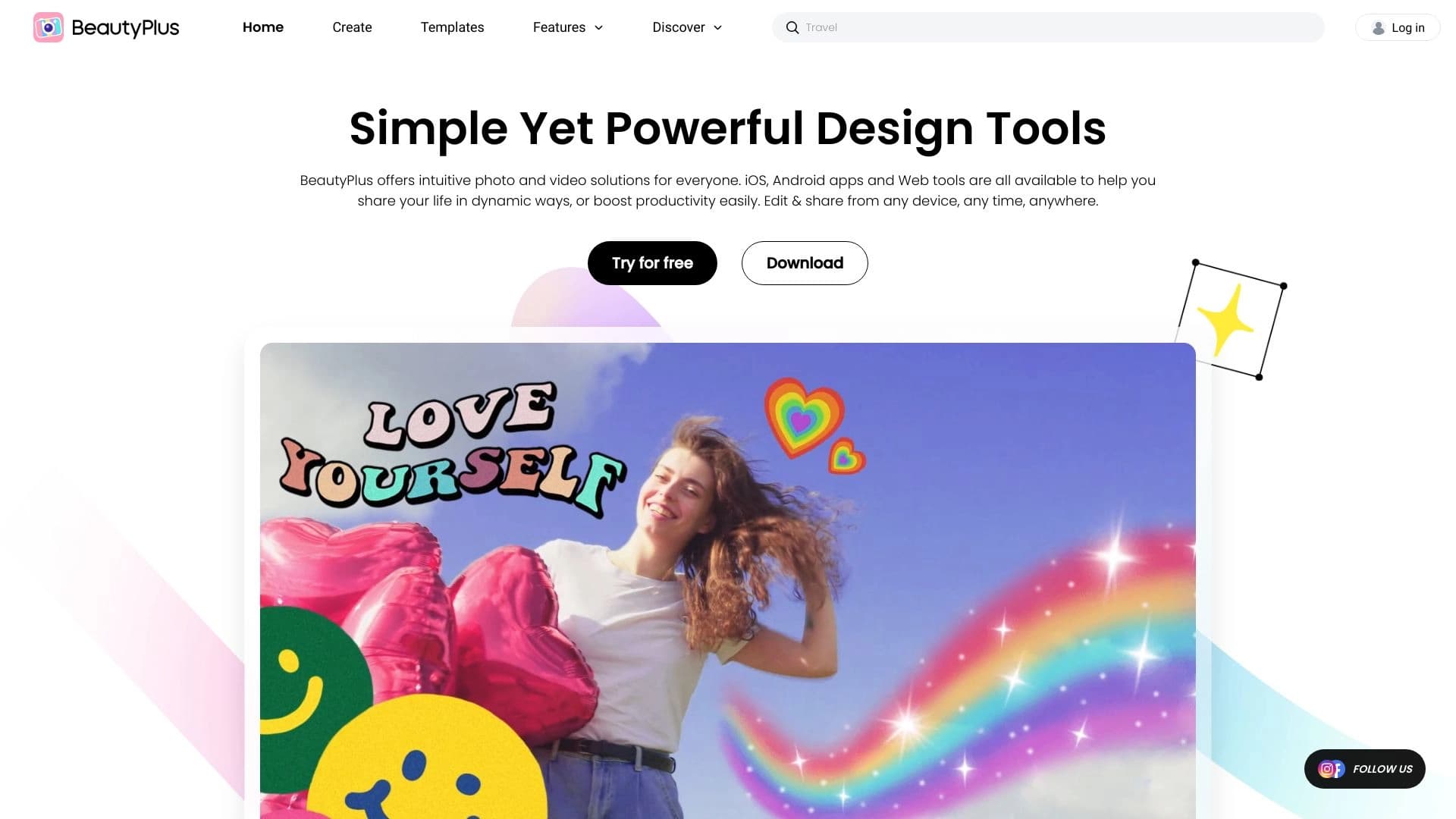
BeautyPlus — это AI-редактор для фото и видео, разработанный компанией Pixocial Technology (Singapore) Pte. Ltd. Основной фокус инструмента — улучшение портретов и селфи с помощью нейросетей. Приложение автоматически ретуширует кожу, повышает разрешение и детализацию изображений, позволяет менять фон, удалять объекты и накладывать фильтры. Дополнительно BeautyPlus умеет генерировать аватары в аниме-стиле и восстанавливать старые снимки.
Инструмент доступен в виде веб-сервиса и мобильных приложений для iOS и Android. Ежемесячная аудитория веб-версии составляет около 75 миллионов посещений. BeautyPlus предлагает бесплатную версию с базовым функционалом и платную подписку для расширенных возможностей.
Характеристики BeautyPlus
| Характеристика | Значение |
|---|---|
| Тип инструмента | AI-редактор фото и видео |
| Категории | Редактирование изображений, Улучшение фото, Генерация аватаров, Мобильные приложения с ИИ, Восстановление фотографий |
| Платформы | Веб (браузер), iOS, Android |
| Разработчик | Pixocial Technology (Singapore) Pte. Ltd. |
| Бесплатный тариф | Да (ограниченный функционал) |
| Наличие премиум-версии | Да (BeautyPlus Premium) |
| Языки интерфейса | Русский, английский и ещё 30 языков |
| Рейтинг | 4.5 |
| Оценка редакции | 8.7 из 10 |
| Ежемесячные посещения | 75M (веб) |
| Дата добавления в каталог | 7 ноября 2025 |
Для кого подходит нейросеть BeautyPlus?
Энтузиасты селфи и обычные пользователи
BeautyPlus ориентирован на массовую аудиторию, которая хочет быстро улучшать свои фотографии без профессиональных навыков. Инструмент подходит для повседневного редактирования снимков, создания контента для социальных сетей и быстрой чистки фотографий от недостатков кожи.
Инфлюенсеры и бьюти-блогеры
Для создателей контента BeautyPlus предлагает широкий набор AI-инструментов ретуши, фильтров и спецэффектов, позволяющих быстро получать качественные портреты для публикаций. Инструмент поддерживает интеграцию с Instagram и TikTok, что упрощает процесс публикации.
Фотографы
Несмотря на простоту, BeautyPlus может быть полезен и фотографам для быстрой предварительной обработки портретов, пакетного улучшения качества снимков и создания коллажей.
Как использовать нейросеть BeautyPlus?
Через мобильное приложение
Скачайте и установите приложение BeautyPlus из App Store или Google Play. Откройте приложение, сделайте селфи или выберите фото из галереи. Используйте инструменты ретуши — сглаживание кожи, осветление глаз, отбеливание зубов, наложение макияжа. Примените фильтры, стикеры и спецэффекты. Сохраните отредактированное фото и поделитесь в социальных сетях.
Через веб-версию
Зайдите на сайт beautyplus.com, выберите нужную функцию — фильтры, ретушь, удаление фона, макияж, эффекты или создание коллажей. Загрузите изображение и начните редактирование. Веб-версия удобна для обработки большого количества снимков на большом экране.
Специализированные функции
Для использования функции определения возраста (BeautyPlus Age Guesser) достаточно загрузить изображение, и нейросеть проанализирует черты лица, выдав возрастную оценку. Для повышения качества изображений через AI Image Enhancer нужно перетащить файлы в окно браузера — система сама применит оптимальные настройки.
Основные функции BeautyPlus
Ретушь и улучшение портретов
BeautyPlus автоматически улучшает портреты за 3 секунды. В набор инструментов входят сглаживание кожи, осветление глаз, отбеливание зубов и макияжные эффекты. Точность ретуши кожи, по заявлению разработчика, достигает 98%. Приложение также позволяет изменять черты лица на фото и видео.
Фильтры и творческие эффекты
Инструмент предлагает более 400 тематических фильтров, которые обновляются каждые 7 дней. Доступны стикеры, спецэффекты, поддержка 300 шрифтов для текста. BeautyPlus поддерживает создание коллажей из 10 фотографий и генерацию аватаров в аниме-стиле.
Работа с фоном и объектами
Пользователи могут удалять и заменять фон на основе текстового описания, а также удалять лишние объекты с фотографий одним касанием. Эти функции работают как в веб-версии, так и в мобильном приложении.
Видеоредактирование
BeautyPlus поддерживает обработку видео — наложение фильтров, эффектов и музыки. Доступна генерация 3D-видео из фотографий.
Восстановление старых фотографий
Приложение умеет восстанавливать старые снимки: повышать разрешение, восстанавливать цвет до 95%, устранять размытость и усиливать детали.
Пакетная обработка
Сервис поддерживает массовую обработку до 50 изображений одновременно, что удобно для работы с большими коллекциями фото.
Преимущества BeautyPlus
Простота использования
BeautyPlus имеет интуитивно понятный интерфейс, не требующий профессиональных навыков. Умное автокорректирование делает кожу более живой, устраняет прыщи и неровности, при этом лицо остаётся узнаваемым. Обработка занимает секунды, даже для нескольких фотографий одновременно.
Многофункциональность
В одном приложении собраны инструменты для ретуши, фильтрации, смены фона, создания коллажей и видеомонтажа. Пользователям не нужно переключаться между разными сервисами. Доступны креативные AI-фильтры для уникальных художественных эффектов.
Кроссплатформенность
BeautyPlus доступен на вебе, iOS и Android, что позволяет редактировать фото как на телефоне, так и на компьютере. Приложение поддерживает русский, английский и ещё 30 языков.
Популярность и доверие
Большая активная пользовательская база (75 миллионов ежемесячных посещений веб-версии) подтверждает популярность сервиса. Приложение регулярно обновляется.
Недостатки BeautyPlus
Качество обработки
При чрезмерном использовании фильтров и функций ретуши результат может выглядеть неестественно — лицо становится почти «идеальным», что иногда воспринимается как излишняя обработка. Освещение, угол камеры, улыбка, макияж и фильтры могут влиять на точность возрастной оценки. По детским фотографиям нейросети часто ошибаются сильнее.
Ограничения бесплатной версии
Многие продвинутые функции доступны только по платной подписке. Часть расширенных возможностей становится недоступной после окончания 7-дневного бесплатного пробного периода.
Прозрачность и приватность
Отсутствует открытый исходный код. Недостаточно информации о политике обработки данных и прозрачности AI-алгоритмов. Постоянное «улучшение» себя с помощью ИИ может негативно влиять на самооценку, особенно у подростков.
Региональные ограничения
Из России доступ к веб-версии возможен только через VPN.
Какие задачи решает BeautyPlus
Улучшение селфи и портретов
BeautyPlus прокачивает селфи до уровня профессиональных снимков, убирает прыщи, неровности кожи и другие недостатки, не изменяя до неузнаваемости исходное лицо.
Создание контента для социальных сетей
Инструмент позволяет быстро готовить фото и видео для публикаций, создавать мемы, аватарки и коллажи. Генерация аватаров в аниме-стиле даёт дополнительную возможность для творчества.
Восстановление старых фотографий
Функция восстановления старых снимков повышает их разрешение и качество, возвращает цвет, делая архивные фото более яркими и чёткими.
Автоматическая коррекция изображений
BeautyPlus автоматически корректирует цветовой баланс, контраст и резкость, устраняет размытость, что полезно при массовой обработке фотографий.
Определение возраста по фото
Специализированная функция BeautyPlus Age Guesser анализирует черты лица и выдаёт приблизительную возрастную оценку — подходит для быстрой проверки портретов и селфи.
Цены BeautyPlus
Бесплатный тариф
Базовые функции обработки фото и видео доступны бесплатно. Пользователи могут использовать основные фильтры, ретушь и некоторые эффекты, но с ограничениями. Доступен 7-дневный бесплатный пробный период для мобильного приложения без необходимости ввода данных банковской карты.
Премиум-подписка
Цены различаются в зависимости от региона и выбранного тарифа. По данным из источников, возможны следующие варианты:
- Базовый (Standard): 299 рублей в месяц — предоставляет расширенные инструменты для фото и видео, убирает водяные знаки
- Премиум (Premium): от 799 до 999 рублей в месяц — открывает более 20 дополнительных функций, премиум-фильтры, эксклюзивный контент и приоритетную поддержку
- Годовая подписка: 1999 рублей в год
Точные актуальные цены рекомендуется уточнять на официальном сайте beautyplus.com. Бессрочной (lifetime) лицензии не предусмотрено.
Условия использования BeautyPlus
Для использования BeautyPlus не требуется обязательная регистрация при работе через веб-версию, однако для мобильного приложения необходимо скачать его из магазина приложений и предоставить разрешения на доступ к камере и хранилищу устройства. Некоторые расширенные функции становятся платными после окончания бесплатного пробного периода.
Подписка на BeautyPlus Premium автоматически продлевается, если пользователь не отменит её до окончания текущего периода. Для отмены подписки необходимо зайти в настройки учётной записи в App Store или Google Play.
Приложение соответствует стандартным политикам конфиденциальности, однако информация о конкретных условиях обработки данных пользователей не раскрывается в полном объёме. Возрастное ограничение для использования приложения не указано, но функция постоянного «улучшения» внешности может негативно влиять на самооценку подростков.
Доступность BeautyPlus
Платформы
BeautyPlus доступен на трёх платформах: веб-браузер (сайт beautyplus.com), iOS (App Store) и Android (Google Play). Приложение можно скачать бесплатно на iPhone, iPad и устройства Android.
География
Инструмент не имеет явных региональных ограничений, за исключением России, где веб-версия доступна только через VPN. Топ-регионы по посещаемости: Вьетнам (14,21%), Япония (11,08%), Индонезия (10,9%), Филиппины (10,47%), США (8,32%).
Языки
Интерфейс поддерживает русский, английский и ещё 30 языков.
Чем отличается BeautyPlus от аналогов
Основные конкуренты
Среди прямых аналогов BeautyPlus можно выделить такие инструменты, как Facetune, Snapseed, Pixlr, VSCO, Adobe Photoshop Express, YouCam Perfect, FaceApp и YouCam Makeup. Основное отличие BeautyPlus — это сочетание большого количества AI-функций в одном приложении: от ретуши и смены фона до восстановления старых фотографий и генерации аниме-аватаров.
Ключевые отличия
В отличие от профессиональных редакторов, BeautyPlus максимально упрощает процесс обработки: многие функции работают автоматически, не требуя ручных настроек. Например, ретушь кожи выполняется за 3 секунды, а удаление объектов — одним касанием. При этом приложение поддерживает более широкий спектр функций, чем многие специализированные инструменты.
Из российских альтернатив, работающих без VPN, можно отметить PhotoAiD, New Profile Pic, Nero AI Image Upscaler, Magicly, НейроХудожник и Magic Art Bot. Однако прямое сравнение их характеристик с BeautyPlus в источниках не приводится.
Ограничения при сравнении
Генератор AI-аватаров на момент публикации данных ещё не был полностью запущен в BeautyPlus. Некоторые конкуренты предлагают аналогичные функции, но точное сравнение их качества и возможностей затруднено из-за отсутствия независимых тестов.
Заключение
BeautyPlus — это универсальный AI-редактор для фото и видео, ориентированный на массовую аудиторию. Инструмент объединяет ретушь портретов, фильтры, смену фона, восстановление старых снимков и генерацию аватаров в одном приложении, доступном на вебе, iOS и Android. Основные преимущества — простота использования, скорость обработки и широкий набор функций. К недостаткам можно отнести ограничения бесплатной версии, возможную неестественность результатов при чрезмерной ретуши, недостаток информации о прозрачности AI и приватности данных, а также недоступность веб-версии в России без VPN. BeautyPlus подходит как для повседневного редактирования селфи и фото для социальных сетей, так и для массовой обработки изображений, однако для полного доступа ко всем возможностям потребуется премиум-подписка.
Тарифы
Часто задаваемые вопросы

Смотрите также


Онлайн-сервис на основе нейросети для превращения обычных фотографий в стилизованные художественные портреты и аватары.


ИИ-платформа для быстрого создания сайтов и управления процессами малого бизнеса.


Инструмент для автоматизированного создания SEO-контента с исследованием ключевых слов и генерацией длинных текстов.

Онлайн-сервис на основе ИИ для автоматического создания субтитров к видео.

Платформа для генерации изображений, видео и аудио с помощью искусственного интеллекта по текстовым описаниям.


Сервис для виртуальной примерки одежды с помощью ИИ.


Нейросеть Google для генерации и редактирования изображений по текстовому описанию на базе моделей Gemini.


AI-инструмент для автоматизации маркетинга в социальных сетях, включающий генерацию контента, планирование публикаций и аналитику.