

AI STUDIO от DeepBrain
वीडियो निर्माण के लिए AI-अवतार प्लेटफ़ॉर्म, जो टेक्स्ट, छवियों और क्लिप्स से वीडियो बनाता है।
अवलोकन
AI STUDIO by DeepBrain — विवरण
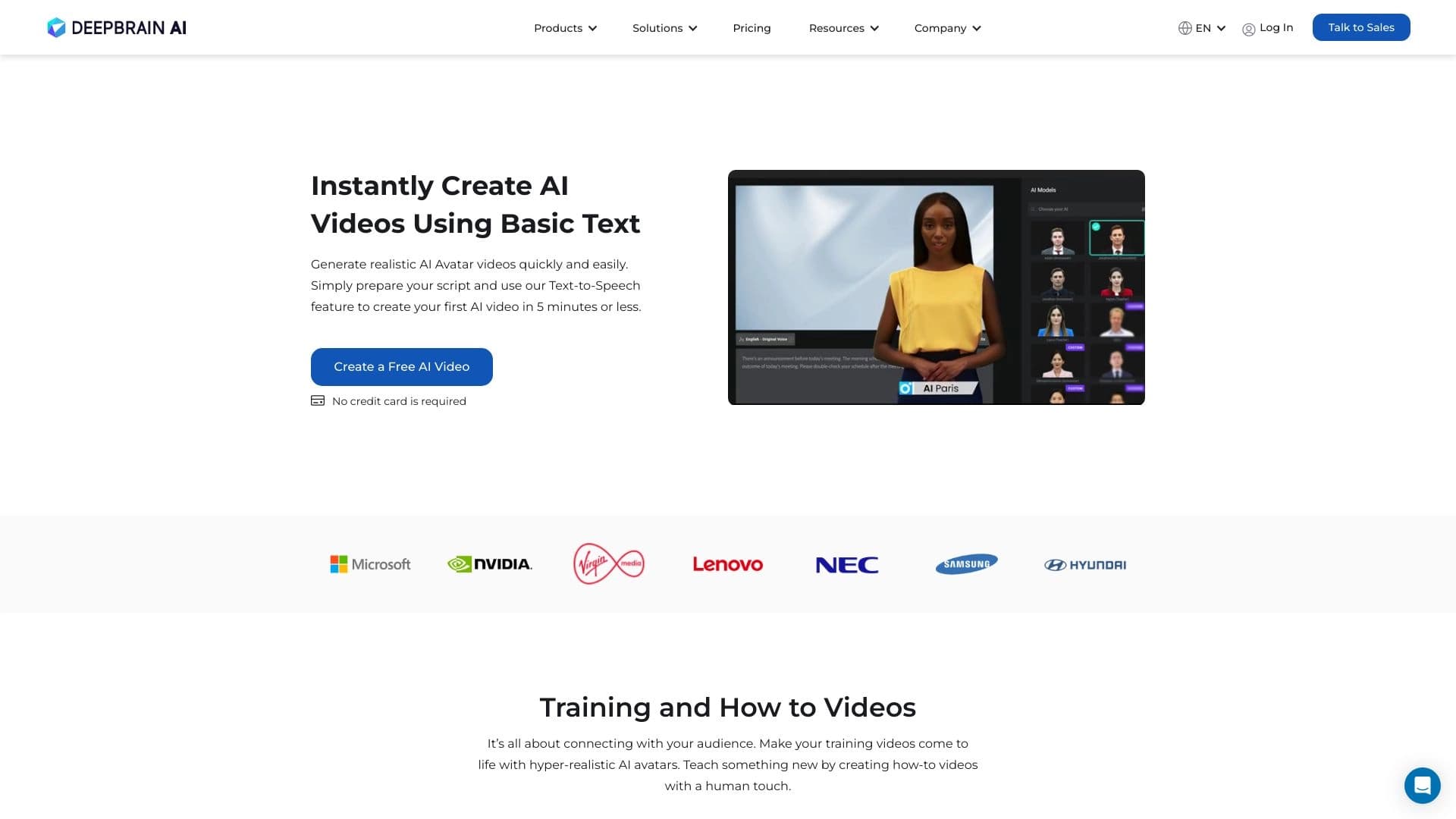
डीपब्रैन द्वारा एआई स्टूडियो एक ब्राउज़र आधारित वीडियो जनरेशन प्लेटफॉर्म है जो पाठ, छवियों और लघु क्लिप को तैयार-निर्मित वीडियो में बदल देता है जिसमें यथार्थवादी डिजिटल अवतार शामिल हैं। सेवा पाठ-टू-वीडियो मॉडल पर काम करती है: आप एक स्क्रिप्ट लिखते हैं या एक तैयार दस्तावेज़ अपलोड करते हैं, एक आभासी प्रस्तुतकर्ता चुनें, और सिस्टम स्वचालित रूप से वीडियो को होंठ सिंक, चेहरे की अभिव्यक्ति और वॉयसओवर के साथ इकट्ठा करता है।
मंच क्लासिक वीडियो उत्पादन के प्रतिस्थापन के रूप में स्थित है। एक वीडियो बनाने के लिए कोई फिल्म चालक दल, स्टूडियो, अभिनेता या महंगे उपकरण की आवश्यकता नहीं है - पूरी प्रक्रिया ऑनलाइन होती है। AI STUDIO एकाधिक इंटरफ़ेस भाषाओं का समर्थन करता है और इसकी क्षमताओं का परीक्षण करने के लिए एक स्वतंत्र स्तर प्रदान करता है।
सेवा की एक विशिष्ट विशेषता गहरी सामग्री स्थानीयकरण है। मंच स्वचालित रूप से तैयार वीडियो को 150+ भाषाओं में अनुवाद कर सकता है जबकि कथाकार की आवाज, दृश्य शैली और भाषण-लिप सिंक्रनाइज़ेशन को संरक्षित करता है। यह एक वैश्विक दर्शकों के साथ काम करने वाली कंपनियों के लिए उपकरण को मूल्यवान बनाता है।
AI STUDIO by DeepBrain — मुख्य विशेषताएं
| फ़ीचर | मूल्य |
|---|---|
| प्रकार | वीडियो निर्माण |
| व्यापार मॉडल | फ्रीमियम |
| प्रथम रिलीज तिथि | 01-03-2023 |
| प्रवेश | वेब प्लेटफॉर्म (deepbrain.io) |
| समर्थित भाषाओं | 150+ (फ्रेंच, कोरियाई और अन्य सहित) |
| अवतारों की संख्या | 2,000+ (रीडी-मेड और कस्टम) |
| टेम्पलेट्स की संख्या | 7000+ |
| भाषण संश्लेषण | 150+ भाषाओं, बिल्ट-इन एआई डबिंग |
| इनपुट प्रारूप | पाठ, पीडीएफ, शब्द, लेख लिंक, चित्र, लघु क्लिप |
| नि: शुल्क स्तर | उपलब्ध (कोई क्रेडिट कार्ड आवश्यक नहीं) |
| भुगतान योजना मूल्य | $29 प्रति माह |
कौन है AI STUDIO?
व्यापार और विपणन
मंच उन कंपनियों के लिए डिज़ाइन किया गया है जो ठेकेदारों पर भरोसा किए बिना वीडियो सामग्री उत्पादन को मानकीकृत और स्केल करना चाहते हैं। विपणन टीम एक सुसंगत ब्रांड शैली में उत्पाद प्रस्तुतियों, प्रचार वीडियो और समाचार खंड तैयार कर सकती है। विपणन उपकरण के साथ एकीकरण वीडियो पीढ़ी को मौजूदा वर्कफ़्लो में एम्बेड करने की अनुमति देता है।
मानव संसाधन और प्रशिक्षण
AI STUDIO HR डिपार्टमेंट्स और L&D टीमों को सूट करता है जो नियमित रूप से प्रशिक्षण सामग्री का उत्पादन करने की आवश्यकता होती है। मंच का उपयोग नए कर्मचारियों, आंतरिक नीति संक्षेपण और कॉर्पोरेट पाठ्यक्रमों के लिए ऑनबोर्डिंग वीडियो बनाने के लिए किया जाता है। एक कथा के साथ वीडियो पाठ निर्देश की तुलना में अवशोषित करना आसान है, और टेम्पलेट्स को गति देते हैं मानक सामग्री की तैयारी।
सामग्री निर्माता
उपकरण यूट्यूब ब्लॉगर्स, ऑनलाइन पाठ्यक्रम लेखकों और सोशल मीडिया मैनेजरों के लिए उपयोगी है। AI STUDIO आपको जल्दी से लेख और स्क्रिप्ट को एक बोलने वाले अवतार के साथ वीडियो में बदलने देता है, रिकॉर्डिंग और संपादन पर समय बचाता है। ऑनलाइन पाठ्यक्रम उत्पादकों के लिए, पीडीएफ और वर्ड दस्तावेज़ अपलोड करने की क्षमता विशेष रूप से मूल्यवान है - सिस्टम उन्हें स्वचालित रूप से वीडियो व्याख्यान में परिवर्तित करता है।
डीपब्रेन द्वारा एआई स्टूडियो का उपयोग कैसे करें
पाठ से वीडियो बनाना
मूल कार्यप्रवाह इस तरह दिखता है: उपयोगकर्ता सूची से एक कथाकार की उपस्थिति (आधार संस्करण में 150+ विकल्प) चुनता है, स्क्रिप्ट टेक्स्ट में प्रवेश करता है या पेस्ट करता है, और पीढ़ी शुरू होता है। सिस्टम पाठ का विश्लेषण करता है, ठहराव और जोर देता है, होंठ सिंक के साथ अवतार बनाता है, और एक समाप्त वीडियो फ़ाइल को आउटपुट करता है। सभी कार्रवाई ब्राउज़र में होती है, जिसमें कोई अतिरिक्त सॉफ्टवेयर स्थापित नहीं होता है।
दस्तावेज़ और लिंक अपलोड करना
मैन्युअल रूप से टाइपिंग टेक्स्ट के बजाय, आप एक पीडीएफ फाइल, एक वर्ड दस्तावेज़ अपलोड कर सकते हैं, या एक लेख के लिए एक लिंक प्रदान कर सकते हैं। मंच स्वचालित रूप से सामग्री निकालता है, इसे संरचना करता है , और एक वीडियो उत्पन्न करते हैं। यह मोड वीडियो प्रारूप में पाठ सामग्री के थोक रूपांतरण के लिए सुविधाजनक है - उदाहरण के लिए, सोशल मीडिया क्लिप में ब्लॉग लेखों को अनुकूलित करना।
डिजिटल ट्विन बनाना
उन उपयोगकर्ताओं के लिए जिन्हें एक अद्वितीय प्रस्तुतकर्ता की आवश्यकता होती है, एक तस्वीर से डिजिटल अवतार बनाने की सुविधा है। एक छवि अपलोड करके, आपको एक व्यक्तिगत कथा प्राप्त होती है जो आपके द्वारा प्रदान किए गए ग्रंथों को आवाज़ देगा। यह एक ब्रांड के लिए व्यक्तित्व जोड़ता है लेकिन पंजीकरण की आवश्यकता होती है और भुगतान योजनाओं तक पहुंच की संभावना होती है।
डीपब्रैन द्वारा एआई स्टूडियो की मुख्य विशेषताएं
अवतारों के साथ वीडियो जनरेशन
मंच की मुख्य विशेषता एक यथार्थवादी आभासी प्रस्तुतकर्ता के साथ पाठ से वीडियो बना रही है। उपयोगकर्ताओं के पास कस्टम विकल्प सहित 2,000+ तैयार अवतारों तक पहुंच है। प्रणाली स्पंदित पाठ के साथ होंठ आंदोलन, चेहरे की अभिव्यक्ति और स्वर के सटीक सिंक्रनाइज़ेशन को सुनिश्चित करती है।
अनुवाद और स्थानीयकरण
अंतर्निहित स्वचालित अनुवाद वीडियो को 150+ भाषाओं में अनुकूलित करता है जबकि अवतार और होंठ सिंक को संरक्षित करता है। यह सुविधा अंतरराष्ट्रीय दर्शकों के लिए सामग्री उत्पन्न करने वाली कंपनियों के बीच मांग में है जो प्रत्येक क्षेत्र के लिए रीशूटिंग से बचना चाहते हैं।
दस्तावेज़ और टेम्पलेट हैंडलिंग
मंच इनपुट के रूप में पीडीएफ, वर्ड फाइलों और लेख लिंक को स्वीकार करता है, उन्हें मैनुअल टेक्स्ट रीवर्किंग के बिना वीडियो में बदल देता है। इसके अतिरिक्त, 7,000+ तैयार किए गए वीडियो टेम्पलेट विभिन्न क्षेत्रों में उपलब्ध हैं - प्रस्तुतियों से प्रशिक्षण पाठ्यक्रम तक। टेम्पलेट्स वीडियो उत्पादन को गति देते हैं और एक सुसंगत ब्रांड शैली को बनाए रखने में मदद करते हैं।
डीपब्रेन द्वारा एआई स्टूडियो के लाभ
- संसाधन बचत पेशेवर वीडियो एक फिल्म चालक दल, अभिनेता, स्टूडियो, या पोस्ट-प्रोडक्शन के बिना बनाया गया है। यह सामग्री उत्पादन की लागत और समय को काफी कम कर देता है।
- उच्च गुणवत्ता वाले सिंक्रनाइज़ेशन। प्रणाली ठीक से होंठ आंदोलनों, चेहरे की अभिव्यक्ति और भाषण के साथ अवतार से मेल खाती है, जिससे अवतार यथार्थवादी और प्राकृतिक हो जाते हैं।
- गहरी स्थानीयकरण। स्वचालित अनुवाद न केवल भाषा को बदलता है बल्कि दृश्य शैली, स्वर वितरण और अभिव्यक्ति को भी संरक्षित करता है - वीडियो को लगता है कि इसे लक्ष्य भाषा में गोली मार दी गई थी।
- फास्ट कंटेंट अनुकूलन। दस्तावेज़ अपलोड करना और लिंक मिनटों में वीडियो में टेक्स्ट सामग्री बदल जाता है।
- फ्री स्टार्ट। आप क्रेडिट कार्ड दर्ज किए बिना शुरू कर सकते हैं, और स्टार्टर योजना उन वीडियो की संख्या को सीमित नहीं करती है जो आप बना सकते हैं।
- ब्रांडिंग और टीमवर्क। मंच कई उपयोगकर्ताओं के लिए ब्रांड शैली अनुकूलन और सहयोगी कार्य का समर्थन करता है।
दीपब्रैन द्वारा एआई स्टूडियो के नुकसान
- अपेक्षाकृत उच्च मूल्य। भुगतान की योजना प्रति माह $ 29 से शुरू होती है, जो छोटी परियोजनाओं और व्यक्तिगत उपयोगकर्ताओं के लिए कभी-कभी वीडियो जरूरतों के साथ महंगा हो सकता है।
- इंटरनेट कनेक्शन पर निर्भरता सेवा ब्राउज़र में चलती है, इसलिए वीडियो पीढ़ी और डाउनलोड के लिए स्थिर और तेज कनेक्टिविटी की आवश्यकता होती है।
- मूल्य निर्धारण पारदर्शिता की कमी। आधिकारिक वेबसाइट पूरी तरह से भुगतान की गई योजनाओं की विस्तृत लागत का खुलासा नहीं करती है - सटीक नियम और उपलब्ध विकल्पों को पंजीकरण के दौरान स्पष्ट करने की आवश्यकता है।
- संभव मुक्त स्तरीय सीमाओं। हालांकि स्टार्टर योजना वीडियो की संख्या को सीमित नहीं कर सकती है, कुछ विशेषताओं (जैसे डिजिटल जुड़ना) केवल एक भुगतान सदस्यता के साथ उपलब्ध हो सकते हैं।
क्या समस्या है AI STUDIO by DeepBrain Solve?
पाठ से वीडियो सामग्री का निर्माण
सेवा का मुख्य कार्य पाठ लिपियों को बोलने वाले अवतार के साथ समाप्त वीडियो में बदल रहा है। यह प्रस्तुतियों, प्रचार सामग्री, समाचार खंडों और मनोरंजन सामग्री की आवश्यकता को कवर करता है।
मौजूदा वीडियो का अनुवाद और स्थानीयकरण
AI STUDIO बहुभाषी सामग्री की समस्या को हल करता है। प्रत्येक बाजार के लिए वीडियो रीशूटिंग के बजाय, आप एक बार वीडियो बनाते हैं और फिर स्वचालित रूप से इसे आवश्यक भाषाओं में अनुवाद करते हैं - अवतार गुणवत्ता हानि के बिना सिंक में नई भाषा को "स्पीक" करेगा।
दस्तावेजों और लेखों को परिवर्तित करना
मंच स्वचालित रूप से वीडियो प्रारूप में पाठ सामग्री को अनुकूलित करता है। एक PDF, Word फ़ाइल अपलोड करना, या लेख लिंक मैन्युअल प्रतिलिपि के बिना वीडियो पीढ़ी की प्रक्रिया शुरू करता है और पाठ का निर्माण करता है। यह प्रशिक्षण विभागों के लिए सुविधाजनक है जो नियमित रूप से निर्देश और नीतियों को दृश्य वीडियो सामग्री में बदल देते हैं।
AI STUDIO by DeepBrain - मूल्य निर्धारण
वितरण मॉडल फ्रीमियम है। उपयोगकर्ता क्रेडिट कार्ड दर्ज किए बिना मुफ्त में शुरू कर सकते हैं। स्टार्टर योजना बनाई गई वीडियो की संख्या को सीमित नहीं करती है, जिससे आपको सदस्यता खरीदने से पहले प्लेटफॉर्म का पूरी तरह से परीक्षण करने की अनुमति मिलती है।
भुगतान की योजना प्रति माह $ 29 से शुरू होती है। योजनाओं, उपलब्ध सुविधाओं और सीमाओं का विस्तृत ब्रेकडाउन आधिकारिक वेबसाइट पर खुलासा नहीं किया जाता है - सटीक शर्तें चुनी गई योजना और उपयोगकर्ता की जरूरतों पर निर्भर करती हैं। पंजीकरण के दौरान या अपने खाता डैशबोर्ड में वर्तमान मूल्य निर्धारण की जानकारी की जांच करने की सिफारिश की जाती है।
डीपब्रैन द्वारा एआई स्टूडियो के लिए उपयोग की शर्तें
पंजीकरण पर deepbrain.io वेबसाइट शुरू करने के लिए आवश्यक है। सेवा ब्राउज़र में चलती है, जिसमें कोई अतिरिक्त सॉफ्टवेयर स्थापित नहीं होता है। साइट पर जाने पर, एक साथी टैग "via = ailibricom" का इस्तेमाल किया जा सकता है - यह रेफरल कार्यक्रमों की संभावित उपस्थिति को इंगित करता है और सेवा की कार्यक्षमता को प्रभावित नहीं करता है।
फ्री टियर आपको प्रीपेमेंट के बिना वीडियो बनाने या क्रेडिट कार्ड को जोड़ने की अनुमति देता है। मुफ्त योजना (वीडियो अवधि, उपलब्ध अवतार, वॉटरमार्क की उपस्थिति) की सटीक शर्तों को सार्वजनिक स्रोतों में विस्तृत नहीं किया जाता है - पंजीकरण के बाद इन्हें स्पष्ट किया जाना चाहिए।
डीपब्रैन द्वारा एआई स्टूडियो की उपलब्धता
मंच डीपब्रेन के माध्यम से सुलभ है। आईओ वेबसाइट और किसी भी आधुनिक ब्राउज़र में काम करता है। यह फ्रेंच, कोरियाई और अन्य सहित 150+ भाषाओं का समर्थन करता है। यह स्थानीय परियोजनाओं और अंतरराष्ट्रीय कंपनियों दोनों के लिए वैश्विक रूप से उपलब्ध सेवा बनाता है।
दुनिया भर के उपयोगकर्ताओं को बहु भाषा इंटरफेस समर्थन के लिए धन्यवाद के साथ काम करने के लिए आरामदायक मिलेगा। मुफ्त परीक्षण अवधि आपको सदस्यता खरीद पर निर्णय लेने से पहले वीडियो पीढ़ी की गुणवत्ता और मंच कार्यक्षमता का मूल्यांकन करने की अनुमति देती है।
कैसे विकल्प से डीपब्रेन डिफर्स द्वारा एआई स्टूडियो
दस्तावेज़ों से स्वचालित वीडियो जनरेशन
अधिकांश प्रतियोगियों को एक समर्पित क्षेत्र में मैनुअल टेक्स्ट प्रविष्टि की आवश्यकता होती है, जबकि AI STUDIO PDF फ़ाइलों, वर्ड दस्तावेज़ों और लेख लिंक को स्वीकार करता है। यह मूल रूप से वर्कफ़्लो को बदलता है: उपयोगकर्ता तैयार सामग्री को अपलोड करता है और मध्यवर्ती नकल और स्वरूपण चरणों के बिना एक वीडियो प्राप्त करता है।
अवतार संरक्षण के साथ गहरे स्थानीयकरण
कई सेवाएं उपशीर्षक अनुवाद या अलग-अलग वॉयसओवर प्रदान करती हैं, लेकिन एआई स्टूडियो मूल अवतार को संरक्षित करता है और अनुवादित भाषण के साथ अपने होंठों को ठीक से सिंक करता है। वीडियो हर भाषा में प्रामाणिक दिखता है - यह प्रतियोगियों से एक महत्वपूर्ण अंतर है जहां अवतार अनुवाद के बाद अप्राकृतिक दिखता है।
अवतार और टेम्पलेट लाइब्रेरी का स्केल
2,000+ अवतार और 7,000+ वीडियो टेम्प्लेट - सबसे अधिक प्रत्यक्ष प्रतियोगियों की तुलना में काफी अधिक। यह विविधता कस्टम विकास की आवश्यकता के बिना कॉर्पोरेट प्रस्तुतियों से प्रशिक्षण पाठ्यक्रमों तक कार्यों की एक विस्तृत श्रृंखला को कवर करती है।
टीमवर्क और ब्रांडिंग
AI STUDIO को शुरू से व्यवसाय उपयोगकर्ताओं के लिए डिज़ाइन किया गया था, इसलिए इसमें सहयोग उपकरण और ब्रांड शैली अनुकूलन शामिल है। यह विशेष रूप से व्यक्तिगत सामग्री रचनाकारों के उद्देश्य से समाधानों के अलावा मंच सेट करता है।
निष्कर्ष
DeepBrain द्वारा AI STUDIO एक व्यापक AI अवतार वीडियो जनरेशन प्लेटफॉर्म है जो व्यवसायों, मानव संसाधन विभागों और सामग्री निर्माताओं की जरूरतों को पूरा करता है। सेवा के प्रमुख फायदे स्वचालित दस्तावेज़-टू-वीडियो रूपांतरण, गुणवत्ता संरक्षण के साथ 150+ भाषाओं में सामग्री स्थानीयकरण और अवतारों और टेम्पलेट्स की एक विशाल पुस्तकालय हैं। मुफ्त स्टार्टर योजना जिसमें कोई वीडियो सीमा नहीं है और क्रेडिट कार्ड की आवश्यकता आपको खरीद से पहले प्लेटफॉर्म का परीक्षण करने की अनुमति देती है, जबकि प्रति माह $ 29 से भुगतान की योजना नियमित सामग्री उत्पादन के अनुरूप है। मुख्य सीमाएं छोटी परियोजनाओं, अधूरे मूल्य निर्धारण पारदर्शिता और इंटरनेट गति पर निर्भरता के लिए अपेक्षाकृत उच्च मूल्य हैं। समग्र रूप से, एआई स्टूडियो उन कंपनियों के लिए क्लासिक वीडियो उत्पादन का एक व्यावहारिक विकल्प है जो उच्च गुणवत्ता वाली वीडियो सामग्री को जल्दी और पैमाने पर बनाना चाहते हैं।
अक्सर पूछे जाने वाले प्रश्न
यह भी देखें


एआई-आधारित प्लेटफ़ॉर्म जो छवि निर्माण, संपादन और विज्ञापन क्रिएटिव बनाने के लिए है।


एआई एजेंट जो कोडिंग में मदद करता है और डेवलपमेंट वर्कफ़्लो को अनुकूलित करता है।

क्लाउड-आधारित प्लेटफ़ॉर्म जो AI अवतारों, संश्लेषित आवाज़ और दर्जनों भाषाओं में वीडियो के स्वचालित अनुवाद के साथ वीडियो निर्माण की सुविधा देता है।


एआई-आधारित ऑनलाइन प्लेटफ़ॉर्म जो ब्लॉग, लेख और सोशल मीडिया पोस्ट सहित टेक्स्ट सामग्री तेज़ी से बनाने के लिए है।


वीडियो के त्वरित निर्माण और संपादन के लिए न्यूरल नेटवर्क, जो टेक्स्ट विवरण, छवियों और संदर्भों के आधार पर काम करता है।


एक ओपन सोर्स एआई डेवलपमेंट एजेंट जो आईडीई में सीधे कोड उत्पन्न करने, रिफाइन करने और डिबग करने में मदद करता है।.


पाठ विवरण से प्रस्तुतियों, दस्तावेजों और वेब पृष्ठों को बनाने के लिए एआई उपकरण।.


AI Slide Studio — यह AI-आधारित सेवा है जो किसी दिए गए विषय पर अनुकूलन योग्य प्रस्तुतियाँ तेज़ी से बनाने के लिए है।