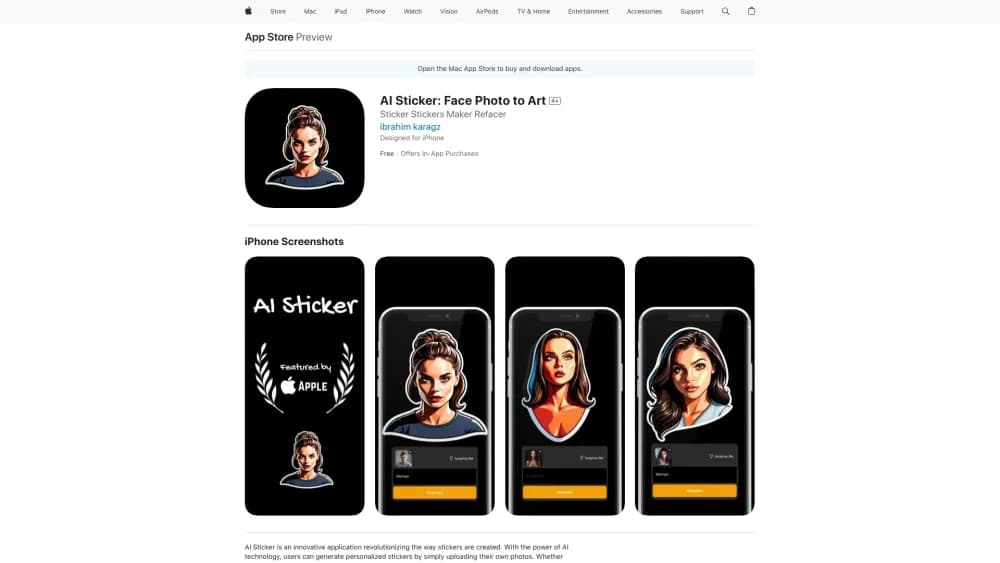
AI Sticker
Mobile app that turns photos into stickers using neural networks.

Overview
AI Sticker Neural Network Description
AI Sticker is a mobile app that turns ordinary photos into stickers using neural networks. Simply upload a photo, and the artificial intelligence transforms it into a cartoon image, caricature, or animated sticker. The service is designed for those who want to quickly create personalized images for chats and social media without learning complex graphic editors.
The service's main feature is speed and simplicity. The user selects a processing style, optionally adjusts facial expressions or adds animation, and gets the finished result within a couple of minutes. The app requires no special skills: the entire process is built on intuitive settings. However, the quality of the final sticker directly depends on the original photo — blurry or poorly taken shots will produce unpredictable results.
AI Sticker Features
| Characteristic | Value |
|---|---|
| Category | Image and photo generators |
| Type | Mobile app |
| Developer | AI Sticker Studio |
| Monthly visits | 388.9K |
| Publication date | September 10, 2025 |
| Platform | iOS (App Store) |
| Distribution model | Not specified |
Who is AI Sticker suitable for?
Messaging and social media users
The app is designed for those who actively communicate in messengers and want to stand out. Instead of standard emoji sets and built-in stickers, users can use their own photos turned into unique images. This is especially relevant for teenagers and young people who value originality in conversations.
Fans of unusual stickers
AI Sticker will appeal to those who collect or create unconventional stickers. The service allows quick experimentation with looks: turning photos into cartoon characters, caricatures, or animated versions. No design skills are needed — the neural network does all the work.
Users without design skills
People far from Photoshop and other editors will appreciate the service's simplicity. There are no complex layers, masks, or curves — just basic settings and a clear interface. This is an ideal option for quickly creating personalized content without any training.
How to use AI Sticker?
Uploading a photo
The first step is to choose a suitable photo. For the best results, it is recommended to use clear, well-lit photos where the face is fully visible and unobstructed. Blurry images will most likely produce a low-quality sticker.
Adjusting style and parameters
After uploading, the user selects a processing style: cartoon, caricature, or another available option. Facial expressions can also be adjusted, filters added, or animation enabled. All settings are basic — the app does not offer deep manual adjustments.
Getting and saving the result
Within a couple of minutes after processing is complete, the sticker is ready. It can be saved to the gallery or shared in messengers and social media right away. If the result is unsatisfactory, users can try a different photo or change the settings — for example, see how the sticker looks in various styles.
Key AI Sticker features
Turning photos into stickers
The app's main function is converting uploaded photos into stickers. The neural network automatically processes the image and creates a cartoon or caricature version ready for use in chats.
Animation and emotion changes
AI Sticker can create animated stickers and change facial expressions in the original photo. This brings even a static shot to life and makes it more expressive for conversations.
Filters and style settings
The app offers a choice of processing styles and filter overlays. Users can experiment with the sticker's appearance, picking the right option for a specific chat or mood.
AI Sticker advantages
High generation speed
One of the service's main strengths is speed. A finished sticker appears in just a few seconds, allowing users to create entire series of images without long waits.
Ease of use
No design skills or knowledge of graphic editors are required to use the app. The entire process comes down to pressing a couple of buttons and choosing basic settings, making it accessible to any user.
Detail and expression customization
Unlike many similar services, AI Sticker lets users change facial emotions and choose a processing style. This makes it possible to personalize a sticker for a specific situation.
AI Sticker drawbacks
Limited manual settings
The neural network only provides basic options — fine-tuning of the image is not available. Users accustomed to detailed control over the result may find the functionality too simple.
Dependence on the original photo quality
The generation result directly depends on the original photo. Blurry, dark, or poorly cropped photos produce a bad sticker that cannot be fixed with built-in tools.
Constant internet connection required
The app works only online; there is no offline mode. Without a stable internet connection, the service cannot be used, which may be inconvenient while traveling or on limited data plans.
What tasks does AI Sticker solve?
Creating unique stickers for chats
The service's main task is generating personalized stickers for messengers and social media. Users can turn their photos into original images that cannot be found in standard sets.
Generating animated stickers
In addition to static images, the app creates animated stickers. These elements make conversations more expressive and convey emotions more dynamically than regular pictures.
AI Sticker pricing
The service is priced through a subscription model. The app page lists the following plans:
- Weekly subscription — available on a weekly basis.
- Monthly subscription — available on a monthly basis.
- Monthly premium subscription — available on a monthly basis.
It is worth noting that the premium subscription matches the price of the regular monthly one, but the exact set of additional features is not specified in the source data.
AI Sticker terms of use
The app works exclusively online — a constant internet connection is required to generate stickers. No offline mode is provided, so without a network connection, AI Sticker features will be unavailable.
To get started, simply download the app and upload a photo. The neural network then processes the image, while the user only selects styles and settings. No specific device hardware requirements are mentioned in the source data.
AI Sticker availability
AI Sticker is available on the App Store for iOS devices — the service page includes a corresponding download link. Information about an Android or web version is absent from the source data.
The service operates online: an internet connection is required to generate stickers. With monthly visits of around 388.9 thousand, the app appears to be in demand among users.
How AI Sticker differs from alternatives
AI Sticker stands out from competitors through its narrow specialization: it is focused exclusively on creating stickers from photos. Unlike universal image generators such as Midjourney, Kandinsky, or Flux.1, this service does not try to cover every scenario — it does one task, but quickly and simply.
Compared to tools like Leonardo.ai or Nano Banana, AI Sticker offers simpler controls and requires no prompt-writing skills. Just upload a photo and choose a style — the neural network handles the rest. However, this simplicity comes with a limited set of settings, which prevents achieving the same level of variety offered by more complex generators. Yandex Art (Shedevrum) can also work with images, but AI Sticker specializes specifically in stickers, making it a more targeted solution for a particular task.
Conclusion
AI Sticker is a convenient app for quickly turning photos into personalized and animated stickers. The service is aimed at casual communication in messengers and suits users without design skills. The neural network handles the main work, leaving the user to simply choose a style and share the result. However, the limited set of manual settings and the dependence on the original photo's quality make it not a universal tool, but a niche solution for light creative tasks.
Frequently asked questions
See also

AI tool for product image processing and generating professional photos with virtual models.

Web service for generating images from text prompts and converting photos and videos into artistic artworks.

Web service for generating images from text descriptions and communicating with virtual characters.

A multimedia AI toolkit for editing and enhancing photos, videos, and PDF documents.

Generative platform for creating realistic images and short videos from text or images with control over style and camera movement.

Google's neural network for generating and editing images from text descriptions, based on Gemini models.

AI platform for creating text and visual content, oriented toward marketing tasks.

An open platform for generating images and other visual content from text descriptions using AI.