AI Photo Restorer

Free

AI-powered online service for automatic restoration of old and damaged photos.

AI Photo Restorer
949Views
4.3Rating
Visit website

Overview

AI Photo Restorer neural network description

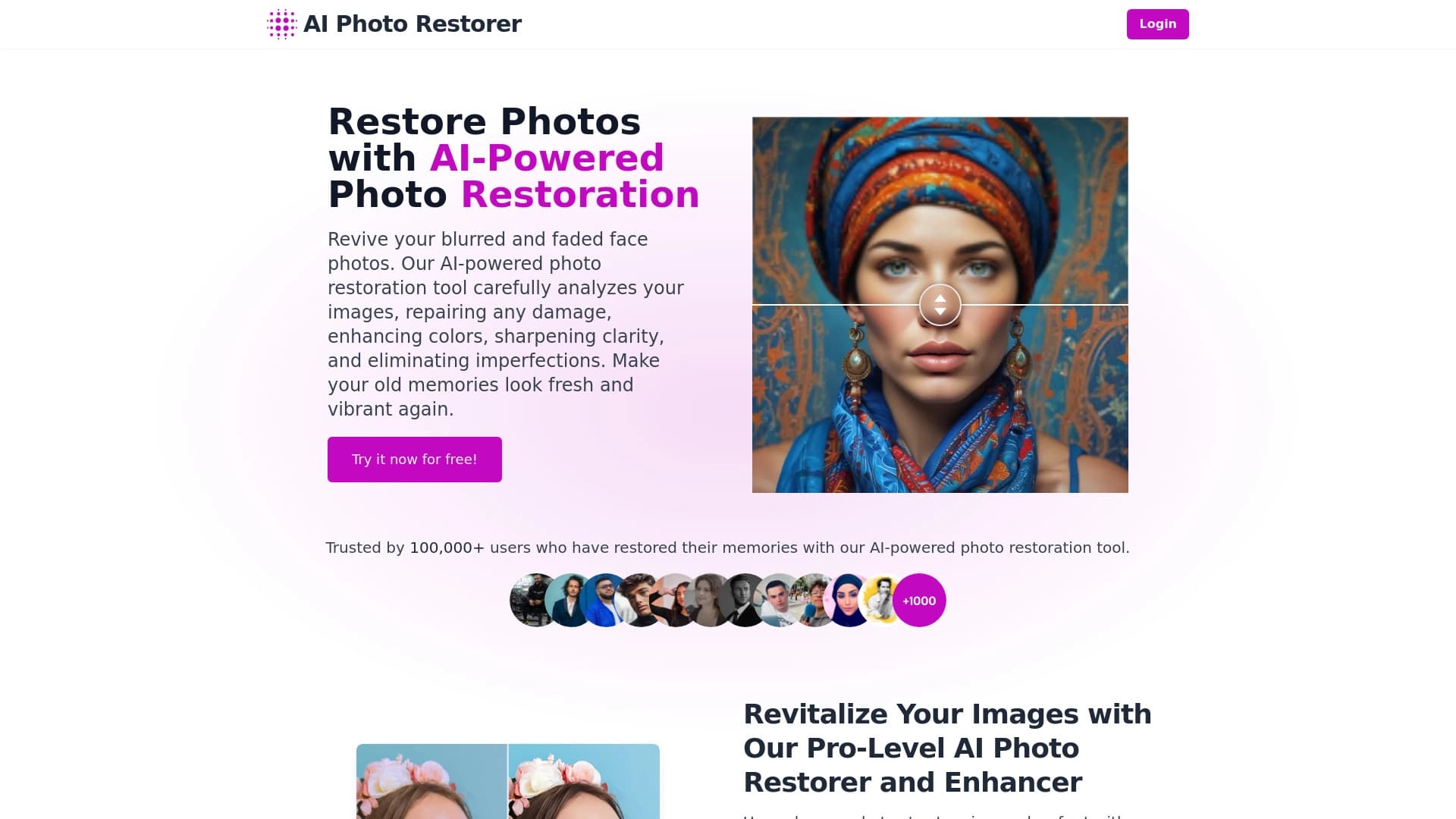
AI Photo Restorer is an AI-powered online service designed for automatic restoration of old, damaged, and faded photographs. The tool works directly in the browser, without the need to install additional software.

The neural network analyzes the uploaded image and automatically eliminates defects: scratches, cracks, stains, dust, and noise. Additionally, the algorithm improves image sharpness, corrects contrast and white balance, and revives dull and faded colors. One of the key features of the service is upscaling images up to 4x, which allows preparing old photos for printing or digital use.

Ease of use

To use the service, simply upload a photo to the website — the neural network does everything else automatically. No special settings or photo editing skills are required.

Purpose

AI Photo Restorer is primarily designed for restoring family archives, old portraits, and historical photos. The service brings time-worn photographs back to life, making them suitable for viewing, printing, and storage.

AI Photo Restorer specifications

SpecificationValue
TypeOnline service
CategoryImage editing, photo restoration
PlatformWebsite (aiphotorestorer.com)
Distribution modelFree (free tier with limitations)
User rating4.3 out of 5
Editorial rating9.4 out of 10
Number of usersOver 100,000
Monthly visits388.9K
Free tierYes (up to 5 photos)

Who is AI Photo Restorer suitable for?

Owners of old family archives

The service is ideal for people who have old family photos with scratches, stains, or faded colors. Such photos can be restored without special skills or knowledge in photo editing.

Photographers

Professional photographers can use the tool for quick restoration of retro shots or damaged images from their archives. High processing speed and automatic mode allow handling large volumes of photos without manual work.

Regular users

The tool is suitable for all categories of users who want to improve the quality of old photos for personal use, such as creating gifts, desktop wallpapers, or preparing photos for printing.

How to use AI Photo Restorer?

Step 1: Uploading a photo

To get started, go to aiphotorestorer.com and upload an old or damaged photo. The service supports a wide range of file formats.

Step 2: Automatic processing

After uploading, the neural network automatically processes the image. No special settings or parameters need to be configured — the algorithm independently identifies defects and restores the photo.

Step 3: Downloading the result

Once processing is complete, which usually takes a few seconds, the user can download the restored version of the photo. For complex and heavily damaged images, processing time may be longer.

Key features of AI Photo Restorer

Restoring damaged photos

The neural network automatically removes scratches, cracks, stains, dust, and other defects that appear on old photos over time. Noise is also removed from images.

Improving image quality

The service restores detail in faces and backgrounds, enhances sharpness, and corrects contrast and white balance. Colors on faded photos become vibrant and saturated.

Image upscaling

AI Photo Restorer supports upscaling photos up to 4x. This is especially useful for small, low-resolution images that need to be prepared for printing or digital use.

Portrait processing

The service effectively restores facial details in old portraits, making it an excellent choice for restoring historical and family photographs.

AI Photo Restorer advantages

High restoration quality

Users note that photos with defects look like new — scratches and dust disappear, and even heavily worn images look vivid and sharp. The high editorial rating (9.4 out of 10) confirms the quality of the algorithm's work.

Full automation

All processes are performed automatically; users don't need to learn photo editing tools or adjust settings. Simply upload a photo and get the result.

Browser-based operation

The service works online on the website — no software installation on your computer is required. This makes the tool accessible from any device with an internet connection.

AI Photo Restorer disadvantages

Possible distortions

In some cases, the neural network may "hallucinate" details and distort photos. This means the algorithm draws in elements that weren't in the original, which can lead to inaccuracies.

Limitations with heavily damaged photos

If the original photo is of very poor quality or heavily damaged, the chances of a good result are significantly reduced.

Loss of unique elements

Unique details such as captions, signs of aging, and other small elements may disappear during the restoration process.

What tasks does AI Photo Restorer solve

Restoring old and damaged photos

The main purpose of the tool is to bring old, damaged, and faded photos back to life. The service effectively handles family archives, old portraits, and historical images.

Improving image quality

The neural network enhances sharpness, detail, and color reproduction, making photos higher quality and more appealing. This is especially useful for re-photographed or scanned old photos.

Preparing photos for printing

Thanks to the 4x upscaling feature, AI Photo Restorer allows preparing small and low-quality images for printing, as well as creating wallpapers for desktops and digital devices.

Removing defects

The tool removes various defects from images: scratches, cracks, stains, noise, dust, and other artifacts of aging that spoil the appearance of photos.

AI Photo Restorer pricing

Free tier

New users can take advantage of free attempts — the service allows restoring up to 5 photos at no cost. This is enough to test the functionality and evaluate the quality of the tool.

Paid plans

For users who require regular photo processing, paid plans are available. The starter plan includes unlimited restoration and costs $7 per month. The premium plan at $19 per month provides priority processing and extended features.

AI Photo Restorer terms of use

To start using the service, simply go to the website and upload a photo. No complex registration or verification is required — the restoration process begins immediately after uploading the image.

The service works directly in the browser without installing software, making it accessible on any device with an internet connection. Using paid plans requires creating an account and making a payment.

AI Photo Restorer availability

AI Photo Restorer is available through the web platform at aiphotorestorer.com. The service works in any modern browser, ensuring accessibility across various devices: computers, laptops, tablets, and smartphones.

How AI Photo Restorer differs from alternatives

AI Photo Restorer stands out among other photo restoration tools due to its automatic operation mode. Users don't need to understand settings or master complex photo editing tools — simply upload an image and get the finished result.

Among its advantages are also high processing speed (on average a few seconds), support for upscaling up to 4x, and the ability to test for free. At the same time, the service has limitations: it sometimes distorts details, struggles with heavily damaged photos, and may remove unique image elements.

Conclusion

AI Photo Restorer is a simple and effective online tool for automatic restoration of old and damaged photos. The service is great for quick photo processing without special skills: it automatically removes scratches, stains, and cracks, restores colors and details, and allows upscaling images up to 4x. For owners of family archives, this is a convenient solution that brings old photos back to life. However, it's important to consider possible detail distortions and limited effectiveness when working with heavily damaged photos.

Restoring damaged and faded photos
Enhancement of old photo quality
Upscaling photo resolution

Pricing

PlanPriceFeaturesLimits
Free planFreeRestore up to 5 photosUp to 5 photos

Frequently asked questions

See also