

AI Mail Assistant
Ekstensi AI bagi Gmail yang membantu rancangan jawaban, menerjemahkan email, dan menyortir pesan masuk.
Tinjau
Tampilan Jaringan Neural Asisten Al Mail
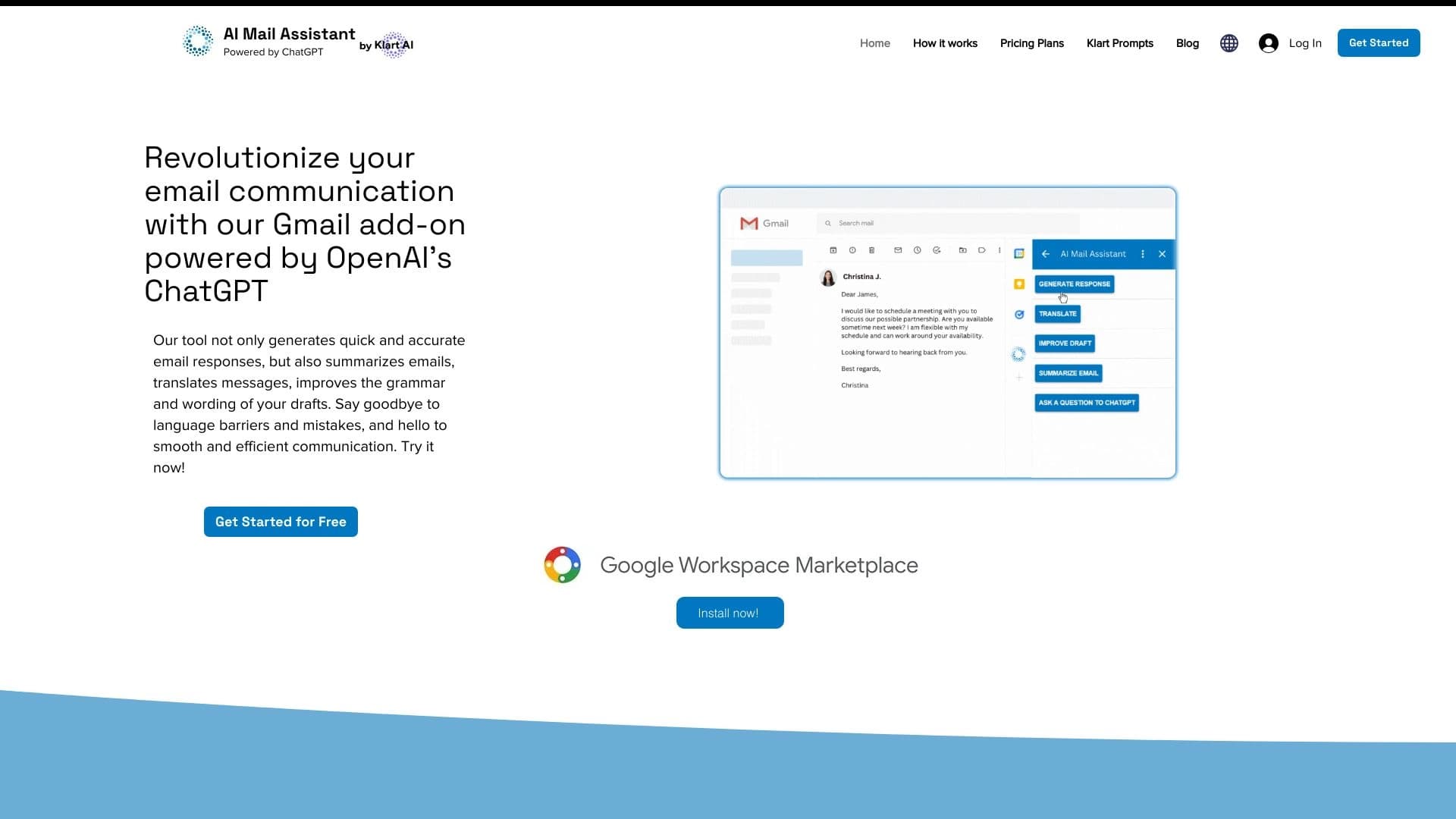
Asisten Al Mail adalah ekstensi Gmail yang dibangun pada teknologi kecerdasan buatan. Alat ini dirancang untuk menyederhanakan manajemen email: secara otomatis ini menghasilkan balasan pada pesan masuk, membantu memperbaiki tata bahasa dan gaya kesalahan dalam draf, menerjemahkan pesan ke dalam 13 bahasa, dan menciptakan ringkasan singkat dari percakapan panjang. Selain itu, jaringan saraf dapat mengurutkan email yang masuk dengan kategori dan mengekstrak rincian kontak (nama, judul pekerjaan, perusahaan, telepon, email) langsung dari teks surel.
Solusinya bekerja sebagai iklan browser dan mengintegrasikan langsung ke antarmuka Gmail. Jaringan saraf menggunakan model GPT- 3, memungkinkan untuk memahami bahasa alam dan konteks korespondensi.
Fitur Asisten Al Mail
| Fitur | Nilai |
|---|---|
| Tipe | Ekstensi Gmail / App Area Kerja Google |
| Teknologi Inti | GPT-3 |
| Kategori | Email, Ringkasan, Terjemahan, Asisten AI, Manajemen Tugas, Ekstraksi Data |
| Platform | Web (ekstensi peramban) |
| Pengembang | Area Kerja / Applai |
| Model Distribusi | Freemium |
| Kunjungan Monthly | 173.5K |
| Peringkat Penyunting | 8,6-9.1 dari 10 |
| Peringkat Pengguna | 4,2-4.7 dari 5 |
| Tier Bebas Tersedia | Ya (pemrosesan kontak terbatas dan fitur dasar) |
| Rencana Dasar | Tersedia pada langganan bulanan |
| Rencana Premium | Tersedia pada langganan bulanan yang lebih tinggi |
Siapa Asisten Al Mail?
Alat ini berguna untuk berbagai pengguna yang aktif bekerja dengan email. Terutama:
- Penjualan dan pemasaran profesional. Bagi mereka yang mempertahankan korespondensi klien aktif, alat ini membantu cepat respon kerajinan, mempertahankan nada yang tepat, dan menghemat waktu pada draft.
- Pengguna dengan volume tinggi email masuk. Jika puluhan atau ratusan pesan tiba setiap hari, kategori otomatis dan rangkuman ringkas membantu dengan cepat memisahkan pesan penting dari yang kedua.
- Mereka yang bekerja dengan database kontak. Pengguna yang perlu mengumpulkan data kontak dari surel untuk newsletters atau CRM pemutakhiran dapat otomatis proses ini.
- Perusahaan beroperasi secara internasional. Kemampuan untuk menerjemahkan email ke dalam 13 bahasa menghilangkan hambatan bahasa ketika berkomunikasi dengan mitra asing dan klien.
Bagaimana menggunakan Asisten Al Mail?
Memasang Ekstensi
Untuk memulai, Anda perlu menginstal ekstensi. Pergi ke halaman aplikasi pada Google Workspace Marketplace dan tambahkan alamat ke akun Gmail Anda. Pemasangan butuh beberapa menit dan tidak memerlukan keahlian teknis khusus.
Bekerja dengan Email
Setelah instalasi, ekstensi terintegrasi ke antarmuka Gmail. Ketika Anda membuka email, jaringan saraf menyarankan opsi jawaban, dapat membuat ringkasan percakapan, atau menerjemahkan teks. Untuk mengekstrak kontak, hanya membuka email yang relevan - jaringan saraf akan menganalisis teks dan menampilkan data terstruktur dalam format yang nyaman. Hasil dapat diekspor langsung ke Google Sheets.
Fitur Kunci dari Asisten AI Mail
Generasi Balas dan Pengubahan Draft
Jaringan saraf secara otomatis menyusun balasan terhadap email yang masuk berdasarkan konteks percakapan. Fitur perbaikan draft membantu memperbaiki kesalahan tata bahasa, menyesuaikan gaya, dan membuat teks lebih profesional.
Terjemahan dan Ringkasan
Alat ini menerjemahkan email ke dalam 13 bahasa, memungkinkan Anda untuk bekerja dengan koresponden internasional tanpa mempekerjakan penerjemah. Fitur summarisasi menciptakan ringkasan singkat percakapan panjang, membiarkan Anda cepat memahami esensi tanpa membaca setiap pesan.
Ekstraksi dan Pengurutan Data
Jaringan saraf mengambil nama, judul pekerjaan, perusahaan, alamat, telepon, email, dan sambungan website dari teks email. Kontak yang dikumpulkan dapat diekspor ke Google Sheets. Email yang masuk secara otomatis diurutkan ke dalam kategori, menyederhanakan navigasi kotak-surat.
Kemajuan Asisten Al Mail
Tabungan Waktu dan Automatisasi
Keuntungan utama adalah tabungan waktu yang signifikan ketika bekerja dengan email. Alih-alih menulis secara manual setiap jawaban, pengguna mendapatkan opsi yang sudah-dibuat yang dapat disunting atau dikirim segera. Koleksi kontak otomatis menghilangkan rutinitas menyalin data dari email.
Akurasi dan Integrasi
Jaringan saraf secara akurat mengumpulkan rincian kontak, termasuk judul pekerjaan, organisasi, dan alamat, bahkan jika informasi tersebar di seluruh teks email. Built-in Google Sheets integrasi memungkinkan ekspor langsung dari data terstruktur. Alat ini bekerja dalam lingkungan Gmail yang akrab, tidak perlu beralih ke layanan pihak ketiga.
Penyesalan Asisten Al Mail
Meskipun fungsionalitas, alat ini memiliki keterbatasan tertentu:
- Hanya bekerja dengan email. Jaringan saraf tidak memproses lampiran - berkas PDF, dokumen, atau gambar tetap di luar lingkup analisis.
- Ketergantungan pada struktur email. Jika sebuah email diformat luar biasa, jaringan saraf dapat membuat kesalahan selama analisis. Dalam kasus tersebut, verifikasi manual dari data yang diekstrak diperlukan.
Apa Tugas Apakah Asisten Al Mail Sove?
- Manajemen email. Balas otomatis, menyortir pesan masuk, membuat rangkuman percakapan.
- Manajemen kontak. Mengekstrak data kontak dari email, dengan cepat membangun database klien, populasi sistem CRM.
- Terjemahan dan editing. Menerjemahkan email ke dalam 13 bahasa, meningkatkan tata bahasa dan gaya draf.
- Ciptaan isi. Menghasilkan email promosi, mengikuti pesan-pesan, dan posting blog menggunakan template yang sudah dibuat.
Harga Asisten Al Mail
Alat ini beroperasi pada model freemium. Tingkat bebas termasuk pemrosesan kontak terbatas dan fitur respon dasar dan fitur terjemahan.
- Rencana Dasar - langganan bulanan. Termasuk kemampuan ekstraksi data canggih dan integrasi Google Sheets.
- Rencana Premium - berlangganan bulanan yang lebih tinggi. Menyediakan pengeluaran data tak terbatas dan dukungan prioritas.
Waktu Penggunaan Asisten AI Mail
Untuk menggunakan alat, instalasi dari Google Workspace Marketplace diperlukan. Fungsi ekstensi sebagai tambahan Gmail dan tidak memerlukan instalasi perangkat lunak tambahan.
Sebuah akun Google dasar dan koneksi internet yang stabil cukup untuk memulai.
Ketersediaan Asisten AI Mail
Alat ini bekerja pada platform web dan tersedia sebagai ekstensi peramban. Integrasi primer diimplementasikan dengan Gmail, dengan dukungan untuk Outlook dan Apple Mail juga diumumkan.
Aplikasi ini tersedia untuk instalasi melalui Google Workspace Marketplace. Antarmuka mendukung berbagai bahasa, dan terjemahan email tersedia dalam 13 bahasa.
Bagaimana Asisten Al Mail Differs dari Alternatif
Perbedaannya adalah pendekatan komprehensif untuk manajemen email. Tidak seperti solusi fokus, Asisten Al Mail menggabungkan berbagai fungsi: generasi balasan, terjemahan, summarisasi, ekstraksi kontak, dan pengurutan inbox.
Keuntungan yang signifikan adalah pembangunan dalam integrasi Google Sheets untuk mengekspor kontak yang diekstrak, yang sangat berharga bagi profesional penjualan dan pemasar. Alternatif yang belum diketahui termasuk ChatGPT Add- dalam daftar Outlook, Victor AI, dan Addy AI, namun tidak satupun dari mereka menawarkan fitur yang sama dalam ekstensi Gmail tunggal.
Kesimpulan
Asisten Al Mail adalah solusi praktis untuk otomatis aliran email. Alat ini menggabungkan generasi balasan, terjemahan ke dalam 13 bahasa, summarisasi, dan kontak ekstraksi data dalam satu ekstensi. Untuk profesional menangani volume besar korespondensi, ini diterjemahkan menjadi nyata waktu tabungan. Batas utama adalah kekurangan Pemrosesan lampiran. Pada saat yang sama, struktur harga fleksibel dengan tingkat bebas memungkinkan Anda untuk menguji alat sebelum berkomitmen ke berlangganan.
Pertanyaan yang sering ditanyakan
Lihat juga


Platform AI untuk perencanaan kerja otomatis, manajemen tugas, dan prioritas.

Catalog dari alat AI dengan bahan pendidikan dan panduan untuk memilih jaringan saraf.


Asisten AI multifungsional untuk menghasilkan teks, gambar, dan audio.


Peron untuk meningkatkan lalu lintas organik dan menciptakan konten dengan bantuan AI dan partisipasi ahli.

Aplikasi mobile untuk penyuntingan foto dan membuat avatar bergaya menggunakan AI.

Sebuah platform untuk pencipta konten yang menggabungkan manajemen tautan, pemasaran email, toko online, dan analisis dalam penyunting visual tunggal tanpa coding.

Sebuah jaringan saraf untuk analisis dokumen yang mengekstrak informasi kunci, menciptakan ringkasan, dan menjawab pertanyaan tentang isi file yang diunggah.

Perencana perjalanan AI yang menciptakan jadwal pribadi dan membantu Anda memilih penerbangan, akomodasi, dan kegiatan dalam percakapan.