
AI Keyboard・ReplyAssistant
Aplicativo de teclado para iOS baseado na API do ChatGPT para criar textos rápidos e bem escritos em qualquer aplicativo.
Visão geral
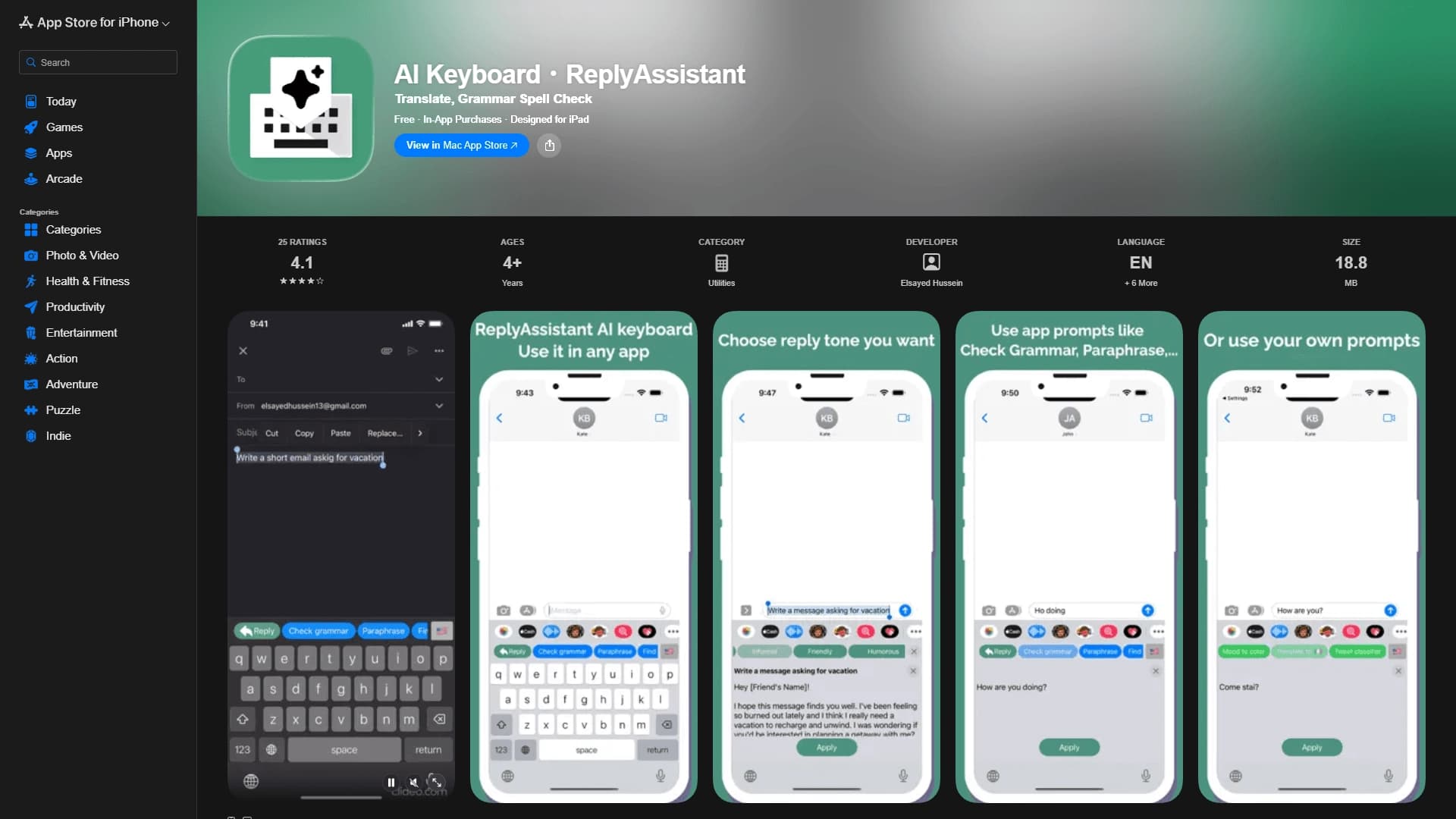
AI Keyboard®ReplyAssistant é um teclado inteligente para dispositivos Apple, construído na tecnologia ChatGPT API. Ele funciona como uma extensão de teclado completa que permite que você componha, edite e traduza textos em qualquer aplicativo — de messengers para clientes de e-mail.
A principal ideia por trás da ferramenta é reduzir o tempo gasto na digitação e eliminar a necessidade de mudar constantemente entre aplicativos para verificar erros ou traduzir. Em vez de copiar uma frase para um serviço separado, você obtém todas as ferramentas necessárias no seu teclado. O sistema em si sugere redação, corrige imprecisões, e ajuda você a expressar seus pensamentos no tom certo.
Teclado AI;ReplyAssistant Features
| Característica | Valor |
|---|---|
| Tipo | Teclado IA com um assistente de escrita |
| Categorias | E-mail e comunicação, ortografia e gramática |
| Plataformas | iOS (iPhone, iPad) |
| Tecnologia | API ChatGPT |
| Plano livre disponível | Sim (versão gratuita com compras no aplicativo) |
| Línguas | Inglês e vários outros |
| Disponibilidade | Loja de aplicativos |
Para quem é o teclado AI?
Estudantes e alunos
Estudantes de escolas e universidades que frequentemente se comunicam com professores e colegas de classe apreciarão a capacidade de rapidamente obter respostas bem escritas, corretamente fraseadas. O teclado ajuda a evitar erros estranhos na correspondência acadêmica formal.
Trabalhadores de escritório e profissionais de negócios
Profissionais cujo trabalho envolve comunicação rápida com colegas, clientes ou parceiros podem compor respostas profissionais diretamente do telefone. Isto é especialmente relevante para aqueles que estão frequentemente fora do escritório e tem que responder a e-mails ou mensagens em movimento.
Qualquer um que digita muito em dispositivos móveis
Qualquer usuário de iPhone ou iPad que converse regularmente em messengers ou em mídias sociais pode simplificar sua vida. O teclado é útil não só para comunicação de negócios, mas também para tarefas diárias — desde respostas rápidas aos amigos até traduzir mensagens de contatos estrangeiros.
Como utilizar o Teclado AI
Instalação e activação
Para começar a usar a ferramenta, você precisa baixar o aplicativo da App Store. Após a instalação, acesse as configurações do sistema iOS, encontre "General" → "Keyboard", e adicione AI Keyboard®ReplyAssistant à lista de teclados ativos. Só então a extensão estará disponível em qualquer aplicativo.
Trabalhando em aplicativos
Uma vez ativado, o teclado aparece sempre que o teclado do sistema é chamado em qualquer aplicativo — mensageiros, clientes de e-mail ou redes sociais. Para obter uma sugestão ou corrigir um texto, simplesmente pressione o botão correspondente no teclado, e o sistema oferecerá opções de resposta adequadas, erros corretos ou traduzir texto sem exigir que você saia do aplicativo atual.
Principais características do Teclado AI
Respostas e respostas inteligentes
O sistema analisa o contexto da conversação e oferece opções de resposta prontas. Você pode escolher o tom — de formal a casual. Isso acelera a comunicação e ajuda quando é difícil encontrar o texto certo.
Verificação de gramática e ortografia
O teclado detecta e corrige automaticamente erros de digitação, erros gramaticais e imprecisões estilísticas. Isso permite que você envie mensagens bem escritas sem ter que reler o texto e corrigir manualmente erros.
Tradução da mensagem
Você pode traduzir texto digitado para outras línguas diretamente do teclado. Inglês e vários idiomas adicionais são suportados. Este recurso é especialmente útil quando se comunica com colegas estrangeiros ou amigos — não mais copiar texto em um aplicativo de tradução separado.
Vantagens do Teclado AI
Versatilidade e integração
O teclado funciona em qualquer aplicativo no iOS, incluindo mensageiros, serviços de e-mail e redes sociais. Está totalmente integrado ao sistema: você não precisa alternar entre aplicativos para verificar texto ou traduzir — tudo está disponível em um só lugar.
Conveniência para uso diário
O aplicativo é compacto e não sobrecarrega o sistema, tornando-o confortável para o trabalho diário. O teclado lida com correspondência de negócios, tarefas acadêmicas e conversas casuais igualmente bem, cobrindo praticamente todos os cenários de uso.
Suporte de escrita inteligente
Graças à API ChatGPT, o teclado entende o contexto e pode sugerir phrasing mais significativo e natural do que respostas simples de modelo. Isso ajuda qualquer um a escrever textos coerentes, lógicos e bem estruturados, mesmo aqueles que lutam com a redação.
Retrocessos do teclado AI
As informações sobre os inconvenientes óbvios do serviço não são divulgadas em fontes disponíveis. No entanto, vale a pena notar que a ferramenta só funciona em dispositivos Apple – proprietários de smartphones e tablets rodando Android ou outros sistemas operacionais não serão capazes de usar o teclado. Além disso, uma vez que toda a funcionalidade é desbloqueada através de compras no aplicativo, os usuários da versão gratuita podem não ter acesso a alguns recursos avançados.
Que tarefas o AI Keyboard é que o AI Assistant resolve?
Escrever rapidamente respostas e respostas
Em vez de gastar tempo pensando em como dizer algo, os usuários podem obter uma opção de resposta adequada com um único toque. Isso acelera significativamente a comunicação, especialmente quando você precisa responder a um grande número de mensagens.
Corrigir erros e erros
O teclado corrige automaticamente erros de gramática e ortografia em tempo real. Usuários não precisam verificar manualmente o texto antes de enviar — o sistema faz isso para eles.
Tradução sem mudar de apps
O recurso de tradução funciona diretamente na interface do teclado, eliminando a necessidade de copiar texto, abrir um aplicativo de tradução separado e voltar. Isso economiza tempo e mantém o fluxo de conversação ininterrupta.
Teclado AI;ReplyAssistant Prices
AI Keyboard®ReplyAssistant tem uma versão gratuita complementada por compras no aplicativo. Isso significa que os recursos básicos estão disponíveis sem custo, mas os usuários podem comprar opções adicionais ou uma assinatura para expandir a funcionalidade. Preços específicos não estão listados na página do aplicativo, então as taxas atuais podem ser encontradas diretamente na App Store antes de baixar.
Termos de uso para o teclado AI
Para usar o teclado, você precisa instalar o aplicativo e ativar a extensão do teclado nas configurações do sistema iOS. Depois disso, a ferramenta fica disponível em todos os aplicativos do dispositivo. A funcionalidade completa provavelmente requer uma conexão à internet, pois o serviço usa a tecnologia ChatGPT API baseada na nuvem para processar solicitações.
Disponibilidade do Teclado de IA
AI Keyboard®ReplyAssistant está disponível apenas para proprietários de dispositivos Apple — iPhone e iPad. A instalação é feita através da App Store oficial. O aplicativo não está disponível em outras plataformas móveis, incluindo Android, então os usuários de tais dispositivos não têm como usar este teclado.
Como o teclado AI é diferente das alternativas
A principal diferença entre o AI Keyboard®ReplyAssistant e outros teclados com características de IA reside na sua profunda integração com o ecossistema iOS e no seu foco específico em operações de texto no contexto de mensagens. O sistema baseado na API do ChatGPT não apenas corrige erros ou oferece sugestões de palavras — ele gera respostas completas levando em conta o tom da conversa e contexto.
Outra diferença é sua multifuncionalidade: o teclado combina verificação gramatical, tradução e sugestões de resposta em uma única interface. Muitos aplicativos concorrentes se especializam em apenas uma dessas tarefas. Além disso, a disponibilidade de uma versão gratuita torna a ferramenta mais acessível no início em comparação com serviços que exigem imediatamente uma assinatura.
Conclusão
AI Keyboard®ReplyAssistant é uma solução prática de teclado para usuários iOS que querem acelerar suas mensagens e melhorar a qualidade de texto. Ao combinar sugestões inteligentes baseadas no ChatGPT, verificação ortográfica e tradução em uma ferramenta, o aplicativo cobre as principais necessidades da comunicação moderna. Com suporte para todos os tipos de aplicativos e uma versão gratuita, este teclado será útil para estudantes, funcionários de escritório e qualquer pessoa que regularmente escreve mensagens de seu telefone e valores precisão e velocidade.
Perguntas mais frequentes
Consulte também

Plataforma de IA multifuncional para criação de conteúdo, combinando síntese de fala, geração de texto, criação de avatar e edição de vídeo.


Um agente de desenvolvimento de IA de código aberto que ajuda a gerar, refinar e depurar código diretamente no IDE.


Rede neural que gera imagens e ilustrações com base em uma descrição de texto.


Assistente de IA para marketing que ajuda a criar estratégias de promoção e otimizar campanhas publicitárias.


Assistente de e-mail IA que se integra com Gmail e Outlook.

Plataforma em nuvem para criação de vídeos com avatares de IA, fala sintetizada e tradução automática de vídeos para dezenas de idiomas.


Plataforma para conversar com personagens virtuais de IA, que podem ser criados e personalizados de acordo com suas preferências.

Plataforma comunitária para descobrir, publicar e compartilhar modelos abertos de geração de imagens baseados em IA.