

AI Infographic Generator
Transforme les textes en infographie visuelle avec l'IA.
Aperçu général
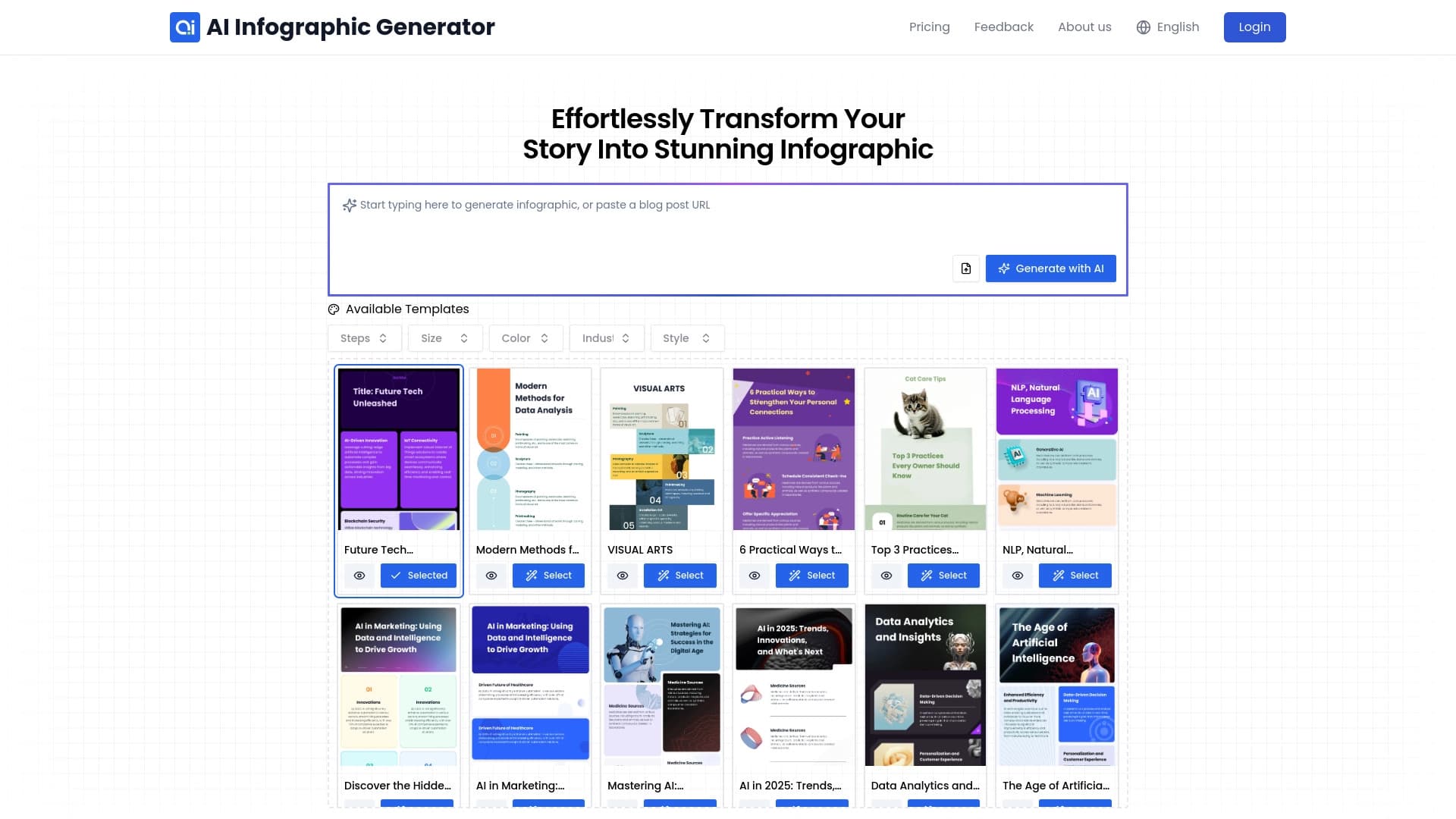
Générateur d'infographie AI est un service Web conçu pour la création d'infographie automatique. L'outil reprend la partie routinière du travail d'un concepteur : il analyse le texte téléchargé et le transforme indépendamment en un schéma visuel structuré. Au lieu de sélectionner manuellement les mises en page et les blocs d'alignement, l'utilisateur colle simplement le matériau source ou sélectionne le fichier souhaité.
Le système fonctionne sur le principe "charger — obtenir un projet". Le réseau neuronal lui-même suggère l'arrangement des blocs, des icônes et des accents de couleur basés sur la signification du texte. Cependant, il est important de comprendre : le résultat est rarement parfait lors du premier essai. Le plus souvent, l'infographie finie doit être affinée manuellement pour obtenir la précision dans la présentation des données et l'unicité du design. Ce n'est pas une solution totalement autonome, mais plutôt un assistant intelligent qui accélère la création de contenu visuel sans remplacer l'édition finale.
Caractéristiques du générateur d'infographie AI
| Fonctionnalité | Valeur |
|---|---|
| Type | Générateur d'infographie |
| Catégories | Assistants de conception, Outils de gestion de projet, Outils de conception graphique, Générateurs de conception, Générateurs de contenu texte, Outils d'analyse de données |
| Développeur | InfographAI |
| Plateforme | Service Web (site Web) |
| Visites mensuelles | 388.9K |
| Plan gratuit | Disponible (accès limité aux modèles et fonctionnalités de base) |
| Plan de base | 499 RUB par mois |
| Régime de primes | 999 RUB par mois |
Pour qui est le générateur d'infographie AI?
Professionnels sans compétences de conception
L'outil est principalement destiné aux personnes qui ont besoin d'infographies de qualité mais n'ont pas le temps ou le désir d'apprendre des éditeurs graphiques complexes. Cela pourrait inclure les étudiants qui préparent des projets universitaires ou des employés de bureau qui doivent rapidement formater les données pour les présentations internes.
Marchés et créateurs de contenu
Ceux qui tiennent régulièrement des blogs ou préparent des rapports pour la gestion doivent constamment visualiser l'information. Générateur d'infographie AI vous permet de transformer rapidement des textes longs en schémas concis et clairs adaptés aux messages ou diapositives de médias sociaux. L'avantage principal est la vitesse: ce qui prenait plusieurs heures prend maintenant quelques minutes.
Comment utiliser le générateur d'infographie AI?
Déroulement étape par étape
Le service suit un système simple en trois étapes. Tout d'abord, l'utilisateur choisit un modèle approprié dans la galerie ou colle immédiatement ses données dans le champ texte. Ensuite, le réseau neuronal analyse automatiquement le contenu et sélectionne la structure optimale pour l'infographie future. Après cela, vous pouvez procéder à l'aperçu du résultat du projet.
Ajustements définitifs et exportations
Au stade de l'aperçu, l'utilisateur a la possibilité d'intervenir dans le processus. Vous pouvez modifier le schéma de couleurs, remplacer les polices ou réarranger les blocs sémantiques. Une fois que le résultat est satisfaisant, tout ce qui reste est pour télécharger le fichier terminé. Il est important de se rappeler : plus le texte source est complexe, plus il est probable que des ajustements de structure manuelle seront nécessaires.
Caractéristiques clés du générateur d'infographie AI
Convertir différents formats
L'outil peut fonctionner avec trois principaux types de données sources: des articles, des billets de blog et des fichiers PDF. Ceci couvre la plupart des cas d'utilisation typiques — du formatage du travail académique à la création d'un CV visuel ou d'un communiqué de presse. L'utilisateur n'a pas besoin de structurer l'information à l'avance; le réseau neuronal le fera lui-même.
Conception intelligente et personnalisation
L'IA décide de manière indépendante de la meilleure façon d'organiser les données sur la page. Il regroupe des idées liées, met en lumière des figures clés et sélectionne des accents visuels. En même temps, l'utilisateur conserve le contrôle total : la possibilité de changer de style, de couleurs et de polices est disponible à toutes les étapes du travail. Cela permet d'adapter le résultat à l'identité de marque d'une entreprise ou à d'autres exigences.
Avantages du générateur d'infographie AI
Économie de temps et d'efforts
Le principal avantage du service est la rapidité de la création infographie. Au lieu de planifier manuellement la mise en page de chaque bloc, l'utilisateur obtient une fondation prête en quelques minutes. Il n'est pas nécessaire d'apprendre à dessiner des outils ou à comprendre la typographie — l'algorithme intelligent le gère.
Flexibilité dans les paramètres
Les infographies peuvent être adaptées à des besoins spécifiques : modifier la palette pour correspondre aux couleurs du logo, choisir les polices de la marque ou construire la structure comme vous le souhaitez. Le service permet une personnalisation assez profonde du résultat, sans se limiter à choisir simplement une « peau » pour un modèle. En outre, les données complexes deviennent beaucoup plus visuelles et plus faciles pour le public à comprendre.
Inconvénients du générateur d'infographie AI
Résultats similaires à des modèles et besoin de raffinement
Le principal inconvénient est le style de machine reconnaissable. Les infographies créées par le réseau neuronal sont presque toujours basées sur des modèles et manquent de conception unique. Pour les tâches non standard ou les projets créatifs, ce niveau est souvent insuffisant, donc vous devez changer manuellement les couleurs, corriger les textes et réarranger les blocs.
Erreurs de visualisation des données
L'intelligence artificielle n'interprète pas toujours correctement la signification des données téléchargées. Des erreurs logiques peuvent survenir lors de la visualisation : connexions incorrectes entre les éléments, proportions déformées ou accent mis sur les détails secondaires. Presque tous les projets nécessitent un examen final et des corrections avant leur publication ou leur utilisation dans les rapports.
Quelles tâches le générateur d'infographie AI résout-il?
La tâche principale de l'outil est de soulager l'utilisateur de la nécessité de travailler avec les éditeurs graphiques lors de la création de contenu visuel. Le service vous permet d'obtenir rapidement une représentation claire de texte complexe, qui est particulièrement utile lors de la préparation de rapports marketing, de formater les résultats de recherche, ou de créer du matériel éducatif. Les infographies créées avec l'IA aident le public à saisir rapidement les principales idées et les chiffres d'un long document texte.
Une fonction secondaire, mais tout aussi importante, est de transformer les statistiques "boring" en histoires visuelles engageantes. Cela rend l'outil précieux pour les présentations où vous avez besoin non seulement de transmettre des données, mais aussi de retenir l'attention du public.
Prix du générateur d'infographie AI
Le service fonctionne sur un modèle freemium. Il existe un plan gratuit qui donne accès à un ensemble limité de fonctionnalités de base et de modèles. Pour les utilisateurs qui ont besoin de capacités élargies, deux régimes payants sont disponibles :
- Plan de base — 499 RUB par mois.
- Régime de primes — 999 RUB par mois, y compris un accès illimité à toutes les fonctionnalités et le soutien prioritaire.
La liste exacte des fonctionnalités disponibles sur chaque plan n'est pas détaillée dans les sources publiques, il est donc utile de vérifier le site officiel avant de payer.
Conditions d'utilisation du générateur d'infographie AI
Pour commencer, l'utilisateur doit sélectionner un modèle approprié ou coller ses données dans un champ dédié. Le système traite automatiquement l'information et offre une variante infographie pour l'édition. Les exigences précises relatives à la procédure d'enregistrement ou à la vérification obligatoire des comptes ne sont pas précisées dans les sources disponibles — probablement, pour commencer, vous devez simplement ouvrir le site Web et commencer à créer un projet.
Disponibilité du générateur d'infographie AI
L'outil est un service entièrement Web qui fonctionne à travers un navigateur. Cela signifie qu'aucune installation logicielle n'est requise sur votre ordinateur, et tous les projets sont stockés en ligne. L'information sur le soutien pour des langues d'interface spécifiques et les restrictions régionales ne sont pas divulguées dans les sources officielles.
Comment le générateur d'infographie de l'IA diffère des alternatives
Contrairement aux générateurs universels d'images tels que Midjourney, Kandinsky ou Stable Diffusion, qui créent des images à partir de descriptions de texte, ce service est strictement axé sur l'infographie. Sa tâche n'est pas de dessiner une illustration abstraite, mais de structurer les données factuelles en un schéma logique avec des blocs, des flèches et des chiffres. Alors que Yandex Art se concentre sur les images artistiques et Leonardo.ai sur les images réalistes et l'art conceptuel, AI Infographie Generator travaille avec la sémantique de texte et sa structure logique. La principale différence est un résultat qui peut être utilisé dans les rapports et les présentations sans adaptation supplémentaire.
Conclusion
Générateur d'infographie AI est un outil en ligne pratique pour visualiser rapidement l'information texte. Il gagne vraiment du temps lors de la création d'infographies de base, en particulier pour les utilisateurs sans compétences de conception. Cependant, il est important d'évaluer ses capacités de façon réaliste : pour les projets commerciaux à fort rendement ou les rapports analytiques complexes, il faudra probablement les perfectionner manuellement. Dans l'ensemble, le service est le mieux adapté au travail d'ébauche et à la création de matériaux visuels simples où la vitesse importe plus que l'unicité de conception.
Foire aux questions
Voir aussi


Service virtuel d'essai de vêtements alimenté par l'IA.


Service de transcription automatique de l'audio et de la vidéo dans le texte avec support pour plus de 100 langues.

Service en ligne pour la création d'un clone de voix réaliste à partir d'un court enregistrement audio et texte-à-parler.


Une plateforme pour créer des chatbots d'entreprise basés sur vos propres documents sans codage.


Assistant AI pour la création et l'édition rapides de textes dans différents formats.

Un service en ligne qui vous permet de discuter avec les documents PDF : posez des questions et obtenez des réponses concises avec l'attribution des sources.


Outil d'IA en ligne pour créer des images en profondeur.

Service pour la création d'avatars personnalisés et photos shoots utilisant l'IA basé sur des selfies téléchargés.