

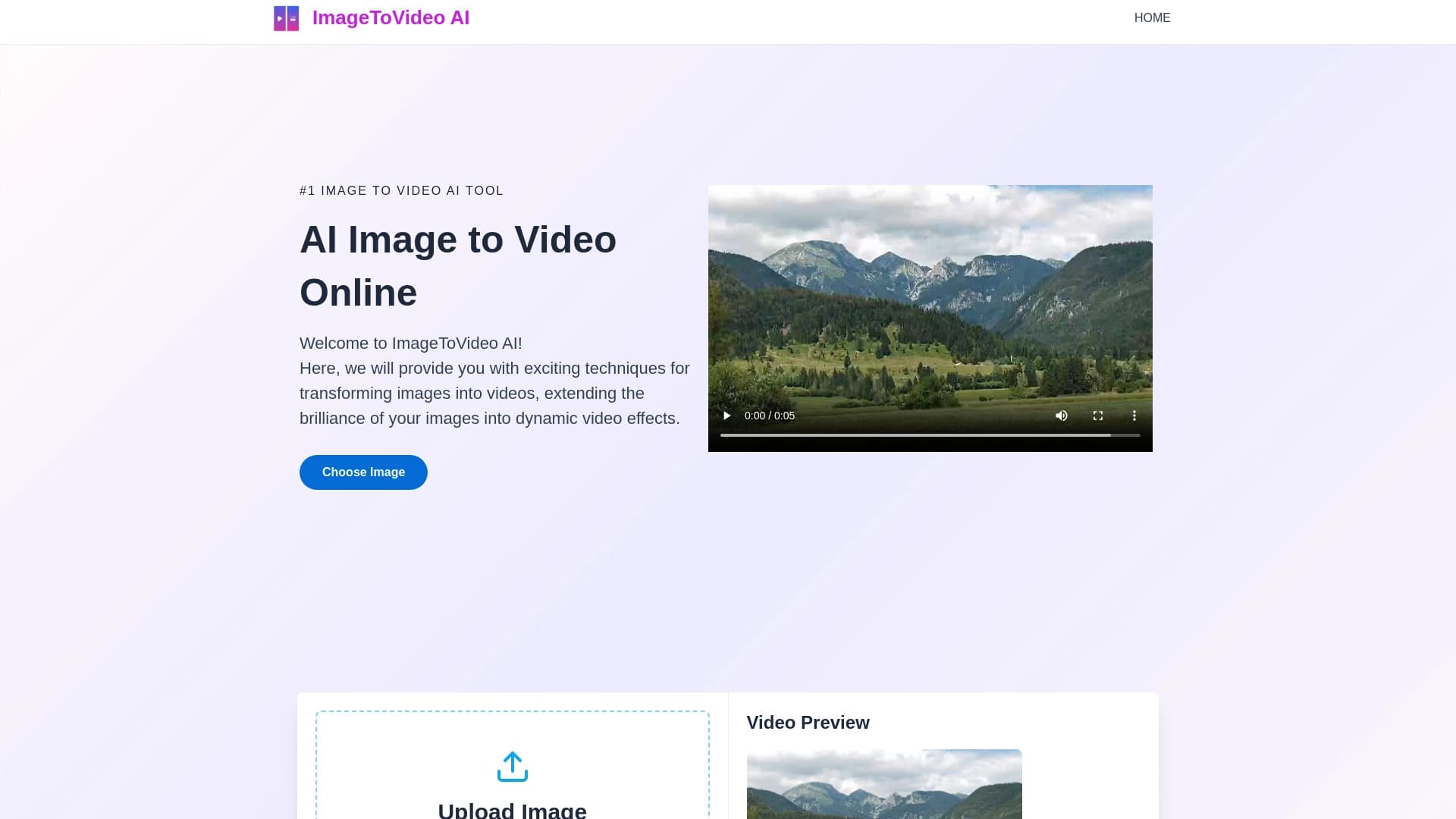
AI Image to Video Online
Convierte imágenes subidas en videos MP4 cortos usando inteligencia artificial.
Examen
AI Image to Video Online es un servicio web que utiliza inteligencia artificial para convertir imágenes estáticas en videos MP4 cortos. El principio es simple: los usuarios suben una foto, describen el estilo deseado o el movimiento en texto, y la red neuronal genera el clip terminado por sí mismo. Todo lo que se requiere del usuario es unos minutos de espera y una idea clara. No se necesita edición de vídeo, configuración de línea de tiempo o trabajo clave.
La herramienta apunta a un público de masas y se posiciona como una solución para aquellos que necesitan convertir rápidamente fotos en vídeos para redes sociales, materiales publicitarios o archivos personales. El servicio funciona completamente en el navegador, eliminando la necesidad de instalaciones de software pesado o navegando complejas interfaces profesionales de editor de vídeo.
Imágen AI para Video Características en línea
| Característica | Valor |
|---|---|
| Tipo de herramienta | Plataforma en línea para la conversión de imágenes a video |
| Categoría | Image to Video, AI Video Generator |
| Plataforma | Servicio web (basado en el navegador) |
| Formatos de entrada | JPG, PNG, WEBP |
| Formato de salida | MP4 |
| Desarrollador | ImageToVideo AI |
| Tier gratis | Sí (número limitado de vídeos, características básicas) |
| Registro | No se requiere (por catálogo de datos) |
| Watermarks | Ninguno en videos terminados |
| Tráfico mensual | 388,9K |
| Modelo de precios | Suscripción o pago único (tiempo de vida) |
| Catálogo Fecha de adición | 23 de febrero, 2025 |
¿Para quién es IA Imagen para Video Online?
Los principiantes con No Editing Experience
El servicio está diseñado para personas que nunca han trabajado con editores de vídeo y carecen de habilidades especializadas. La interfaz es intuitiva, y todo el proceso de generación no tarda más de un par de minutos. Los usuarios no necesitan comprender capas, transiciones o configuraciones de exportación, simplemente subir una imagen y escribir un mensaje de texto.
Creadores de contenido y vendedores
Bloggers, especialistas de SMM, fotógrafos e influencers pueden traer rápidamente tiros estáticos a la vida para puestos de redes sociales. Los marketers de marca utilizan la herramienta para crear vídeos promocionales de fotos de productos sin contratar diseñadores o editores de vídeo. La capacidad de producir videos sin marca de agua hace que sea atractivo para uso comercial.
Usuarios Sin Presupuesto para Software Expensivo
Los editores de vídeo profesionales son costosos y requieren un hardware potente. Imágen AI a Video Online se ejecuta en la nube, por lo que los usuarios no necesitan un ordenador de alta gama — cualquier laptop o incluso un teléfono inteligente con acceso a Internet lo hará. Esta es una solución rentable para aquellos que necesitan video "vivir" sin una inversión financiera significativa.
Cómo utilizar la imagen AI para vídeo en línea
Proceso de generación paso a paso
Todo el proceso de creación de vídeo toma sólo unos pasos. En primer lugar, vaya al sitio web del servicio a través de cualquier navegador. Luego subir una imagen en uno de los formatos soportados — JPG, PNG o WEBP. No se necesita conversión previa; el servicio acepta archivos como son. Después de subir, escriba un mensaje de texto que describa el estilo de vídeo deseado, por ejemplo, "movimiento de nube agregado" o "crear animación de fondo sutil". Una vez listo, simplemente golpee el botón generar y espere el resultado.
Requisitos de dispositivo y conexión
Como el servicio está completamente basado en la web, todo lo que necesita es una conexión estable a Internet. La generación puede ser lanzada desde un ordenador, portátil, tableta o smartphone, sin necesidad de instalación de software adicional. Con una conexión débil, el procesamiento puede tardar más o más, por lo que se recomienda una conexión confiable.
Características clave de la imagen de AI a vídeo en línea
Subir imagen y generación de vídeo
La función central del servicio es convertir imágenes estáticas en clips MP4 animados. Los usuarios suben una foto, proporcionan una descripción de texto del estilo deseado, y la red neuronal crea un vídeo corto. El algoritmo determina automáticamente qué elementos de la imagen para animar y genera movimiento liso.
Interfaz simple sin curva de aprendizaje
La interfaz está diseñada para ser entendida en un par de minutos. No hay menús desordenados, ajustes complejos o paneles de herramientas confusas. Toda la funcionalidad se reduce a tres acciones: subir una imagen, introducir un mensaje de texto y recibir el resultado.
Efectos personalizables y soporte de privacidad
Más allá de la generación básica, el servicio ofrece efectos de vídeo ajustables para tareas creativas. Protección de privacidad y seguridad de datos se reclaman — las imágenes cargadas se procesan de acuerdo con la política de privacidad del servicio.
Ventajas de IA Imagen a Video Online
Velocidad y Simplicidad
Crear un vídeo de una foto tarda unos minutos. No es necesario estudiar editores de vídeo, ver tutoriales o bucear en detalles técnicos. Subir una foto, escribir una descripción, obtener un MP4 terminado — así es como funciona el servicio.
No Watermarks
Los videos generados vienen sin marcas de agua. Esto significa que los resultados se pueden utilizar libremente para proyectos personales, puestos de redes sociales o fines comerciales sin acreditar el servicio.
Amplia gama de aplicaciones
La herramienta se adapta a numerosas tareas: desde crear vídeos de marketing y animar fotos de productos para preservar memorias personales y mejorar el contenido de redes sociales. La flexibilidad de los formatos de imagen de entrada (JPG, PNG, WEBP) garantiza la compatibilidad con la mayoría de las fuentes de fotos.
Drawbacks of AI Image to Video Online
Controles limitados para tareas complejas
El servicio no proporciona control detallado sobre el proceso de animación. Los usuarios no pueden especificar exactamente qué elementos de imagen deben moverse, ajustar la velocidad de animación o establecer escenarios de movimiento complejos. Esta limitación hace que la herramienta no sea adecuada para la producción profesional de vídeo que requiere un control ajustado.
Dependencia de Internet
Como todo el procesamiento ocurre en la nube, la calidad y la velocidad dependen directamente de la estabilidad de conexión a Internet. Con una mala conectividad, la generación puede tardar más o fracasar enteramente, especialmente crítica cuando se trabaja bajo los plazos.
Confianza en un Servicio de Terceros
Los usuarios deben subir imágenes a los servidores del servicio para su procesamiento. A pesar de la protección de datos reclamada, esto requiere cierto nivel de confianza en los desarrolladores. Cómo se almacenan y eliminan los archivos cargados, queda poco claro.
¿Qué problemas presenta la imagen de AI para grabar en línea?
El servicio ayuda a abordar una amplia gama de tareas relacionadas con la creación de contenido de vídeo rápido. En primer lugar, trae fotos a la vida para las redes sociales — convirtiendo marcos estáticos en clips dinámicos que atraen más atención al público. En segundo lugar, crea vídeos promocionales de las fotos de productos — los marketers pueden producir fácilmente demostraciones de productos animados sin contratar videografos. En tercer lugar, transforma instantáneas de vacaciones y fotos personales en vídeos para archivos familiares o presentaciones. Por último, la herramienta se adapta a fotógrafos y creadores que necesitan construir rápidamente videos de portafolio mostrando su trabajo en movimiento.
Imágen AI para Video Online Precios
Tier gratis
El servicio ofrece un plan gratuito con un número limitado de vídeos generados y funcionalidad básica. El nivel gratuito incluye una marca de agua en los clips de salida, junto con restricciones en la resolución y el recuento de generación.
Suscripciones pagadas
Para los usuarios que necesitan capacidades ampliadas, hay dos planes pagados disponibles. El plan Starter cuesta 599 RUB por mes e incluye hasta a 50 videos por mes, soporte de resolución HD y sin marcas de agua. El plan Premium cuesta 1499 RUB al mes, ofreciendo generaciones ilimitadas, soporte 4K y procesamiento de solicitudes prioritarias.
Modelo de precios alternativos - Pago de una sola vez
Además de las suscripciones, algunos catálogos mencionan la opción de planes de pago únicos (acceso a tiempo libre). Los paquetes van desde $9.9 USD por 60 créditos a $99.99 USD por 1600 créditos. Todos los planes incluyen videos sin marca de agua, la capacidad de elegir duración de clip de 5 o 10 segundos, soporte de correo electrónico, y a veces descuentos de hasta 70%.
Términos de uso para imagen AI a vídeo en línea
Se requiere una conexión estable a Internet para utilizar el servicio, ya que todas las computaciones se realizan lado servidor. Los usuarios suben sus imágenes a los servidores del servicio, después de lo cual la red neuronal los procesa y devuelve el archivo de vídeo terminado. Según los datos del catálogo, el registro no es necesario para usar la herramienta — puede subir una imagen y recibir un vídeo inmediatamente. No se necesita tarjeta de crédito para uso básico, aunque el acceso a las características pagadas requiere uno o pago a través de otros sistemas.
La protección de la privacidad y la seguridad de los datos se reclaman: el servicio se compromete a salvaguardar los materiales cargados. Sin embargo, los detalles específicos de las políticas de almacenamiento y eliminación de datos no se revelan en fuentes públicas, lo que vale la pena considerar antes de subir imágenes sensibles.
Disponibilidad de imagen AI a Video Online
AI Image to Video Online es una herramienta completamente web accesible a través de un navegador en cualquier dispositivo: ordenador, laptop, tablet o smartphone. No se necesita instalación de software adicional, lo que hace que el servicio esté disponible desde cualquier dispositivo conectado a Internet. No se mencionan restricciones regionales ni requisitos de VPN en fuentes oficiales.
Según el análisis del tráfico, la mayor parte de los usuarios proviene de los Estados Unidos (30.67%), seguido de Francia (19.16%), Brasil (7.15%), México (6.96%), y Polonia (5.83%). Esto indica una audiencia internacional y la ausencia de bloqueo regional obvio.
Cómo Imagen AI para Video Diferencias Online de Alternativas
El mercado ofrece numerosas herramientas de imagen a vídeo, desde gigantes de la industria como Google VEO, Sora y Kling AI a servicios especializados como Hailuo y Pika Labs. El diferenciador clave de AI Image to Video Online está en su equilibrio de simplicidad y accesibilidad.
A diferencia de Sora o Google VEO, que apuntan a profesionales con funcionalidad avanzada pero compleja, este servicio simplifica todo a tres acciones: subir, describir y obtener resultados. Mientras que algunos competidores se centran principalmente en la generación de imágenes, aquí el énfasis es cuadrado en el formato de vídeo.
La principal ventaja competitiva es la ausencia de marcas de agua en los archivos de salida, permitiendo que los vídeos se utilicen para proyectos comerciales sin restricciones. También cabe destacar la política de precios flexibles: los usuarios pueden comenzar con un acceso gratuito a la vida útil, mientras que muchas alternativas operan exclusivamente sobre una base de suscripción.
Conclusión
AI Image to Video Online es una herramienta sencilla y eficaz para convertir rápidamente imágenes estáticas en videos cortos sin requerir habilidades de edición. El servicio es un excelente ajuste para principiantes, creadores de contenidos, marketers y usuarios cotidianos que necesitan "llevar fotos a la vida" para redes sociales, publicidad o proyectos personales. Generación instantánea, soporte para formatos de imagen populares y salida sin marca de agua lo convierten en una solución práctica para tareas cotidianas. Al mismo tiempo, los usuarios deben considerar el conjunto limitado de controles y la dependencia de la calidad de conexión a Internet. Si necesita resultados rápidos sin sumergirse en detalles técnicos — esta herramienta es una opción sólida.
Aranceles
Preguntas frecuentes
Vea también

Generar vídeos publicitarios con actores virtuales sin filmación real.

Servicio para generar videos verticales cortos usando una red neuronal a través de API o aplicación móvil.


Herramienta AI para automatizar el marketing en redes sociales, incluyendo generación de contenidos, programación post y análisis.


Plataforma en línea impulsada por AI para crear rápidamente contenido de texto, incluyendo blogs, artículos y publicaciones de redes sociales.


Asistente de marketing AI que ayuda a crear estrategias de promoción y optimizar campañas publicitarias.

Plataforma de nube para crear vídeos usando avatares AI, discurso sintetizado y traducción automática de clips a docenas de idiomas.


Red neuronal que genera imágenes e ilustraciones basadas en una descripción de texto.

Anakin.ai es una plataforma de código bajo que combina varios modelos AI para la creación de contenidos y automatización de flujo de trabajo sin codificación.