
AI Hug
Layanan untuk membuat pelukan video realistis dari foto menggunakan AI.
Tinjau
Deskripsi Jaringan Neural Al Hug
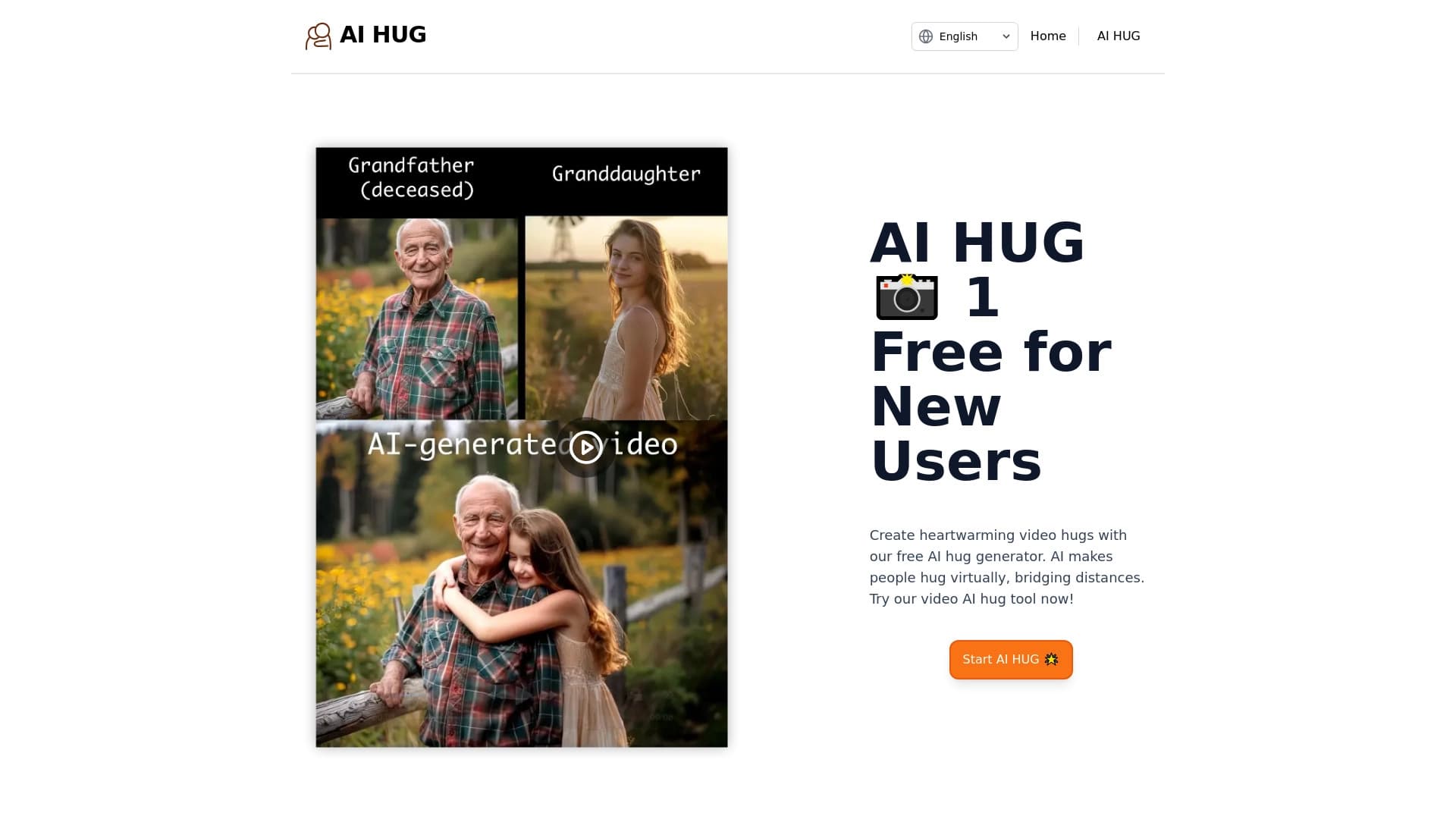
AI Hug adalah layanan khusus online yang menggunakan kecerdasan buatan untuk mengubah foto biasa menjadi video animasi pendek yang menampilkan pelukan. Konsep layanan ini sederhana dan emosional: Anda mengunggah gambar, dan jaringan saraf menganalisis pose, ekspresi wajah, dan detail gambar, kemudian menghasilkan klip realistis di mana orang-orang tampak berpelukan. Format ini memungkinkan Anda mengirim orang yang dicintai salam video hangat bahkan ketika Anda ribuan kilometer terpisah. Layanan ini beroperasi pada model freemium: generasi dasar dapat dicoba secara gratis, sementara subscriptions dibayar tersedia untuk penggunaan aktif.
Fitur pelukan AI
| Fitur | Nilai |
|---|---|
| Tipe | Generator gambar dan foto |
| Kategori | Generator foto dan gambar |
| Platform | Situs web |
| Pengembang | Hug AI |
| Kunjungan bulanan | 151.4K |
| Rencana gratis | Bebas - membuat satu pelukan video |
| Starter rencana | $5.99 per bulan - sampai dengan sepuluh pelukan video dan dukungan dasar |
| Rencana premium | $17.99 per bulan - pelukan video tak terbatas, dukungan prioritas, fitur lanjutan |
Untuk siapa AI Hug?
People Living Far From Loved Ones
Penonton utama layanan adalah mereka yang ingin mengungkapkan perasaan kepada keluarga dan orang yang dicintai sementara di kota lain atau negara. Alih-alih pesan teks standar atau panggilan, Al Hug memungkinkan Anda mengirim video pribadi di mana Anda tampak memeluk penerima. Ini adalah cara untuk menambahkan kehangatan komunikasi digital dan menjembatani jarak emosional.
Fans of Artists and Public Figure
Layanan ini memungkinkan Anda membuat pelukan video dengan seniman atau blogger favorit. Cukup upload foto Anda dan gambar idola Anda, dan jaringan saraf menghasilkan klip yang terlihat seperti foto gabungan dengan pelukan. Bagi penggemar, ini adalah cara yang tidak biasa dan emosional untuk berinteraksi dengan idola mereka.
People Wanting to Preserve Memories of Loved Ones
AI Hug dapat menciptakan kembali adegan dengan orang-orang yang tidak lagi di sini. Berdasarkan foto arsip, layanan menghasilkan pelukan video yang membantu menghidupkan kembali saat-saat hangat. Ini adalah alat halus untuk bekerja dengan memori dan emosi, meskipun membutuhkan pendekatan hati-hati untuk digunakan.
Bagaimana cara menggunakan pelukan buatan
Proses Penciptaan Video
Mendapatkan klip mengambil hanya tiga langkah. Pertama, mengunggah foto yang jelas di mana wajah dan pose terlihat jelas. Kemudian menggambarkan skenario pelukan yang diinginkan - misalnya, "pelukan ramah" atau "ulang tahun lembut pelukan". Setelah itu, tekan tombol menghasilkan dan tunggu beberapa menit sementara jaringan saraf memproses gambar dan menciptakan video.
Pilihan Foto Tips
Kualitas video terakhir langsung tergantung pada gambar sumbernya. Foto dengan pencahayaan normal di mana wajah dan pose adalah pekerjaan yang paling terlihat. Blurry, gelap, atau terlalu bayangan foto dapat menyebabkan distorsi dan kesalahan jaringan saraf. Hal ini juga penting bahwa foto berisi hanya satu orang - ini menyederhanakan tugas algoritma dan meningkatkan realisme hasil.
Fitur Kunci AI Hug
Membuat Hugs Video dari Foto
Fungsi inti layanan adalah menciptakan nyata klip pelukan animasi berdasarkan gambar upload. Jaringan saraf menganalisis foto, otomatis mengidentifikasi orang, dan menganimasikan adegan pelukan, akuntansi untuk pose, ekspresi wajah, dan rincian penampilan. Tampaknya seolah-olah orang benar-benar berdiri bersama-sama, meskipun kadang-kadang algoritma menghasilkan lucu dan tidak sepenuhnya hasil realistis.
Penampilan Pelukan
Pengguna dapat menggambarkan skenario yang diinginkan untuk klip - dari pelukan ramah santai ke momen perayaan. Hal ini memungkinkan membuat video unik untuk kesempatan tertentu: ulang tahun, ulang tahun, ulang tahun, reuni setelah perpisahan yang panjang, atau hanya sambutan malam yang hangat. Kemampuan untuk menyesuaikan skenario membuat setiap klip dipersonalisasi.
AI Hug Advantages
Koneksi Emosional pada Jarak
Layanan menangani tantangan penting - menyampaikan emosi melalui layar. Sebuah pelukan video yang dibuat oleh jaringan saraf terasa jauh lebih hangat daripada pesan biasa atau bahkan panggilan video. Ini adalah cara untuk mendukung orang yang dicintai, peduli dan perhatian ketika bertemu secara pribadi tidak mungkin.
Personalisasi untuk Khusus Pekerjaan
Setiap video dapat disesuaikan untuk acara tertentu atau alasan. Ulang tahun, ulang tahun, atau hanya "Aku merindukanmu" - pengguna memilih skenario. Hal ini membuat klip yang sesuai dan bermakna pada saat tertentu.
Kemudahan Penggunaan
Layanan ini dirancang untuk pemula: antarmuka intuitif, dan generasi hanya membutuhkan beberapa menit. Tidak ada keterampilan khusus atau membaca manual diperlukan - hanya mengunggah foto dan tekan tombol.
Mode Percobaan Bebas
AI Hug menawarkan generasi gratis dari satu video. Hal ini memungkinkan Anda berkenalan dengan layanan, menilai kualitas hasil, dan hanya kemudian memutuskan apakah akan berlangganan. Pendekatan ini menurunkan penghalang entri dan mengurangi risiko kekecewaan pembelian.
Al Hug Drawbacks
Taktik Terbatas
Hal ini penting untuk memahami: pelukan video tidak dapat menggantikan kontak fisik nyata. Emosi yang disampaikan melalui layar akan selalu berbeda dari pelukan yang sebenarnya. Layanan ini adalah solusi kompromi untuk komunikasi jarak jauh, bukan alternatif sepenuhnya untuk bertemu secara pribadi.
Konser Privasi
Mengunggah foto pribadi ke platform pihak ketiga selalu membawa risiko. Pengguna harus percaya layanan dengan gambar mereka, dan ada potensi ancaman kebocoran gambar atau penyalahgunaan oleh pihak ketiga. Sebelum mengunggah foto-foto yang sensitif, itu layak dengan hati-hati meninjau kebijakan privasi.
Dependence pada Kualitas Foto Sumber
Video terakhir sangat tergantung pada kualitas gambar upload. Blurry, gelap, atau foto dipotong buruk dapat menyebabkan cacat terlihat - wajah terdistorsi, pose tidak wajar, atau kesalahan animasi. Jika Anda tidak memiliki jelas, baik-menyala foto, hasilnya mungkin mengecewakan.
Masalah apa yang dilakukan AI Hug Solve?
Membuat Hugs Virtual ke Convey Feeling
Tujuan utama layanan adalah untuk membiarkan Anda mengekspresikan emosi hangat dan menunjukkan perawatan ketika Anda jauh dari orang yang dicintai. Pelukan virtual menjadi jembatan emosional antara orang-orang di ruang digital.
Mengulang Adegan dengan Orang-orang Tidak Lagi Di sini
Layanan dapat "membawa ke kehidupan" foto archival dan menciptakan kembali saat-saat dengan mereka yang tidak lagi dengan kami. Ini adalah alat halus untuk melestarikan kenangan dan mengingat kembali suka dalam format baru, meskipun membutuhkan kesiapan emosional dari pengguna.
Berbagi Clip Emosional dengan Keluarga
Al Hug menciptakan video pendek Anda dapat berbagi dengan orang yang dicintai di Messenger dan jejaring sosial. Ini adalah cara untuk terus berkomunikasi, membawa emosi positif, dan menambahkan variasi untuk interaksi digital sehari-hari.
Harga Hug AI
Layanan beroperasi pada model freemium dan menawarkan tiga rencana berlangganan. Setiap pengguna dapat memulai dengan versi bebas untuk mengevaluasi kualitas jaringan saraf, kemudian memilih rencana dibayar sesuai berdasarkan frekuensi penggunaan dan kebutuhan.
| Rencana | Harga | Fitur |
|---|---|---|
| Bebas | Bebas | Buat satu pelukan video |
| Pemulai | $5.99 per bulan | Sampai dengan sepuluh pelukan video per bulan, dukungan dasar |
| Premium | $17.99 per bulan | Pelukan video tak terbatas, dukungan prioritas, fitur lanjutan |
Terms pelukan AI dari Penggunaan
Menggunakan layanan memerlukan mengunggah foto - pembuatan video tidak tersedia tanpa ini. Proyek ini menawarkan versi percobaan gratis yang memungkinkan Anda membuat satu klip tanpa biaya. Ini adalah format yang nyaman untuk eksplorasi awal.
Sebelum penggunaan aktif, perlu menjaga privasi dalam pikiran: dengan berbagi gambar pribadi dengan platform, Anda mempercayakan foto Anda. Disarankan untuk mengunggah gambar-gambar yang nyaman Anda percaya pada layanan ketiga partai.
AI Hug Avability
AI Hug adalah layanan online yang dapat diakses melalui situsnya. Tak diperlukan instalasi perangkat lunak tambahan - hanya peramban dan koneksi internet. Halaman projek tidak menentukan batasan atau bahasa antar muka regional, sehingga tersedia bagi pengguna di berbagai negara mungkin bervariasi.
Bagaimana pelukan AI Differs dari Alternatif
Kebanyakan AI Alternatif pelukan - seperti Leonardo.ai, Midjourney, Kandinsky, atau Faxe.1 - adalah generator gambar umum. Mereka dapat membuat gambar fotorealistik dari deskripsi teks tapi tidak mengkhususkan diri dalam adegan tertentu. AI Pelukan bekerja secara sempit: berfokus pada skenario tunggal - pelukan video realistis dari foto-foto yang diunggah.
Perbedaan penting layanan adalah analisis mendalam gambar upload. Alih-alih menghasilkan dari awal, jaringan saraf memproses foto Anda, otomatis mengidentifikasi orang, menganalisis pose dan ekspresi wajah, dan kemudian "merakit" pelukan akuntansi untuk semua rincian. Pendekatan ini memberikan hasil yang lebih terpersonalisasi dibandingkan dengan standar prompt-berbasis pembuatan gambar.
AI Hug juga menonjol untuk kesederhanaannya: tidak perlu merancang teks kompleks prompt atau fine- tune parameter - hanya upload foto dan menggambarkan skenario. Hal ini membuat layanan dapat diakses oleh penonton yang luas, termasuk orang-orang tanpa pengalaman teknis. Dibayar target rencana regular gunakan, sedangkan versi gratis memungkinkan Anda mengeksplorasi alat tanpa komitmen keuangan.
Kesimpulan
AI Hug adalah layanan online khusus untuk menciptakan pelukan virtual dengan kecerdasan buatan. Ini menyelesaikan tugas emosional tertentu: membantu Anda mengekspresikan perasaan kepada orang yang dicintai pada jarak jauh, menciptakan adegan dengan orang-orang baik, dan mempertahankan hubungan hangat dalam bentuk digital. Layanan ini mudah digunakan, menawarkan mode percobaan gratis, dan membayar rencana untuk pengguna aktif. Batas utama adalah ketergantungan pada kualitas foto sumber dan privasi yang layak dipertimbangkan ketika mengunggah gambar pribadi.
Harga
Pertanyaan yang sering ditanyakan
Lihat juga


Alat web bebas dari Google yang menggunakan mesin belajar untuk mengubah sketsa kasar menjadi ikon dan ilustrasi yang rapi.

Sebuah komunitas untuk penemuan harian dan diskusi produk teknologi baru.

Layanan untuk menciptakan avatar personalisasi dan tunas foto menggunakan AI berdasarkan selfie yang diunggah.


Lain- bertenaga virtual pakaian mencoba-on layanan.


Platform Generatif untuk menciptakan gambar realistis dan video pendek dari teks atau gambar dengan kontrol atas gaya dan gerakan kamera.

Sebuah layanan penciptaan presentasi yang menggunakan beberapa agen AI untuk pengumpulan informasi, desain, dan analisis data.


Alat AI online untuk membuat deepfake dan menyunting gambar.


Platform yang didukung oleh sumber daya untuk pembuatan video otomatis, penyuntingan, dan terjemahan.