

AI Formatter
AI tool for automatic formatting of professional documents.
لمحة عامة
AI Formatter Neural Network Description
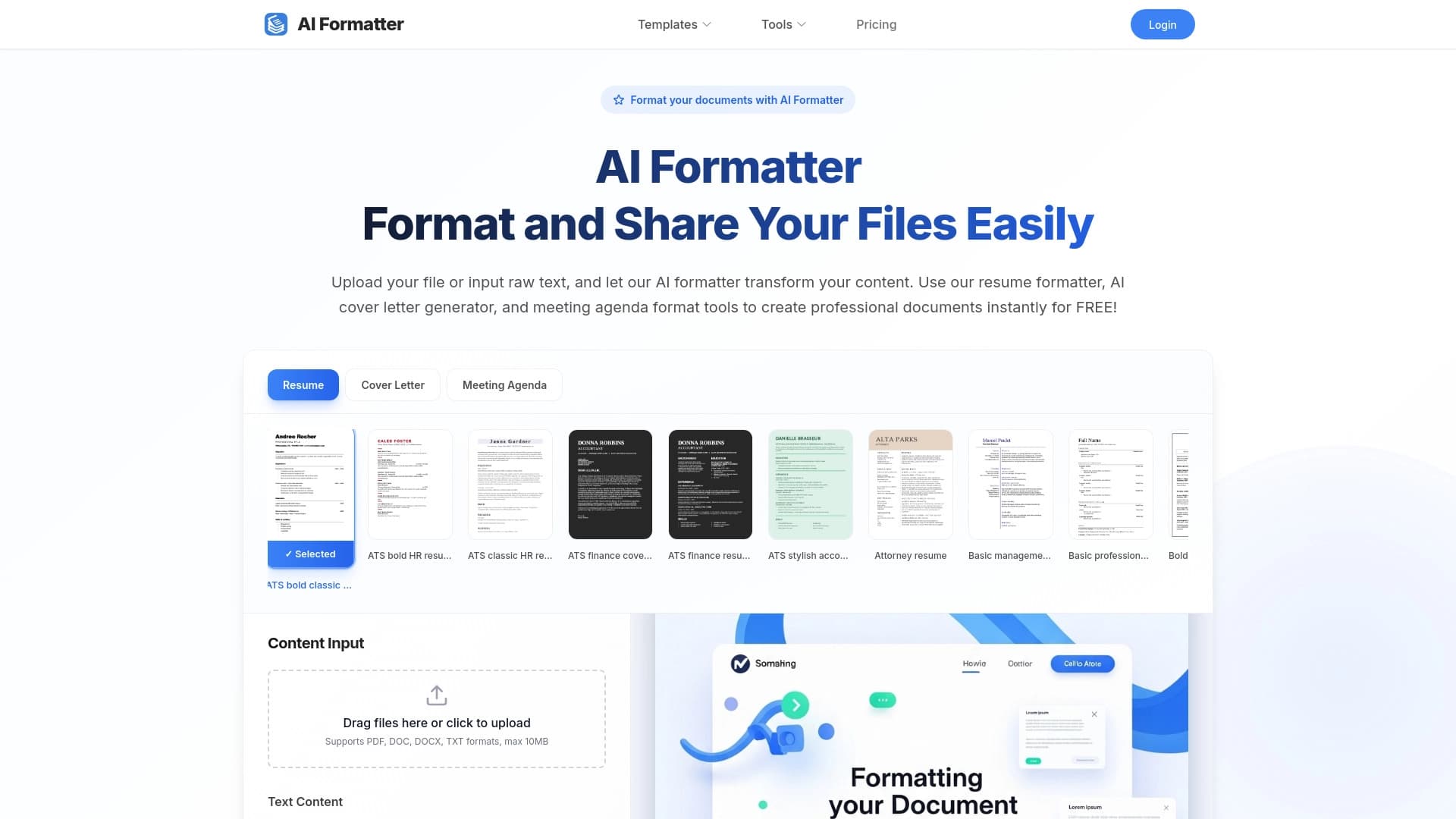
(إيه فورماتر) أداة تُحضر الوثائق إلى معيار مهني باستخدام ذكاء اصطناعي It is designed for users who need to quickly obtain a neat, structured file without manually adjusting fashions, indents, and fonts.
وتركز هذه الخدمة على العمل مع ثلاثة أنواع رئيسية من النصوص: استئناف الأعمال، وخطابات التغطية، وجدول أعمال الاجتماعات. المنطق بسيط: تدخل البيانات المصدرية، والشبكة العصبية تتعامل مع صيغة - تحويل النص "سحب" إلى وثيقة منظمة مع ترتيب واضح للأقسام.
هذا النهج مفيد لأولئك الذين غالباً ما يحتاجون إلى إعداد وثيقة عمل بسرعة لكن لا يريدون قضاء الوقت مع النماذج وفي المقام الأول، تتولى شركة AI Formatter الجزء الروتيني من العمل المتصل بالتصميم والهيكل.
AI Formatter Characteristics
| الخصائص | القيمة |
|---|---|
| الغرض | الشكل الآلي للوثائق |
| أنواع الوثائق الداعمة | مقتطفات، رسائل، جداول أعمال الاجتماعات |
| نموذج التوزيع | غير محددة |
| التكنولوجيا الرئيسية | الاستخبارات الفنية |
| سهولة التعلم | منخفضة - مجرد إدخال البيانات |
| شكل النتائج | وثيقة مهنية منظمة |
من هو آي فورماتر مناسب؟
الباحثون عن العمل والمرشحون
ويواجه الأشخاص الذين يبحثون عن عمل في كثير من الأحيان مسألة تشكيل سيرهم الذاتية بشكل موحد. ويمكن أن تكون صيغة الاستمارة مفيدة لأولئك الذين لا يطمئنون إلى الهيكل الصحيح لسياراتهم أو يرغبون في توفير الوقت اللازم لإعدادها قبل تقديم طلب للشواغر.
عمال المكاتب ومديروها
ويقوم الأمناء والمساعدون والمديرون بانتظام بإعداد جداول أعمال الاجتماعات والوثائق الداخلية. بالنسبة لهذا الجمهور، الأداة مهمة كطريقة لتسريع المهام الروتينية، بدلاً من الشكل اليدوي، يكفي لنقل الجوهر من محتوى الشبكة العصبية
المجانين ومنظمو المشاريع
وكثيرا ما يتولى المهنيون العاملون لحسابهم الخاص المهام ذات الصلة - من كتابة الرسائل إلى إعداد المقترحات التجارية. ويمكن لهذه الأداة أن تأخذ شكل الرسائل السرية وغيرها من وثائق الأعمال القصيرة التي تتطلب حضورا دقيقا.
كيف تستخدم "آي فورماتر"؟
إعداد بيانات المصدر
الخطوة الأولى هي جمع المعلومات التي تريد رؤيتها في الوثيقة ويمكن أن تكون هذه قائمة بالمهارات وخبرة العمل لاستئناف العمل، أو مواضيع رئيسية لجدول أعمال الاجتماع، أو نص رسالة سرية. كلما أكملت البيانات، كلما كان أسهل للشبكة العصبية لتكوينها
تقديم البيانات إلى الملجأ
ويدخل المستخدم ببساطة النص المعد إلى واجهة الخدمات. ولا حاجة إلى معرفة خاصة بالعلامات أو الأساليب - فالمخابرات الاصطناعية تحدد بشكل مستقل اللبنات المنطقية وترتبها حسب الترتيب الصحيح.
استلام الوثيقة الختامية
وبعد التجهيز، يعيد النظام ملفا جاهزا للاستخدام. وتبرز الوثيقة هيكلا ودقيقا، مع فصل واضح إلى أجزاء ذات معنى. In most cases, the result requires no additional manual refinement.
Key Features of AI Formatter
Resume Creation
This feature turn scattered information about experience, education, and skills into a standardized document with a clear structure. وتقوم الشبكة العصبية بترتيب الأقسام بطريقة منطقية وتضع الشكل على نمط متسق.
كتاب صياغة
وتساعد هذه الأداة على تحويل نص رسالة موجزة إلى وثيقة عمل مصاغة بدقة. This eliminates the need to manually set margins, choose fonts, and manage paragraph alignment.
إعداد جدول الأعمال
وفيما يتعلق بالمراسلات التجارية وتنظيم الاجتماعات، تُنشئ الدائرة قائمة مُأمر بها بالبنود ذات التسلسل الهرمي الواضح. ولا يحتاج المستخدم إلا إلى إدراج المواضيع المطروحة للمناقشة، كما أن الشبكة العصبية تشكلها في وثيقة رسمية.
مزايا AI Formatter
- مدخرات الوقت وتستغرق عملية التشكيل ثواني وليس دقائق أو ساعات من العمل اليدوي.
- سهل الاستخدام. لا حاجة لدراسة التعليمات - فقط أدخل البيانات والحصول على النتيجة.
- الاتساق الهيكلي. وتحظى الوثائق بمظهر مهني موحد يتسم بأهمية خاصة عند إعداد ملفات مماثلة متعددة بالجملة.
- لا حاجة لمهارات التصميم. المستعمل لا يحتاج لفهم الكتابة أو الدوافع أو أساليب الشكل
Disadvantages of AI Formatter
لا توجد معلومات دقيقة عن قيود الخدمة في البيانات المتاحة ويمكن افتراض أن أوجه القصور المحتملة تشمل مجموعة محدودة من أنواع الوثائق المدعومة - وهي حاليا ثلاثة فقط. وظيفة الأداة تتصل بتصدير البيانات وحجم النصوص المجهزة و تكييف أساليب الشكل الفردية أيضاً لا تزال غير واضحة
ما هي المشاكل التي تقوم بها منظمة العفو الدولية؟
المشكلة الرئيسية التي تحلها الأداة هي القضاء على "الروتين الرسمي" وبدلاً من وضع العلامات يدوياً، والتباعد بين الخطين، والحوادث، والقوائم المحتوية على الرصاص، يركز المستخدم على محتوى النص، في حين تتولى الاستخبارات الاصطناعية وضع الشكل.
وبالإضافة إلى ذلك، تحل الدائرة مشكلة عدم اتساق الوثائق. وعندما تُنشأ استئنافات أو رسائل في برامج مختلفة أو تستخدم نماذج مختلفة، يمكن أن يختلف مظهرها. فريق "إي فورماتر" يجلب جميع الوثائق إلى نظرة مهنية موحدة
وتعالج الأداة أيضا الحاجة إلى إعداد وثائق سريعة "على الطليعة" - على سبيل المثال، عندما لا يتبقى سوى القليل من الوقت قبل إجراء المقابلة والاستئناف على وجه الاستعجال بحاجة إلى تهدئة. وفي هذه الحالات، تصبح سرعة الشبكة العصبية عاملا حاسما.
AI Formatter Pricing
ولا تتضمن البيانات الرسمية عن الخدمة معلومات عن تكاليف الاستخدام. It is unknown whether the tool is fully free, operates on a subscription basis, or offers one-time payments. ولا توجد أيضا بيانات عن مدى توافر فترة محاكمة حرة أو حدود لعدد الوثائق المجهزة في وثائق المحكمة نسخة مجانية
AI Formatter Terms of Use
تفاصيل عن شروط الخدمة غير موجودة من مصادر عامة ولا توجد معلومات عن ما إذا كان التسجيل مطلوبا، أو متطلبات حجم البيانات المحملة، أو القيود المفروضة على الاستخدام التجاري للوثائق المتولدة. شروط تجهيز بيانات المستخدمين وسياسة خصوصية الخدمة غير معروفة أيضاً
AI Formatter Availability
المعلومات عن توافر الأداة محدودة ولا يُحدد ما إذا كانت الخدمة تعمل كتطبيق على شبكة الإنترنت، أو برنامج حاسوب مكتبي، أو تطبيق متنقل. ولا توجد أيضا بيانات بشأن ما إذا كانت الأداة تفرض قيودا إقليمية أو لغوية، سواء كانت تدعم الروسية، أو ما إذا كان القصد منها هو فقط بالنسبة للمستعملين الناطقين بالإنكليزية.
How AI Formatter Differs from Alternatives
واستنادا إلى الوصف، يكمن الفرق الرئيسي للأداة في تخصصها. وبدلا من محاولة تغطية جميع أنواع الوثائق، تركز الدائرة على ثلاثة أشكال محددة - استئنافات، تغطية الرسائل، وجدول أعمال الاجتماعات. وهذا يتيح لها العمل معها على نحو مهذب ويمكن التنبؤ به قدر الإمكان.
وثمة اختلاف محتمل آخر هو النهج المتبع في التفاعل. المستعمل لا يحتاج إلى اختيار نموذج من معرض وادخال البيانات يدوياً فيه ويكفي مجرد إدخال المعلومات، وتبت الشبكة العصبية بنفسها في أفضل طريقة لتنظيم الوثيقة وتقديمها.
من المهم أيضاً ملاحظة أنّ (آي فورماتر) مُوجّه لا نحو تجربة التصميم، بل نحو معايير العمل. ونتائج عملها هي وثيقة قابلة للتنبؤ ومحافظة ومناسبة للاستخدام الرسمي.
خاتمة
و " نشرة المعلومات " (AI Formatter) هي أداة ضيقة التخصص تحل مهمة محددة: سرعة إدخال وثائق الأعمال إلى معيار مهني. وسيكون من المفيد للباحثين عن العمل، والعاملين في المكاتب، وأي شخص يعد بانتظام استئنافات أو رسائل أو جداول أعمال الاجتماعات. بالنظر إلى عدم وجود بيانات مفصلة عن التسعير، شروط الدخول، والقيود التقنية، فمن الجدير التحقق من هذه المعلومات عن موارد الخدمة الرسمية قبل بدء استخدامها. ومع ذلك، فإن المفهوم نفسه - وهو هيكل النص التلقائي دون مشاركة المستعملين في عملية التشكيل - يبدو عمليا ومطلوبا.
الأسئلة المتكررة
انظر أيضا


تمديد الكروم الذي يساعد على إدارة التذاكر، والتاريخ، والعلامات الكتابية مع مساعد آي.

AI keyboard for Apple devices that speeds up typing with corrections, translation, and response generation.


مساعد مكتب مساعد شؤون الإعلام في ماكوس، ويندوز، ولينكس الذي يطلق عبر الهوكي فوق جميع النوافذ ويجمع بين نماذج لغوية متعددة في واجهة واحدة.


AI platform for fast website creation and small business process management.

AI-powered toolkit for optimizing work flows and boosting productivity.

عميل في شركة "آي آي" لتشغيل اتصالات الزبائن ودعمهم.

مساعد للأعمال التجارية الذي يساعد على إدارة المهام والروتين الآلي من خلال الحوار.

AllChat is a universal platform that combines several popular language models in a single interface for communication, image generation, file analysis, and code execution.